


Catchr starts at $24/month for teams that want marketing data in their existing dashboards, spreadsheets and AI assistants. Whatagraph starts from €699/month billed annually and combines data preparation, native reports, monitoring and IQ Agents. The useful comparison is the work your team wants each subscription to handle.
The quick answer
Choose Catchr when Data Studio, Power BI, Google Sheets or Excel is already where your team works. You get the connection layer, unlimited users and MCP from Starter, with BigQuery from $79/month. Choose Whatagraph when you want a shared reporting workspace to prepare data, maintain client reports and automate reporting tasks. Its higher price covers a broader reporting product.
Whatagraph vs Catchr at a glance
| What matters | Whatagraph | Catchr |
|---|---|---|
| Starting price | From €699/month, billed annually. | ✓ Included |
| Where reports live | Native reporting workspace. | Your existing reporting tools. |
| People and accounts | Unlimited users and reports. | Unlimited users. |
| AI assistance | MCP for connected data and documented plan-dependent report actions. | MCP analysis and export-job management. |
| Owned warehouse data | BigQuery transfer on Prime. | BigQuery from Momentum: $79/month. |
Pricing: pay for the reporting workflow you actually need
Catchr starts at $24/month. Whatagraph Max starts from €699/month billed annually.
That is a large difference in starting commitment, but the subscriptions cover different work. Catchr connects data to the tools you choose. Whatagraph also supplies the report builder, preparation layer and reporting operations.
For a freelancer with established Data Studio templates, Catchr keeps the purchase focused on access to data. For an agency replacing several reporting processes, Whatagraph’s additional capabilities may justify a larger budget.
Whatagraph plans
| Plan | Published billing | Included scope |
|---|---|---|
| Max | From €699/month, billed annually. | From 50 source credits. |
| Prime | Custom annual quote. | Premium integrations, custom report domain, public API and BigQuery/Data Studio transfers. |
Checked October 23, 2026 on the current pricing page. Prices retain their published currencies; no exchange-rate conversion is assumed.
Catchr plans
| Plan | USD, billed monthly | Capacity and destinations |
|---|---|---|
| Starter | $24/month | 3 platforms |
| Momentum | $79/month | 5 platforms |
| Growth | $239/month | 10 platforms |
| Scale | $599/month | 25 platforms |
Every Catchr plan includes unlimited users and Catchr requests. Source providers still apply their API limits. Your chosen BI, warehouse and AI subscriptions remain separate, so include those in the budget if you do not already use them.
What costs extra as your team grows?
| What you add | Whatagraph | Catchr |
|---|---|---|
| More client accounts | Source credits cover connected accounts. Additional capacity changes the configuration. | Upgrade when you exceed platform or total-account capacity. |
| More colleagues | Unlimited users are listed. | Unlimited users on every plan. |
| External destinations | Prime is the route for BigQuery, Data Studio transfer and public API. | Everyday BI and spreadsheet destinations from Starter; BigQuery on Momentum, API on Growth, wider storage on Scale. |
| Client presentation | Native report building and delivery are part of the product. | Build and deliver reports in your chosen destination; include any external tool subscription. |
Why Catchr fits freelancers and growing agencies
| Your setup | Catchr | Whatagraph |
|---|---|---|
| Freelancer 3 platforms, 3 accounts | Starter: $24/month. | Evaluate Max for an integrated reporting workspace. Its entry configuration is larger than this three-account need. |
| Agency 5 platforms, 25 accounts, 3 people | Momentum: $79/month. | An entry source-credit configuration can cover 25 connected accounts when the required integrations are included. Price the chosen reporting and transfer features in the quote. |
| Growing agency 8 platforms, 60 accounts, BigQuery and API | Growth: $239/month. | Prime quote required. |
The strongest Catchr saving comes when your existing reporting tools already do the presentation work. Account managers can prepare client dashboards, analysts can work in spreadsheets and colleagues can ask AI questions using the same connected stack. Budget for the product you will use, then compare the full workflow.
Data sources: can you connect your clients’ marketing stack?
Advertising, analytics, ecommerce and CRM platforms
Catchr covers paid media, analytics, ecommerce, CRM and social sources. An agency can connect Google Ads and Meta Ads alongside GA4, Shopify or HubSpot, then send the results to its reporting destinations. Browse Catchr’s connector directory.
Whatagraph’s integration catalogue also spans marketing channels and business data. Its plans distinguish advanced and premium integrations, so the specific services your clients use affect the package. Google Sheets can bring custom data into Whatagraph reports; that input is different from sending marketing data into a spreadsheet.
Metrics, dimensions and historical data
Metrics describe performance, such as spend and conversions. Dimensions break those numbers down by date, account or campaign. Catchr lets you choose the source fields your report needs. Available combinations and historical depth follow the provider’s API and the connected account.
Whatagraph can prepare shared definitions, custom metrics and blends before reporting or transfer. That is useful when several account managers should report the same business KPI in the same way. A connection to the same platform does not establish identical fields or historical coverage between vendors.
Managing multiple accounts across clients
A platform is a service such as Google Ads; an account is one client’s account inside it. Five Google Ads accounts therefore count as one platform and five accounts in Catchr. Momentum includes 30 total accounts across five platforms.
Whatagraph uses source credits for connected accounts. Keep that separate from the number of reports: a client report combining three accounts uses a different amount of source capacity from one showing a single account. Both products list unlimited users, so team access is not the central distinction here.
Where do you want your reporting work to happen?
Whatagraph can be the place where your team prepares, builds and delivers the report. Catchr connects the client stack to the tools where your team already analyzes and presents results. Follow the destination your next client deliverable needs.
Databases and warehouses: BigQuery in both, broader storage in Catchr
Catchr

Catchr’s datastream setup is shown above. Whatagraph documents its own BigQuery transfer; an equivalent current product screenshot was not available in the checked guide.
Whatagraph’s BigQuery transfer moves connected sources into your warehouse. You choose the table’s fields, and the transfer runs in the background. Its managed Whatagraph Storage serves the internal reporting layer and is separate from your own BigQuery project.
Catchr includes BigQuery exports from Momentum at $79/month. Growth adds API access. Scale expands the choice to Snowflake, Redshift, Azure SQL, MySQL, PostgreSQL, S3, Google Cloud Storage and Azure Blob, with custom schema mapping.
Choose Whatagraph when its preparation and native reporting layer should also feed BigQuery. Choose Catchr when you want scheduled marketing data in your own storage while keeping your existing analysis tools. The destination directory shows the available routes; wider warehouses require Scale.
MCP: ask your data and act on the reporting workflow
Catchr
Whatagraph
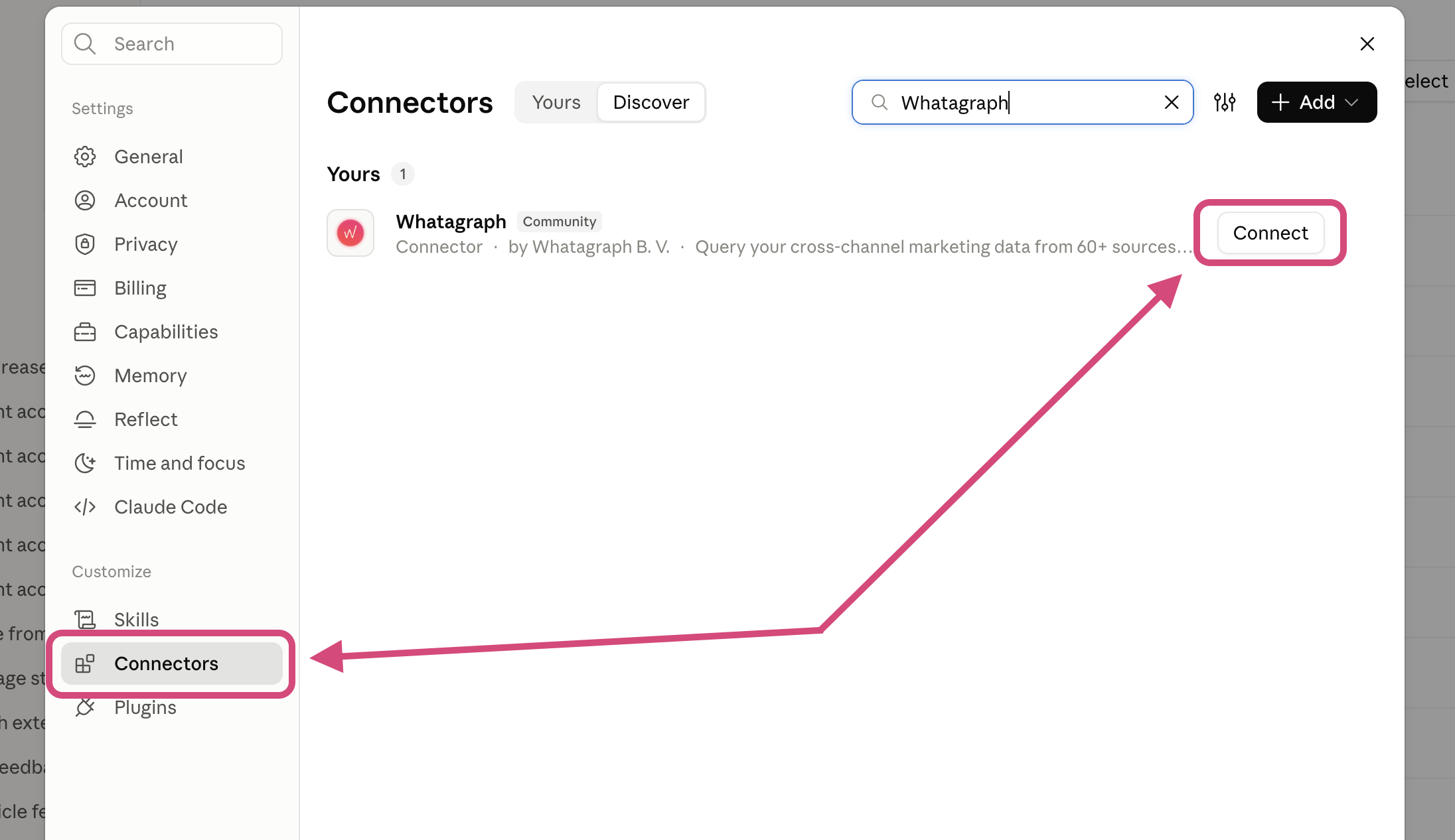
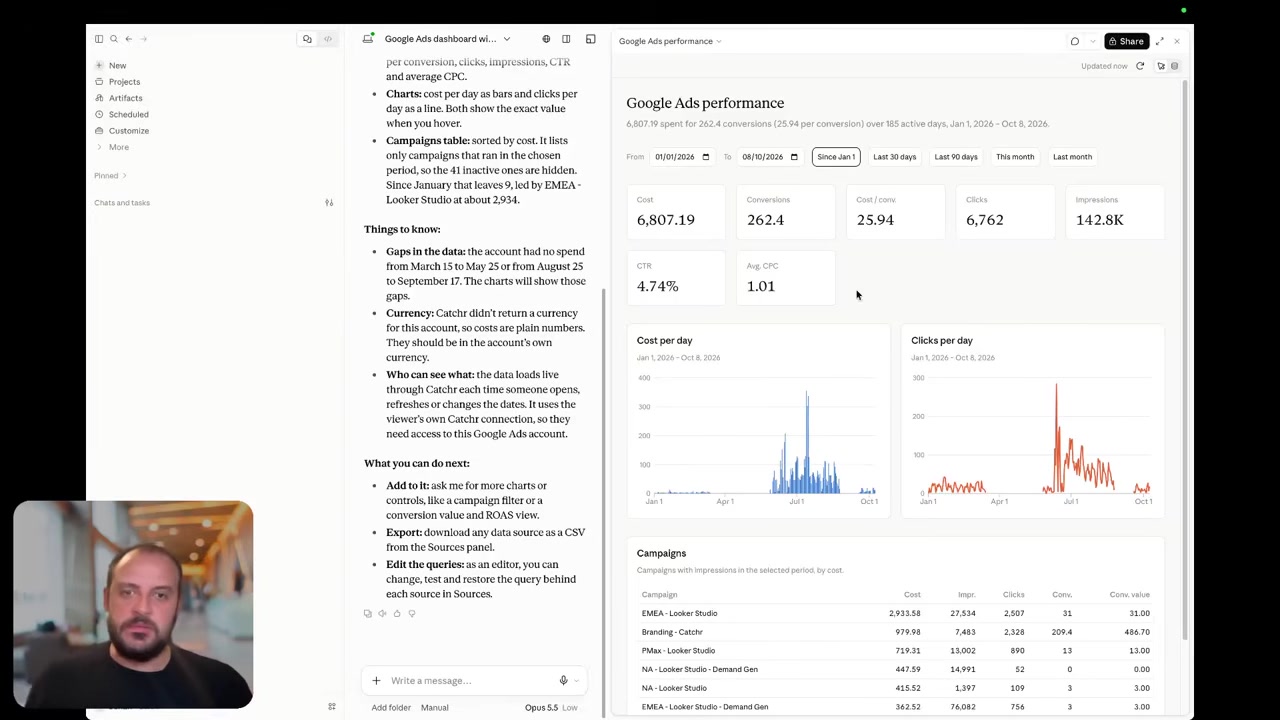
Both products connect marketing data to AI assistants. With Catchr MCP, you can investigate performance, discover accounts and fields, and manage export jobs. That supports questions such as which campaigns drove a CPA change, followed by a reusable export for continued analysis.
Whatagraph brings its shared data definitions and reporting objects into the conversation. Its latest connection guide documents report building, blends, goals and other changes with approval and plan-dependent tools. Older pages still describe read-only access or forthcoming writes, so exact action availability should follow the current subscription.
Whatagraph also has separate IQ Agents inside its workspace for report operations and recurring tasks. Catchr’s emphasis is analysis and data delivery across external tools.
Coming soon
Create and update campaigns through Catchr MCP
Planned for a future release. These actions are not available yet.
Data Studio: keep your client dashboards
Catchr

Catchr connector setup is shown above. Whatagraph also supports a Data Studio transfer; its website’s illustrative transfer graphic is not presented here as a product screenshot.
Catchr includes Data Studio connectors from Starter. Select the client accounts and fields, then use Data Studio charts, filters and calculated fields. Your existing templates remain the starting point for report design.
Whatagraph’s Data Studio transfer lets teams prepare data in Whatagraph before it reaches the report. It is a Prime feature, and the destination page describes daily updates. That can suit an agency that wants shared blends maintained centrally.
If you mainly need data for established dashboards, Catchr keeps that connection available at a smaller starting commitment. If a shared preparation layer is part of the project, include its value when comparing Whatagraph Prime.
Power BI: work directly in your existing model
Catchr

Catchr’s Power BI query builder is shown. A direct Whatagraph Power BI destination was not established by the official pages checked.
Catchr sends marketing data into Power BI through saved Web queries, included from Starter. Your team can combine those tables with its other business data, build measures and maintain refreshes in Power BI.
Whatagraph’s documented Excel and CSV exports can support a file handoff. A BigQuery transfer on Prime offers another possible intermediate source for downstream BI. Both involve a different setup from an in-product Power BI destination.
For a team already using Power Query and DAX, Catchr fits the existing work. Whatagraph makes more sense when its own report builder becomes the main presentation tool, or when its BigQuery output is already part of your data setup.
Google Sheets: delivering data into your working spreadsheet
Catchr
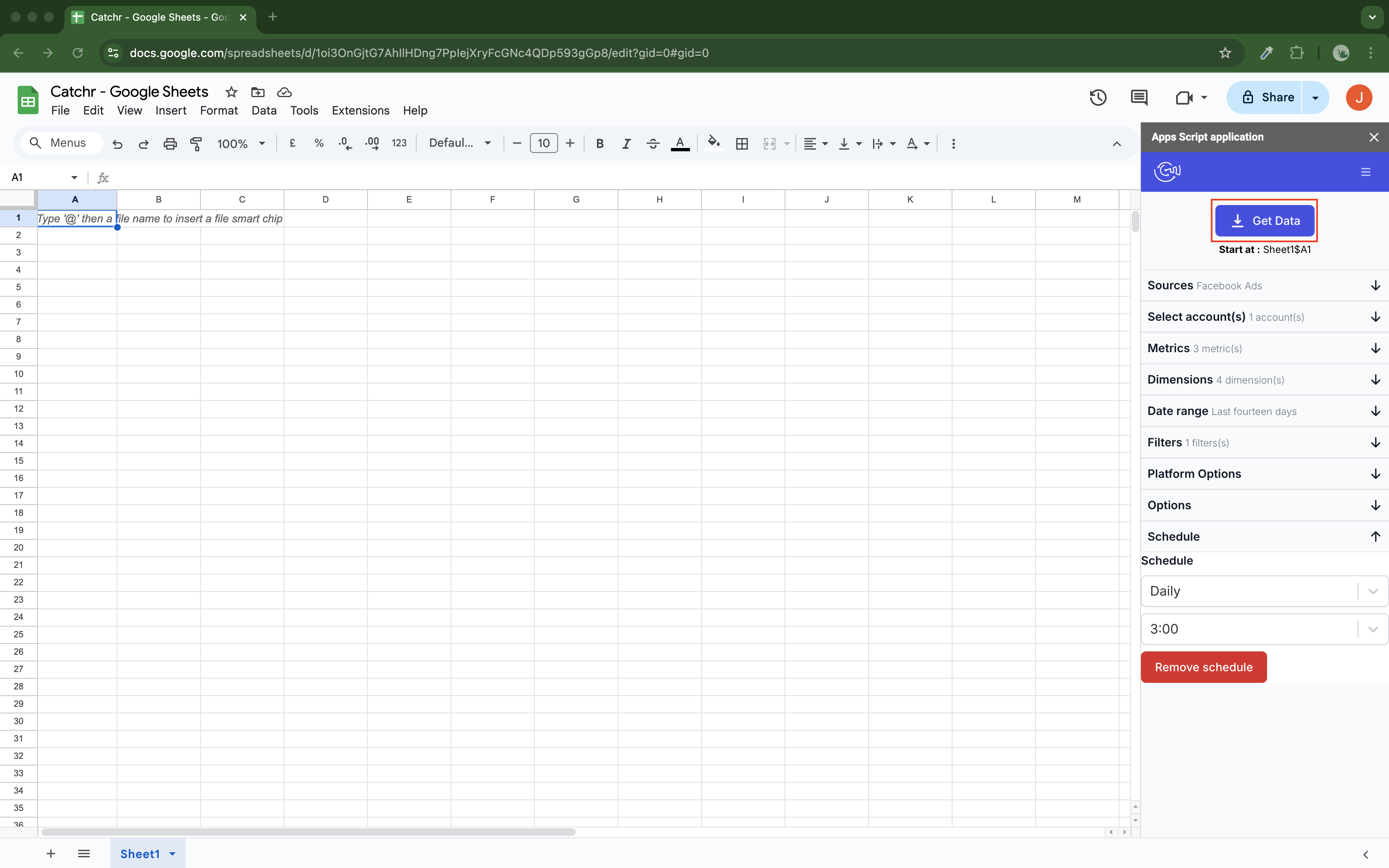
Catchr’s add-on writes marketing data into Sheets. Whatagraph’s documented Sheets integration reads spreadsheet data into Whatagraph reports.
With Catchr’s native Google Sheets add-on, select accounts, fields and dates inside the workbook. Schedule hourly, daily, weekly or monthly updates. Replace, append and combine/update modes support recurring reporting tables without rebuilding the sheet.
Whatagraph reads a prepared Google Sheet as an input. Its guide requires a date column and numeric metrics and describes hourly report refreshes. This is useful for adding targets or offline results to a Whatagraph dashboard.
The direction decides the fit. Choose Catchr when the spreadsheet is where you analyze marketing results. Choose Whatagraph’s Sheets input when the spreadsheet supplies additional information to the native client report.
Excel: an ongoing workbook or an exported report?
Catchr
Whatagraph

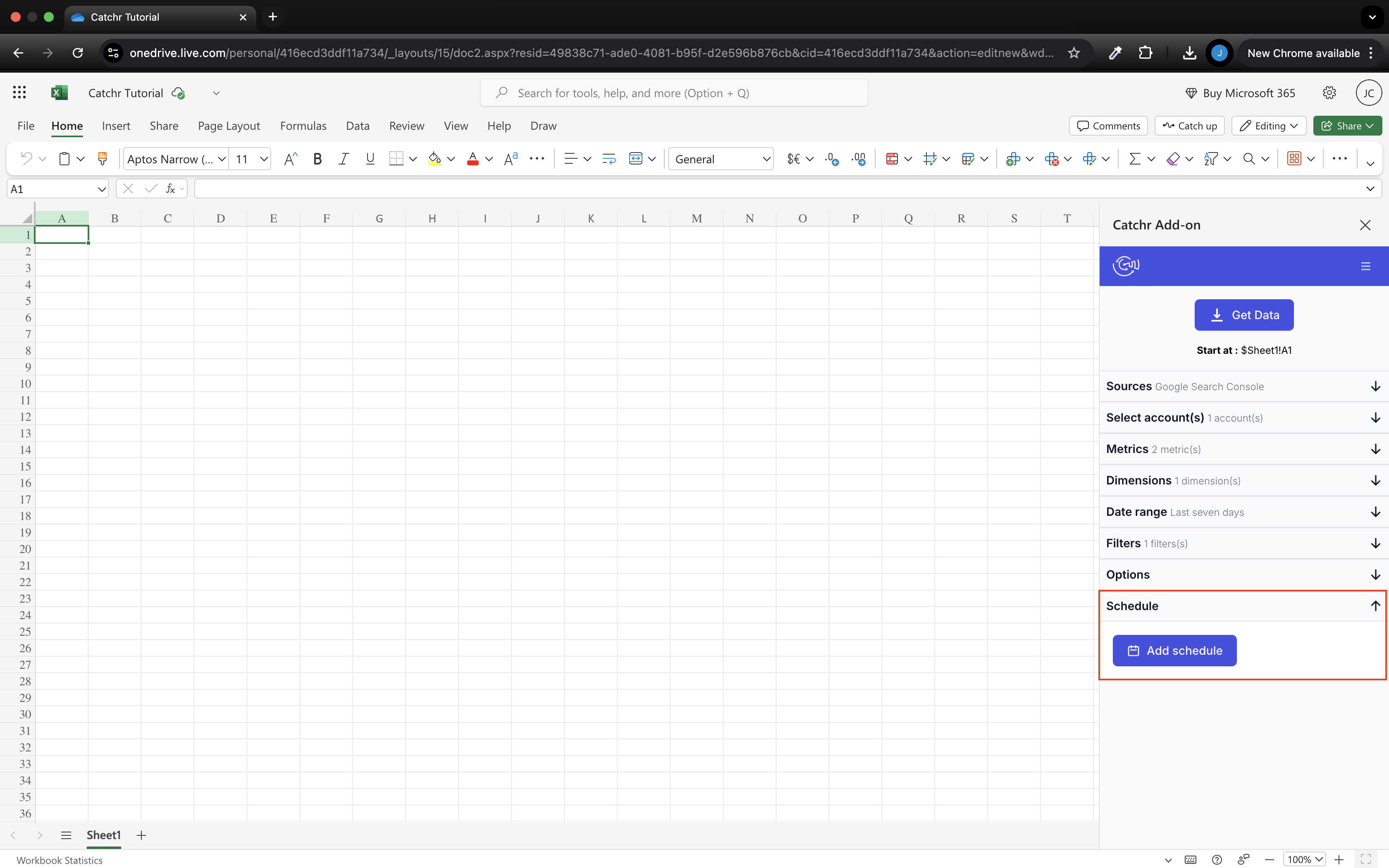
Catchr’s native Excel add-in works on the web and desktop. The query lives with the workbook, so your recurring report can retain formulas, pivots and formatting while its marketing data updates.
Whatagraph lets you download a complete report as Excel or a widget as CSV. Its guide excludes Amazon Ads from those exports because of source API restrictions. This is a useful finished-file handoff, rather than a documented workbook query add-in.
Choose Catchr for the analyst who opens the same workbook every week to review pacing. Choose Whatagraph’s export for the client who needs a portable copy of a report already built there.
Compare all six workflows
| Workflow | Whatagraph | Catchr |
|---|---|---|
| MCP and AI | Connected data, documented plan-dependent report actions and native IQ Agents. | Analysis and export-job management from Starter. Campaign actions planned. |
| Databases and warehouses | Prime transfer to customer-owned BigQuery. | BigQuery from Momentum; wider warehouse/storage choices on Scale. |
| Data Studio | Prepared-data transfer on Prime. | Connector destination from Starter. |
| Power BI | File or intermediate warehouse route in checked evidence. | Saved Web queries from Starter. |
| Google Sheets | Spreadsheet is an input to Whatagraph. | Native add-on sends marketing data into Sheets. |
| Excel | Download a completed report as an Excel file. | Native add-in for ongoing workbook queries. |
Which one fits your team?
Choose Whatagraph when…
Choose Whatagraph when the team wants to manage data definitions, client reports, monitoring and reporting agents in one place. Its native report builder and linked templates are substantial parts of the product. Prime also makes sense for teams that want those reporting capabilities alongside prepared data delivered to BigQuery or Data Studio.
Choose Catchr when…
Choose Catchr when your agency already has reporting templates and wants reliable access to the underlying marketing data in those tools. Start with Data Studio and Sheets, add Power BI or AI analysis without another Catchr destination subscription, and move to BigQuery as your reporting grows. Unlimited users support collaboration; platform and account capacity determine the plan.
How to move from Whatagraph to Catchr
- Choose the future home for each client report: Data Studio, Power BI, Sheets or Excel. Identify any BigQuery tables that should keep feeding other teams.
- Reconnect the client accounts in Catchr and rebuild one representative report, including its custom metrics and cross-channel calculations.
- Move Whatagraph groups and blends to the reporting tool or warehouse that will own them. Recreate the client-facing layout, branding and delivery schedule there.
- Compare one complete reporting period, including spend, conversions and campaign totals, before replacing the client link.
- Run both reports through the next delivery cycle. Replace recurring IQ Agent tasks separately according to the actions available in the new workflow.
Catchr supplies the data connection. Whatagraph report layouts, linked templates and agents are not automatically imported, so allow time for the reporting work that your team currently delegates to Whatagraph.
Test your client stack before committing
Try the workflow your next client report needs.
Connect a real client stack, open your destination and check the numbers before you switch.
No credit card required. Choose a plan after testing your sources and destinations.
Keep comparing by workflow
Find a Data Studio reporting template →
Compare every tool by destination and MCP →
Plan your client marketing report →
Sources and comparison method
Written by Catchr. Official product and pricing pages were checked on October 23, 2026. Sources include Whatagraph pricing, integrations, its linked destination guides and the current MCP setup guide. The latest guide documents plan-dependent write actions; older MCP pages conflict. We did not benchmark speed, uptime or support. Screenshots are unmodified public documentation images, with dates identified in captions.
Catchr’s team confirmed current plan limits, BigQuery on Momentum, API on Growth and wider storage on Scale. It also confirmed that MCP analysis and export-job management are available today; campaign creation and updates remain planned. These owner confirmations supersede older Catchr pricing copy. External destination and AI subscriptions are separate.
- Whatagraph product overview · pricing and allowances.
- Catchr product overview · pricing · destinations · MCP.
- Whatagraph MCP Server.
- Get more from Whatagraph MCP.
- What are IQ Agents?.
- Connect external tools to IQ Agents.
- Data Destination FAQ.
- Connect Google Sheets sources.
- Export a report to Excel or CSV.
- Whatagraph pricing.
- Catchr destination directory.
- Get Started with Database and Data Stream.
- Catchr pricing.
- Data Studio connectors.
- Data Studio script limits.
- Power BI destination.
- Google Sheets destination.
- Get started with Google Sheets.
- Excel destination.
- Catchr MCP.
- MCP usage examples.
- Google Apps Script quotas.


