
Blog post

How to connect Catchr MCP to ChatGPT

Catchr

ChatGPT

Camille Fournillier
March 6, 2026
| Lastest update
March 9, 2026

Connect to Looker Studio

Easily access your data and automate your report!

Connect to Google Sheets

Easily access your data and automate your report with Catchr's add-on!

Quick answer

  1. Enable Developer mode in ChatGPT
  2. Create a new app with your Catchr MCP server URL
  3. Authenticate
  4. Then use the Catchr app directly in chat prompts.

What you need

  • A Catchr MCP endpoint URL (example: https://api.catchr.io/mcp)
  • Valid Catchr authentication (OAuth)
  • At least one data source must be connected in app.catchr.io.
  • Access to ChatGPT settings with app creation enabled

Connect Catchr MCP to ChatGPT step-by-step

1. Enable Developer mode

Open ChatGPT settings and go to Apps, then enable Developer mode.
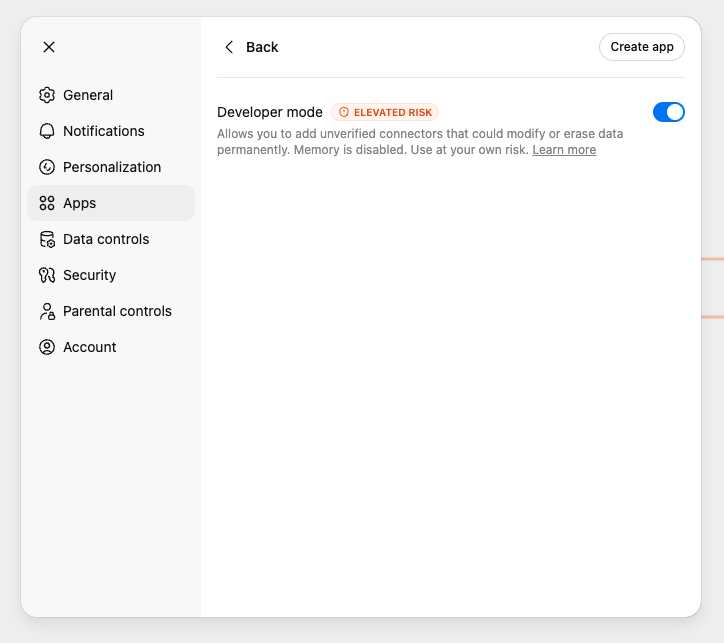
Screenshot: ChatGPT Settings > Apps with Developer mode toggle enabled.

2. Create the Catchr app

In the same Apps area, click Create app. Fill in:

  • Name: Catchr
  • Description (optional): Access all your Marketing data.
  • MCP Server URL: https://api.catchr.io/mcp
  • Authentication: OAuth

Check the risk confirmation box, then click Create.
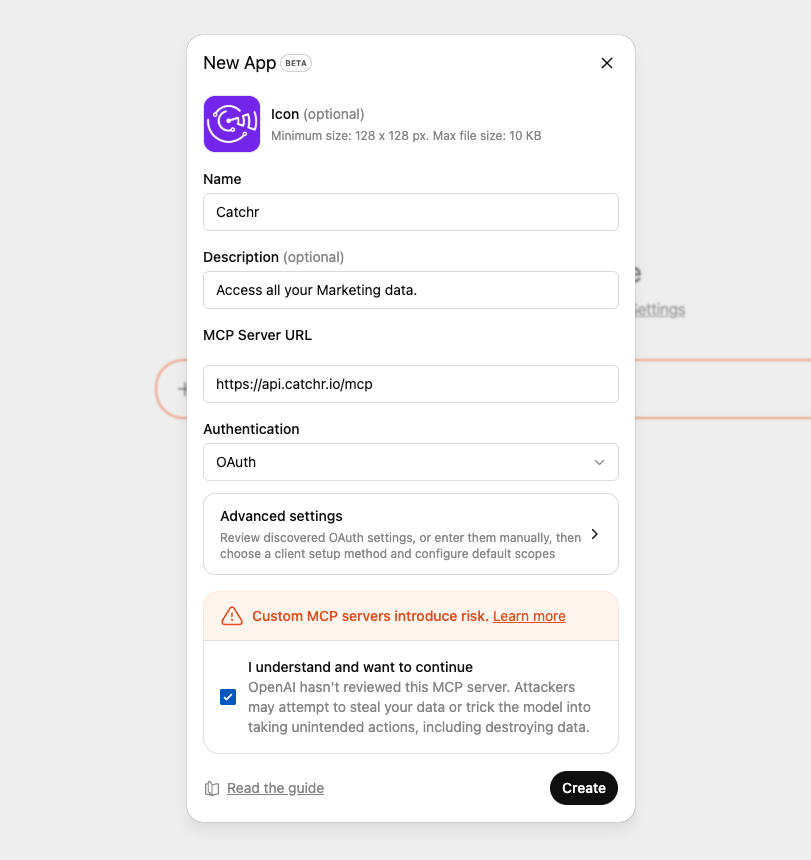
Screenshot: ChatGPT New App modal configured with Catchr MCP server URL and OAuth authentication.

3. Start using Catchr in chat

Open a new chat in Developer mode and call Catchr directly in your prompt.
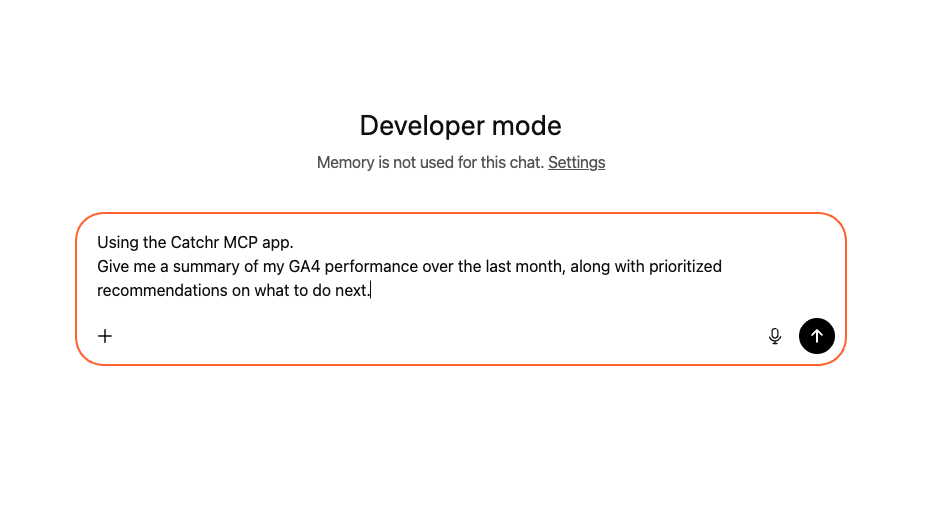
Screenshot: ChatGPT Developer mode conversation with a prompt requesting a GA4 monthly summary via Catchr MCP app.

4. Validate the output

If connected correctly, ChatGPT uses Catchr tools and returns structured marketing metrics and insights.
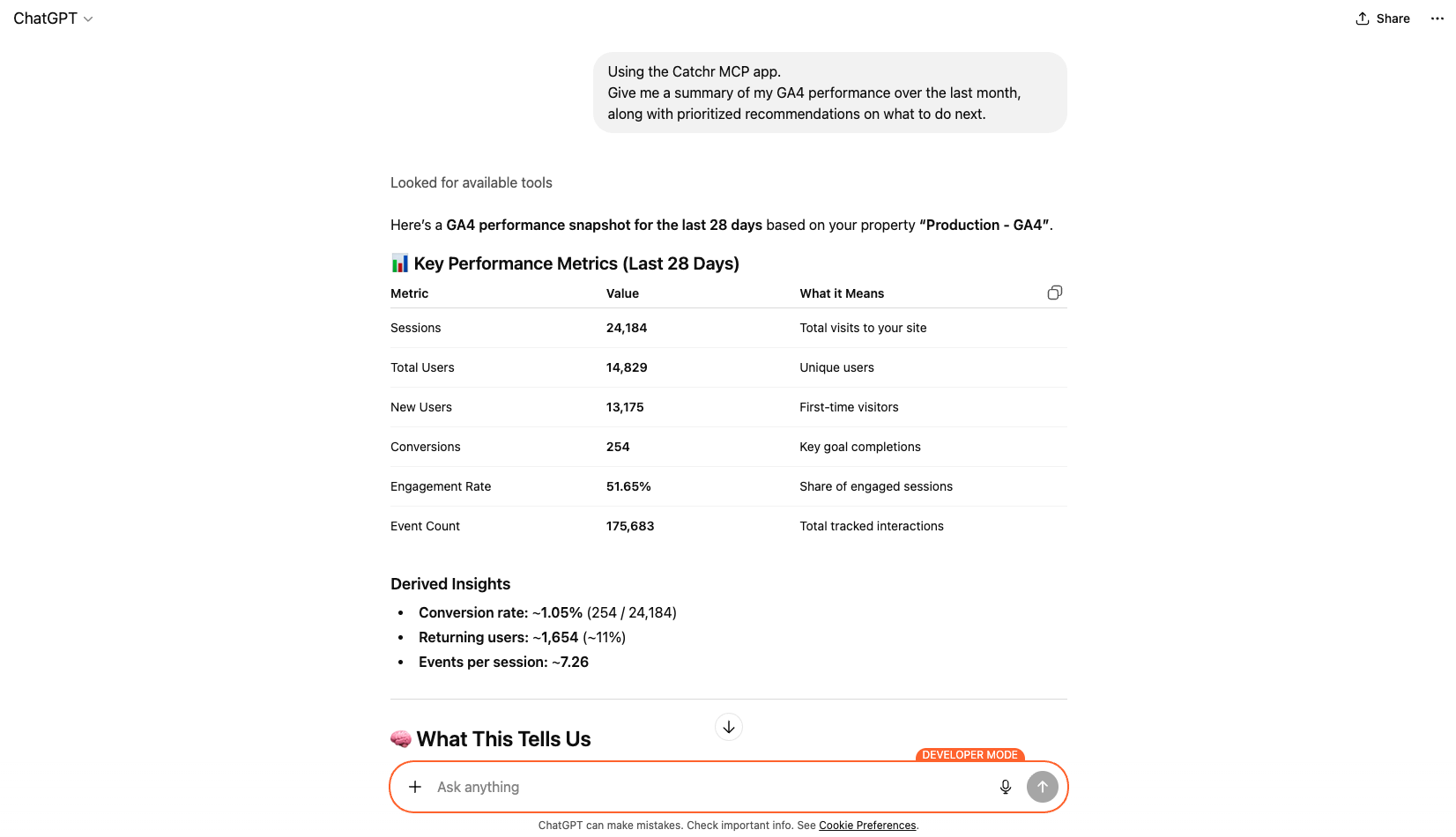
Screenshot: ChatGPT response generated via Catchr MCP showing GA4 key performance metrics and derived insights for the last 28 days.

Example prompts

  1. Using Catchr, create a monthly GA4 recap with key KPIs and 5 prioritized recommendations.
  2. Compare this period vs the previous one and explain what impacted conversion the most.
  3. Give me an actionable channel review: what to keep, what to cut, and what to test next.

Troubleshooting

  • If app creation is unavailable: confirm Developer mode is enabled.
  • If you don't see Developer mode in the Apps menu, your workspace likely restricts app management. On Enterprise accounts, only the workspace Owner or an Admin can add apps like Catchr MCP.
  • If auth fails: reconnect OAuth and retry.
  • If no tools are called: explicitly mention Using the Catchr MCP app in the prompt.

FAQ

Do I need to code to connect Catchr MCP to ChatGPT?

No. The setup is done from ChatGPT settings by creating a new app, adding the MCP server URL, and authenticating.

Which authentication method should I use?

Use the method required by your Catchr workspace. In most cases, OAuth is the recommended option.

Why is Developer mode required?

Developer mode enables custom MCP connectors in ChatGPT so you can connect third-party servers like Catchr.

Can I use Catchr MCP for client reporting?

Yes. You can use it to generate weekly or monthly summaries, compare periods, and produce action-oriented recommendations quickly.

What should I do if Catchr responses look incomplete?

Use a more explicit prompt with date range, metrics, and output format (table, bullets, or summary).

Conclusion

Connecting Catchr MCP to ChatGPT gives marketing teams direct access to performance data without relying on manual exports or engineering support. Once connected, you can move from raw data to prioritized actions in a few prompts, making reporting faster and decision-making clearer.
Looker studio

Start analyzing your data with a Looker Studio template

Catchr provides free dashboard templates to help you start analyzing your data on Looker Studio — 100+ available templates!

See all the Looker Studio templates

Start analyzing your data with a Looker Studio template

Catchr provides free dashboard templates to help you start analyzing your data on Looker Studio — 100+ available templates!

See all the Looker Studio templates

Start analyzing your data with a Power BI template

Catchr provides free dashboard templates to help you start analyzing your data on Power BI — 20+ available templates!

See all the Power BI templates

Start analyzing your data with a Power BI template

Catchr provides free dashboard templates to help you start analyzing your data on Power BI — 20+ available templates!

See all the Power BI templates
Google Sheets

Start analyzing your data with a Google Sheets template

Catchr provides free dashboard templates to help you start analyzing your data on Google Sheets — 20+ available templates!

See all the Google Sheets templates

Start analyzing your data with a Google Sheets template

Catchr provides free dashboard templates to help you start analyzing your data on Google Sheets — 20+ available templates!

See all the Google Sheets templates

Connect all your Marketing data to ChatGPT

Simplify your data extraction with 75+ marketing data connectors to easily move your data to ChatGPT. No-code integration!

Start your free trial

✔ 14 days free trial — No credit-card required

Easily connect your to ChatGPT

Move your data from to ChatGPT with Catchr's no-code integration. Easy to set up, always up-to-date. Automate your data extract now!

Connect your data to multiple destinations

Easily integrate your data thanks to Catchr's no-code connector. Move your data to dashboard tools, spreadsheets, database and more... 20+ destiantions available

Start your free trial

✔ 14 days free trial — No credit-card required

Move your Marketing data to your favorite tools

Simplify your data extraction and move all your Marketing data to dashboard tools, spreadsheets, database and more... No code required!
75+ connectors | 20+ destinations

Start your free trial

✔ 14 days free trial — No credit-card required

More blog post about

No items found.
TURN DATA INTO GROWTH

Bring your Marketing data together, where it really matters

With Catchr, pull data from all your platforms, export it to dashboards, spreadsheets or databases, and track the metrics that drive your business.
Start moving your data
14 days free-trial - No credit card required 🎉