


DashThis gives agencies a place to build, brand and share client dashboards. Catchr sends marketing data into the reporting tools, spreadsheets and AI assistants they already use. Catchr starts at $24/month; DashThis starts at $54/month on monthly billing, including its native reporting workspace.
The quick answer
Choose Catchr when you want the same client accounts available in Data Studio, Power BI, Google Sheets, Excel and AI without separate Catchr subscriptions for each destination. Choose DashThis when the finished deliverable is a branded dashboard with its own sharing and delivery. Both include unlimited users and MCP, but they organize data and price capacity differently.
DashThis vs Catchr at a glance
| What matters | DashThis | Catchr |
|---|---|---|
| Starting price | $54/month monthly. | ✓ Included |
| Reporting workflow | Build and share dashboards inside DashThis. | Send data to your own BI tools, spreadsheets and AI assistants. |
| Team access | Unlimited users on all displayed plans. | Unlimited users on every plan. |
| Capacity | Count dashboards and connected sources used in them. | Count platforms and total connected accounts. |
| MCP | Reads dashboard widgets and supports approved reporting actions. | Discovers and queries source data and manages export jobs. |
| Owned data destinations | Dashboard and PDF outputs are documented. | BigQuery from Momentum at $79/month. |
Pricing: compare connected accounts and finished reports
Catchr Starter costs $24/month. DashThis Individual costs $54/month on monthly billing.
Catchr includes three platforms, 10 total accounts and the standard reporting destinations. DashThis includes three dashboards and 15 connected sources, plus the tools to build and share those dashboards.
A smaller Catchr bill is valuable when you already have Data Studio templates or an established workbook. If your team needs a reporting canvas as well, include the work of creating and delivering those reports in the comparison.
DashThis plans
| Plan | Monthly / annual billing | Capacity |
|---|---|---|
| Individual | $54/month monthly | 3 dashboards |
| Professional | $164/month monthly | 10 dashboards |
| Business | $324/month monthly | 25 dashboards |
| Standard | From $499/month monthly | Higher selectable dashboard and source capacity |
| AI Insights Pro | Add-on: $19/month monthly | Advanced AI Insights with chat and dashboard context |
DashThis lists unlimited users, its integration catalogue, MCP and basic AI Insights across its plans. Its limits apply to dashboards and connected sources, not simply the number of platform types. Official pricing checked October 23, 2026.
Catchr plans
| Plan | USD, billed monthly | Capacity and destinations |
|---|---|---|
| Starter | $24/month | 3 platforms |
| Momentum | $79/month | 5 platforms |
| Growth | $239/month | 10 platforms |
| Scale | $599/month | 25 platforms |
Every Catchr plan includes unlimited users and Catchr requests. Source providers still apply their API limits. Your chosen BI, warehouse and AI subscriptions remain separate, so include those in the budget if you do not already use them.
What costs extra as your team grows?
| What you add | DashThis | Catchr |
|---|---|---|
| More clients | Both the dashboard allowance and connected-source allowance matter. | Platform and total-account capacity determine the plan. |
| More colleagues | Unlimited users included. | Unlimited users included. |
| AI features | MCP and basic insights included; AI Insights Pro costs extra. | MCP included from Starter. The AI assistant subscription is separate. |
| Warehouse or API workflow | Do not use the dashboard plan as a quote for a warehouse export that is not documented. | BigQuery on Momentum, API on Growth, broader storage on Scale. |
Why Catchr fits freelancers and growing agencies
| Your setup | Catchr | DashThis |
|---|---|---|
| Freelancer 3 platforms, 3 accounts | Starter: $24/month. | Individual: $54/month monthly. |
| Agency 5 platforms, 25 accounts, 3 people | Momentum: $79/month. | Professional: $164/month monthly. |
| Growing agency 8 platforms, 60 accounts, BigQuery and API | Growth: $239/month. | Business: $324/month monthly covers 60 sources and up to 25 dashboards. It is a native reporting comparison; a BigQuery/API export equivalent is not established by the checked offer. |
The agency example shows why source counts alone are insufficient. Twenty-five accounts could feed five client dashboards or 25 separate reports. DashThis’s appropriate plan changes with that presentation choice. Catchr’s account capacity stays the same while the destination handles report organization.
Data sources: can you connect your clients’ marketing stack?
Advertising, analytics, ecommerce and CRM platforms
Catchr’s connector directory covers advertising, analytics, ecommerce, CRM and social data. That lets an agency combine campaign performance with store or sales information and use the result in its preferred reporting tool.
DashThis’s integration catalogue includes paid media, web analytics, social, SEO and ecommerce sources. Its Google Sheets and CSV inputs can add custom information to reports. A prepared spreadsheet can be useful for targets or offline results, but it is different from a direct CRM connection.
Metrics, dimensions and historical data
Catchr lets users choose metrics such as spend or conversions and dimensions such as date or campaign. Those choices define the table the destination receives. The source API controls available combinations and history; a platform logo is not a promise that every field is exposed.
DashThis organizes the reporting view into widgets and calculated metrics. Those widgets also determine what its MCP connector can read. A dashboard can be an excellent shared definition of the client’s KPIs, while a source query is useful when a new question needs a different breakdown.
Managing multiple accounts across clients
Catchr counts platform types separately from accounts. Five clients with Google Ads, Meta Ads and GA4 use three platforms and 15 accounts. If those are the only sources, Momentum provides enough account capacity, even though only three of its five platform slots are used.
DashThis counts connected sources used on dashboards. Its dashboard allowance is a second measure of capacity. Keep both numbers visible when adding clients: a multi-channel report and several separate channel reports can use the same accounts but different amounts of dashboard capacity.
Your destination decides the better fit
DashThis is the reporting destination itself. Catchr connects marketing sources to external tools. Start with what the client or analyst needs to open: a ready-to-share dashboard, a working spreadsheet, a BI model, a warehouse table or an AI conversation.
Databases and warehouses: reusable tables beyond the dashboard
Catchr

Catchr’s datastream setup is shown. DashThis’s checked documentation describes dashboard and PDF outputs, rather than an equivalent warehouse export screen.
Catchr includes BigQuery exports from Momentum at $79/month. An agency can store campaign results alongside sales data and use the same tables for several reports. Growth adds API access for custom workflows.
Scale adds Snowflake, Redshift, Azure SQL, MySQL, PostgreSQL, S3, Google Cloud Storage and Azure Blob, with custom schema mapping. These broader destinations are not included just because a plan supports BigQuery; they require Scale.
DashThis’s export guidance describes PDF as the outbound report format and CSV as an input. The official pages checked do not establish direct customer-owned warehouse outputs. Choose Catchr when the deliverable must be a reusable data table; choose DashThis when it is the client dashboard or PDF.
MCP: dashboard context or a new question about your source data?
Catchr
DashThis
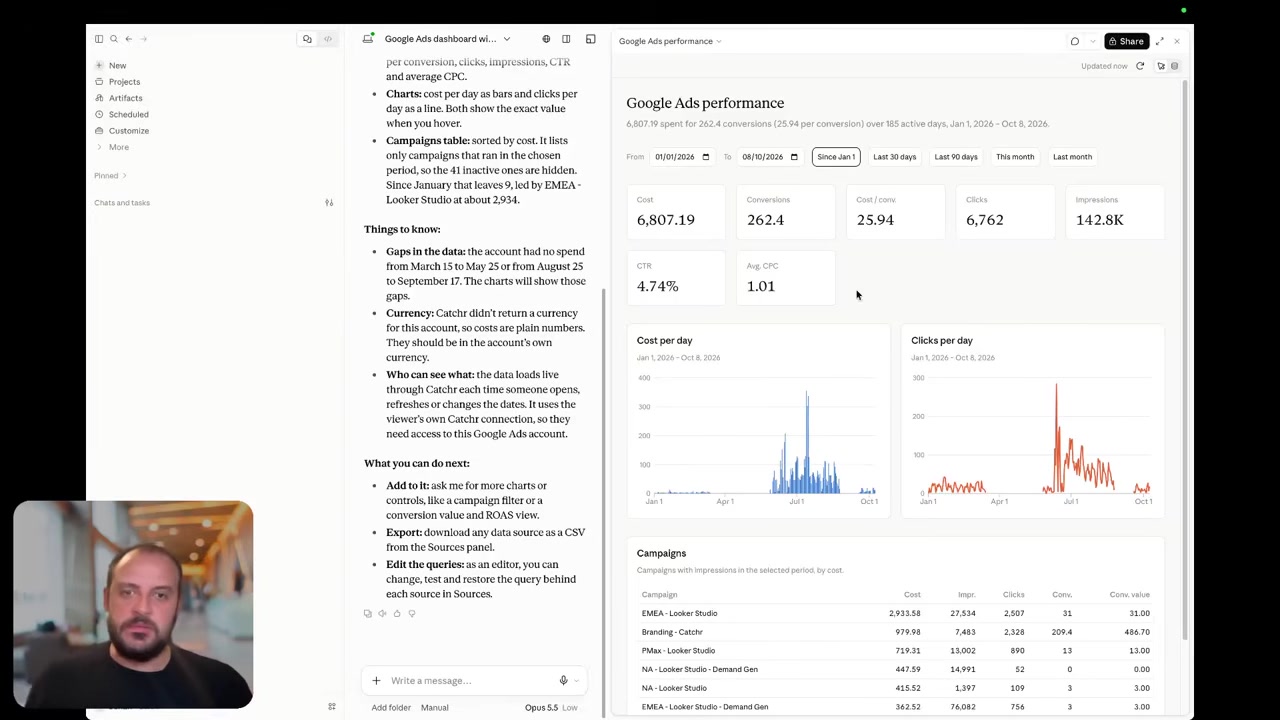
Catchr MCP can discover connected accounts and fields, query marketing performance and manage export jobs. That is useful when a client asks for a campaign breakdown that was never included in the regular dashboard. Analysis and export-job management are available today.
Coming soon
Create and update campaigns through Catchr MCP
Planned for a future release. These actions are not available yet.
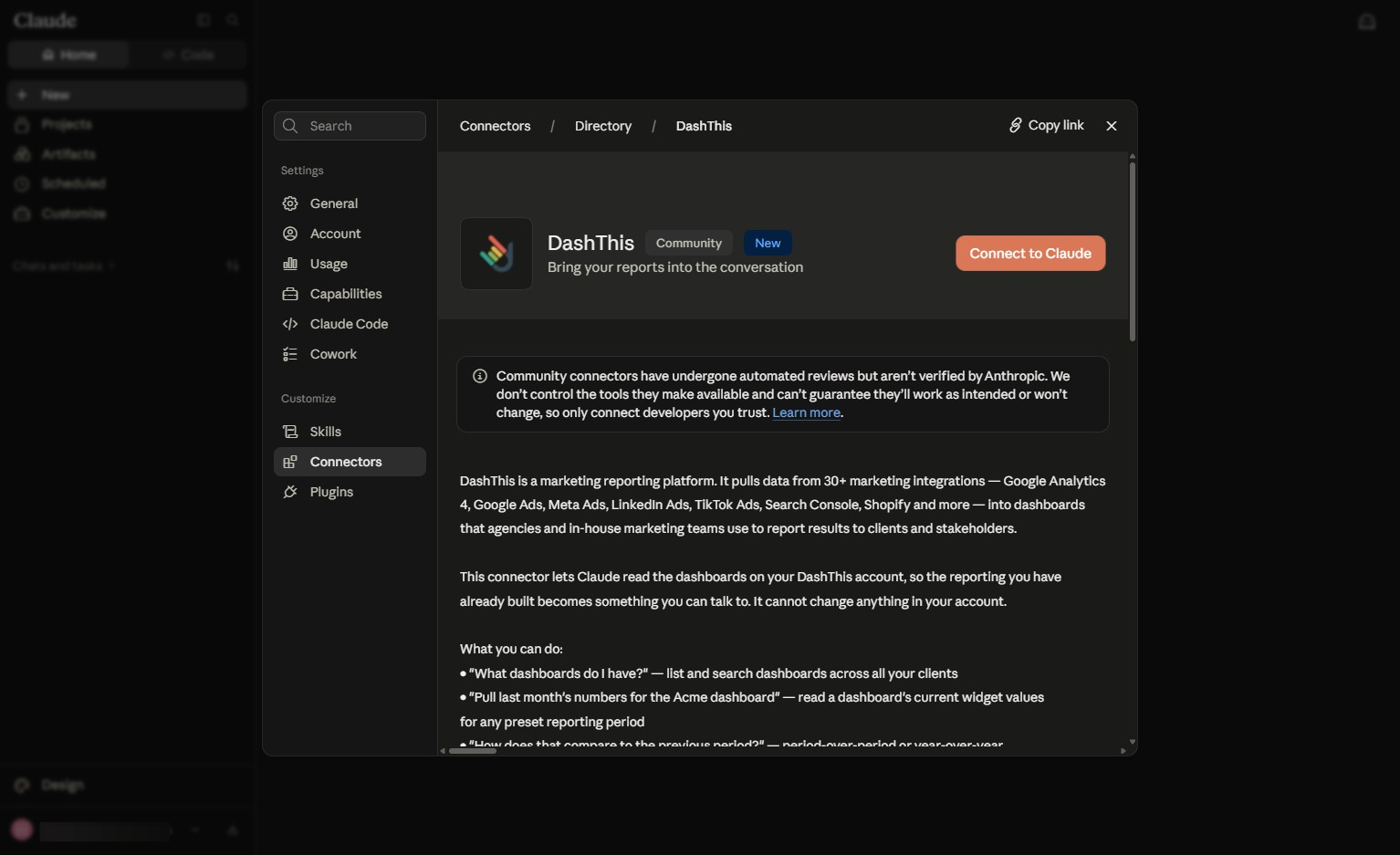
DashThis MCP reads the values and commentary in existing dashboards. It can provide a PDF and perform approved reporting actions. Its current overview also lists dashboard and widget editing, although the limitations page retains narrower wording about existing-dashboard changes.
The stable distinction is where the numbers come from: DashThis reads dashboard widgets rather than requesting an absent field from the source platform. Catchr supports source-level investigation and data delivery. DashThis is attractive when the assistant should work with the client report your team has already curated.
Data Studio: connect your existing reports or choose DashThis’s canvas
Catchr

DashThis
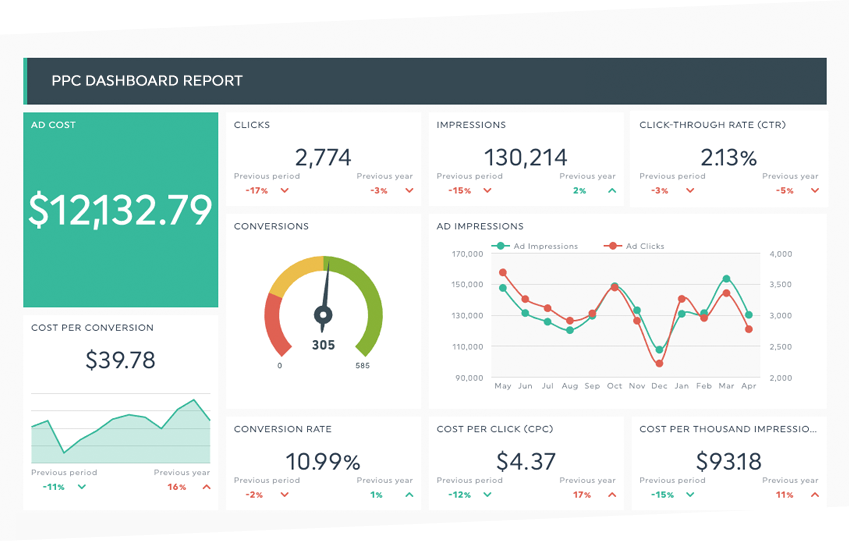
Catchr includes Data Studio connectors from Starter. Use your client templates, native charts, filters and calculated fields, with marketing data supplied by Catchr. The reporting experience stays in the tool your team already knows.
DashThis’s native dashboard is the alternative shown alongside it. The product packages templates, widgets and client presentation in its own workspace. Its public integration directory does not establish a direct DashThis-to-Data Studio destination.
If your clients already use shared Data Studio links, Catchr helps preserve that workflow. If your team wants a dedicated reporting product to organize its client deliverables, DashThis can replace the canvas. A native DashThis report should not be mistaken for a native export into Data Studio.
Power BI: keep your marketing data in the business model
Catchr

Catchr’s Power BI query builder is shown. No equivalent direct DashThis output was established in the checked documentation.
Catchr’s Power BI destination uses saved Web queries from Starter. Your analysts can bring marketing tables alongside sales or operations data, maintain relationships and define the measures the business uses.
DashThis is its own reporting surface. It does not document an equivalent Power BI data delivery route on the official integration and export pages reviewed. A finished dashboard or PDF serves a different purpose from tables available to Power Query and DAX.
Choose Catchr when marketing needs to join the existing Power BI model. Choose DashThis when a separate client-facing marketing dashboard is the desired output. Catchr provides the connection; your Power BI team keeps responsibility for the model and its report delivery.
Google Sheets: the direction of the connection matters
Catchr
DashThis
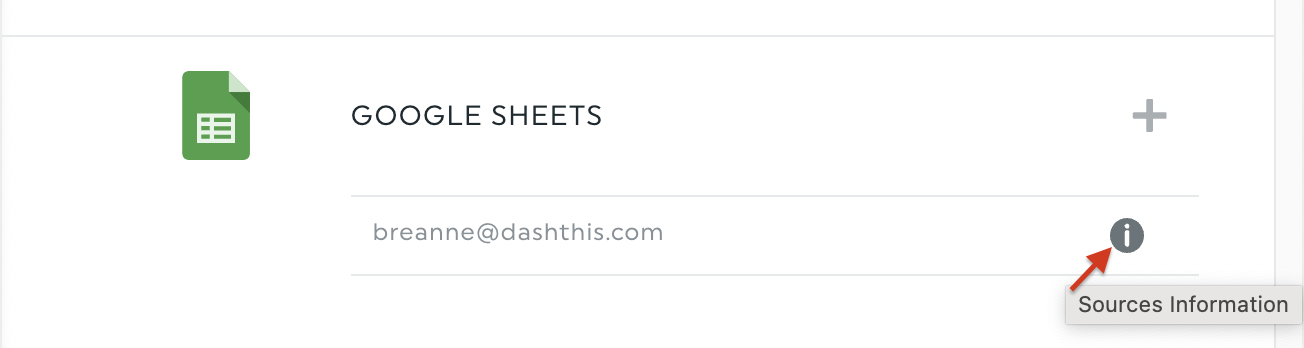
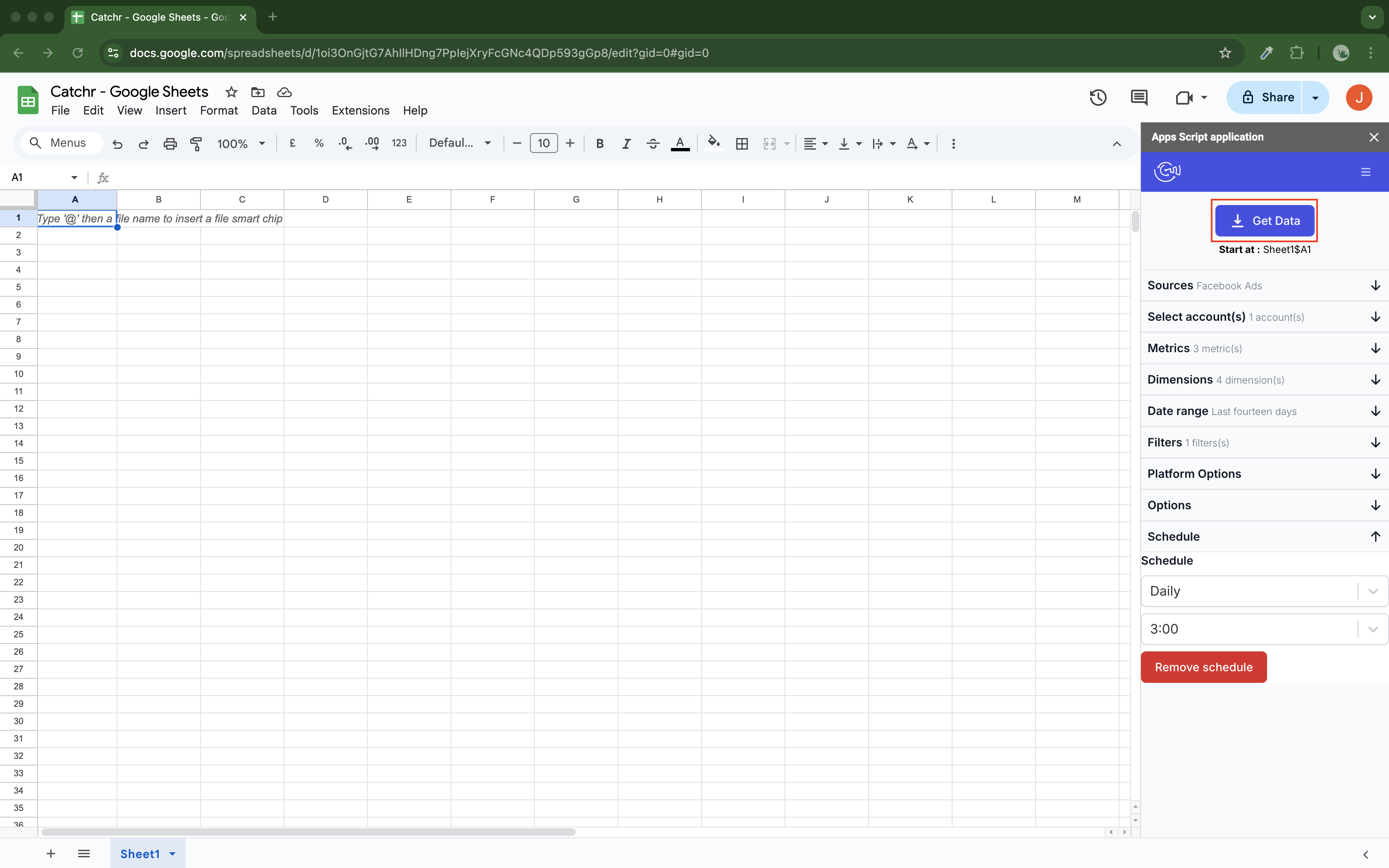
Catchr’s native Sheets add-on writes marketing data into your workbook. Select the accounts, fields and dates, then choose hourly, daily, weekly or monthly updates. Replace, append and combine/update modes support different recurring reporting needs.
DashThis’s Google Sheets integration reads spreadsheet data into a dashboard. Its guide explicitly says the dashboard cannot be exported back into Sheets. That is useful when a prepared sheet contains targets or offline metrics you want in the client report.
For weekly campaign pacing, Catchr keeps the working numbers where your formulas and notes live. For adding a spreadsheet’s custom figures to a native DashThis dashboard, DashThis’s inbound integration does the relevant job.
Excel: refresh the workbook your team already uses
Catchr
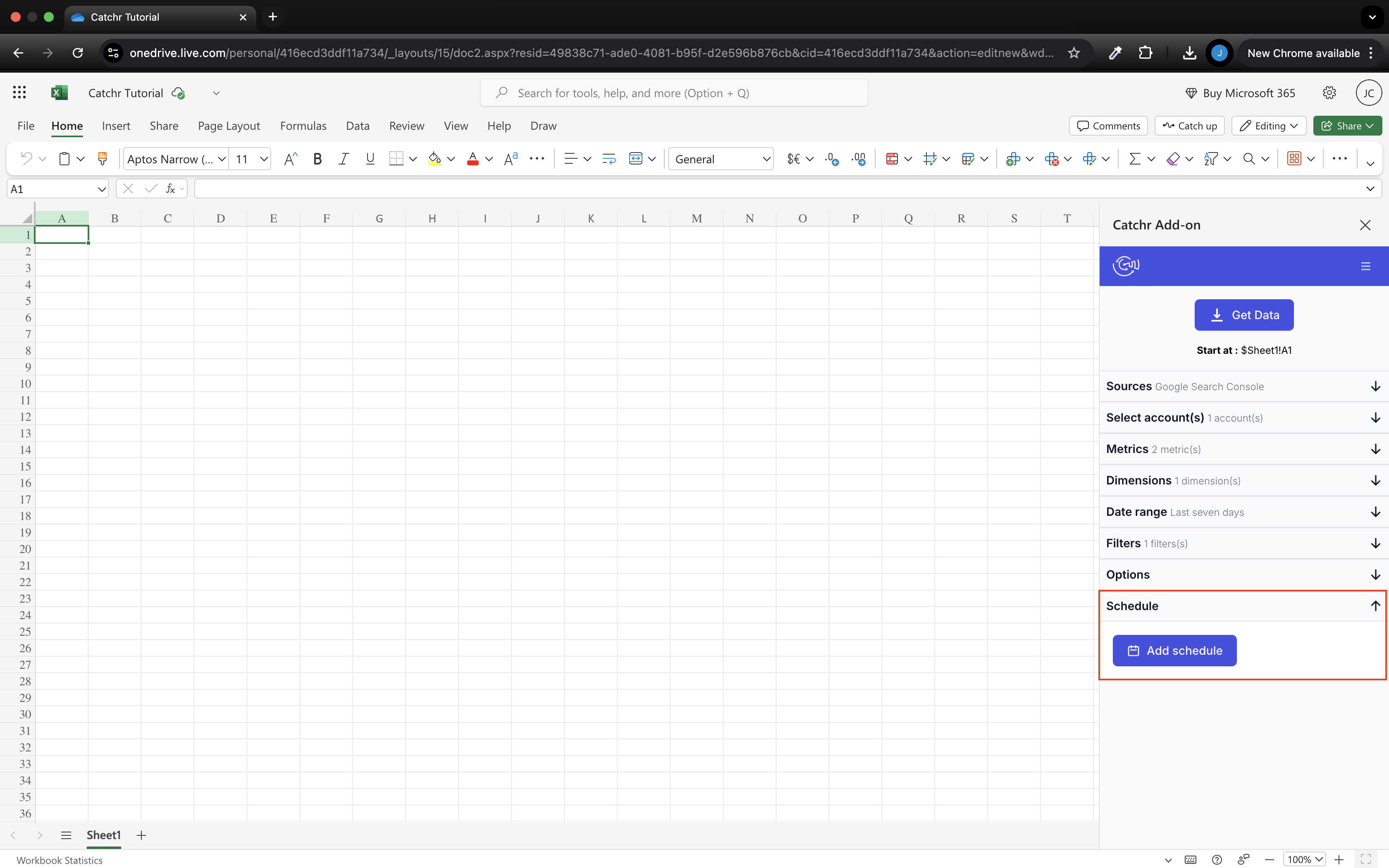
Catchr’s Excel add-in is shown. An equivalent native DashThis workbook add-in or scheduled Excel destination was not established in the official pages checked.
Catchr provides a native Excel add-in for web and desktop, included from Starter. Analysts can select source accounts and fields from the workbook and maintain recurring queries alongside their formulas, pivots and charts.
DashThis’s spreadsheet guide says its Google Sheets integration does not support Excel. Its documented outbound report format is PDF, while CSV is an inbound custom-data route. Those routes do not provide the same ongoing workbook workflow.
If the finance or marketing team already reviews an Excel model every week, Catchr fits that routine. If the main objective is delivering a branded summary to a client, DashThis’s dashboard and PDF may remove the need for an Excel deliverable altogether.
Compare all six workflows
| Workflow | DashThis | Catchr |
|---|---|---|
| MCP and AI | Dashboard-widget analysis and approved reporting actions. | Source analysis and export-job management; campaign actions planned. |
| Databases and warehouses | Dashboard/PDF output; direct warehouse delivery not established. | BigQuery on Momentum; wider storage on Scale. |
| Data Studio | Native DashThis reporting canvas. | Feeds your Data Studio reports from Starter. |
| Power BI | No direct output established in reviewed docs. | Saved Web queries from Starter. |
| Google Sheets | Reads a sheet into DashThis. | Writes marketing data into Sheets with a native add-on. |
| Excel | No native workbook destination established. | Native web and desktop add-in from Starter. |
Which one fits your team?
Choose DashThis when…
Choose DashThis when the agency wants account managers to build and send client dashboards inside one product. Its templates, branded reports, sharing and delivery form the core purchase. Dashboard-aware AI is useful when the report already contains the metrics and commentary you want the assistant to discuss.
Choose Catchr when…
Choose Catchr when a client report is only one use of your marketing data. The same accounts can support Data Studio dashboards, pacing workbooks, Power BI analysis and AI investigation. Start at $24/month, add BigQuery from Momentum, and keep unlimited users as the agency grows. Your team retains control of its reporting tools and final delivery.
How to move from DashThis to Catchr
- Choose a replacement destination for each client dashboard. Decide whether the client needs a shared report, PDF, spreadsheet or Power BI view.
- Connect the relevant accounts in Catchr and rebuild one representative client report. Carry over calculated KPIs, date comparisons and useful commentary.
- Recreate branding, client permissions and email or PDF delivery in the chosen reporting tool. These are part of the DashThis workflow you are replacing.
- Compare a complete reporting period and the main campaign breakdown before changing client-facing links.
- Run both reports through one delivery cycle. Then move the remaining clients using the approved template.
DashThis layouts do not automatically become Catchr dashboards. Catchr supplies the data to the new destination, so plan the report-design work alongside the connection change. Keep the old client link available until the replacement has been reviewed.
Test your client stack before committing
Try the workflow your next client report needs.
Connect a real client stack, open your destination and check the numbers before you switch.
No credit card required. Choose a plan after testing your sources and destinations.
Keep comparing by workflow
Find a Data Studio reporting template →
Compare every tool by destination and MCP →
Plan your client marketing report →
Sources and comparison method
Written by Catchr. Official product and pricing evidence was checked on October 23, 2026: DashThis pricing, integrations, MCP overview, MCP limitations and the linked spreadsheet/export guides. The MCP overview and limitations page differ on the scope of existing-dashboard edits; both support approved reporting writes. Missing public documentation is not proof that a private or future feature cannot exist. We did not benchmark uptime, speed or support.
Catchr’s team confirmed current plan limits, BigQuery on Momentum, API on Growth and wider storage on Scale. MCP analysis and export-job management are available today; campaign actions remain planned. These confirmations supersede older Catchr pricing copy. Product images are unmodified official examples; older interfaces are identified in captions.
- DashThis product overview · pricing and allowances.
- Catchr product overview · pricing · destinations · MCP.
- DashThis MCP Connector: How It Works.
- MCP notes/limitations.
- Connect with MCP using a service key.
- Create a dashboard with Google Sheets.
- What is a CSV file?.
- DashThis integrations.
- DashThis pricing.
- Catchr destination directory.
- Get Started with Database and Data Stream.
- Catchr pricing.
- Data Studio connectors.
- Data Studio script limits.
- Power BI destination.
- Google Sheets destination.
- Get started with Google Sheets.
- Excel destination.
- Catchr MCP.
- MCP usage examples.
- Google Apps Script quotas.


