


Catchr starts at $24/month for the reporting tools your agency already uses, with unlimited users. Improvado combines data collection, modeling and governance in a broader enterprise platform, alongside a separate MCP Only offer. The useful choice is how much of your data operation you want the provider to run.
The quick answer
Choose Catchr for direct client reporting, spreadsheet work and AI analysis in one subscription. Choose Improvado when shared marketing models, governance and a wider enterprise data operation are central requirements. Its MCP Only offer deserves a separate evaluation for teams working primarily through an AI assistant.
Improvado vs Catchr at a glance
Catchr makes the everyday reporting budget easy to calculate. Improvado’s value extends into shared data models and enterprise operations. Compare the offer that matches your work.
| What matters | Improvado | Catchr |
|---|---|---|
| Starting offers | MCP Only: $100/month Full platform Starter: | ✓ Published monthly plans $24/month 3 platforms, 10 total accounts |
| People and reporting | Usage-led platform with connectors and destinations included. Final configuration follows data volume and plan. | ✓ Included from Starter Unlimited users Data Studio, Power BI, Sheets, Excel and MCP |
| Warehouse strategy | Modeled datasets, default destinations and enterprise loading workflows. | BigQuery from $79/month. Wider warehouse and storage destinations on Scale. |
| AI scope | MCP spans live queries and platform operations; separate MCP Only and full-platform packaging. | Analysis and reporting export-job management included. ◷ Campaign actions planned |
| Best fit | A central team owning harmonization, governance and enterprise analytics. | Agencies keeping reporting and analysis in familiar tools. |
Pricing: a reporting subscription or a broader data platform?
Start with the job you are buying. Catchr prices the connected marketing stack by platforms and total accounts. Improvado sizes its platform by usage and data volume, with a separate entry route for AI-assistant users. A quoted platform deployment and a connector subscription can include very different responsibilities.
Improvado plans
| Offer | Published price | Scope |
|---|---|---|
| MCP Only | $100/month | 2M rows/year |
| Starter | From $20,000/year | 20M rows/year |
| Growth | From $50,000/year | 60M–200M rows/year |
| Enterprise | Custom quote | Enterprise capacity, identity and services. |
Improvado includes connectors and destinations, while advanced measurement modules have separate pricing. The annual figures above are entry prices, not configured quotes for the examples below. Official Improvado pricing, checked October 23, 2026.
Catchr plans
| Catchr plan | USD, billed monthly | Capacity and included destinations |
|---|---|---|
| Starter | $24/month | 3 platforms Data Studio, Power BI, Sheets, Excel and MCP. |
| Momentum | $79/month | 5 platforms Adds BigQuery exports. |
| Growth | $239/month | 10 platforms Adds API access; BigQuery remains included. |
| Scale | $599/month | 25 platforms Wider warehouse, database and storage destinations, plus custom schema mapping. |
All Catchr plans include unlimited users and Catchr requests. Source providers still apply their own API limits. External BI licenses, warehouse usage and AI subscriptions are separate from the connector subscription.
Three real reporting budgets
| Team and workload | Catchr fit | How to scope Improvado |
|---|---|---|
Freelancer 3 platforms | Starter: $24/month. Build a client dashboard, maintain a pacing sheet and ask AI questions from the same accounts. | Compare MCP Only for an assistant-led workflow. For a full platform deployment, ask for the appropriate plan and delivery scope. |
Agency 5 platforms | Momentum: $79/month. All three people are included, with five account slots left. BigQuery is also available. | Account count alone cannot determine a matching quote. Include annual rows, update frequency, workspaces and who will maintain shared models. |
Growing agency 8 platforms | Growth: $239/month. Fits within 10 platforms and 100 accounts. Adds API access to scheduled BigQuery exports. | Scope the warehouse, API access and expected volume together. Include measurement or governance work your team needs from the provider. |
For a freelancer, the immediate value is keeping a dashboard and spreadsheet current without a larger platform project. For an agency, unlimited Catchr users means an account manager and analyst can share the work without changing the subscription when a colleague joins.
An enterprise team may place more value on common definitions, transformations and operational support. Include those responsibilities in the decision: replacing data movement alone does not replace an established marketing data model or measurement program.
Data sources: can you connect your clients’ marketing stack?
Advertising, analytics, ecommerce and CRM platforms
Catchr connects the categories most agency reports need: advertising, web analytics, ecommerce, CRM and social platforms. Bring Google Ads and Meta Ads together with GA4, Shopify or HubSpot, then use the connected accounts in the destinations your team prefers.
Improvado also covers marketing and business sources. Its broader catalog and modeling layer can matter when a central team combines marketing with a larger business data estate.
Browse Catchr connectors or explore Improvado sources.
Metrics, dimensions and historical data
A platform connection gives you fields to build a report. Spend, clicks and conversions are metrics; date, campaign and device are examples of dimensions. Available combinations and historical depth follow each source API and the permissions on the connected account.
Catchr lets you choose source fields for the reporting question. Improvado also offers shared models and transformation recipes, which can reduce repeated channel mapping across many reports. That distinction matters more than assuming the two catalogs expose identical fields.
Managing multiple accounts across clients
Catchr counts platforms and accounts separately. Five clients with one Google Ads account each use one platform and five accounts. Momentum gives an agency five platforms and 30 total accounts; a portfolio of 25 accounts leaves five accounts of headroom.
Improvado’s commercial model emphasizes data consumption and workspace scale. A portfolio with many low-volume accounts can have different needs from a few accounts producing detailed daily extracts. Catchr’s published account allowances make that part of the agency budget explicit.
Keep your reports, choose how much data preparation you need
Both products can supply the destinations below. Catchr keeps the routine close to the marketer: connect accounts, open a reporting tool and choose the view. Improvado adds a central place to prepare and govern data before teams consume it.
Databases and warehouses: direct exports or centrally prepared tables
Catchr

Improvado

Catchr exports marketing data to your own databases and warehouses. Select connected accounts, choose fields and schedule recurring delivery. Your analysts can combine advertising performance with customer or sales tables without changing the reporting tools used by account managers.
BigQuery starts on Momentum at $79/month. Growth at $239/month adds capacity and API access. Scale at $599/month adds Snowflake, Redshift, Azure SQL, MySQL, PostgreSQL, Amazon S3, Google Cloud Storage and Azure Blob Storage, with custom schema mapping.
Improvado supports a wider destination estate, including Databricks and Microsoft Fabric, alongside familiar warehouses and databases. Its load workflow can automatically create load orders for new extracted tables sent to a default destination.
That suits a team standardizing many tables before they reach analysts. Catchr fits agencies that want scheduled source exports while their own SQL or BI model handles the business definitions.
Explore Catchr database and warehouse destinations · See Catchr for BigQuery.
MCP: reporting questions and the work behind them
Catchr
Improvado

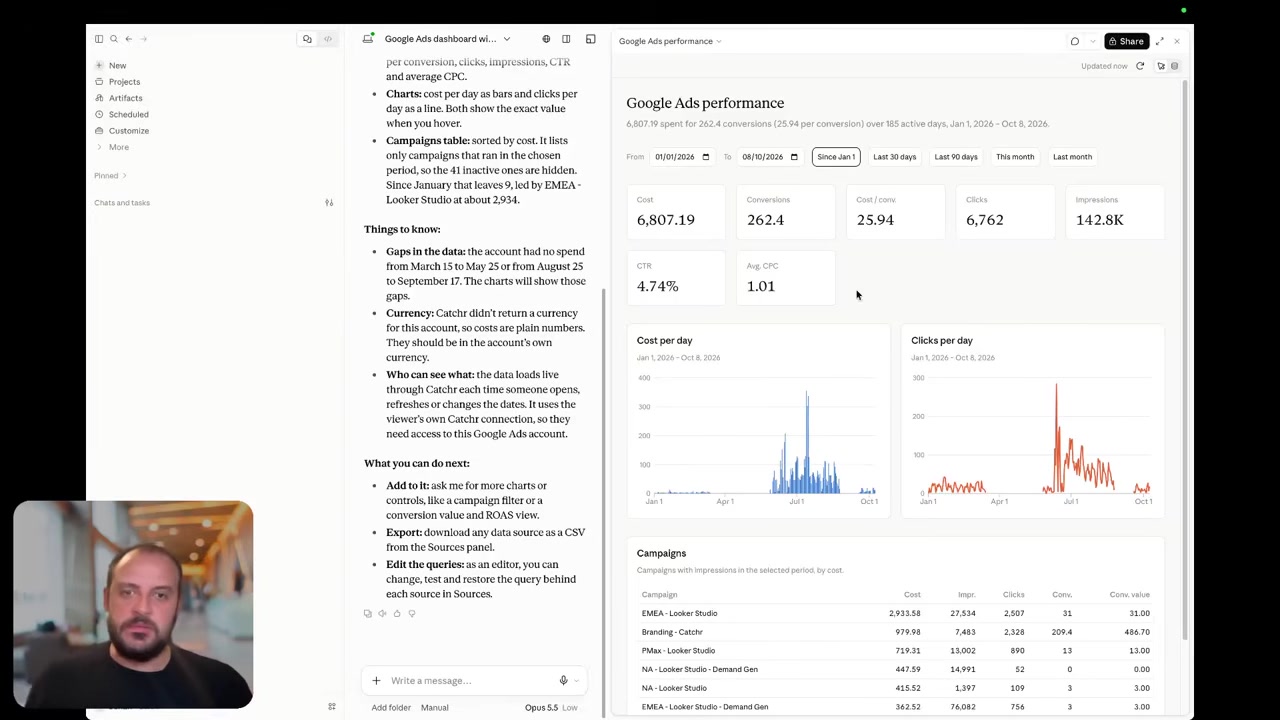
Catchr includes MCP from Starter at $24/month. Ask ChatGPT, Claude or Copilot about your connected marketing data, investigate a campaign change and prepare the next client conversation. Your assistant can also create and manage reporting export jobs; the destination must be available on your plan.
Improvado’s MCP documentation describes access to live data, stored history and platform operations such as extracts, loads, recipes and governance. Its scope can serve a data team asking an agent to operate the surrounding platform.
The practical difference is the recurring work: Catchr covers questions about client performance and management of reporting exports. Improvado can connect those questions to its broader modeling and governance environment. Its documentation also promotes campaign actions; the supported platforms and actions should be established in the purchased configuration.
Today, Catchr supports marketing analysis and reporting export-job management.
Coming soon
Create and update campaigns through Catchr MCP
Planned for a future release. These actions are not available yet.
Data Studio: build the client report in your existing tool
Catchr

Catchr gives you source connectors for Data Studio from Starter. Select the client accounts and fields, then build charts, date controls, filters and calculated fields in your report. Catchr’s report templates provide a starting point for recurring client reporting.
Improvado lists Data Studio in its reporting catalog. Its broader proposition is delivering prepared marketing data to the reporting layer. That is useful when several dashboards must use a centrally maintained model.
Catchr suits the account manager building a client report directly from connected sources. The same subscription also supplies Sheets, Power BI, Excel and AI, so the client dashboard can sit alongside the analyst’s other tools.
The image above shows Catchr’s connector setup. No comparable Improvado Data Studio setup screenshot was available in the official pages reviewed.
Find Catchr Data Studio connectors.
Power BI: direct queries or a shared warehouse
Catchr

Catchr feeds Power BI through a saved Web query from Starter. Choose the source, accounts, metrics and dates in Catchr, then load the results into Power BI. Your team keeps its transformations in Power Query and its measures and relationships in the Power BI model.
Improvado documents a warehouse route: load the marketing data into a database such as BigQuery, Snowflake or Azure SQL, then connect Power BI with that database’s native connector. It also describes API-based dataset refresh for Desktop and Service. See its Power BI integration.
Use Catchr for a direct marketing query feeding your existing report. The warehouse route is a better fit when several reports already rely on one centrally prepared set of tables. The Catchr image above illustrates the Web-query workflow; an equivalent Improvado setup screen was not found.
Google Sheets: own the query from your workbook
Catchr
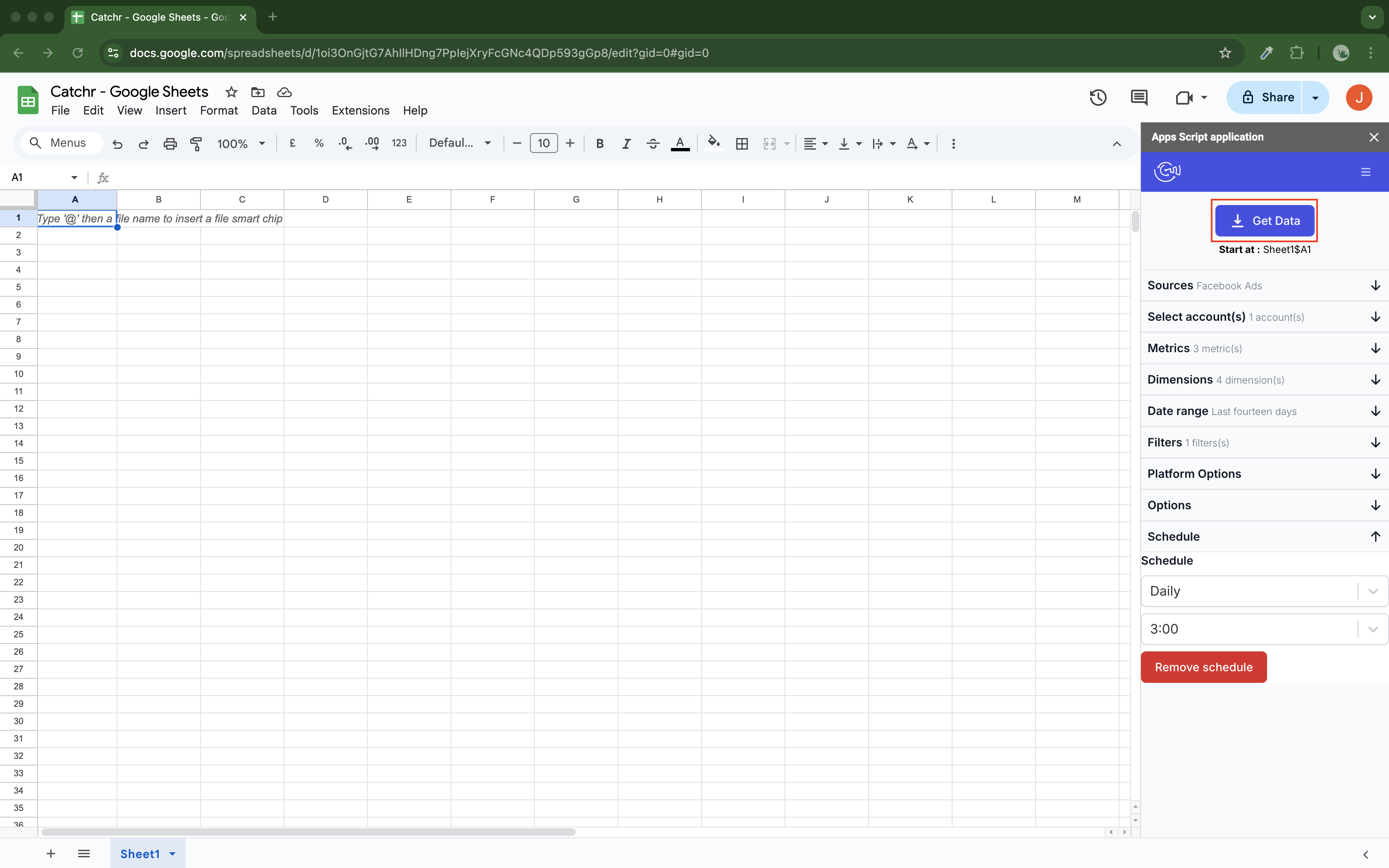
Catchr’s native Google Sheets add-on is included from Starter. Select accounts, metrics, dates and the destination cell inside your workbook. Schedule updates hourly, daily, weekly or monthly so the next pacing review starts with current data.
Replace refreshes the output, Append adds rows, and Combine/update matches selected dimensions to update existing rows and add new ones. The analyst building the spreadsheet can manage these queries from the same working environment.
Improvado describes Google Sheets as both an input and an output. Its integration page supports writing into spreadsheet ranges or tabs, including append workflows. This is useful for delivering data prepared in the wider platform.
Catchr puts query creation in the native add-on, which suits an analyst who owns the client workbook. The screenshot shows that in-sheet workflow; the reviewed Improvado documentation did not provide an equivalent native add-on screenshot.
Explore Catchr for Google Sheets.
Install Catchr from Google Workspace Marketplace.
Excel: a native add-in or a Power Query database connection
Catchr
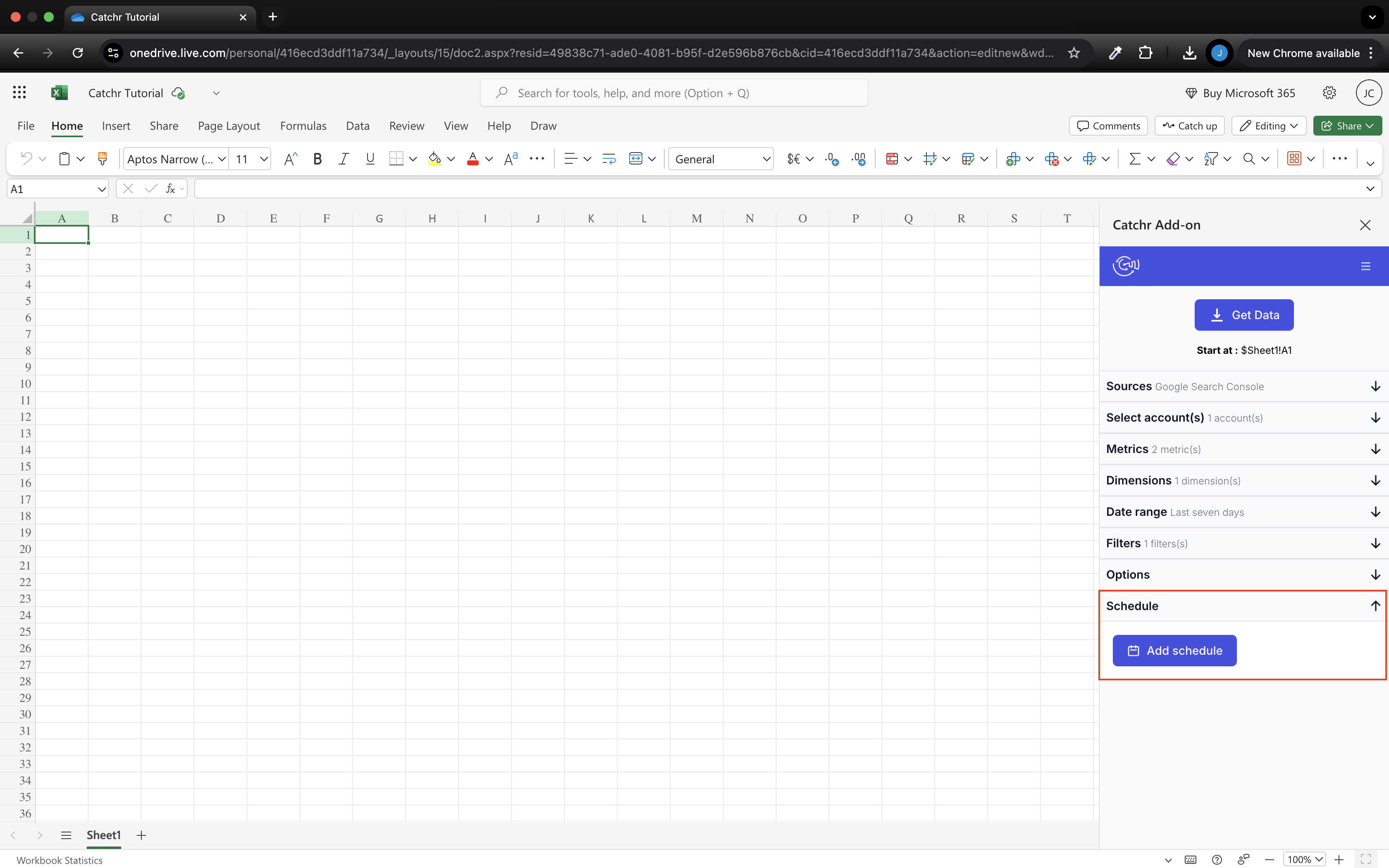
Catchr includes a native Excel add-in for web and desktop from Starter. Use its docked pane to choose sources, accounts, fields and dates. Run the query into your workbook and keep the analysis in the formulas, pivot tables and charts your team already uses.
Excel comes with the other everyday reporting destinations and unlimited Catchr users. A colleague using Data Studio or an AI assistant can work with the same connected marketing stack under the same subscription.
Improvado’s documented Excel Power Query route loads prepared data into a database that Excel can read. That gives workbook users access to the same central tables as other reporting tools.
Catchr offers the direct in-workbook alternative through its native add-in. The image above shows Catchr’s pane; Improvado’s public integration description does not establish a matching Excel add-in interface. Choose the workflow your spreadsheet owner wants to maintain.
Install Catchr from Microsoft Marketplace.
Compare all six workflows
| Workflow | Improvado | Catchr |
|---|---|---|
| MCP & AI | Broad platform operations; separate MCP Only offer. | Analysis and export-job management from Starter; campaign actions planned. |
| Databases & warehouses | Prepared tables and automated load orders across an enterprise destination catalog. | BigQuery from Momentum; wider databases and storage on Scale. |
| Data Studio | Reporting destination within the wider data platform. | Source connectors and templates from Starter. |
| Power BI | Warehouse-native connection and dataset-refresh API route. | Saved Web queries from Starter. |
| Google Sheets | Spreadsheet input and output in the platform. | Native add-on with schedules and three update modes. |
| Excel | Database data consumed through Power Query. | Native Excel add-in for web and desktop. |
Which one fits your team?
Choose Improvado when…
Choose Improvado when a central data team wants shared marketing models, governance and enterprise delivery managed together. Its broader platform can justify the investment when those responsibilities are part of the brief. For an AI-first use case, evaluate MCP Only on its own scope and limits.
Choose Catchr when…
Choose Catchr when the priority is the next client report, campaign pacing sheet or AI-assisted performance review. The everyday destinations and unlimited users are included from $24/month. Add BigQuery on Momentum or use Growth when your agency needs eight platforms, 60 accounts and API access.
How to move from Improvado to Catchr
- Choose one recurring client report and list the source accounts, report dates and destination it uses.
- Keep existing business definitions: formulas, channel mappings and attribution logic need an owner if they currently live in Improvado.
- Reconnect those sources in Catchr and rebuild the destination query. Keep report layouts and workbook formulas wherever practical.
- Compare one completed reporting period, including currency and time zone, then run the next scheduled refresh alongside the existing delivery.
- Move the remaining client reports in groups. Keep any Improvado measurement or governance services you still rely on until their replacement is ready.
A report can move independently of the entire data platform. This makes the first migration a concrete reporting task and shows whether the simpler subscription fits the agency’s daily work.
Test your client stack before committing
Try the workflow your next client report needs.
Connect a real client stack, open your destination and check the numbers before you switch.
No credit card required. Choose a plan after testing your sources and destinations.
Keep comparing by workflow
Find a Data Studio reporting template →
Compare every tool by destination and MCP →
Choose how to visualize marketing data →
Sources and comparison method
Written by Catchr. Official product and pricing pages were reviewed on October 23, 2026. Improvado’s current pricing supersedes earlier Free Limited and Advanced plan references. Annual starting prices are not configured quotes. Workflow sources: destinations, load setup, MCP, reporting tools, Power BI, Sheets and Excel.
Catchr plan prices, BigQuery on Momentum, included spreadsheet add-ons and current MCP export-job management were confirmed by the Catchr owner for this comparison. Campaign actions are planned. Catchr pricing and MCP overview provide public context; owner corrections take precedence where the pricing page is awaiting an update. Screenshots are unmodified public documentation images and the cited Catchr demo. We did not benchmark uptime, speed or support.
- Improvado product overview · pricing and allowances.
- Catchr product overview · pricing · destinations · MCP.
- Improvado pricing.
- Improvado MCP documentation.
- Improvado destinations.
- Improvado Power BI integration.
- Improvado Google Sheets integration.
- Improvado Google Sheets source documentation.
- Improvado Excel Power Query integration.
- Improvado reporting tools catalog.
- Catchr destination directory.
- Get Started with Database and Data Stream.
- Catchr pricing.
- Data Studio connectors.
- Data Studio script limits.
- Power BI destination.
- Google Sheets destination.
- Get started with Google Sheets.
- Excel destination.
- Catchr MCP.
- MCP usage examples.
- Google Apps Script quotas.


