


AgencyAnalytics gives agencies a complete client-reporting workspace, starting at $20 per client per month billed annually. Catchr starts at $24/month for three platforms and 10 accounts, with unlimited users and data connections to Data Studio, Power BI, spreadsheets and AI. The choice is whether you want a reporting platform or data in the tools your team already uses.
The quick answer
Choose Catchr to keep your Data Studio templates, Power BI models, Excel workbooks and customer-owned warehouse. Choose AgencyAnalytics for branded dashboards, client access and scheduled report delivery in one product. Both support Google Sheets and MCP, but AgencyAnalytics administers its reporting workspace while Catchr can manage external data exports.
AgencyAnalytics vs Catchr at a glance
Catchr is the direct fit when your existing reports and workbooks should stay in place. AgencyAnalytics earns its price by supplying the presentation, client portal and delivery layer as well as integrations.
| What matters for your team | AgencyAnalytics | Catchr |
|---|---|---|
| Starting price | $20/client/month Billed annually. Client count determines the base total. | $24/month Monthly billing; three platforms and 10 accounts. |
| Reporting home | ✓ Native client reporting Dashboards, reports, white labeling and client portal. | ✓ Your existing tools Data Studio, Power BI, Sheets, Excel and AI from Starter. |
| People | Unlimited staff accounts. | Unlimited users. No Catchr seat fees. |
| Database direction | Reads your existing database into AgencyAnalytics reports. Database access belongs in the sales quote. | Exports marketing data to your database. BigQuery from Momentum, $79/month. |
| Spreadsheets | Google Sheets app exports queries; Sheets can also feed native reports. | Native Sheets and Excel add-ons, including recurring updates. |
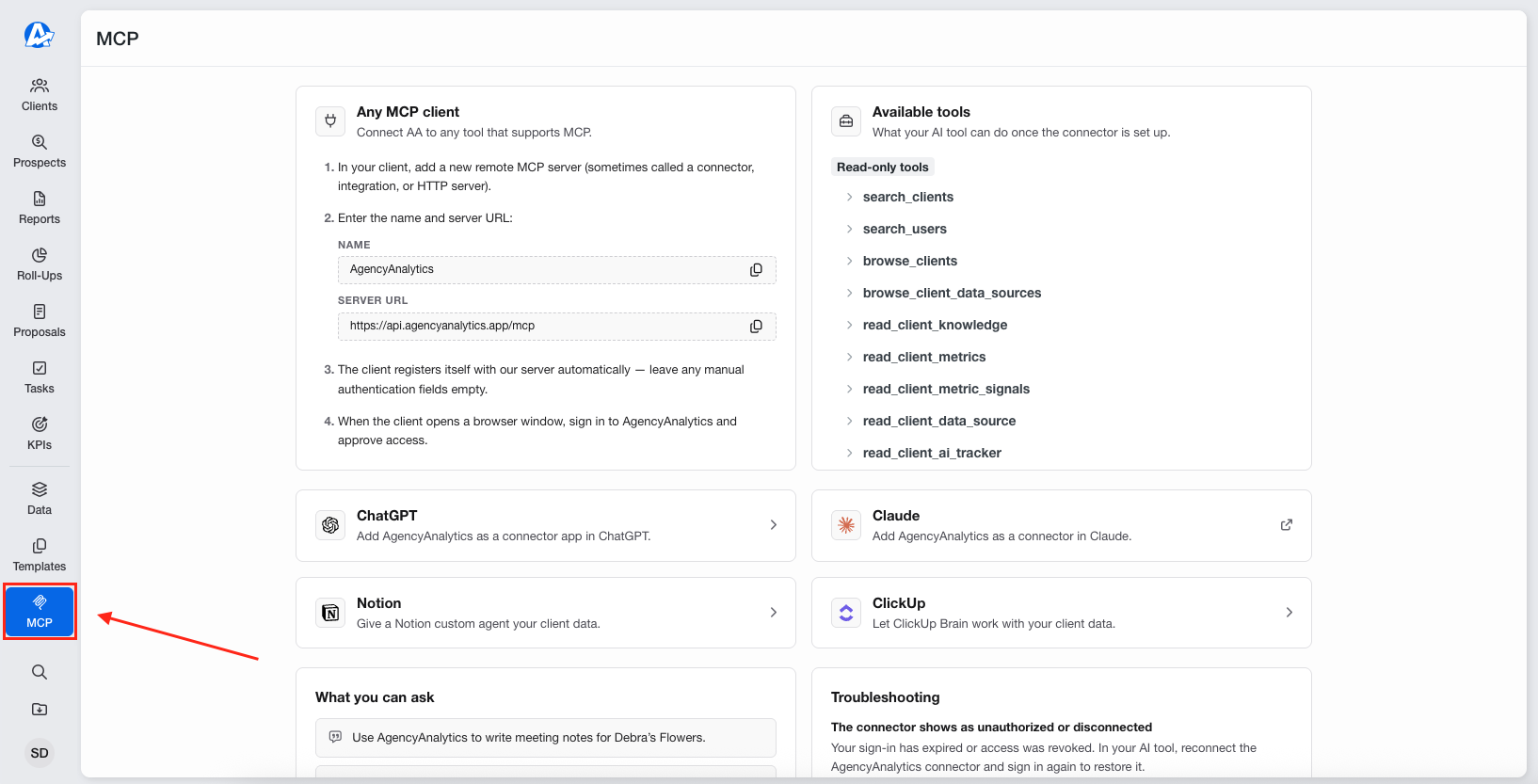
| MCP actions | Analysis plus client, user, custom-metric and view administration. | Analysis and export-job management. ◷ Planned Campaign creation and updates in a future release. |
Published USD prices checked October 23, 2026. A client is a business relationship; an account is an individual connected advertising, analytics or business account. They are different billing units.
Pricing: compare client delivery with the data connection layer
Start with the number of clients and the reporting product you want to buy. AgencyAnalytics’ annual per-client price includes the reporting environment. Catchr’s monthly price covers the data connections, while your team builds and shares reports in its chosen tools.
A one-client freelancer can pay less for AgencyAnalytics at its advertised annual rate than for Catchr Starter. An agency with several clients may prefer Catchr’s shared platform and account capacity, particularly when its dashboards and workbooks already exist.
AgencyAnalytics pricing
| Offer | Published USD price | What it covers |
|---|---|---|
| Core plan | $20/client/month Billed annually | Unlimited data sources, reports, dashboards and staff; client portal, automated reporting and MCP access. |
| Volume pricing | Contact sales for 25+ clients | Discounted per-client pricing, onboarding, database connectors and priority support are listed in the volume offer. |
| Optional tools | Additional charges | Rank Tracker, AI Tracker and Site Auditor can change the total. Choose them only if the agency needs their separate tracking or audit functions. |
Catchr plans
| Plan | USD, billed monthly | Included capacity and destinations |
|---|---|---|
| Starter | $24/month | 3 platforms 10 total accounts Data Studio, Power BI, Sheets, Excel and MCP. |
| Momentum | $79/month | 5 platforms 30 total accounts BigQuery exports included. |
| Growth | $239/month | 10 platforms 100 total accounts BigQuery plus API access. |
| Scale | $599/month | 25 platforms 500 total accounts Wider warehouses, databases and storage; custom schema mapping. |
Every Catchr plan includes unlimited users and Catchr requests. Source-platform API limits still apply. Your BI, Microsoft, Google, AI and cloud-storage subscriptions are separate.
What changes the total?
| What you add | AgencyAnalytics | Catchr |
|---|---|---|
| Another client | Adds to the billed client count, subject to your agreement. | Uses account capacity. A new client does not itself create a separate per-client fee. |
| More colleagues | Unlimited staff are included. | Unlimited users are included. Account managers and analysts can share the subscription. |
| Database requirements | Database connectors read data into native reports; include them in the sales discussion. | BigQuery starts on Momentum. Wider database destinations require Scale. |
| Presentation and delivery | Native dashboards, client access and report distribution are part of the product. | Your chosen BI or spreadsheet tool handles report design, access and delivery. |
Three practical agency setups
| Your reporting setup | Catchr fit | AgencyAnalytics fit |
|---|---|---|
| Freelancer: 3 platforms and 3 accounts for 1 client | Starter: $24/month. Keep the client report in Data Studio and its checks in a spreadsheet. Three platforms and 10 accounts are included. | $20/month billed annually for one client at the published rate. This lower headline price includes a native client-reporting environment. It is a good fit if that is where the report should live. |
| Agency: 5 platforms, 25 accounts and 3 people | Momentum: $79/month. The 25 accounts fit inside the 30-account allowance. All three people and BigQuery access are included. | Illustration: $100/month billed annually if those accounts represent five clients. That assumes five clients with five source accounts each. Another client distribution changes the price; staff remain unlimited. |
| Growth team: 8 platforms, 60 accounts, BigQuery and API | Growth: $239/month. Ten platforms and 100 accounts cover the requirement, including marketing-data exports to BigQuery and API access. | No equivalent configured total established. Client count prices the reporting workspace. Its database and administration API features do not establish the requested outbound BigQuery and marketing-data API workflow. |
The agency example assumes one account per platform per client. Franchise and multi-location businesses can have a different distribution, and AgencyAnalytics’ multi-account behavior varies by integration. Catchr’s total-account allowance is easier to map when the requirement is a shared data connection layer across several reporting destinations.
Include the work your team already does. If you maintain a library of useful Data Studio templates, Catchr lets those assets keep serving clients. If you want to stop maintaining separate BI assets and standardize client access in one product, AgencyAnalytics’ integrated reporting experience may justify its subscription.
AgencyAnalytics pricing · Catchr pricing. Checked October 23, 2026; annual commitments and monthly subscriptions are labeled separately.
Data sources: can you connect your clients’ marketing stack?
Both services connect the common marketing stack, but they organize it around different working environments. Catchr supplies data to selected destinations. AgencyAnalytics organizes integrations within client reporting workspaces.
Advertising, analytics, ecommerce and CRM platforms
Catchr connects advertising, analytics, ecommerce, CRM and social platforms. A typical agency can combine Google Ads, Meta Ads and GA4 reporting with Shopify sales or HubSpot pipeline data, then work in the destinations appropriate to each team.
AgencyAnalytics also covers these categories, with a particularly visible emphasis on agency SEO, social, paid media and client reporting. Its directory includes both marketing services and databases. A database integration in that directory is an input to an AgencyAnalytics report. Browse its integrations or explore Catchr sources.
Metrics, dimensions and historical data
A platform name alone does not tell you which report can be built. Metrics describe values such as cost, leads and revenue; dimensions separate them by dates, campaigns or another available breakdown. Historical availability still depends on the source platform and account permissions.
Catchr lets the team select fields for its destination. AgencyAnalytics presents integration data through its own widgets and reporting features. A shared source connection does not imply identical fields, history or custom metrics; the report’s business question should guide the choice.
Managing multiple accounts across clients
Catchr counts platform types and total connected accounts. Five Google Ads accounts use one platform and five account slots. Momentum can therefore cover a 25-account portfolio across five platforms without a separate charge for each client relationship.
AgencyAnalytics centers the subscription on clients. A client may connect several marketing integrations, with multi-account support depending on the integration. The agency gains a client-specific reporting space and access model alongside the data connections. This structure is useful when each client needs its own branded reporting experience.
Choose where your team and clients should work
AgencyAnalytics brings the reporting experience into its own application. Catchr keeps Data Studio, Power BI, spreadsheets, AI assistants and your warehouse available as working destinations. The six workflows below distinguish real destination support from an integration that only brings data into a native dashboard.
Databases and warehouses: the direction of the data matters
Catchr

AgencyAnalytics

Catchr exports marketing data to customer-owned databases. BigQuery is available from Momentum at $79/month. Growth adds API access, while Scale includes Snowflake, Redshift, Azure SQL, MySQL, PostgreSQL, S3, Google Cloud Storage and Azure Blob, plus custom schema mapping.
AgencyAnalytics’ database connectors do the reverse. They query existing BigQuery, MySQL, Redshift, PostgreSQL and Snowflake data into its dashboards and reports. That is useful when a client’s revenue or offline activity is already in a database.
It is not the same as sending connected ad-platform data out to your warehouse. The official AgencyAnalytics API guide also describes administration rather than a general outbound marketing-data pipeline.
Choose Catchr when the team wants ownership of marketing tables in its warehouse for joins, analysis and downstream reporting. Choose AgencyAnalytics’ database route when the table already exists and the goal is to display it in a client report.
Explore Catchr for BigQuery. · See all Catchr destinations.
MCP: reporting-workspace actions or external export automation
Catchr
AgencyAnalytics
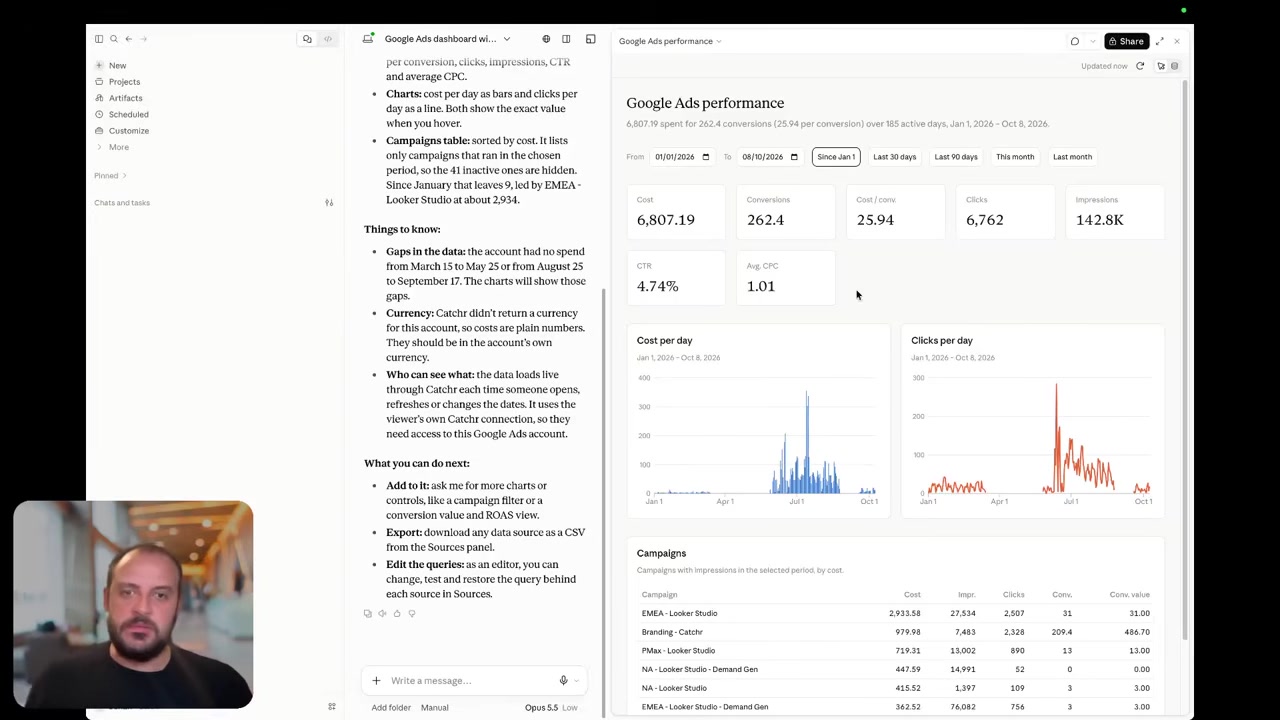
Both products support marketing analysis through MCP. Catchr includes ChatGPT, Claude and Copilot access from Starter alongside its reporting and spreadsheet destinations.
AgencyAnalytics adds meaningful workspace actions: creating or editing clients, users, custom metrics and views, plus ranking operations. Its documented MCP is client-scoped, follows existing permissions and is available to Admin and Staff users. This is useful when the assistant should help maintain the agency’s reporting environment.
Catchr’s additional actions focus on data delivery. An assistant can help set up, update and run reporting export jobs, with the destination included on the appropriate plan. The same source access can support a performance conversation and a recurring warehouse export.
AgencyAnalytics’ documented workspace writes should likewise not be presented as ad-platform campaign controls.
Coming soon
Create and update campaigns through Catchr MCP
Planned for a future release. These actions are not available yet.
Data Studio: keep your templates or use native client reports
Catchr

AgencyAnalytics
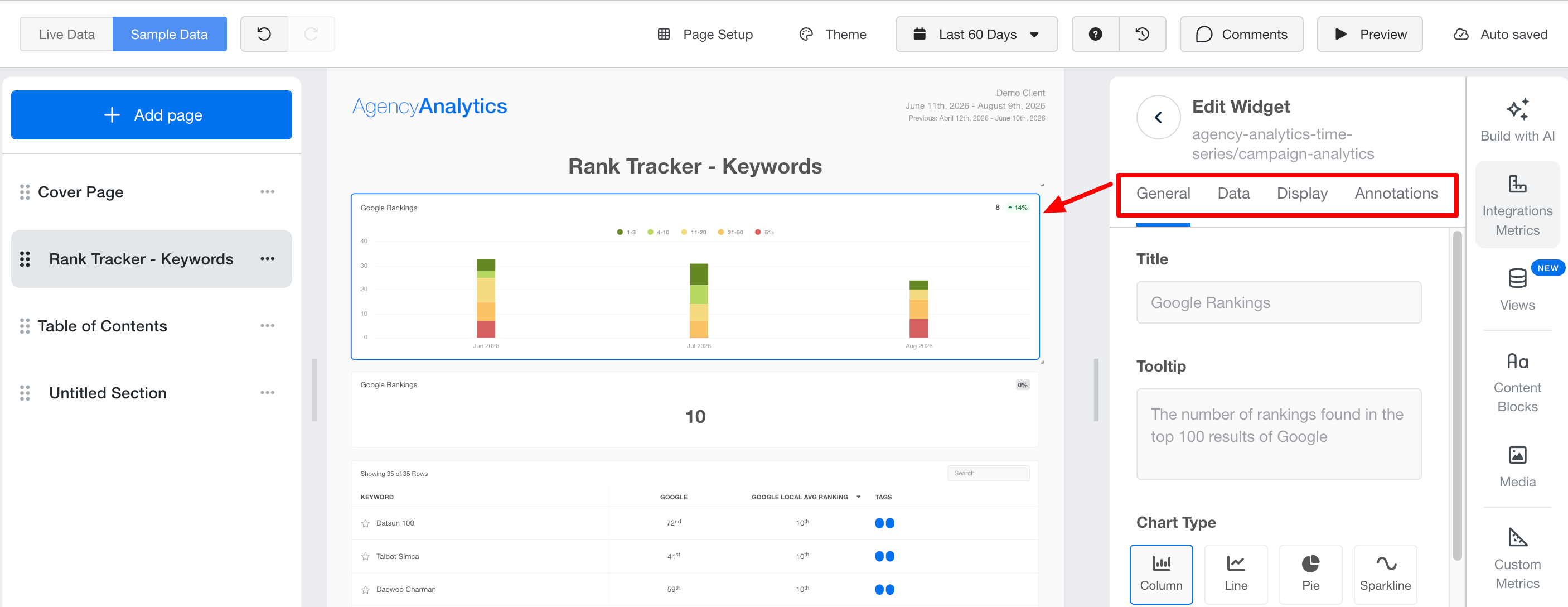
The AgencyAnalytics screenshot shows its native report editor. It is not a Data Studio connection; a direct outbound connector was not established in the official material reviewed.
Catchr supplies Data Studio connectors from Starter. Your team keeps its report templates, calculated fields, chart choices and Google sharing workflow. Start with a Catchr reporting template or connect an existing client report.
AgencyAnalytics is compelling when the agency wants to standardize reports, branding and client access in its own reporting platform. Catchr is the closer fit when clients already recognize the agency’s Data Studio dashboards and the team wants those assets to remain the deliverable.
For a recurring monthly report, this is a practical ownership decision. With Catchr, your existing dashboard stays the canvas. With AgencyAnalytics, the native report editor becomes the place where the team creates and delivers the report.
Explore Catchr for Data Studio.
Power BI: keep your model with Catchr’s saved Web queries
Catchr

Catchr’s Power BI workflow is shown above. AgencyAnalytics documents its own dashboards and inbound database widgets; the reviewed sources did not establish an equivalent direct Power BI destination.
Catchr sends selected marketing data into Power BI from Starter. Choose source accounts, fields and dates, then load the saved Web query. Keep Power Query transformations, relationships, DAX measures and the final report in your Microsoft environment.
This matters when the reporting model already combines marketing with finance or sales data. The data connection can change without replacing the team’s chosen BI environment or rebuilding the entire client-reporting operation inside another product.
AgencyAnalytics can still be the better choice when the goal is to provide a complete reporting workspace to account managers. Its native reports solve that presentation task; they should not be mistaken for refreshable Power BI data delivery.
Google Sheets: a shared strength with different reporting centers
Catchr
AgencyAnalytics
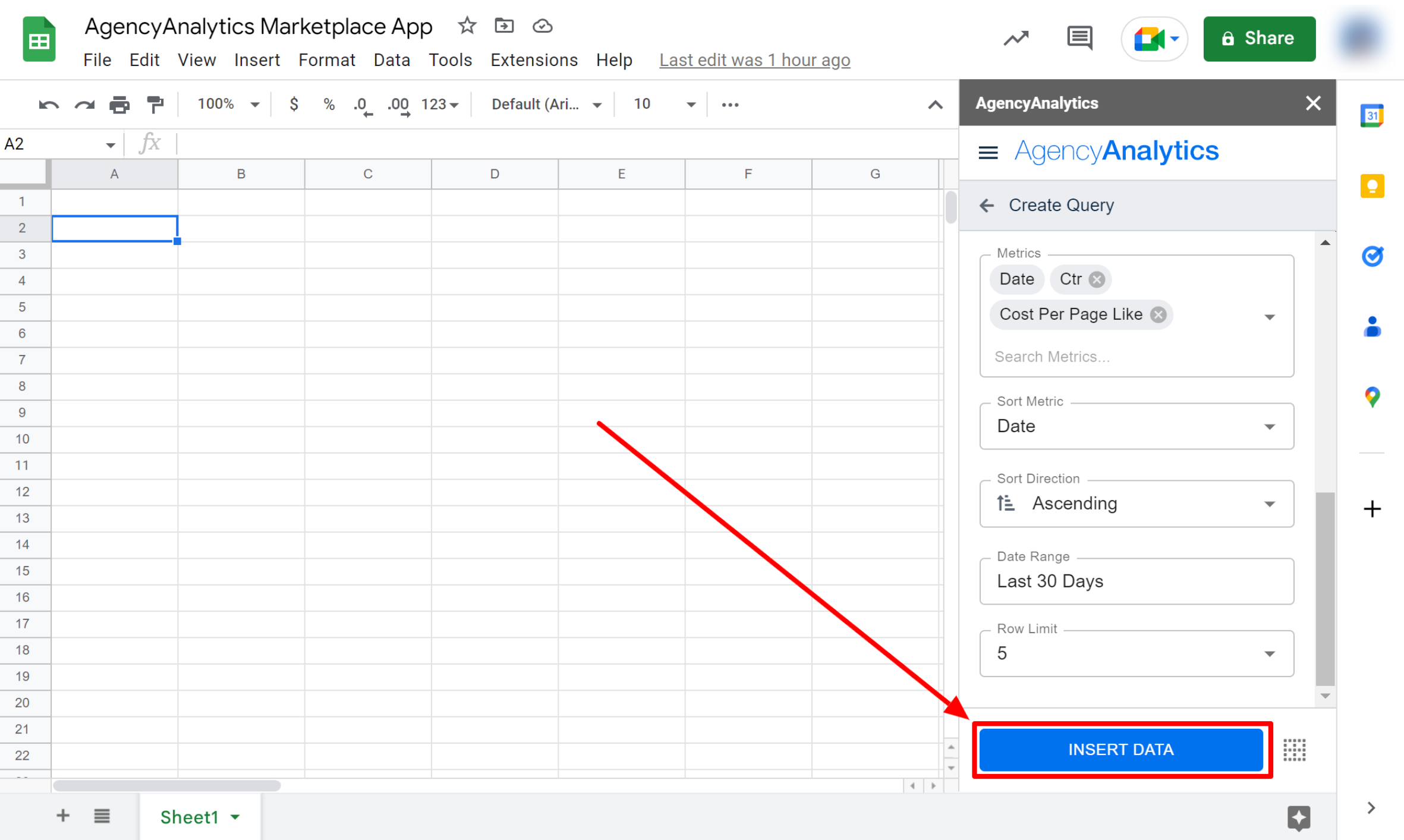
AgencyAnalytics has a genuine Google Sheets app. It can pull selected client, integration and metric data into a worksheet. The guide documents saved queries and manual refresh of one or all queries. Sheets can also supply data back to its report widgets.
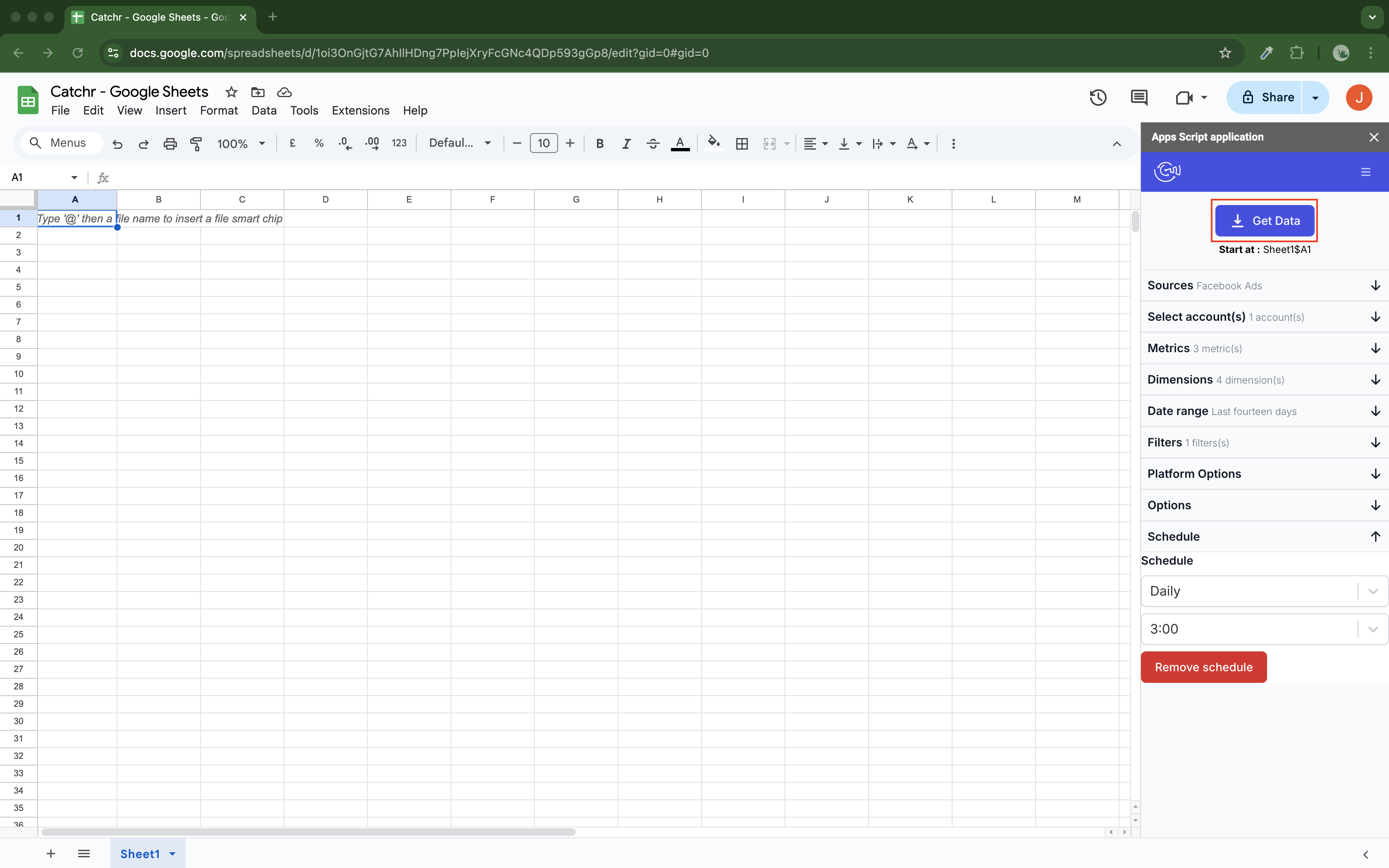
Catchr’s native Sheets add-on is designed around the workbook as a destination. Choose sources, accounts and fields, then schedule updates hourly, daily, weekly or monthly. Use Replace, Append or Combine/update according to how the reporting table should change.
That makes Catchr useful for campaign pacing, forecasts and recurring client summaries that depend on spreadsheet formulas. Account managers can work in the dashboard while analysts maintain the supporting workbook using the same Catchr source access.
AgencyAnalytics is a good fit when Sheets supports a broader native client-reporting process. Catchr is the closer fit when the spreadsheet itself is the team’s day-to-day working asset.
Explore Catchr for Google Sheets.
Excel: a native destination for recurring analysis
Catchr
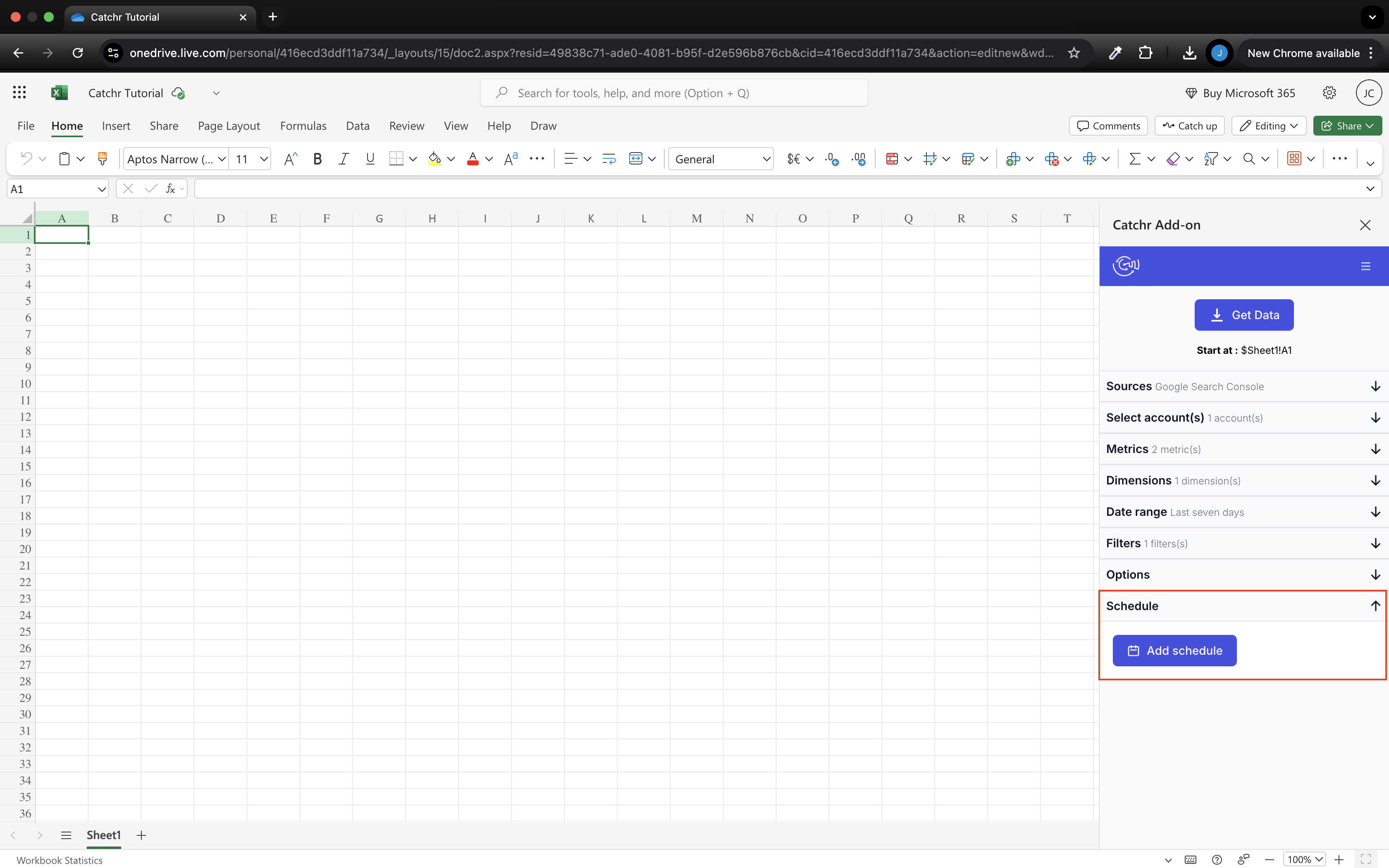
Catchr’s Excel add-in is shown above. The reviewed AgencyAnalytics documentation did not establish an equivalent native Excel query add-in for connected marketing data.
Catchr works in Excel on the web and desktop from Starter. Select your accounts, metrics, dimensions and dates in the task pane, then send results into the workbook. Existing formulas and charts remain part of the team’s analysis.
Schedule hourly, daily, weekly or monthly updates and choose whether to replace results, append rows or combine/update them. This supports the recurring margin, pacing and performance workbooks that often sit alongside an agency’s client dashboard.
AgencyAnalytics’ report-sharing workflow emphasizes web links and PDFs, while certain tools offer file exports. Those are useful deliverables, but a downloaded file is different from a saved query in a living workbook. Choose Catchr when Excel is a continuing requirement in the reporting process.
Compare all six workflows
| Workflow | AgencyAnalytics | Catchr |
|---|---|---|
| MCP & AI | Analysis and client-reporting workspace administration. | Analysis and export-job management; campaign actions planned. |
| Databases & warehouses | Reads existing databases into native reports. | Exports marketing data to BigQuery from Momentum; wider destinations on Scale. |
| Data Studio | Native report editor; direct outbound connector not established. | Data Studio connectors from Starter. |
| Power BI | Native reporting; direct outbound Power BI route not established. | Saved Web queries for Power BI models. |
| Google Sheets | Native app for queries; Sheets can also feed native reports. | Native add-on with schedules and three update modes. |
| Excel | Some file-export cases; general native query add-in not established. | Native web and desktop add-in with recurring updates. |
Which one fits your team?
Choose AgencyAnalytics when…
Choose AgencyAnalytics when your agency wants a complete branded client-reporting product. Its dashboards, portal, scheduled delivery and workspace administration can reduce the separate tools account managers need to operate. It also fits a one-client freelancer who prefers the native reporting experience at the advertised annual price.
Choose Catchr when…
Choose Catchr when Data Studio templates, Power BI models, Sheets, Excel or your own warehouse are already valuable working assets. Catchr supplies the data without requiring a new client-reporting platform. Unlimited users and everyday destinations are included from $24/month; BigQuery starts at $79/month.
How to move from AgencyAnalytics to Catchr
- List the clients, connected accounts and reports you want to move, including who receives each recurring report.
- Choose the destination for each deliverable: Data Studio, Power BI, Sheets, Excel or a warehouse-backed report.
- Connect the source accounts in Catchr and rebuild one representative client’s report, including its custom metrics.
- Recreate branding, sharing permissions and scheduled delivery in the chosen reporting tool. AgencyAnalytics client portals and native report layouts do not transfer automatically.
- Compare one completed reporting period, then review the client-facing experience with the account manager.
- Move the remaining reports in client batches, keeping the previous delivery available until the replacement is ready.
You can also use the tools for different jobs: retain AgencyAnalytics for clients who value its portal, while using Catchr for the agency’s Power BI, Excel or warehouse requirements. A full replacement is only necessary when the reporting workflow should move too.
Test your client stack before committing
Try the workflow your next client report needs.
Connect a real client stack, open your destination and check the numbers before you switch.
No credit card required. Choose a plan after testing your sources and destinations.
Keep comparing by workflow
AgencyAnalytics alternatives →
Find a Data Studio reporting template →
Compare every tool by destination and MCP →
Plan your client marketing report →
Sources and comparison method
Written by Catchr. Official product and pricing information was reviewed on October 23, 2026. AgencyAnalytics prices are shown with their annual billing term. Client-count scenarios state their assumptions; database connectors are described as inbound report sources, not outbound exports.
Catchr’s team confirmed BigQuery from Momentum, MCP analysis and export-job management today, and campaign actions planned for a future release. These confirmations supersede older Catchr public pricing details. Screenshots are unmodified official documentation images; native reporting is labeled separately from external destinations. No controlled speed, support or uptime benchmark was performed.
AgencyAnalytics pricing · Integration directory · Database connectors · API scope · MCP · Native reports · Sharing and downloading reports · Sheets app · Sheets as an input · Catchr pricing · Catchr destinations · Catchr MCP.
- AgencyAnalytics product overview · pricing and allowances.
- Catchr product overview · pricing · destinations · MCP.
- Connect the AgencyAnalytics Model Context Protocol.
- Understanding Database Connectors.
- Using the Google Sheets App.
- Connect Google Sheets.
- Using the AgencyAnalytics API.
- Create, Customize, and Send Reports.
- Share and Download Reports.
- Catchr destination directory.
- Get Started with Database and Data Stream.
- Catchr pricing.
- Data Studio connectors.
- Data Studio script limits.
- Power BI destination.
- Google Sheets destination.
- Get started with Google Sheets.
- Excel destination.
- Catchr MCP.
- MCP usage examples.
- Google Apps Script quotas.


