


Catchr starts at $24/month with unlimited users and the reporting destinations an agency uses every week. Adverity Connect offers central data collection, transformation and monitoring, while Atlas adds a separate knowledge layer for AI. Choose according to who owns the data preparation and how much shared governance your organization needs.
The quick answer
Choose Catchr for client dashboards, native spreadsheet add-ons, AI analysis and scheduled exports with clear monthly allowances. Choose Adverity when centrally mapped data and enterprise operations are essential. Adverity also documents MCP control of its pipelines; Atlas is a separate product for governed warehouse analysis.
Adverity vs Catchr at a glance
Catchr gives an agency a clear monthly budget and direct access to familiar reporting tools. Adverity is built around a centrally operated data foundation. Its price depends on the proposed deployment.
| What matters | Adverity | Catchr |
|---|---|---|
| Pricing | Customized quote. Scope Connect and Atlas separately. | $24/month to start. 3 platforms, 10 total accounts |
| Team access | Confirm users, workspaces and required products in the proposal. | ✓ Unlimited users Included on every plan. |
| Reporting destinations | Warehouse and BI delivery; Sheets and Excel managed as output destinations. | ✓ Included from Starter Data Studio, Power BI, native Sheets and Excel add-ons. |
| Warehouses | Central mapping, transformations and enterprise destination operations. | BigQuery: Momentum, $79/month. Wider databases and storage: Scale. |
| AI and MCP | Adverity MCP operates pipelines. Atlas adds a separate warehouse knowledge layer. | MCP analysis and export-job management included. ◷ Campaign actions planned |
Pricing: public monthly allowances versus a scoped proposal
Adverity publishes a customized-quote route rather than a universal monthly entry price. That makes scope part of the buying decision. Define whether the project needs Connect, Atlas or both, then include the destinations and services the team will use.
Adverity offers to separate in the proposal
| Offer | Price route | What to scope |
|---|---|---|
| Adverity Connect | Custom quote | Collection, mapping, transformations and destination delivery. Include data volume, workspaces and operating requirements. |
| Adverity MCP | Confirm in your proposal | Requires an Adverity account with Management API access. Ask for the entitlement alongside the Connect configuration. |
| Adverity Atlas | Custom quote | Knowledge and AI analysis over your warehouse. Atlas and Connect are separate products; neither requires the other. |
The official pricing page does not establish a fixed total for the scenarios below. A proposal should say which products, destinations and services are included. We therefore show the Catchr plan that fits each workload and the Adverity scope to request.
Catchr plans
| Catchr plan | USD, billed monthly | Capacity and included destinations |
|---|---|---|
| Starter | $24/month | 3 platforms Data Studio, Power BI, Sheets, Excel and MCP. |
| Momentum | $79/month | 5 platforms Adds BigQuery exports. |
| Growth | $239/month | 10 platforms Adds API access; BigQuery remains included. |
| Scale | $599/month | 25 platforms Wider warehouse, database and storage destinations, plus custom schema mapping. |
All Catchr plans include unlimited users and Catchr requests. Source providers still apply their own API limits. External BI licenses, warehouse usage and AI subscriptions are separate from the connector subscription.
Three real reporting budgets
| Team and workload | Catchr fit | Adverity scope |
|---|---|---|
Freelancer 3 platforms | Starter: $24/month. Client dashboards, native spreadsheet add-ons and AI analysis included. | Request a Connect quote for the sources and outputs. Add Atlas only if warehouse knowledge and AI investigations are part of the need. |
Agency 5 platforms | Momentum: $79/month. Fits within 30 total accounts. All three people are included, alongside BigQuery. | Include the 25 accounts, three people, client workspaces, shared mappings and destinations in the proposal. |
Growing agency 8 platforms | Growth: $239/month. 10 platforms and 100 accounts, with BigQuery exports and API access. | Scope Connect’s warehouse delivery and API entitlement. Separately price Atlas if the team wants its knowledge layer over the data. |
Catchr’s value is easy to see when the team already owns its dashboards and spreadsheet logic. Account managers can review the client report, analysts can work in Excel and everyone can access the connected stack without a Catchr seat charge.
Adverity’s proposal may include central transformations, monitoring and data operations that an agency would otherwise maintain itself. Those responsibilities can justify a broader platform. Keep them visible in the comparison instead of inferring savings from an unpublished competitor price.
For example, a group combining several brands may need every team to use one channel taxonomy and one revenue definition. An independent agency may already manage those definitions inside each client report. The right budget follows that operating model as well as the number of source connections.
Data sources: can you connect your clients’ marketing stack?
Advertising, analytics, ecommerce and CRM platforms
Catchr connects the categories most agency reports need: advertising, web analytics, ecommerce, CRM and social platforms. Bring Google Ads and Meta Ads together with GA4, Shopify or HubSpot, then use the connected accounts in the destinations your team prefers.
Adverity also covers marketing and business sources. Connect emphasizes collecting and preparing data centrally, including transformations and quality monitoring before delivery to other tools.
Browse Catchr connectors or explore Adverity sources.
Metrics, dimensions and historical data
A platform connection gives you fields to build a report. Spend, clicks and conversions are metrics; date, campaign and device are examples of dimensions. Available combinations and historical depth follow each source API and the permissions on the connected account.
Adverity maps source columns to target fields and can transform data before loading it. This helps organizations share consistent definitions. Catchr lets the report owner select source fields and retain business calculations in the BI model, spreadsheet or warehouse.
Managing multiple accounts across clients
Catchr counts platforms and accounts separately. Five clients with one Google Ads account each use one platform and five accounts. Momentum gives an agency five platforms and 30 total accounts; a portfolio of 25 accounts leaves five accounts of headroom.
Adverity organizes collection through datastreams and workspaces. The proposal should cover the portfolio’s volume and workspace requirements. Catchr makes the platform and account allowance visible up front, while keeping users unlimited as client teams grow.
The same reporting destinations, different ownership of preparation
Catchr lets marketers build queries in familiar tools and schedule exports when a warehouse is needed. Adverity Connect prepares data centrally, then delivers it to downstream destinations. The six workflows below show where that changes the analyst’s daily work.
Databases and warehouses: scheduled exports or central data operations
Catchr

Adverity

Catchr exports marketing data to your own databases and warehouses. Select connected accounts, choose fields and schedule recurring delivery. Your analysts can combine advertising performance with customer or sales tables without changing the reporting tools used by account managers.
BigQuery starts on Momentum at $79/month. Growth at $239/month adds capacity and API access. Scale at $599/month adds Snowflake, Redshift, Azure SQL, MySQL, PostgreSQL, Amazon S3, Google Cloud Storage and Azure Blob Storage, with custom schema mapping.
Adverity supports a broad enterprise destination catalog. Its SQL destination includes Redshift, SQL Server, MySQL, Oracle, PostgreSQL, SAP HANA and Snowflake, with staged loading to protect against incomplete updates.
Choose that central operating model when common mappings and transformations must reach several systems. Catchr is a practical fit when the warehouse team already owns the SQL models and wants scheduled marketing data delivery into them.
Explore Catchr database and warehouse destinations · See Catchr for BigQuery.
MCP: reporting automation, pipeline controls and Atlas
Catchr
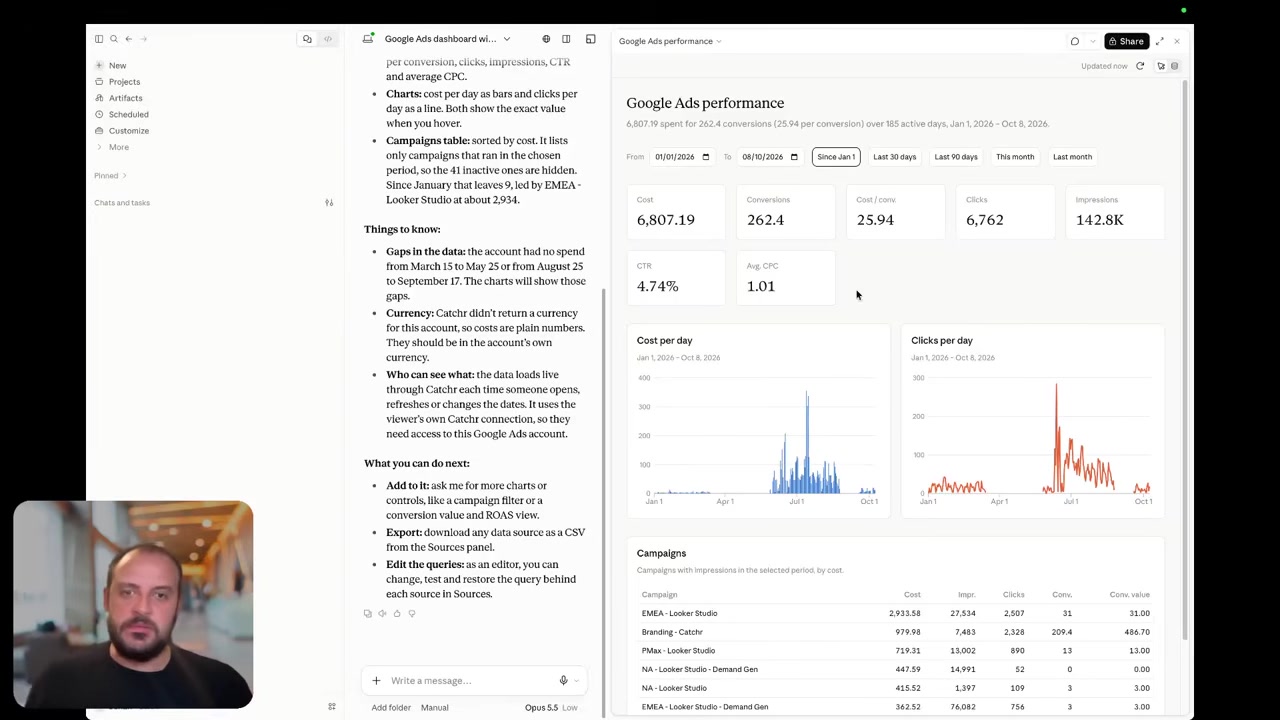
Catchr includes MCP from Starter at $24/month. Ask ChatGPT, Claude or Copilot about your connected marketing data, investigate a campaign change and prepare the next client conversation. Your assistant can also create and manage reporting export jobs; the destination must be available on your plan.
Adverity’s current MCP documentation includes pipeline operations: manage datastreams, trigger fetches, configure destinations, work with transformations and query warehouse data. Changes use a preview and confirmation flow. It requires Management API access.
Adverity Atlas is a separate offer. It supplies governed marketing definitions and business context for investigations across warehouse data, with MCP access. Connect and Atlas can be bought independently.
Catchr is a focused choice for the client-reporting routine. Adverity’s broader pipeline controls matter to a central operations team, while Atlas matters when AI needs shared organizational context. The image above shows Catchr analysis; no comparable Adverity MCP interface screenshot was established in the reviewed documentation.
Today, Catchr supports marketing analysis and reporting export-job management.
Coming soon
Create and update campaigns through Catchr MCP
Planned for a future release. These actions are not available yet.
Data Studio: source connectors or centrally prepared data
Catchr

Catchr gives you source connectors for Data Studio from Starter. Select the client accounts and fields, then build charts, date controls, filters and calculated fields in your report. Catchr’s report templates provide a starting point for recurring client reporting.
Adverity’s documented Data Studio destination routes prepared data through BigQuery maintained by Adverity. Reports receive the output of the central data process.
Catchr’s connector route suits a marketer building a report from source accounts. Adverity’s route suits an organization that wants the same prepared definitions in several dashboards. Both leave the report design in Data Studio.
The screenshot above shows Catchr. Adverity’s reviewed setup guide uses instructional illustrations, so those have not been presented as real product screenshots.
Find Catchr Data Studio connectors.
Power BI: saved Web queries or curated OData shares
Catchr

Adverity

Catchr feeds Power BI through a saved Web query from Starter. Choose the source, accounts, metrics and dates in Catchr, then load the results into Power BI. Your team keeps its transformations in Power Query and its measures and relationships in the Power BI model.
Adverity publishes an OData share from its Data Warehouse. A data owner chooses the date scope, dimensions and metrics, then Power BI reads that prepared share. Scheduled refresh is configured in Power BI Service.
That is useful when a central team decides what each report receives. Catchr suits the analyst who wants to build a marketing query directly and combine it with other datasets inside Power BI. In both cases, the finished model and dashboard remain your team’s reporting assets.
Google Sheets: an in-workbook query or a managed destination
Catchr
Adverity
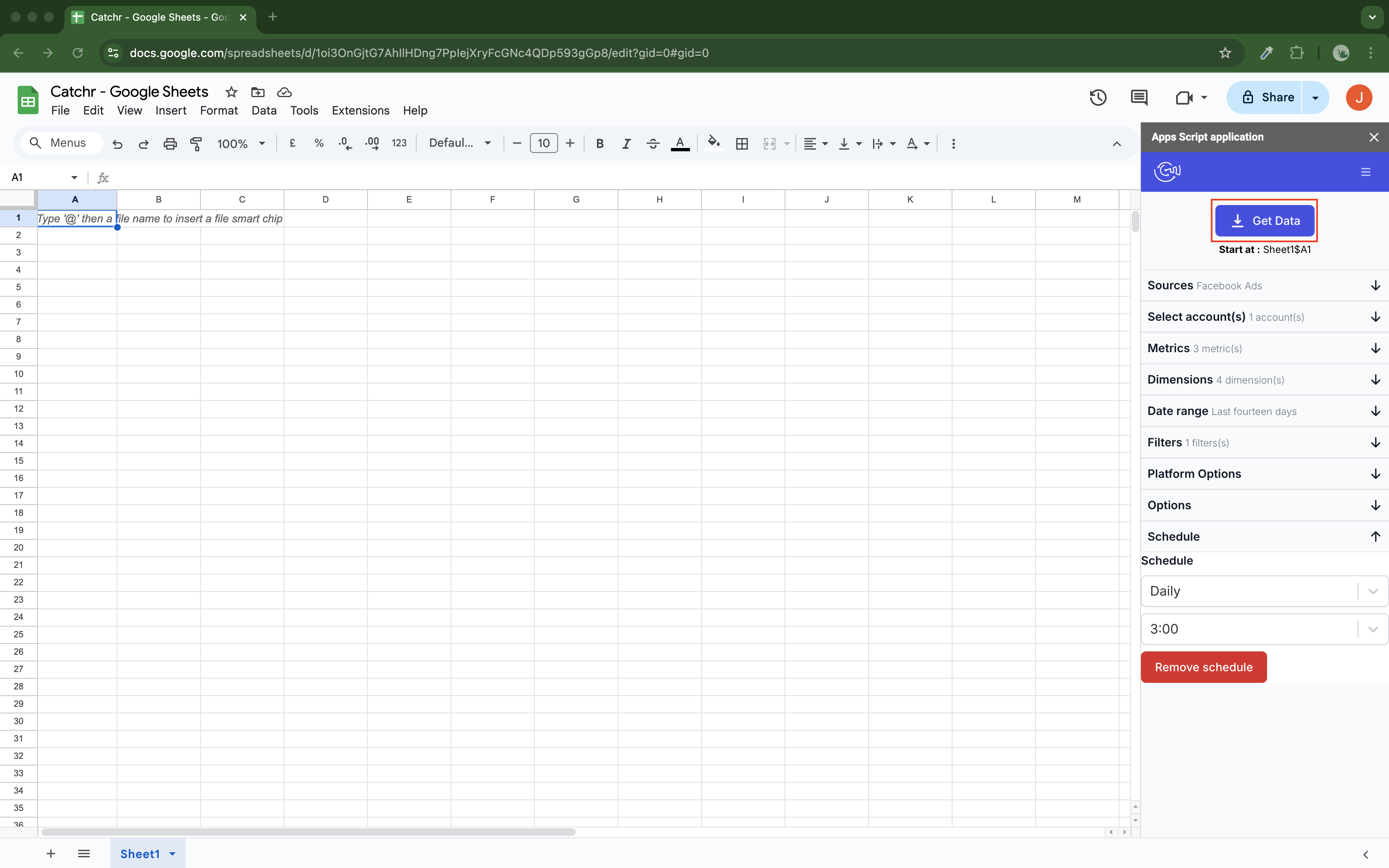
Catchr’s native Google Sheets add-on is included from Starter. Select accounts, metrics, dates and the destination cell inside your workbook. Schedule updates hourly, daily, weekly or monthly so the next pacing review starts with current data.
Replace refreshes the output, Append adds rows, and Combine/update matches selected dimensions to update existing rows and add new ones. The analyst building the spreadsheet can manage these queries from the same working environment.
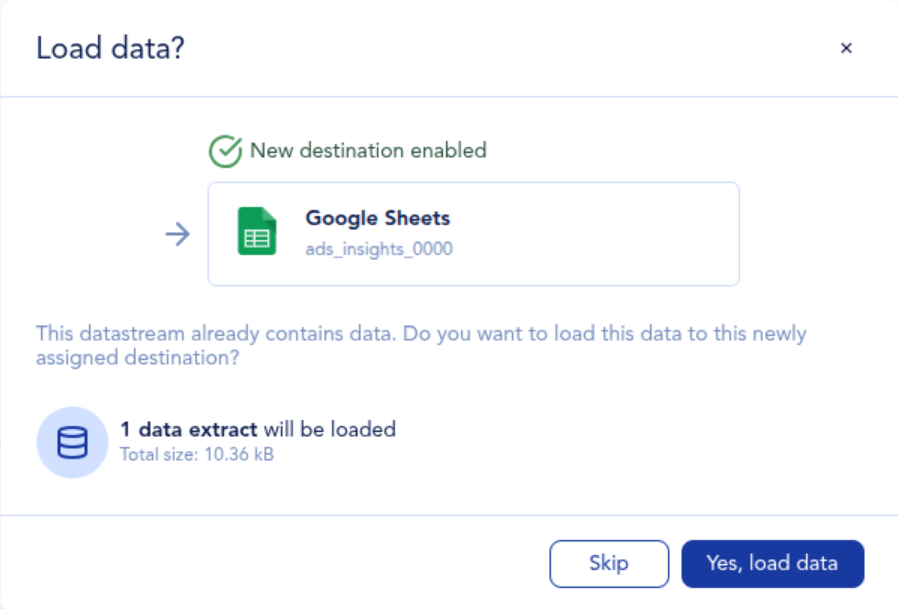
Adverity also supports Google Sheets as a destination. Configure the spreadsheet and tab in Adverity, then send a datastream’s prepared output into it. The official image shows the delivery of an existing extract.
The difference is where the query is owned. Catchr’s add-on suits the analyst making changes from the workbook. Adverity suits a central data owner delivering a consistent table for colleagues to consume.
Explore Catchr for Google Sheets.
Install Catchr from Google Workspace Marketplace.
Excel: native add-in or centrally delivered workbook
Catchr
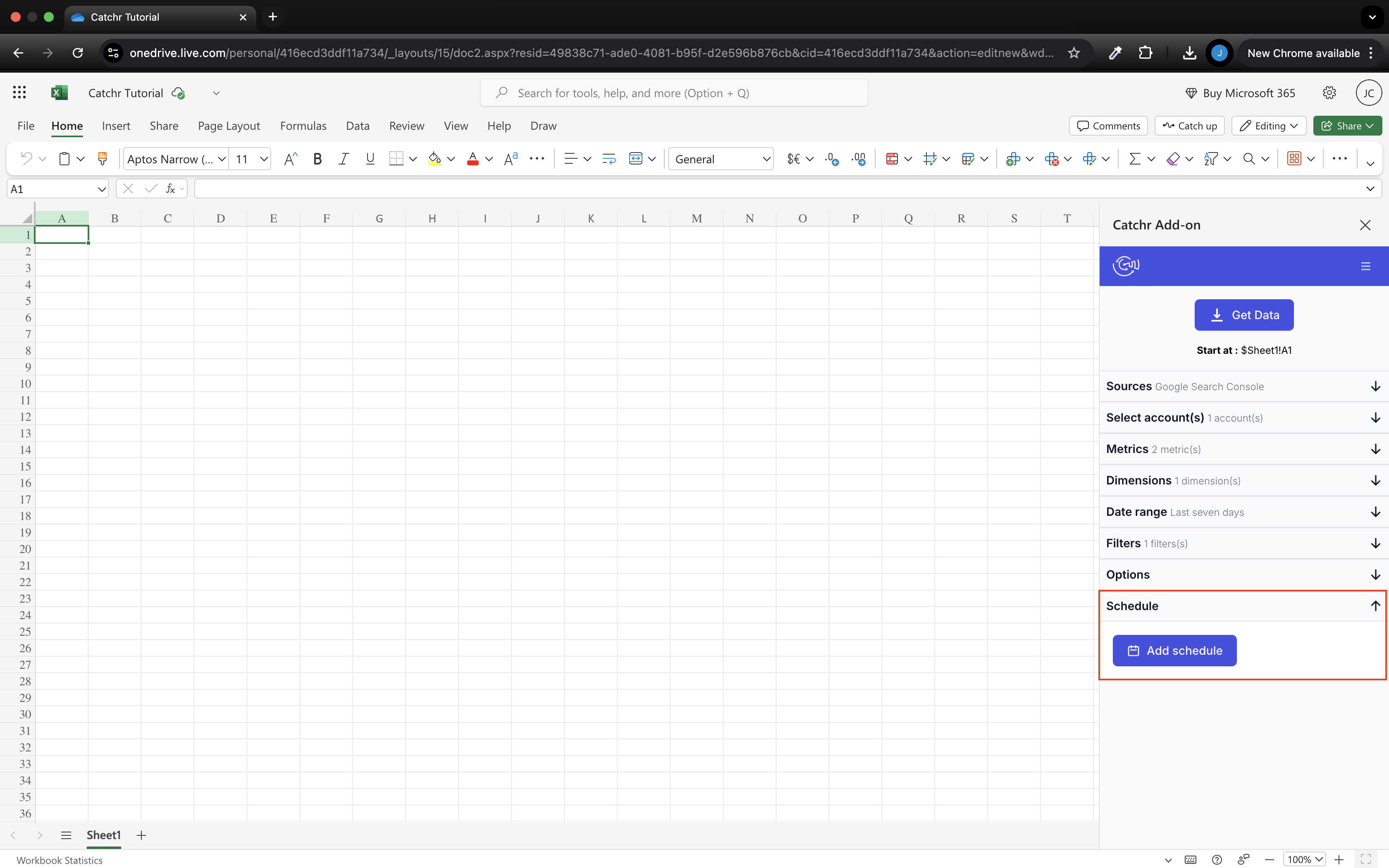
Catchr includes a native Excel add-in for web and desktop from Starter. Use its docked pane to choose sources, accounts, fields and dates. Run the query into your workbook and keep the analysis in the formulas, pivot tables and charts your team already uses.
Excel comes with the other everyday reporting destinations and unlimited Catchr users. A colleague using Data Studio or an AI assistant can work with the same connected marketing stack under the same subscription.
Adverity’s Excel destination writes to a Microsoft-authorized workbook and worksheet. Its append and truncate modes support centrally managed file delivery.
Catchr puts source selection in the Excel add-in. That is convenient for the account manager adjusting a report without first changing a central datastream. The screenshot shows Catchr’s native pane; a matching Adverity in-workbook add-in was not established by the reviewed documentation.
Install Catchr from Microsoft Marketplace.
Compare all six workflows
| Workflow | Adverity | Catchr |
|---|---|---|
| MCP & AI | Pipeline MCP; Atlas adds a separate knowledge layer for warehouse analysis. | Analysis and export-job management from Starter; campaign actions planned. |
| Databases & warehouses | Central mappings, transformations and enterprise delivery. | BigQuery from Momentum; wider databases and storage on Scale. |
| Data Studio | Prepared data through Adverity-maintained BigQuery. | Direct source connectors from Starter. |
| Power BI | Curated OData share from Adverity Data Warehouse. | Saved Web queries from Starter. |
| Google Sheets | Datastream output delivered to a selected spreadsheet and tab. | Native add-on with schedules and three update modes. |
| Excel | Managed workbook destination with append/truncate. | Native add-in for Excel web and desktop. |
Which one fits your team?
Choose Adverity when…
Choose Adverity when a central team must maintain mappings, transformations and quality controls across a larger organization. Its pipeline MCP can help operate that environment. Add Atlas when your AI workflow needs governed definitions and organizational context over existing warehouse data.
Choose Catchr when…
Choose Catchr when your agency wants direct reporting and analysis with a clear monthly allowance. Build client dashboards, manage queries inside Sheets or Excel and ask AI questions from the same connected accounts. Unlimited users make it easy to involve account managers and analysts, while BigQuery is available from Momentum.
How to move from Adverity to Catchr
- Pick a client report whose sources and destination are already clear.
- Record the channel mappings and calculations that currently live in Adverity, then decide whether they belong in the spreadsheet, BI model or warehouse after the move.
- Connect the client accounts in Catchr and recreate the query or scheduled export.
- Compare a completed reporting period, then run both delivery schedules through the next client reporting cycle.
- Move the next group of reports once the owners have accepted the output. Keep shared governance or Atlas workflows in place for teams that still need them.
The migration can be a change to reporting delivery without forcing every data process to move at once. Preserve the definitions your stakeholders rely on and make one person responsible for each remaining transformation.
Test your client stack before committing
Try the workflow your next client report needs.
Connect a real client stack, open your destination and check the numbers before you switch.
No credit card required. Choose a plan after testing your sources and destinations.
Keep comparing by workflow
Find a Data Studio reporting template →
Compare every tool by destination and MCP →
Choose how to visualize marketing data →
Sources and comparison method
Written by Catchr. Pricing and product facts were reviewed against official sources on October 23, 2026: Adverity pricing, Connect, Atlas, current Adverity MCP tools and MCP requirements. Destination evidence: SQL databases, Data Studio, Power BI, Sheets and Excel.
Catchr’s owner confirmed the current monthly allowances, BigQuery on Momentum, included native spreadsheet add-ons and MCP export-job management. Campaign actions remain planned. Public Catchr pricing may still show older BigQuery packaging. Screenshots are unmodified public documentation assets and the cited Catchr demo. Missing counterpart images are stated in the relevant section. No controlled speed, uptime or support benchmark was performed.
- Adverity product overview · pricing and allowances.
- Catchr product overview · pricing · destinations · MCP.
- Adverity Atlas.
- Adverity pricing.
- Adverity connectors and destinations.
- Adverity SQL Database destination.
- Adverity Data Studio destination.
- Adverity advanced Data Studio configuration.
- Adverity Power BI destination.
- Adverity Google Sheets destination.
- Adverity Microsoft Excel destination.
- Catchr destination directory.
- Get Started with Database and Data Stream.
- Catchr pricing.
- Data Studio connectors.
- Data Studio script limits.
- Power BI destination.
- Google Sheets destination.
- Get started with Google Sheets.
- Excel destination.
- Catchr MCP.
- MCP usage examples.
- Google Apps Script quotas.


