


Your next client may use Brevo, keep budgets in Excel or need marketing tables in BigQuery. Catchr connects those sources and working tools in one subscription: everyday reporting starts at $24/month, with BigQuery from Momentum at $79/month. Reporting Ninja starts at $25/month with its own report builder, Data Studio, Sheets, API and MCP. The difference is how each product covers the work your client actually needs.
The quick answer
Choose Catchr to connect sources such as Brevo, Merchant Center or Matomo, populate an existing Excel workbook, prepare Power BI queries and schedule exports into your own warehouse. Reporting Ninja remains a strong price fit when its supported sources, Data Studio, Sheets and native client reports cover the whole brief.
Reporting Ninja vs Catchr at a glance
Start with the client’s sources and final deliverable. Catchr provides native connections for specialist platforms, an Excel add-in and scheduled warehouse exports. Reporting Ninja bundles its connectors with a client-reporting workspace.
| What matters | Reporting Ninja | Catchr |
|---|---|---|
| Client-specific sources | Brevo, Merchant Center, Matomo, CallRail and DV360 are not listed in the reviewed integration directory. | ✓ Documented connections Brevo, Merchant Center, Matomo, CallRail and DV360. |
| Working in Excel | Scheduled Excel files containing report data. Can also read workbook data into native reports. | ✓ Native add-in Select accounts and fields inside the existing workbook. |
| Power BI | API access for a custom connection. A comparable ready-made workflow was not established. | ✓ Included from Starter Configure and preview a query, then import its saved Web URL. |
| BigQuery and wider storage | API for a custom loader. Managed warehouse exports were not established in the reviewed documentation. | ✓ Scheduled exports BigQuery from Momentum: $79/month. Wider databases/storage from Scale: $599/month. |
| Entry price and capacity | $25/month 10 accounts per source type. 10 native reports. Unlimited users. | $24/month 3 platforms / 10 total accounts. Unlimited users. |
| Data Studio, Sheets and AI | Direct Data Studio connectors, Sheets add-on and MCP. API and native client reports also included. | Direct Data Studio connectors, Sheets and Excel add-ins, Power BI and MCP. API from Growth. |
| MCP actions | Analyze marketing data. Owner-enabled writes create, schedule and share native reports. | Analyze marketing data. Create, update and run export jobs on eligible plans. ◷ Campaign actions planned |
Official integration coverage, monthly USD pricing and Excel delivery checked October 23, 2026. A source absent from the directory may still be usable through a custom integration.
Pricing: budget for the client’s sources and deliverable
Catchr Starter includes an Excel add-in, Power BI, Data Studio, Sheets and MCP for $24/month. Momentum adds scheduled BigQuery exports at $79/month. For a client who already works in these tools, the subscription covers the route from the marketing account to the required destination.
Reporting Ninja starts at $25/month and can cost less for a large portfolio of supported sources. Its per-source account allowances are generous. Compare the completed workflow: a native report, an existing workbook and a recurring warehouse load require different capabilities.
Reporting Ninja plans
| Plan | USD monthly / annual equivalent | Included capacity |
|---|---|---|
| Starter | $25/month $20/month billed annually. | 10 native reports. 10 accounts per source type. |
| Small | $50/month $40/month billed annually. | 30 native reports. 30 accounts per source type. |
| Medium | $88/month $70/month billed annually. | 70 native reports. 70 accounts per source type. |
| Large | $150/month $120/month billed annually. | 150 native reports. 150 accounts per source type. |
Reporting Ninja includes its features and integrations across these tiers, with unlimited users. The report allowance applies to its native builder; the Data Studio connector does not impose that native-report limit. Larger capacity is available by contacting its team.
Catchr plans
| Catchr plan | USD, billed monthly | Capacity and destination scope |
|---|---|---|
| Starter | $24/month | 3 platforms Data Studio, Power BI, Google Sheets, Excel and MCP. |
| Momentum | $79/month | 5 platforms Adds BigQuery exports. |
| Growth | $239/month | 10 platforms BigQuery plus API access. |
| Scale | $599/month | 25 platforms Wider warehouses, databases and object storage; custom schema mapping. |
Every Catchr plan includes unlimited users and Catchr requests. Source-platform API limits still apply. External BI subscriptions, AI subscriptions and storage usage are separate from the Catchr price.
What changes the total?
| Cost category | Reporting Ninja | Catchr |
|---|---|---|
| Account growth | Move up when a source type reaches its allowance or the native report count reaches its limit. | Add a platform or block of 10 accounts for $19.99/month, within add-on limits. Choose a higher plan when its destinations or capacity fit the requirement. |
| AI and API | MCP and REST API are included on every plan. MCP queries do not consume its native AI credits; report AI uses a monthly credit allowance. | MCP from Starter; API from Growth. External assistant subscriptions are separate. |
| Storage and client delivery | Native reports and portals are included. An API-based warehouse loader has a separate development and operating cost. | BigQuery on Momentum; wider storage on Scale. Report presentation and client sharing live in the chosen destination. |
Starter and Momentum each allow up to five additional platforms and five blocks of 10 accounts. Extensions increase capacity while keeping the destinations included in the base plan. For example, 20 accounts on one supported platform fit Starter plus one account block for $43.99/month; Reporting Ninja Small is $50/month for that concentrated portfolio.
Three practical monthly budgets
| Your setup | Catchr | Reporting Ninja |
|---|---|---|
| Freelancer 3 platforms / 3 accounts | Starter: $24/month. Includes Data Studio, Sheets, Power BI, Excel and MCP for the connected accounts. | Starter: $25/month. The account set fits, alongside up to 10 native reports, Sheets, Data Studio, API and MCP. |
| Agency 5 platforms / 25 accounts / 3 people | Momentum: $79/month. Covers five platforms and 30 total accounts, all three people and BigQuery exports. | Starter: $25/month for five accounts per source type and up to 10 native reports. All three people are included. This is the cheaper choice if its destination set meets the brief. |
| Growing agency 8 platforms / 60 accounts + BigQuery/API | Growth: $239/month. Includes the required account capacity, scheduled BigQuery exports and API access. | API capacity can start at $25/month if no source type exceeds 10 accounts. The tier depends on account distribution. BigQuery would require a separately built API consumer; this is not a complete managed-export price. |
These examples assume the platforms are supported by both products. Five accounts on each of five platforms means 25 total accounts, while no Reporting Ninja source type exceeds five. If the client also needs a source outside that catalog or a recurring BigQuery load, include the additional connection or loader in the scope before comparing the final budget.
See Reporting Ninja’s published allowances.
Data sources: connect the stack your next client brings
Advertising, analytics, ecommerce and CRM platforms
A client using Google Ads, Meta Ads and Brevo needs all three connections. Catchr supports that stack on Starter, with up to 10 total accounts. Campaign spend and email performance can feed the client’s reporting tools without a separate manual Brevo export.
Both vendors cover familiar platforms including Google Ads, Meta Ads, GA4, Shopify and HubSpot. Catchr also documents the specialist connections below. They are not listed in Reporting Ninja’s current integration directory, checked October 23, 2026.
| Your client’s requirement | Catchr connection | Data you can report on |
|---|---|---|
| Acquisition and email campaigns | Brevo | Campaign delivery, clicks and unsubscribes alongside advertising performance. |
| Ecommerce product feeds | Google Merchant Center | Product identifiers, availability and destination status, plus available performance metrics. |
| A website measured with Matomo | Matomo | Traffic sources, visits and conversions from the analytics system the client uses. |
| Lead generation with phone calls | CallRail | Call activity and lead information alongside campaign reporting. |
| Programmatic media buying | Display & Video 360 | Media costs, campaign performance and available conversion breakdowns. |
Reporting Ninja can read custom data from spreadsheets, so a missing listed connector does not rule out a workaround. Someone still needs to populate that file or build the connection. Browse Catchr’s connections and check the Reporting Ninja directory against the client’s actual stack.
Metrics, dimensions and historical data
A useful comparison starts with the fields behind the report. For Brevo, that might be delivery, clicks and unsubscribes by campaign. For Merchant Center, it might be product identifiers, status and performance. Catchr publishes Brevo fields and Merchant Center fields so the team can check the required view.
Reporting Ninja also exposes metrics, dimensions and custom fields through its connectors and API. On either product, available combinations, history and detail depend on the source and account permissions. Choose the fields and breakdowns the client uses; a connected platform alone does not guarantee every possible report.
Managing multiple accounts across clients
Catchr pools accounts across the subscription; Reporting Ninja counts them per source type. Momentum includes five platforms and 30 total accounts. Reporting Ninja Starter includes 10 accounts per source type for its connector products.
Five clients with Google Ads, Meta Ads, GA4, Microsoft Ads and LinkedIn Ads use 25 accounts across five platforms. Both can cover that portfolio, and Reporting Ninja Starter has the lower subscription price. Catchr becomes the stronger fit when the brief also needs its specialist connections, Excel workflow or scheduled warehouse exports.
Keep working in the tools your clients already use
A client may send a budget workbook, ask for a Power BI report or give your analyst access to a BigQuery project. Catchr connects marketing sources to each of those working environments, alongside Data Studio, Sheets and AI.
The sections below compare how the data reaches each destination. Reporting Ninja also includes its own report builder and client delivery; Catchr’s advantage is most useful when the client’s existing tools are the required destination.
Databases and warehouses: schedule the load into your own tables
Catchr

Choose the marketing accounts, fields, history and schedule, then export into your own BigQuery project. Catchr includes this workflow from Momentum at $79/month. Your analyst can use the resulting tables alongside sales or customer data in the warehouse.
For recurring reporting, configure the initial history and the period to reload on each run. A recent-period reload can capture late changes that the source makes available, such as updated conversions. The export job keeps its configuration and execution status in Catchr.
Scale extends delivery to Snowflake, Redshift, Azure SQL, MySQL, PostgreSQL, S3, Google Cloud Storage and Azure Blob, with custom schema mapping. Growth adds API access; these wider storage destinations require Scale.
Reporting Ninja’s REST API is included from Starter and can supply a custom loader. That route requires a process to request and paginate data, schedule loads, write the tables and handle failures. A comparable managed warehouse-export interface was not established in the reviewed documentation.
Catchr provides the configured export workflow. If your team already maintains a suitable API loader, include that existing investment when comparing the two subscriptions. Cloud storage and processing costs remain separate.
Explore Catchr for BigQuery. · Browse all databases, warehouses and storage destinations.
MCP: create a client report or manage a data export
Catchr
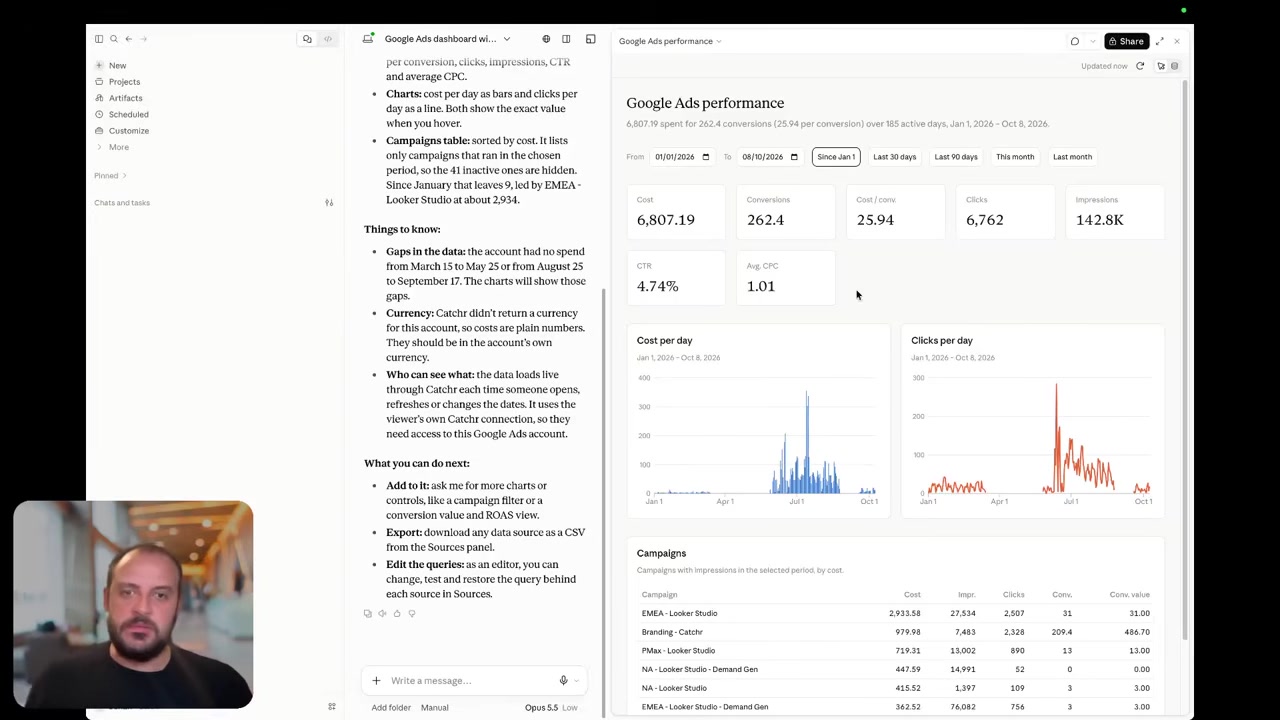
Catchr’s public assistant demo is shown. Reporting Ninja’s documented MCP report-creation workflow is described below.
Both products connect marketing data to external AI assistants. Catchr includes MCP from Starter for analysis and export-job management. Ask about campaign performance, then use the same conversation to configure the next recurring export on an eligible destination plan.
Reporting Ninja goes from analysis to its native report. Its MCP documentation describes read access by default and owner-enabled writes for creating, scheduling and sharing reports. This is a real advantage when the desired output is a branded client deliverable.
For a client who needs a recurring dataset, Catchr MCP can help update an export’s fields or schedule and inspect its latest executions. The destination remains subject to the plan: BigQuery begins on Momentum, while wider databases and storage begin on Scale.
Reporting Ninja’s documented writes manage reporting, rather than changing source-platform campaigns.
Coming soon
Create and update campaigns through Catchr MCP
Planned for a future release. These actions are not available yet.
Data Studio: direct connectors on both sides
Catchr

Reporting Ninja
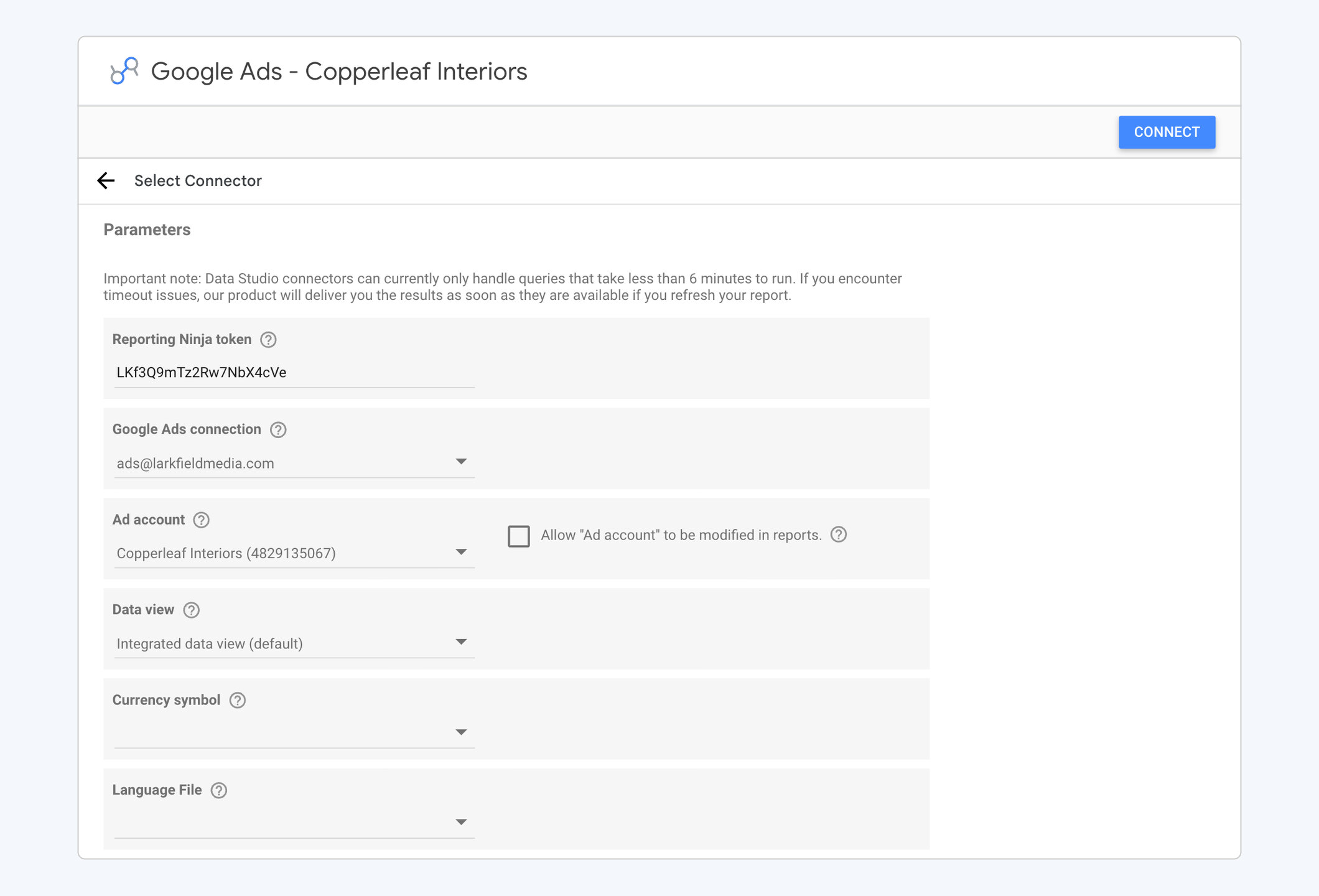
Catchr and Reporting Ninja both connect marketing data directly to Data Studio. Keep your own dashboard, charts and date controls, or start from a template and adapt it to the client.
Reporting Ninja’s setup uses a token, an existing connection and the selected client account. Its Data Studio product is included across plans, with unlimited Data Studio reports within the account allowance. The limits on native Reporting Ninja reports are separate.
Catchr includes Data Studio from Starter alongside Power BI, Sheets, Excel and MCP. Its benefit is the broader set of working destinations available to the agency. If Data Studio is your only output, Reporting Ninja’s per-source capacity may be the stronger price fit as your portfolio grows.
Find Catchr Data Studio connectors.
Power BI: prepare the marketing query your client’s model needs
Catchr

Build and preview the marketing query in Catchr, then load its saved URL in Power BI. Select the source, accounts, fields and date range, use Get data → Web, and add the returned table to the client’s model. This workflow is included from Starter at $24/month.
The client keeps its measures, relationships and visuals in Power BI. Catchr supplies the selected marketing rows; Power BI requests the saved query again when the Import model refreshes.
Reporting Ninja’s API makes a custom connection possible. Its reviewed documentation does not establish the same ready-made query-to-Power-BI workflow. Catchr is a direct fit when the agency wants to configure the marketing query without building that API consumer.
Google Sheets: both have a native scheduled add-on
Catchr
Reporting Ninja
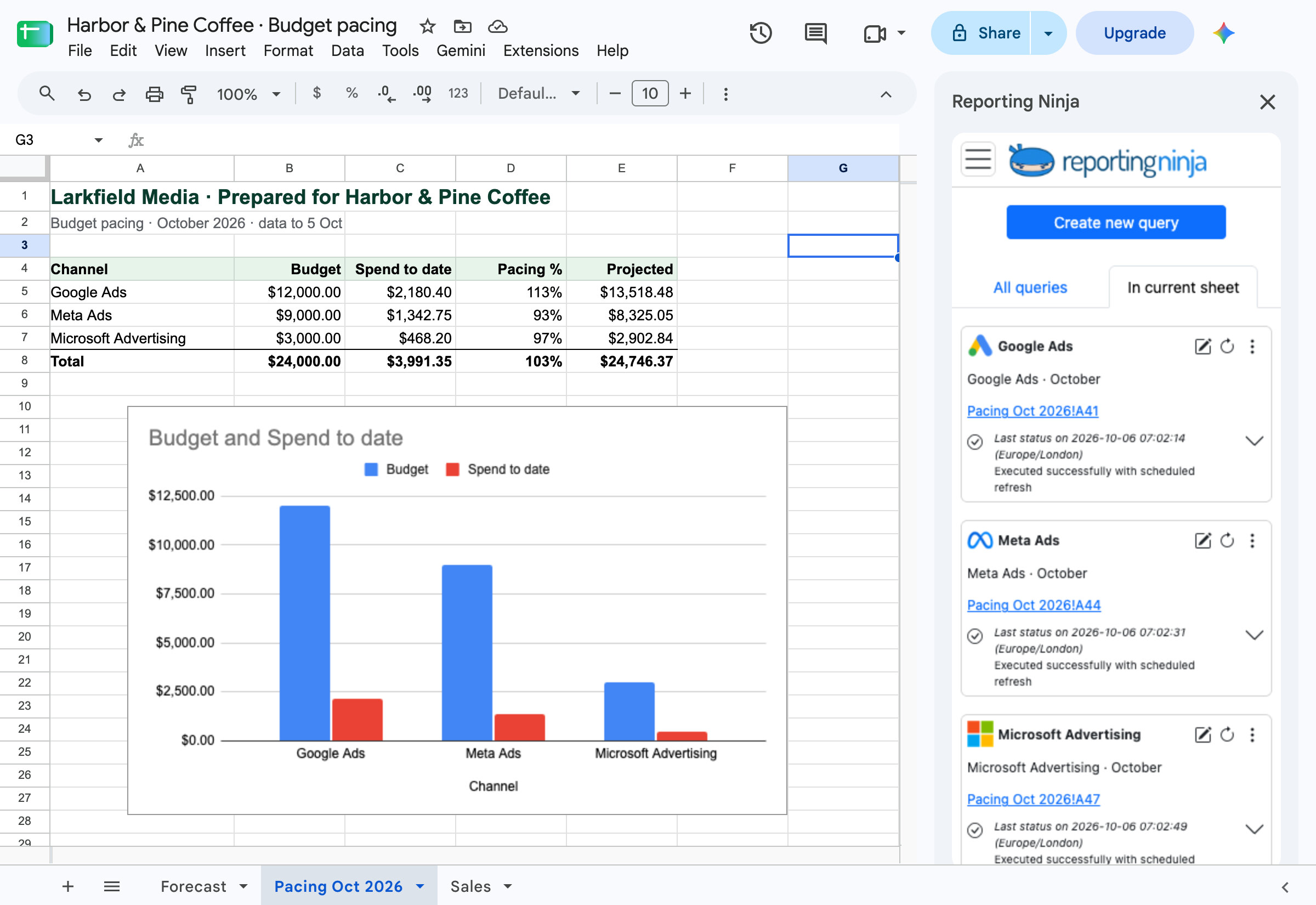
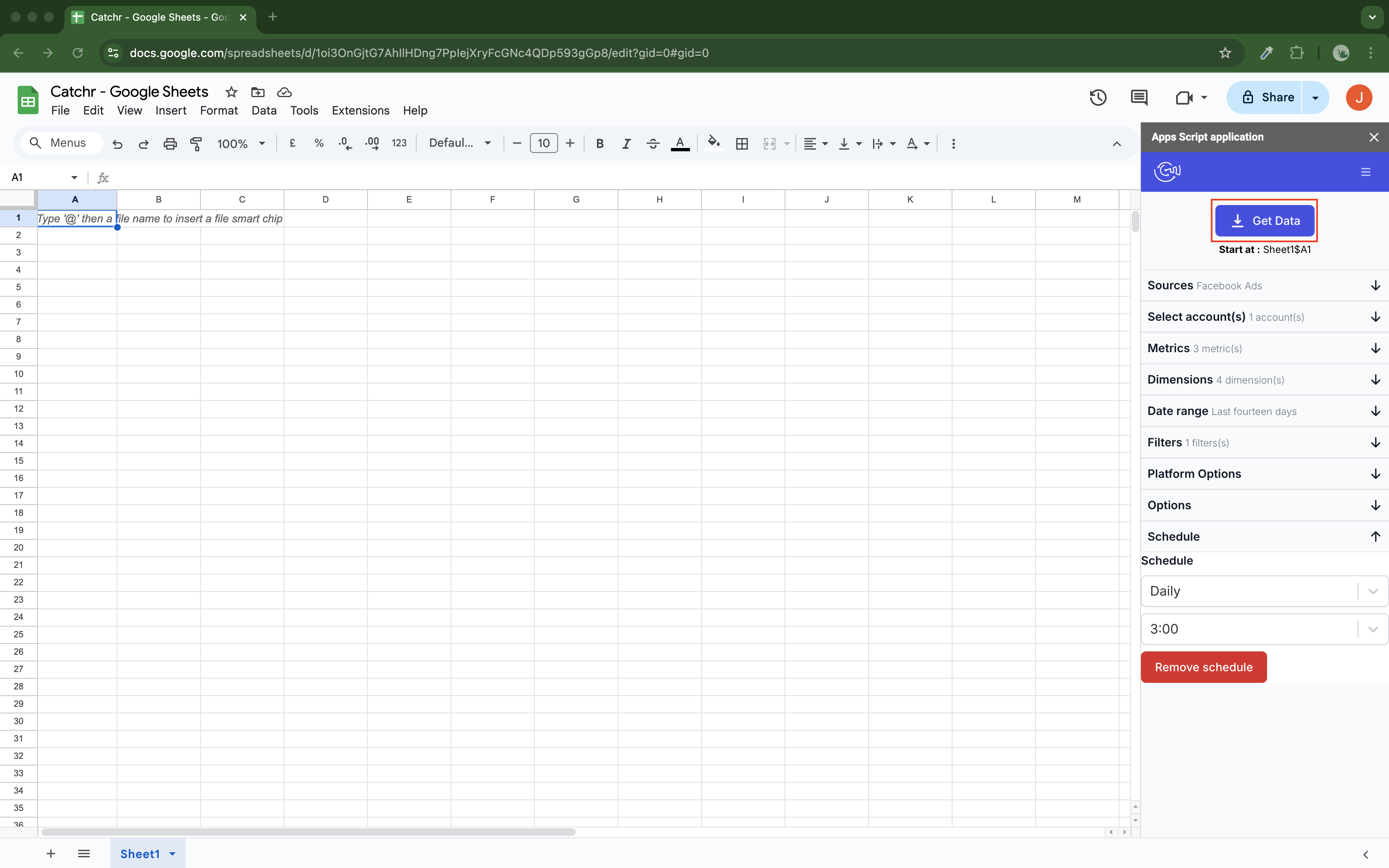
Both add-ons write marketing data into Google Sheets. Select a source, account, fields, dates and starting cell, then save the query. Both document hourly, daily, weekly and monthly refresh options.
Catchr also offers replace, append and combine/update modes, so your team can maintain a current view, add rows or update a table using selected dimensions. The add-on is included from Starter with the other everyday destinations.
Reporting Ninja’s Sheets guide documents scheduled refresh of saved queries, including when the file is closed, and failure-email options. Its all-plan bundle also includes the native report builder and API. For a Sheets-only brief using sources supported by both products, compare the account allowances; Catchr’s wider source and destination coverage matters when the client needs it.
Explore Catchr for Google Sheets. · Install the Catchr add-on.
Excel: keep the workbook with your budgets, formulas and pivots
Catchr
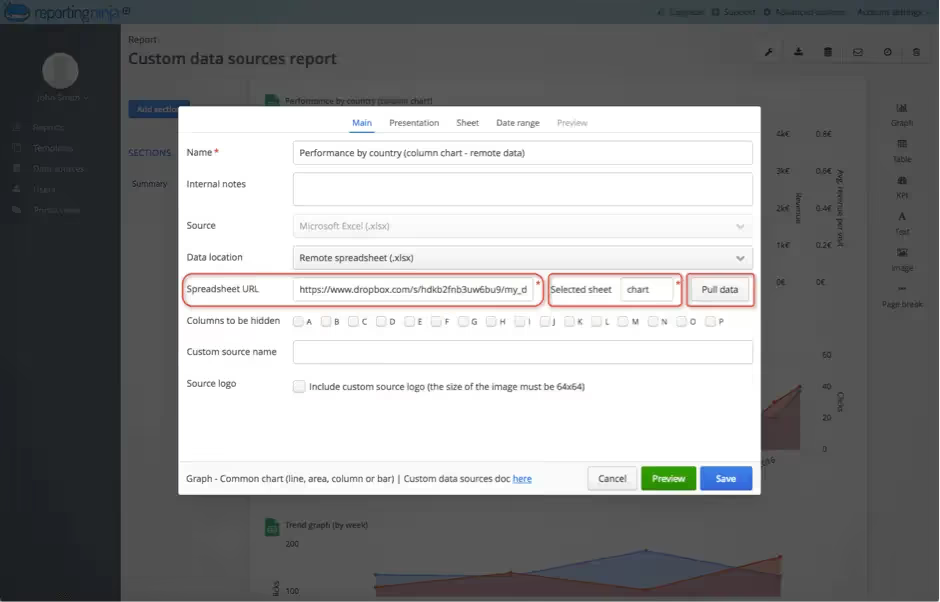
Reporting Ninja — workbook input
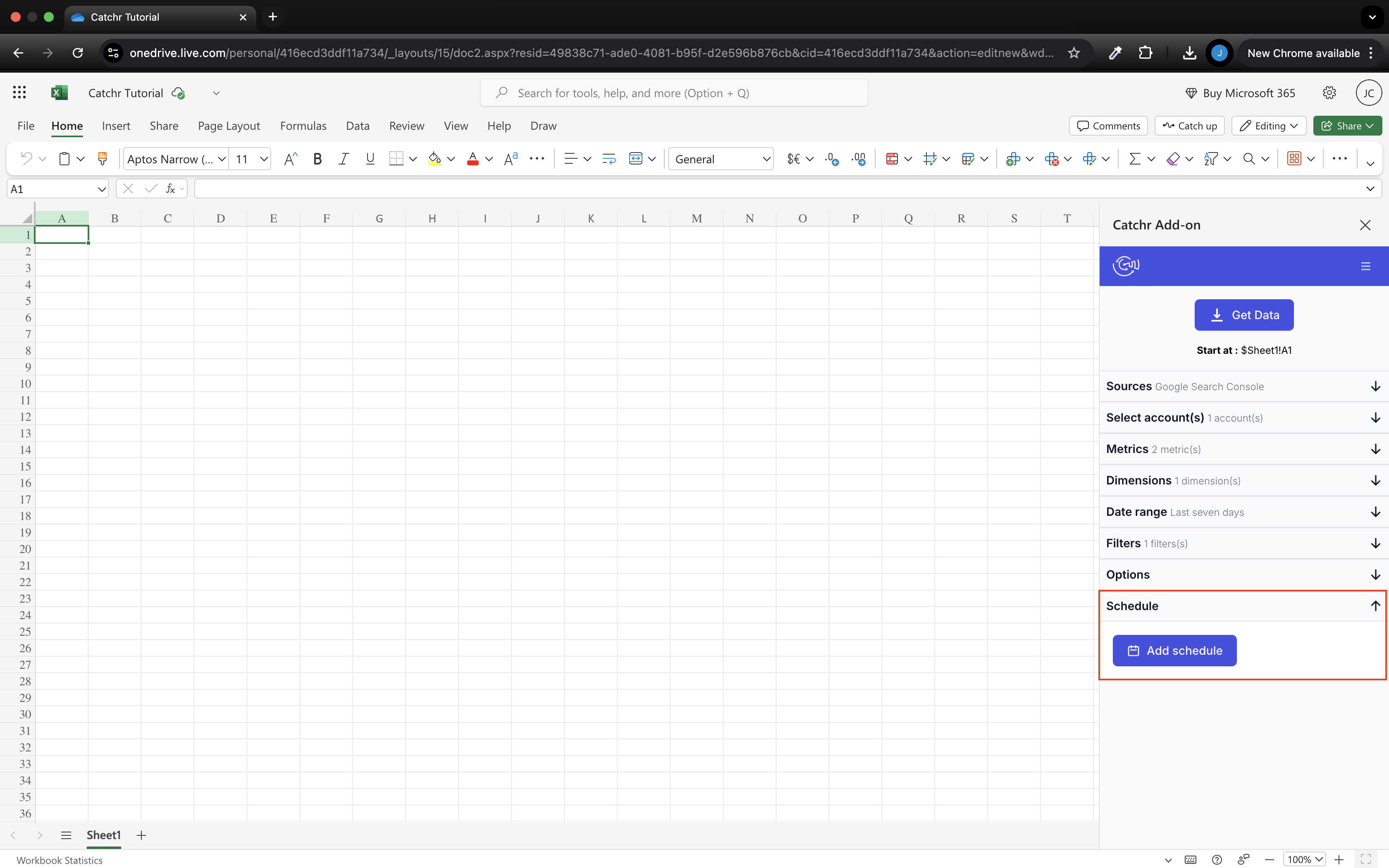
Catchr writes marketing data into the Excel workbook your team already uses. Its native add-in works in web and desktop Excel. Choose the accounts, fields, dates and output cell in the sidebar, then use those rows in your existing calculations and reports.
An analyst can keep campaign data in a dedicated tab and use it in a pacing sheet or pivot table. Replace refreshes the output range, append adds rows, and combine/update reconciles rows using the selected dimensions. Keep formulas and manual inputs outside the range Catchr writes to.
Reporting Ninja’s scheduled reports can send an Excel file containing the data behind a report. It can also read an existing workbook as a custom source, as shown in the older screenshot above. Those are useful ways to deliver or import report data.
The Catchr advantage is authoring the query inside the working workbook. Your analyst selects accounts and fields in the same file that contains the budget model. No equivalent native Reporting Ninja Excel add-in was established in the official pages reviewed; an API or Power Query integration remains a possible custom route.
Explore Catchr for Excel. · Install the Catchr add-in.
Compare all six workflows
| Workflow | Reporting Ninja | Catchr |
|---|---|---|
| MCP & AI | Marketing queries; owner-enabled native report creation and delivery. | Analysis and export-job management. Campaign actions planned. |
| Databases & warehouses | API for custom consumers; managed export not established. | BigQuery from Momentum; wider storage from Scale; API from Growth. |
| Data Studio | Direct connectors, all plans. | Direct connectors from Starter. |
| Power BI | Custom API route possible; native feed not established. | Saved Web queries from Starter. |
| Google Sheets | Native add-on with scheduled refreshes. | Native add-on with schedules and row-update modes. |
| Excel | Scheduled Excel report files. Workbook input to native reports. | Native add-in writes into an existing web/desktop workbook. Replace, append and combine/update modes. |
Which one fits your team?
Choose Reporting Ninja when…
Choose Reporting Ninja when the agency wants native branded reports and a client portal, with Data Studio, Sheets, API and MCP in the same subscription. Its per-source allowances can be attractive for a portfolio spread across several platforms. Its MCP report creation is especially useful when the assistant should produce the client deliverable.
Choose Catchr when…
Choose Catchr for the client whose work extends across specialist sources and existing analysis tools. Connect Brevo for email performance, Merchant Center for product-feed reporting or Matomo for the client’s website analytics. Use the same connected sources in the destinations included in your plan.
For a Microsoft-based team, populate its Excel workbook or prepare the marketing query for Power BI. For an analyst working in BigQuery, configure recurring exports from Momentum. Catchr covers these workflows without requiring the agency to build a separate connector or warehouse loader for each supported route.
How to move from Reporting Ninja to Catchr
- Separate native reports from connector workflows. List which clients use Reporting Ninja reports, Data Studio dashboards or Sheets workbooks.
- Choose the destination for each client. Keep an existing dashboard or workbook where it still fits; move reporting into Power BI or stored BigQuery tables when that is the requirement.
- Reconnect the sources in Catchr. Recreate the saved queries and client calculations, then confirm the headline figures for a completed reporting period.
- Rebuild client delivery where needed. Native Reporting Ninja report layouts, portals and sharing schedules do not move with the data connection.
- Run the next report through the new workflow. Confirm refresh and delivery before replacing the old links or schedules.
For MCP users, the new job may change: Catchr can help manage data exports, while Reporting Ninja’s writes create its native reports. Keep that desired output explicit when reusing prompts.
Test your client stack before committing
Try the workflow your next client report needs.
Connect a real client stack, open your destination and check the numbers before you switch.
No credit card required. Choose a plan after testing your sources and destinations.
Keep comparing by workflow
Reporting Ninja alternatives →
Find a Data Studio reporting template →
Compare every tool by destination and MCP →
Plan your client marketing report →
Sources and comparison method
Written by Catchr. Official sources were checked on October 23, 2026: Reporting Ninja pricing, integrations, MCP, API, Data Studio, Google Sheets and Excel/custom inputs and scheduled delivery, including Excel files.
Catchr’s owner confirmed current tiers, BigQuery from Momentum, API from Growth, wider storage on Scale, and MCP analysis/export-job management. Campaign creation and updates remain planned. This packaging supersedes older public pricing copy. See Catchr pricing, destinations and MCP.
Images are unmodified official assets and public demos. Reporting Ninja’s Excel screenshot shows an earlier interface. These are not private-account tests. Unestablished outbound workflows are described as documentation gaps, and no controlled performance or support benchmark is claimed.
Specialist source coverage was checked against Catchr’s connector directory and Reporting Ninja’s integration directory. An unlisted native source is not proof that a custom connection is impossible. Catchr add-on amounts use the published monthly prices; their configurations retain the base plan’s destination rights.
- Reporting Ninja product overview · pricing and allowances.
- Catchr product overview · pricing · destinations · MCP.
- Reporting Ninja AI connector — MCP.
- Reporting Ninja REST API.
- Reporting Ninja OpenAPI reference.
- Reporting Ninja Data Studio connectors.
- Reporting Ninja Google Sheets add-on.
- Reporting Ninja Google Sheets connector guide.
- Reporting Ninja pricing.
- Reporting Ninja custom data source guide.
- Catchr destination directory.
- Get Started with Database and Data Stream.
- Catchr pricing.
- Data Studio connectors.
- Data Studio script limits.
- Power BI destination.
- Google Sheets destination.
- Get started with Google Sheets.
- Excel destination.
- Catchr MCP.
- MCP usage examples.
- Google Apps Script quotas.


