


Catchr starts at $24/month with Data Studio, Power BI, Google Sheets, Excel and MCP included. Power My Analytics starts at $49.95/month on monthly billing; its spreadsheets begin on Grow at $99.95/month. PMA adds a managed data warehouse and Data Builder for teams that want stored marketing history and prepared datasets at the center of reporting.
The quick answer
Choose Catchr for everyday agency reporting, native spreadsheet workflows and unlimited users from the entry plan, with BigQuery from Momentum at $79/month. Choose Power My Analytics when its managed data history, reusable Data Builder datasets and hub diagnostics are central to your reporting process. Its account-per-source model can also suit a broad, evenly spread portfolio.
Power My Analytics vs Catchr at a glance
Catchr lowers the starting cost of working across dashboards, spreadsheets and AI. PMA’s main distinction is its managed data hub and preparation layer.
| What matters | Power My Analytics | Catchr |
|---|---|---|
| Monthly entry price | Business: $49.95/month 5 sources · 5 total accounts · 2 admins | Starter: $24/month 3 platforms · 10 total accounts · unlimited users |
| Google Sheets and Excel | − Grow or higher | ✓ Included from Starter |
| Data preparation | Managed data warehouse + Data Builder. | Connect sources and choose destinations. |
| BigQuery exports | Quoted export scope. | Momentum: $79/month. |
| MCP and API | MCP and API included with plan quotas. | MCP from Starter; API on Growth. |
USD prices use monthly billing. PMA also publishes lower monthly equivalents for annual commitments. Pricing checked October 23, 2026.
Pricing: spreadsheets and team capacity change the total
Catchr Starter costs $24/month and includes both spreadsheets. PMA Business costs $49.95/month, while Grow at $99.95/month is its first plan with Sheets and Excel.
The plans count capacity differently. Catchr uses platforms and a pooled total of accounts. PMA Grow and Pro use an allowance per source. For an agency concentrated on one advertising channel, that distribution changes the tier or extra capacity it needs.
What costs extra as your team grows?
| What you add | Power My Analytics | Catchr |
|---|---|---|
| Team access | 2 admins on Business. | Unlimited users on every plan. |
| Spreadsheet reporting | Sheets and Excel start on Grow. | Both native add-ons from Starter. |
| Accounts | Per-source capacity on Grow and Pro; account add-ons are published. | Larger platform/account bundle when included capacity is exceeded. |
| Hourly and warehouse delivery | Hourly service is separately packaged. | Sheets schedules from Starter. |
Three realistic reporting setups
| Your setup | Catchr | Power My Analytics |
|---|---|---|
| Freelancer 3 platforms · 3 accounts | Starter: $24/month. Dashboards, Sheets, Excel and MCP fit within the included bundle. | Business: $49.95/month for BI and AI. Grow: $99.95/month when the same freelancer needs Sheets or Excel. |
| Agency 5 platforms · 25 accounts · 3 people | Momentum: $79/month. 25 accounts fit in the pooled allowance; all three colleagues and BigQuery are included. | Grow: $99.95/month if each platform has at most seven accounts. Three admins fit. More than seven accounts on one source needs extra capacity or a different tier. |
| Growth team 8 platforms · 60 accounts · BigQuery/API | Growth: $239/month. 10 platforms, 100 total accounts, BigQuery and API cover this setup. | Obtain an export quote. Pro’s $199.95/month base covers the accounts only if none exceeds 20 per source. It includes API, but is not a verified total for the BigQuery configuration. |
Power My Analytics plans
| Plan | Monthly / annual commitment | Included capacity |
|---|---|---|
| Sample Data | $0 | Sample-data exploration; not free reporting on live client accounts. |
| Business | $49.95/month $41.63/month billed annually | 5 sources · 5 total accounts. |
| Grow | $99.95/month $83.29/month billed annually | Unlimited sources · 7 accounts/source. |
| Pro | $199.95/month $166.63/month billed annually | 20 accounts/source · unlimited admins. |
| Custom | Quote | Negotiated capacity, export requirements and warehouse options. |
Catchr plans
| Plan | Monthly price | Capacity and destinations |
|---|---|---|
| Starter | $24/month | 3 platforms · 10 total accounts. |
| Momentum | $79/month | 5 platforms · 30 total accounts. |
| Growth | $239/month | 10 platforms · 100 total accounts. |
| Scale | $599/month | 25 platforms · 500 total accounts. |
Every Catchr plan includes unlimited users and Catchr requests. Source platforms still apply their own API limits. BigQuery starts on Momentum; the wider export destinations belong to Scale.
For an Excel-first freelancer, Catchr’s advantage is immediate: the add-in is part of a $24 subscription. For an agency using many source types but few accounts on each, PMA’s unlimited-source Grow allowance deserves a closer look.
PMA’s live pricing page offers export add-ons on Business, Grow and Pro, while its export guide says new exports require Custom. We have not treated either lower-tier price as an all-in warehouse quote. Prices checked October 23, 2026.
Data sources: can you connect your clients’ marketing stack?
Advertising, analytics, ecommerce and CRM platforms
Both products connect the main categories behind client reporting: advertising, social, website analytics, ecommerce and sales data. The useful question is how those categories fit your actual account portfolio.
Catchr bundles three platforms on Starter and five on Momentum. PMA Business allows five source types; Grow removes the source-type cap. That can favor PMA when one client brings a long list of small integrations, while Catchr can be attractive when many clients share the same core channels. Browse Catchr’s connector directory.
Metrics, dimensions and historical data
Catchr lets you select the fields needed for a dashboard, spreadsheet or scheduled export. Available metrics, breakdowns and history depend on the platform and account permissions; a connector logo alone does not establish field parity.
PMA collects source data into its managed warehouse and exposes it through connectors and Data Builder. Its ordinary sync runs daily and recollects recent days; some fields query the source live. This distinction matters when a client needs an intraday pacing view rather than a monthly performance summary.
PMA’s managed history and prepared datasets can be valuable for a team that wants collection and preparation handled together. Catchr gives the team a direct choice of working destinations, including its own BigQuery project from Momentum.
Managing multiple accounts across clients
Catchr counts total accounts across the plan. Momentum’s 30-account pool can hold 15 Google Ads accounts, five Meta Ads accounts and five GA4 properties, within its five-platform allowance.
PMA Grow’s seven-account allowance applies separately to each source. The same 25-account portfolio fits if spread evenly, but the example above exceeds the Google Ads allowance. That is why a total account number alone is not enough to price PMA.
For a growing agency, assign the accounts to their actual platforms before selecting a plan. Catchr’s unlimited users then let account managers and analysts share the subscription as responsibilities change.
The same working tools, with a different data layer
Catchr connects your client accounts to the destination the team wants to use. PMA collects data in its hub and can prepare a reusable dataset before delivering it.
Both approaches support familiar reporting tools. The choice is whether you need the managed history and preparation layer, or primarily want affordable access across dashboards, spreadsheets, AI and your own storage.
Databases and warehouses: published Catchr tiers, quoted PMA exports
Catchr

Power My Analytics

Catchr includes BigQuery from Momentum at $79/month. Growth adds API access; Scale adds wider database, warehouse and storage destinations with custom schema mapping. Your marketing data can join the sales and customer tables your team already owns.
PMA stores source data in its own warehouse before delivery. Its export documentation covers BigQuery, MySQL, PostgreSQL, Azure SQL, Snowflake, S3 and FTP/SFTP, with Data Builder preparing the tables. That managed intermediate layer is a useful PMA distinction.
For a new export setup, obtain the destination and refresh terms in the quote: PMA’s pricing page and export help disagree on lower-tier add-on eligibility. Catchr’s public bundle is easier to budget for the BigQuery examples above.
On Scale, Catchr also supports Redshift, Google Cloud Storage and Azure Blob alongside the named SQL and warehouse destinations. See Catchr for BigQuery or explore the destination directory.
MCP: client analysis, with different reporting controls
Catchr
Power My Analytics

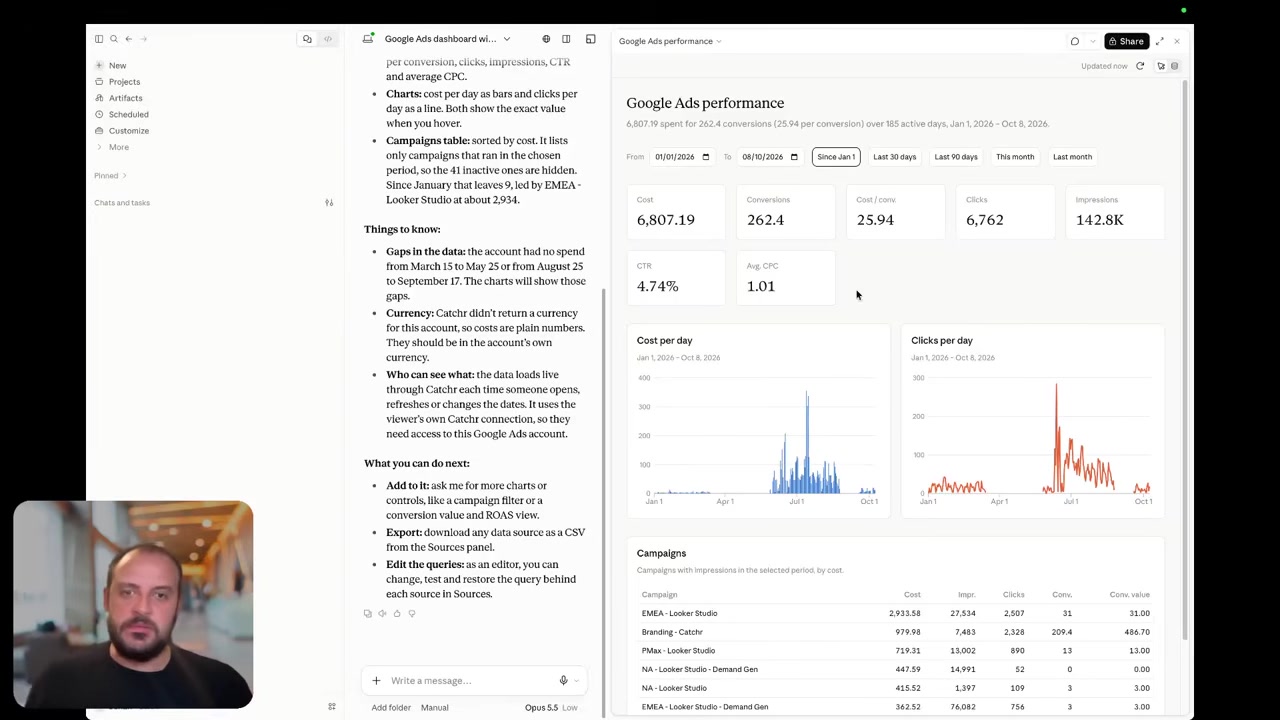
Catchr includes MCP from Starter for ChatGPT, Claude and Copilot. Ask about connected marketing performance, compare reporting periods and manage export jobs from the conversation. Unlimited Catchr requests make usage straightforward, while source API limits still apply.
PMA’s beta MCP combines marketing analysis with hub diagnostics and Data Builder operations. It can inspect connection health and stored coverage, compare performance and create persistent reporting datasets. That is useful when the question is both “what changed?” and “is the data in our hub complete?”
PMA MCP shares its plan’s API request and row quotas. Catchr API access is separately included from Growth, although MCP is available from Starter. Choose around the daily workflow rather than treating API and MCP as interchangeable purchases.
Current export-job management is already available.
Coming soon
Create and update campaigns through Catchr MCP
Planned for a future release. These actions are not available yet.
Data Studio: direct reporting or prepared PMA datasets
Catchr

Power My Analytics

Catchr connects your marketing accounts to Data Studio from Starter. Choose the connector, select the accounts and use Google’s charts, controls, calculated fields and blends to create the client report.
PMA offers source connectors and a Data Builder connector. The latter lets an agency prepare a reusable blended dataset before the data reaches the dashboard, which can help when several reports need the same cross-channel definition.
Catchr is a practical choice when your team already has its dashboard structure and mainly needs the data connections. PMA’s preparation layer may justify the higher subscription when it replaces recurring work inside individual reports. Both let the team keep its Google reporting environment. Explore Catchr for Data Studio.
Power BI: saved queries or PMA Data Builder datasets
Catchr

Power My Analytics
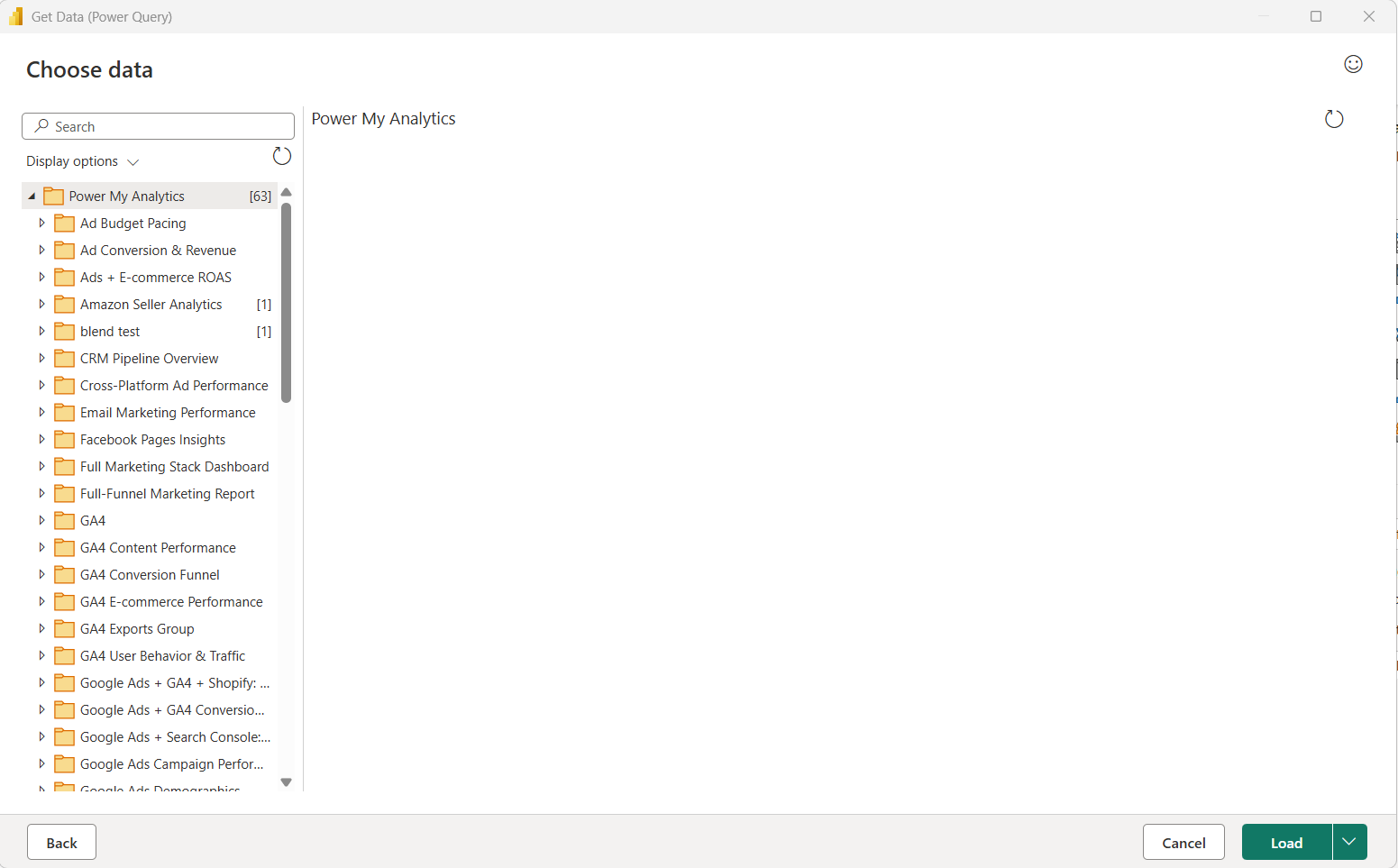
Catchr feeds Power BI through saved Web queries from Starter. Select sources, accounts, metrics and dates in Catchr, then load the results and use Power Query, relationships and DAX to build the reporting model.
PMA supplies a Power BI custom connector for Data Builder datasets. Its documented setup uses Power BI Desktop on Windows, and scheduled refresh in Power BI Service needs an always-on gateway machine. The advantage is bringing prepared PMA datasets into the model; the gateway is part of the operating setup.
If your analysts already prepare everything in Power BI, Catchr offers the source data under the same plan as their other reporting tools. If a shared PMA dataset is your standard, its connector follows that established preparation workflow. Explore Catchr for Power BI.
Google Sheets: recurring reporting from $24/month
Catchr
Power My Analytics
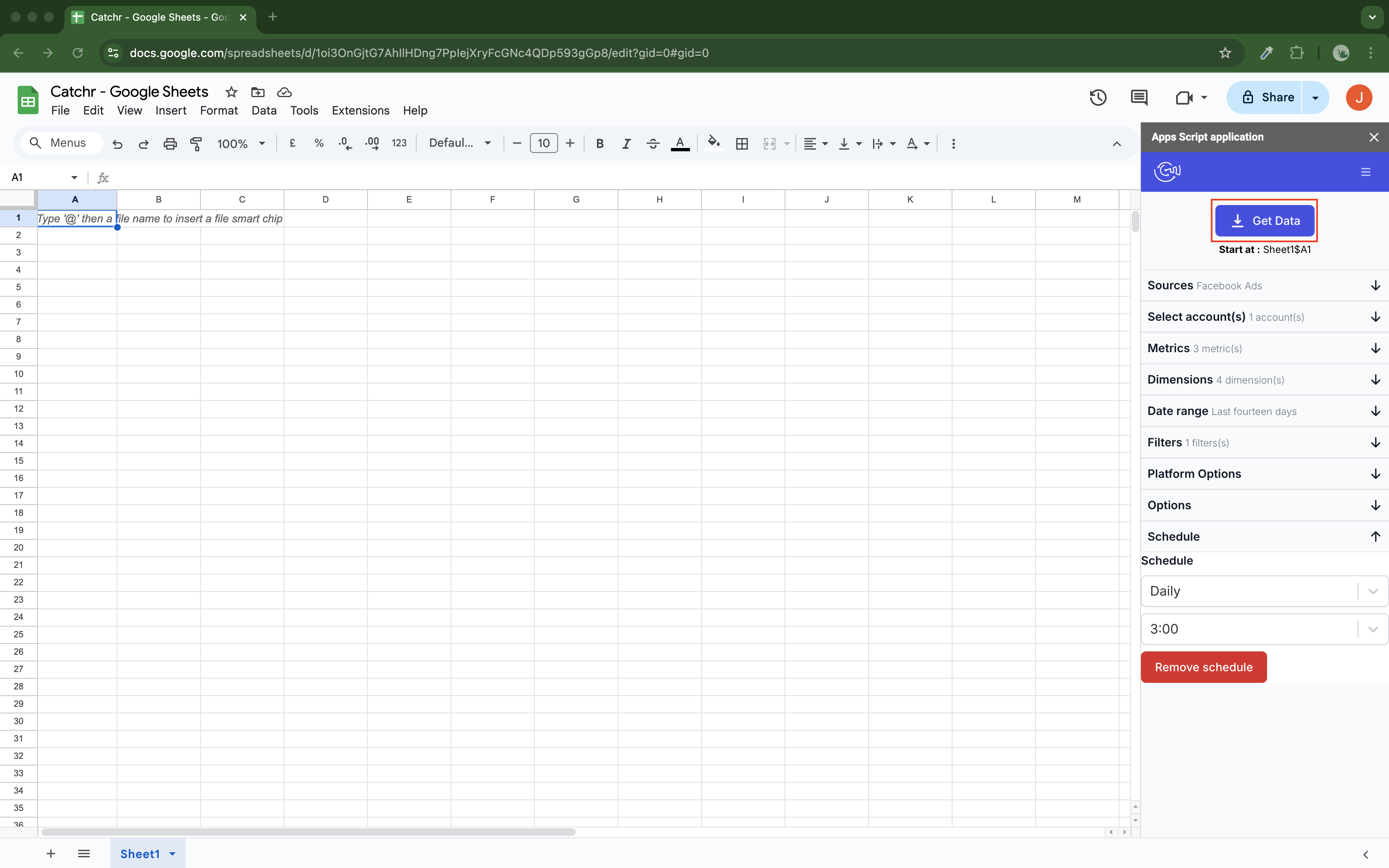
Catchr includes its native Google Sheets add-on on Starter. Pick the accounts, metrics, date range and output cell, then schedule updates hourly, daily, weekly or monthly.
Replace refreshes a current-period table. Append adds new rows, while combine/update matches selected dimensions to update existing rows and add new ones. This gives an account manager a useful foundation for a pacing sheet, budget tracker or recurring client workbook.
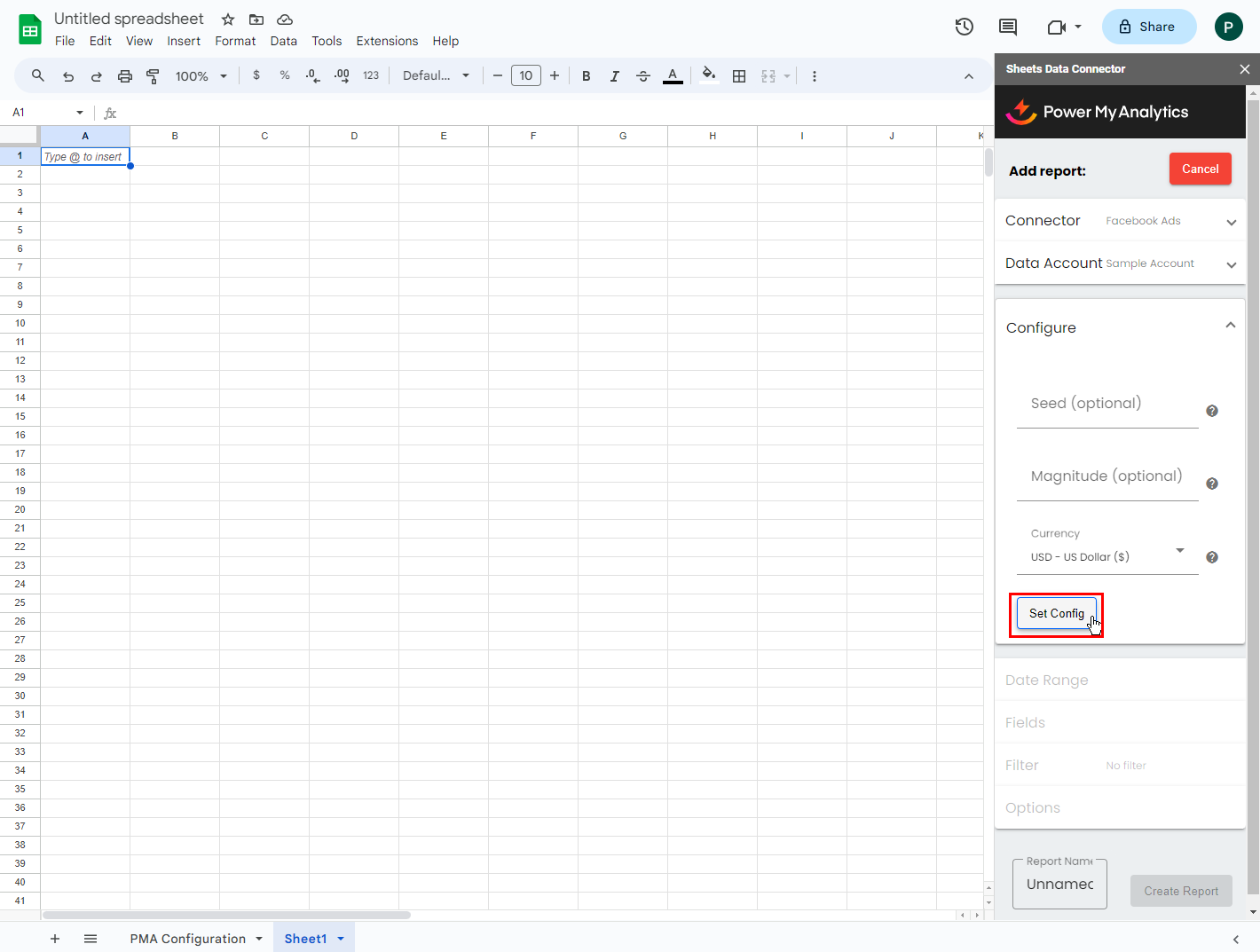
PMA’s Sheets add-on starts on Grow. Its builder filters out incompatible field choices and supports scheduled report refresh. The data available at refresh time depends on the upstream source sync and any live fields; hourly service has separate commercial terms.
Both products remove recurring manual exports. Catchr makes the spreadsheet part of the entry subscription alongside dashboards, Excel and AI. Explore Catchr for Google Sheets.
Excel: native add-ins, different refresh options
Catchr
Power My Analytics
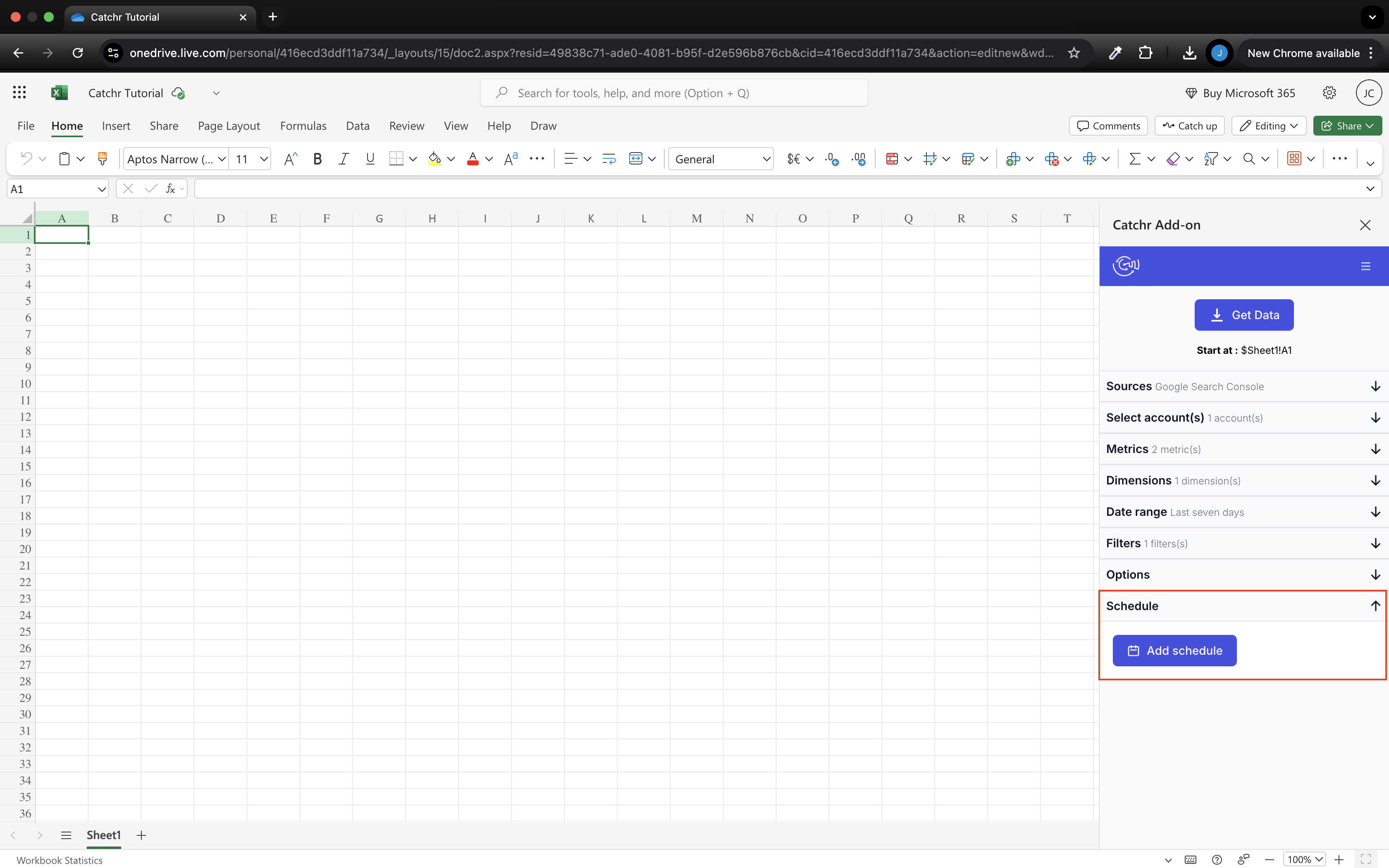
Catchr’s native Excel add-in works on web and desktop and is included from Starter. Select a source, account and fields from the pane, then populate the workbook and schedule recurring updates.
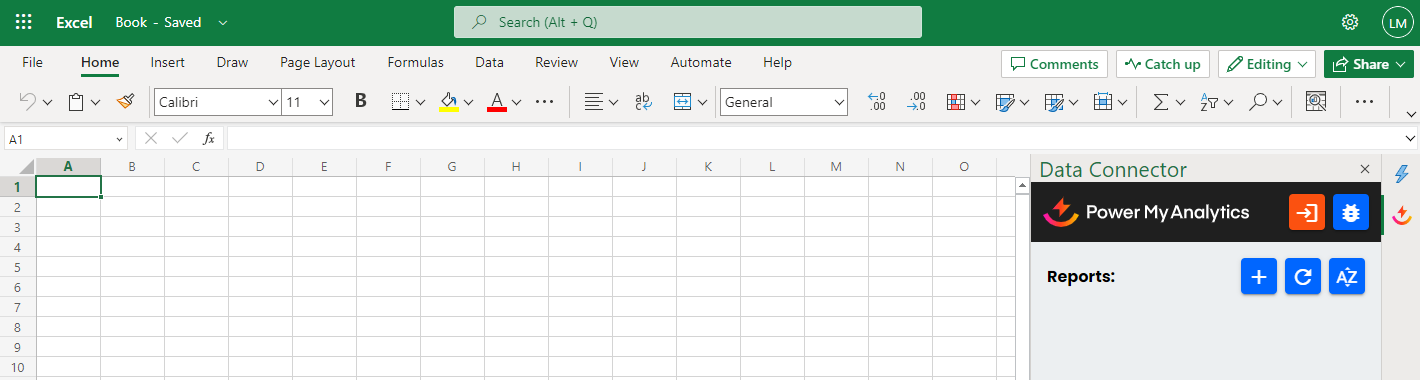
PMA also offers a genuine Excel add-in for web and desktop, beginning on Grow. Its current scheduled-refresh help explicitly limits background spreadsheet schedules to Google Sheets; Excel reports do not support that feature.
For an Excel-first freelancer, the comparison is therefore more than an add-in checkbox. Catchr combines a lower entry price with scheduled workbook queries, while PMA can be attractive when the workbook is consuming prepared Data Builder data and manual refresh is enough.
Your existing Excel formulas and charts remain the place where the team performs its analysis; Catchr supplies the recurring source data. Explore Catchr for Excel.
Compare all six workflows
| Workflow | Power My Analytics | Catchr |
|---|---|---|
| MCP & AI | Hub analysis, diagnostics and Data Builder tools. | MCP analysis and export-job management from Starter. |
| Databases & warehouses | Managed history plus Data Builder exports. | BigQuery from Momentum. |
| Data Studio | Source connectors and prepared datasets. | Native source connectors from Starter. |
| Power BI | Data Builder custom connector; gateway for Service schedules. | Saved Web queries from Starter. |
| Google Sheets | Native add-on from Grow; scheduled refresh. | Native add-on from Starter; schedules and update modes. |
| Excel | Native add-in from Grow; manual refresh. | Native web/desktop add-in from Starter with schedules. |
Which one fits your team?
Choose Power My Analytics when…
Choose PMA when managed source history and Data Builder are part of the requirement. Preparing reusable datasets before they reach dashboards or spreadsheets can simplify a reporting operation built around a shared hub.
Its unlimited source types on Grow and per-source account allowances may also work well for a broadly distributed portfolio. The MCP diagnostics add value when the team routinely investigates missing data or connection health.
Choose Catchr when…
Choose Catchr when the team wants its familiar reporting tools included from the start, with unlimited users. A freelancer gets Sheets and Excel for $24/month; a five-platform agency can use Momentum’s pooled account capacity for $79/month.
Catchr is especially attractive for scheduled Excel reporting, a published BigQuery entry tier, or a team that wants to send marketing data directly into its own storage while keeping dashboards and AI available.
How to move from Power My Analytics to Catchr
- Pick one active client workflow. Identify whether it uses a PMA source connector or a prepared Data Builder dataset. This tells you whether to replace a connection or recreate a shared calculation.
- Preserve the history your reports rely on. Keep PMA’s stored periods available before ending the subscription; reconnecting a source does not automatically recreate its retained warehouse history.
- Connect the accounts in Catchr. Rebuild the Data Studio sources, Power BI query tables or native spreadsheet queries around the report’s existing dates, currency and conversion definitions.
- Choose where shared calculations live. Keep them in Power Query, report blends, spreadsheet formulas or your own warehouse, depending on the team’s preferred reporting tool.
- Move the schedule after one completed reporting cycle. Confirm the client dashboard, workbook and any warehouse table receive the expected update before retiring the old connection.
Test your client stack before committing
Try the workflow your next client report needs.
Connect a real client stack, open your destination and check the numbers before you switch.
No credit card required. Choose a plan after testing your sources and destinations.
Keep comparing by workflow
Power My Analytics alternatives →
Find a Data Studio reporting template →
Compare every tool by destination and MCP →
Choose how to visualize marketing data →
Sources and comparison method
Checked October 23, 2026 against PMA pricing, its destination overview, export guide, MCP tools and linked product guides. Official screenshots are reproduced unchanged, with dates or earlier-interface notes. No paid-account performance benchmark is claimed.
PMA’s pricing page advertises lower-tier export add-ons while its export help specifies Custom for new exports; this article preserves that uncertainty and quotes no all-in PMA export total. Catchr’s team confirmed current plan capacities, unlimited users and requests, BigQuery on Momentum, API on Growth, wider exports on Scale and current MCP export-job management. Catchr campaign actions remain planned; its public pricing page is being updated.
- Power My Analytics product overview · pricing and allowances.
- Catchr product overview · pricing · destinations · MCP.
- Data Destinations Overview.
- Report Data in Power BI.
- Data Studio connector guide.
- Google Sheets Data Integration Guide.
- Excel add-in installation.
- PMA MCP Server Guide.
- PMA MCP Tools Reference.
- Catchr MCP.
- Catchr pricing.
- Catchr destination directory.
- Get Started with Database and Data Stream.
- Data Studio connectors.
- Data Studio script limits.
- Power BI destination.
- Google Sheets destination.
- Get started with Google Sheets.
- Excel destination.
- MCP usage examples.
- Google Apps Script quotas.


