


Connect Google Ads, Meta Ads, GA4 and Shopify for $43.99/month with Catchr Starter plus one platform add-on, including up to 10 accounts. Windsor’s published plan for four platforms is Standard at $118/month. Catchr lets you add channels in smaller steps, with Data Studio, Power BI, Sheets, a native Excel add-in and AI included in the reporting subscription.
The quick answer
Catchr costs less for the four-, five- and eight-platform portfolios detailed below, and lets analysts build queries directly inside Excel. Both include unlimited users on paid plans. Windsor Basic remains competitive for many accounts on three platforms, while its entry-level warehouse access and supported AI campaign actions may suit different needs.
Windsor.ai vs Catchr at a glance
The price of the platforms you actually need matters more than the lowest starting price. Catchr combines a lower cost for several common agency portfolios with capacity add-ons and a native Excel workflow.
| What matters | Windsor.ai | Catchr |
|---|---|---|
| Four platforms, up to 10 accounts | Standard: $118/month. Basic stops at three platforms. | ✓ Starter + one platform $43.99/month. $24 + $19.99. Includes 10 total accounts. |
| Adding a platform or accounts | Move to the next plan when an included allowance is exceeded. | Add capacity to your plan. $19.99 per platform or block of 10 accounts, within add-on limits. |
| Entry plan capacity | Basic: $23/month 3 platforms 75 total accounts Unlimited users | Starter: $24/month 3 platforms 10 total accounts Unlimited users |
| Five-platform agency | Standard: $118/month 7 platforms / 75 accounts | ✓ Momentum fits $79/month 5 platforms / 30 accounts |
| Excel workflow | Build the query in Windsor. Import its URL through Excel’s From Web command. | ✓ Native add-in Build the query inside Excel. Web and desktop; included from Starter. |
| Warehouse access | All destinations available across plans. Task and schedule allowances apply. | BigQuery from Momentum. API from Growth. Wider databases/storage from Scale. |
| MCP & AI | Analysis, destination-task creation and supported campaign actions. | Analysis and export-job management. ◷ Campaign actions planned |
Monthly USD prices checked October 23, 2026. Configurations with add-ons are calculated from published prices. Windsor plans · Windsor capacity rules · Catchr plans and add-ons.
Pricing: add marketing platforms without a large plan jump
Your client adds Shopify to Google Ads, Meta Ads and GA4. You now need four platforms, even if each has only one account. Catchr Starter plus one platform add-on covers that stack for $43.99/month, with room for up to 10 accounts.
Windsor Basic includes three platforms. Its published capacity rules require an upgrade when you need another one, making Standard at $118/month the relevant plan. For this setup, Catchr costs $74.01 less each month.
What costs extra as your team grows?
| What changes | Windsor.ai | Catchr |
|---|---|---|
| More colleagues | Unlimited users on paid plans. | Unlimited users on every plan. |
| More platforms | Upgrade when the plan’s platform allowance is exceeded. Basic: 3. | $19.99 per additional platform. Starter and Momentum allow up to five extra platforms each. |
| More client accounts | Upgrade when the total-account allowance is exceeded. | $19.99 per block of 10 additional accounts. Starter and Momentum allow up to five extra blocks each. |
| Different destinations | All destinations are available across plans. Basic has five daily destination tasks; Standard adds unlimited tasks and hourly schedules. | BigQuery starts on Momentum. Capacity add-ons keep the destination rights of the base plan. |
Four reporting setups, with the configuration included
| Your setup | Catchr | Windsor.ai |
|---|---|---|
| Freelancer adding a channel 4 platforms / up to 10 accounts | Starter + 1 platform: $43.99/month. $24 + $19.99. Save $74.01/month. | Standard: $118/month. Includes 7 platforms and 75 accounts; Basic cannot hold the fourth platform. |
| Agency 5 platforms / 25 accounts / 3 people | Momentum: $79/month. Includes 5 platforms, 30 accounts, unlimited users and BigQuery. Save $39/month. | Standard: $118/month. Includes 7 platforms, 75 accounts and unlimited users. |
| Agency adding channels 8 platforms / 30 accounts | Momentum + 3 platforms: $138.97/month. $79 + (3 × $19.99). Save $160.03/month. | Plus: $299/month. Includes 10 platforms and 200 accounts. Standard stops at seven platforms. |
| Growth team 8 platforms / 60 accounts + API | Growth: $239/month. Includes 10 platforms, 100 accounts, BigQuery and API access. Save $60/month. | Plus: $299/month. Includes 10 platforms, 200 accounts and the required destinations. |
These examples use monthly USD subscriptions and the published add-on prices. The savings apply to these account and platform combinations. Windsor includes more spare account capacity; Catchr’s lower configured cost is useful when the portfolio already fits.
A team with 50 accounts across only three platforms can fit Windsor Basic at $23/month. At seven platforms and 30 accounts, Catchr Momentum plus two platforms is $118.98/month, close to Windsor Standard at $118/month. Count both the platforms and the accounts before choosing.
Windsor.ai plans
| Plan | Monthly billing / annual equivalent | Included capacity |
|---|---|---|
| Forever Free | $0 | 1 source / 1 account / 1 user after the trial |
| Basic | $23 / $19 per month | 3 sources / 75 accounts 5 daily destination tasks |
| Standard | $118 / $99 per month | 7 sources / 75 accounts Unlimited tasks; hourly or daily |
| Plus | $299 / $249 per month | 10 sources / 200 accounts |
| Professional | $598 / $499 per month | 14 sources / 500 accounts Up to 15-minute task schedules |
| Enterprise | Custom quote | Larger capacity and enterprise requirements |
Annual equivalents require annual billing. Windsor’s 30-day trial has broader allowances than its continuing free plan; do not budget the trial capacity as permanent free capacity.
Catchr plans
| Catchr plan | Monthly price | Included capacity and destinations |
|---|---|---|
| Starter | $24/month | 3 platforms 10 total accounts Data Studio, Power BI, Sheets, Excel and MCP |
| Momentum | $79/month | 5 platforms 30 total accounts Adds BigQuery |
| Growth | $239/month | 10 platforms 100 total accounts Adds API access |
| Scale | $599/month | 25 platforms 500 total accounts Wider warehouses, databases and storage; custom schema mapping |
All Catchr plans include unlimited users and unlimited Catchr requests. The connected platforms’ API limits still apply. Your team can use the included reporting destinations together; adding an analyst does not create a seat fee.
Data sources: connect the platforms your clients use
Advertising, analytics, ecommerce and CRM platforms
Catchr covers the main marketing categories an agency combines in a client report: paid advertising, web analytics, ecommerce, CRM and social. Google Ads and Meta Ads can sit alongside GA4, Shopify and HubSpot in the same connected stack.
Windsor.ai covers these categories too, with a broader advertised catalog that extends into business applications and databases. That breadth matters if a client needs a specialist source outside the usual marketing stack. Browse Catchr connectors or explore Windsor’s source catalog.
Metrics, dimensions and historical data
A connector gives you fields for building a report. Spend, clicks and conversions are metrics; campaign, date and device are examples of dimensions. The useful combination depends on the source platform.
Catchr lets you choose the fields for the question you need to answer. Windsor also provides field selection and supports custom fields. Neither catalog size guarantees identical breakdowns or historical depth. Source permissions and API rules continue to shape the available data.
For an account manager explaining a CPA change, start with the relevant channel, campaign and date range. Add the detail that explains the change without turning the client report into an inventory of every available field.
Managing multiple accounts across clients
Both vendors count accounts across the subscription. A platform is a service such as Google Ads; each selected client advertising account counts separately. A manager login does not make all its client accounts one account.
Catchr Momentum’s 30 total accounts can hold a 25-account portfolio across five platforms. If the same clients add three more platforms while staying within 30 accounts, three platform add-ons bring Momentum to $138.97/month. Windsor’s eight-platform configuration requires Plus. A portfolio concentrated on three platforms can instead benefit from Basic’s larger account allowance.
Your reporting tools stay familiar
Build client dashboards, maintain pacing spreadsheets and ask AI questions using the same connected marketing accounts. Catchr includes Data Studio, Power BI, Sheets, Excel and MCP from Starter, with BigQuery and other storage destinations available on the relevant plans.
The sections below show the actual workflow in each tool. Excel is a useful place to compare the experience: Catchr lets the workbook owner build a query directly in its native add-in.
Databases and warehouses: BigQuery from Momentum
Catchr

Windsor.ai

Catchr makes BigQuery available from Momentum at $79/month. You can schedule marketing exports and combine campaign results with sales or customer data in your own warehouse.
Growth adds API access and more capacity. Scale opens Snowflake, Redshift, Azure SQL, MySQL, PostgreSQL, S3, Google Cloud Storage and Azure Blob, with custom schema mapping. See Catchr for BigQuery or browse all destinations.
Windsor includes its destination catalog across plans. Its BigQuery task selects the project, dataset, table and schedule, with historical backfills on paid plans. Its current guide also documents automatic table-schema updates when query fields change.
For a small warehouse workload on three sources, Windsor Basic can be attractive. For the five-platform agency already on Catchr Momentum, BigQuery is a natural next step within the same subscription.
MCP: analyze performance and manage reporting jobs
Catchr
Windsor.ai
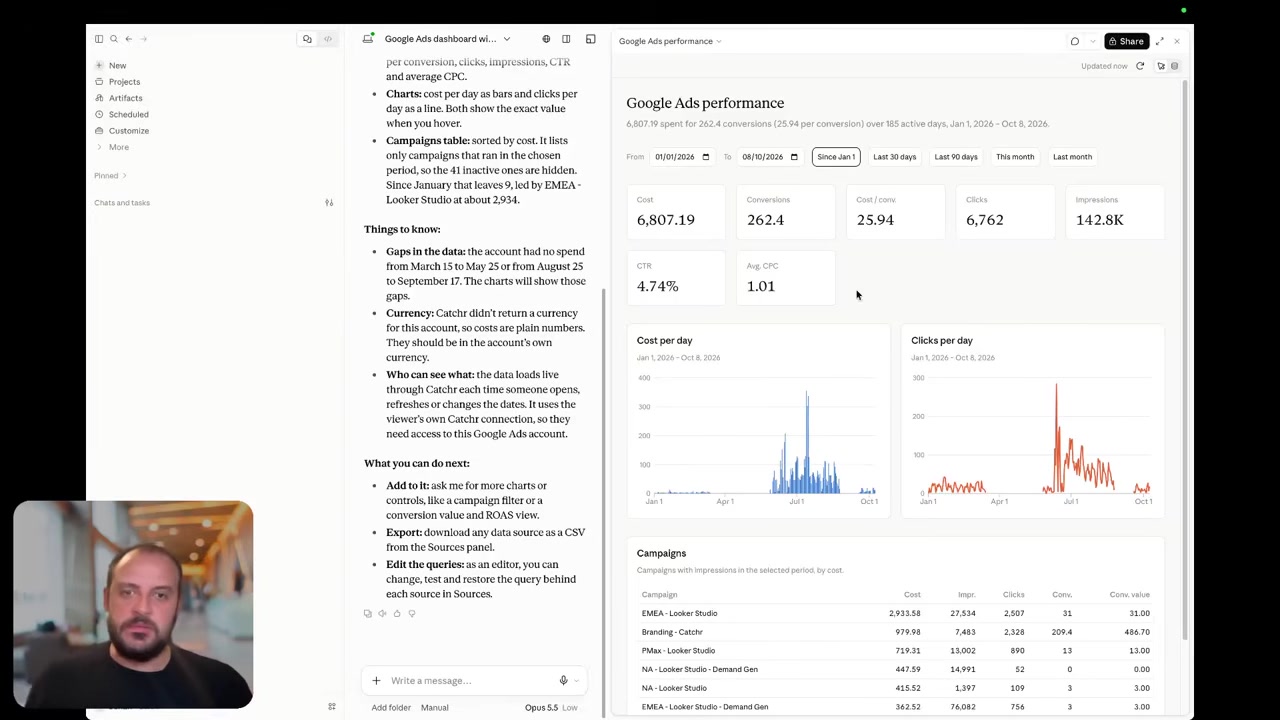
Catchr MCP connects your marketing data to ChatGPT, Claude and Copilot from Starter. Ask which campaigns drove a CPA increase or compare channel performance before a client meeting.
Catchr also supports export-job management today. An assistant can help create, update and run reporting exports, subject to the destinations available on your plan. This supports the step from a question to a recurring reporting workflow.
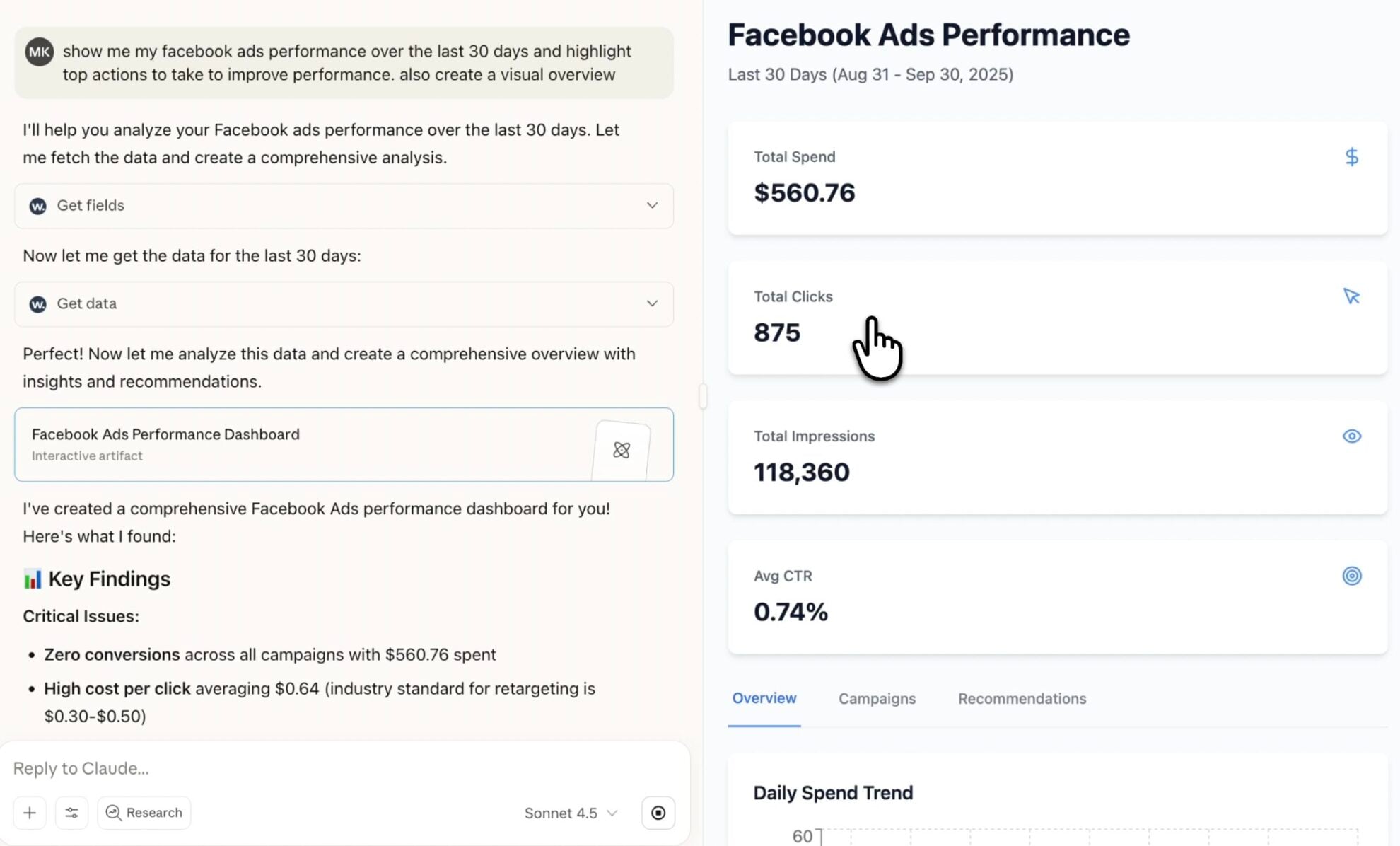
Windsor’s MCP supports analysis and destination-task creation too. It also offers supported actions in external platforms, including campaign creation, budget changes and campaign pausing. Those actions may be decisive for a team that wants to manage campaigns from its AI assistant.
Coming soon
Create and update campaigns through Catchr MCP
Planned for a future release. These actions are not available yet.
Data Studio: direct connections for client dashboards
Catchr

Windsor.ai

Catchr connects source data directly to Data Studio. Choose the accounts and fields for your report, then use the results in charts, filters, calculated fields and blends. Reports request data when opened or refreshed.
Windsor also offers direct connectors, plus a custom-query route for reusing a prepared query. Both can support a recurring client dashboard without a manual CSV export.
The subscription difference becomes useful when your agency adds channels. A five-platform dashboard fits Catchr Momentum while the same source count needs Windsor Standard. Your account manager can still use Sheets or AI to investigate the numbers behind the report. Explore Catchr for Data Studio.
Power BI: saved Web queries or Windsor’s native Desktop connector
Catchr

Windsor.ai

Catchr feeds Power BI through a saved Web query. Select your source and accounts, preview the data, then load the query in Power BI. Your existing model can combine that marketing table with the rest of the business.
Windsor has a native Power BI Desktop connector that loads saved Windsor queries. Its Web and template routes also use query URLs. The Desktop authoring experience is a meaningful Windsor strength for analysts who prefer that route.
With either tool, Power BI remains where the team builds relationships, measures and reports. Catchr includes the connection workflow from Starter, together with the other everyday destinations. See Catchr for Power BI.
Google Sheets: automate the pacing workbook
Catchr
Windsor.ai

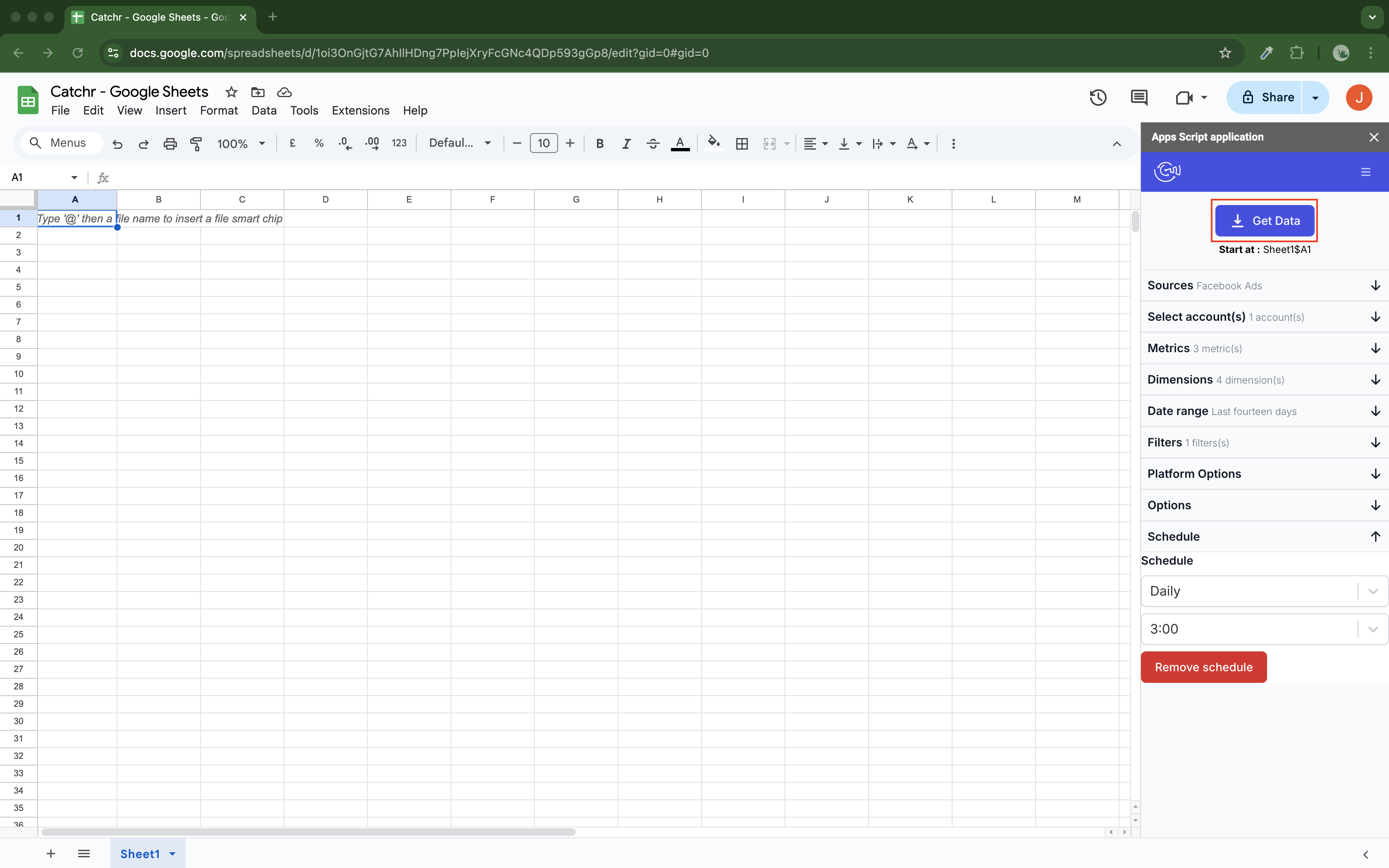
Catchr’s native Google Sheets add-on lets you select source accounts, dates, metrics and dimensions inside the workbook. Schedule hourly, daily, weekly or monthly refreshes so the pacing sheet is ready for the next review.
Replace rebuilds the result, append adds rows, and combine/update reconciles matching rows. That gives a marketer useful choices for a recurring report or a growing record of performance.
Windsor also has a Sheets add-on and a separate destination-task route. Its Columns to Match setting updates matching records while adding new ones. Destination tasks use the plan’s task and refresh allowances.
For a team that already works in Sheets, both provide a practical route. Catchr’s appeal is the same subscription covering the workbook, client dashboard and AI questions. Explore Catchr for Google Sheets.
Excel: build marketing queries inside your existing workbook
Catchr
Windsor.ai

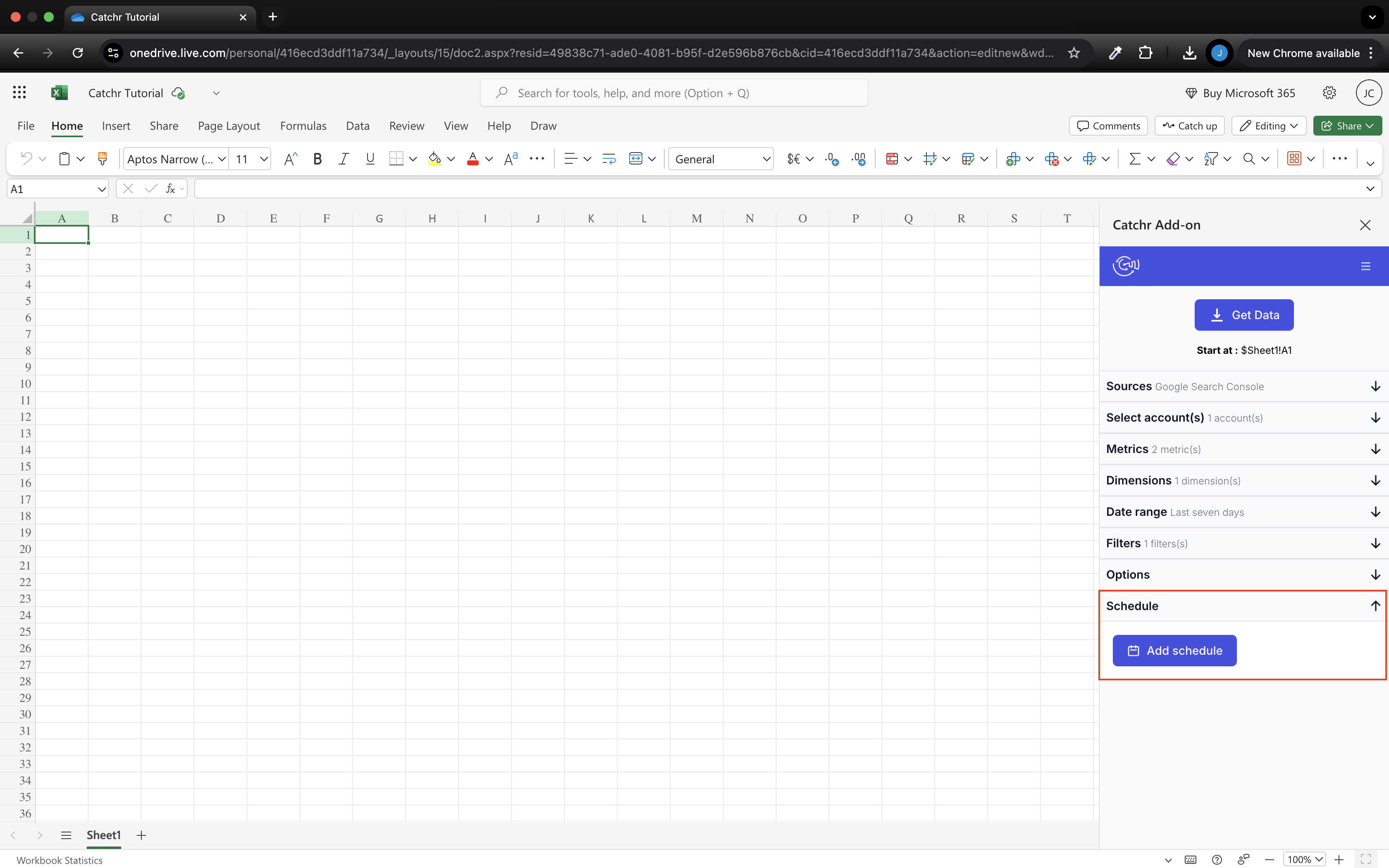
Keep the workbook where your budgets, formulas and pivot tables already live. Catchr’s native Excel add-in lets you select the source, accounts, fields, dates and starting cell from inside Excel, on the web or desktop.
For a client review, add the new advertising account or change the reporting period in the add-in, then refresh the output range. Replace rebuilds the result, append adds rows, and combine/update matches rows using the selected dimensions. Keep formulas and manual inputs outside that output range.
Windsor’s documented Excel route prepares a query in Windsor, copies its URL into Data → From Web, and updates imported data through Excel’s refresh controls. That route suits an analyst who already works with Power Query.
Catchr puts the marketing query controls in the workbook. The person maintaining the report can choose accounts and fields in the same place they review the results. The add-in is included from Starter alongside Sheets, Data Studio, Power BI and MCP.
Explore Catchr for Excel. · Install the Catchr add-in.
Compare all six workflows
| Workflow | Windsor.ai | Catchr |
|---|---|---|
| MCP & AI | Analysis, destination tasks and supported campaign actions. | Analysis and export-job management. Campaign actions planned. |
| Databases & warehouses | All destinations across plans; task allowances apply. | BigQuery: Momentum. API: Growth. Wider targets: Scale. |
| Data Studio | Direct connectors and custom queries. | Direct connectors from Starter. |
| Power BI | Native Desktop connector and Web routes. | Saved Web queries from Starter. |
| Google Sheets | Add-on and destination tasks. | Native add-on; schedules and row-update modes. |
| Excel | Documented Web import workflow. | Build queries inside the native web/desktop add-in. Replace, append or combine/update rows. |
Which one fits your team?
Choose Windsor.ai when…
Choose Windsor.ai when you have many accounts concentrated on three platforms, need its native Power BI Desktop connector, or want warehouse destinations on an entry plan. Basic’s 75-account allowance is a substantial advantage for that account mix.
Windsor is also the stronger choice when supported AI campaign actions are a requirement today. Catchr’s planned campaign actions should not be treated as a replacement for a workflow you already rely on.
Choose Catchr when…
Choose Catchr when your clients’ platform mix is expanding. Four platforms and up to 10 accounts fit Starter plus one platform for $43.99/month. Five platforms and 25 accounts fit Momentum for $79/month. Eight platforms and 30 accounts fit Momentum plus three platforms for $138.97/month.
Those configurations cost less than the corresponding Windsor plans. Add the native Excel workflow when analysts maintain their own workbooks, and use the same connected accounts in dashboards, Sheets and AI. BigQuery starts on Momentum; choose Growth when API access is also required.
How to move from Windsor.ai to Catchr
- Start with one client report and its connected advertising and analytics accounts.
- Connect those accounts in Catchr and rebuild the report’s source queries using the same reporting period.
- For Excel, create the queries in Catchr’s add-in. For Power BI, replace the Windsor connection with Catchr’s saved Web queries.
- Move recurring warehouse tables to the Catchr plan that includes the destination, then schedule the first exports.
- Compare the finished client report before replacing its regular delivery. Keep Windsor campaign-action workflows separately if the team uses them.
You can use Catchr’s 14-day trial to move a real dashboard and its supporting spreadsheet. No credit card is required. That gives the team a concrete view of its next reporting week.
Test your client stack before committing
Try the workflow your next client report needs.
Connect a real client stack, open your destination and check the numbers before you switch.
No credit card required. Choose a plan after testing your sources and destinations.
Keep comparing by workflow
Find a Data Studio reporting template →
Compare every tool by destination and MCP →
Connect marketing data to ChatGPT →
Sources and comparison method
Reviewed October 23, 2026 using Windsor pricing, capacity and upgrade rules, Catchr add-on prices, destination documentation, the MCP reference and write-action documentation. Prices distinguish monthly billing from annual equivalents. Product screenshots are unmodified official examples, dated in their captions.
Catchr prices and current plan inclusions were confirmed by the Catchr team. BigQuery is available from Momentum, API access from Growth and wider warehouse/storage destinations from Scale. Campaign creation and updates through MCP are planned, with no release date announced. These owner confirmations supersede older public Catchr pricing material. This comparison is based on documented capabilities, not a paid-account performance benchmark.
Add-on configurations are calculations from published monthly prices, not negotiated quotes. Each example retains the destination rights of its base plan. Screenshots document the interfaces; they do not establish a measured speed or reliability advantage.
- Windsor.ai product overview · pricing and allowances.
- Catchr product overview · pricing · destinations · MCP.
- Windsor MCP server tool reference.
- Windsor MCP write actions.
- Windsor destination guides.
- BigQuery integration.
- Data Studio integration.
- Power BI destination.
- Google Sheets integration.
- Excel integration.
- Catchr destination directory.
- Get Started with Database and Data Stream.
- Catchr pricing.
- Data Studio connectors.
- Data Studio script limits.
- Power BI destination.
- Google Sheets destination.
- Get started with Google Sheets.
- Excel destination.
- Catchr MCP.
- MCP usage examples.
- Google Apps Script quotas.


