

Catchr starts at $24/month with unlimited users. Supermetrics Starter starts at €49/month with one user and one core destination.
With Catchr, your team can use Data Studio, Power BI, Google Sheets, Excel and AI assistants in the same subscription.
You pay less to get started, and adding colleagues does not add seat fees.
The quick answer
Choose Catchr for multi-channel reporting, AI analysis and scheduled data exports with unlimited users. BigQuery is available from Momentum at $79/month. Supermetrics offers managed warehouse tables and supported AI campaign actions; campaign creation and updates through Catchr MCP are planned for a future release.
Supermetrics vs Catchr at a glance
Catchr’s advantage is what the subscription includes: a lower starting price, unlimited users and all the everyday reporting destinations.
The table separates included features, paid extras and upcoming capabilities.
| What matters for your team | Supermetrics | Catchr |
|---|---|---|
| Monthly starting price | €49/month | ✓ Lower starting price $24/month |
| Starter capacity | − Plan limit 2 platforms 2 accounts per platform 1 user | ✓ Included 3 platforms 10 total accounts Unlimited users |
| Everyday reporting & AI | − Plan limit Choose 1 core destination. Data Studio, Power BI, Sheets, Excel or AI assistants (ChatGPT, Claude and Copilot). Additional destinations cost extra. | ✓ Included All included from Starter. Data Studio, Power BI, Sheets, Excel and AI assistants (ChatGPT, Claude and Copilot). No separate destination fee for these tools. |
| Database & warehouse exports | + Paid extra Not included in Starter (€49/month). Enterprise: a tailored plan priced by the sales team. Includes managed table groups and schema changes. | ✓ Available from Momentum Not included in Starter ($24/month). BigQuery: Momentum ($79/month). Wider database and warehouse exports: Scale ($599/month). |
| AI analysis & campaign actions | Data analysis and supported campaign creation and updates are available. AI Chats and standalone MCP/API have different packaging. | ✓ Included MCP analysis and export-job management from Starter. ◷ Planned Campaign creation and updates through MCP are planned for a future release. |
Monthly billing in each vendor’s published currency. Supermetrics allowances checked October 22, 2026. BigQuery availability on Momentum and planned MCP campaign actions confirmed by the Catchr team; the public pricing page is being updated.
Pricing: Catchr’s main advantage for everyday reporting
Catchr starts at $24/month; Supermetrics starts at €49/month on monthly billing.
Catchr includes three platforms, 10 total accounts and unlimited users at that entry price.
Supermetrics Starter includes two platforms, two accounts per platform and one user. For a freelancer or small agency, Catchr combines a lower starting price with more room for the team and its connected accounts.
The value extends to where you work. Catchr includes Data Studio, Power BI, Google Sheets, Excel and MCP from Starter. Supermetrics’ base plans include one core destination, with extra capacity and destinations available. If you use dashboards for clients, spreadsheets for checks and an assistant for analysis, price that whole setup.
What costs extra as your team grows?
| What you add | Supermetrics | Catchr |
|---|---|---|
| People | Users are capped by plan. Extra users on Growth require a paid add-on. | Unlimited users on every plan. No seat fees. |
| Reporting destinations | One core destination in the base plan. Additional destinations require a paid add-on. | Data Studio, Power BI, Sheets, Excel and AI assistants included from Starter. |
| Platforms & accounts | Paid extras when you exceed the plan’s platform or account allowances, within its add-on limits. | Extra capacity or a larger plan when you exceed the included platforms or total accounts. Users remain unlimited. |
Why Catchr fits freelancers and growing agencies
For these teams, the useful capacity is the platforms they report on, the client accounts they manage and the colleagues who need access. Here is how three common setups fit.
| Your reporting setup | Why Catchr fits | With Supermetrics |
|---|---|---|
| A freelancer reporting on three platforms Google Ads, Meta Ads and GA4, with one account on each. | All three platforms fit in Starter at $24/month. Its 10-account allowance leaves room to add client accounts across those platforms. Data Studio, spreadsheets, Power BI and AI access are included, so the same subscription supports your everyday reporting tools. | Starter starts at €49/month for two platforms and two accounts per platform. This three-platform setup requires a paid platform add-on or a larger plan. One core destination and one user are included. |
| An agency managing multiple clients Five platforms, 25 accounts and three team members. | Momentum covers this setup for $79/month. All 25 accounts fit within the 30-account allowance, and all three team members are included. Unlimited users let account managers and analysts work together without adding Catchr seat fees as the team grows. | Growth starts at €199/month with seven platforms, seven accounts per platform and two users. The third team member requires a paid user add-on. Connecting more than seven accounts on one platform also requires a paid account-capacity add-on. |
| An agency centralizing marketing data in BigQuery Eight platforms, 60 client accounts and a team combining campaign performance with sales data. | Growth covers this setup for $239/month, with capacity for 10 platforms and 100 accounts. Schedule exports to BigQuery, then join the marketing data with sales tables in your warehouse. API access supports custom reporting workflows, while unlimited users keep analysts and account managers working within the same subscription. | BigQuery transfers require Enterprise, a tailored plan priced by the Supermetrics sales team. Its standard Growth reporting plan does not include warehouse transfers. |
Catchr lets you add clients, colleagues and reporting tools without treating each one as a separate upgrade.
The freelancer can use the same connected accounts in Data Studio and Google Sheets. The agency can give account managers and analysts access without paying for extra users. With Growth, the team can also feed BigQuery and build custom workflows through the API while keeping its existing dashboards and spreadsheets.
Monthly pricing and allowances reviewed October 22, 2026 against Catchr pricing and Supermetrics pricing.
Supermetrics plans
Swipe the table to see all columns →
| Supermetrics offer | Published price / billing | Scope |
|---|---|---|
| Starter | €49/month monthly; €39/month billed yearly | 2 sources, 1 user, 2 accounts per source, 1 core destination; Studio and AI Chats listed. |
| Growth | €199/month monthly; €159/month billed yearly | 7 sources, 2 users, 7 accounts per source, 1 core destination; extras available. |
| Enterprise | Custom quote | Custom capacity, warehouse destinations, APIs and enterprise governance. |
Checked October 16, 2026. Prices are shown in EUR. Account, user and core-destination allowances vary by plan; additional capacity changes the configured price. Official Supermetrics pricing.
View the captured Supermetrics pricing page

Catchr plans
Swipe the table to see all columns →
| Catchr plan | USD, billed monthly | Included capacity and scope |
|---|---|---|
| Starter | $24/month | 3 platforms, 10 total accounts; reporting, spreadsheets and AI. |
| Momentum | $79/month | 5 platforms, 30 total accounts; reporting, spreadsheets and AI. |
| Growth | $239/month | 10 platforms, 100 total accounts; adds BigQuery, API, personalized fields and Data Blend. |
| Scale | $599/month | 25 platforms, 500 total accounts; adds warehouse/storage destinations, custom schema mapping and priority support. |
Monthly list prices checked October 16, 2026. Standard plans include unlimited users and requests within their platform/account capacity. Additional capacity and custom configurations can change the quote. External BI, warehouse and AI subscriptions are separate. Current Catchr pricing.
Data sources: can you connect your clients’ marketing stack?
Advertising, analytics, ecommerce and CRM platforms
Catchr’s connector directory covers paid media, analytics, ecommerce, CRM and social platforms. An agency can bring Google Ads and Meta Ads performance together with GA4, Shopify or HubSpot data, then send the results to its reporting tools.
Supermetrics also covers these marketing categories. The useful comparison is the stack your clients use: a freelancer running paid campaigns needs a different selection from an agency combining acquisition, store revenue and sales pipelines. Browse Catchr connectors or check the Supermetrics directory.
Metrics, dimensions and historical data
A platform connection gives you access to fields, not a finished report. Metrics provide values such as spend, clicks or conversions; dimensions split those values by campaign, date or another available breakdown. Catchr lets you select the fields your report needs.
Available combinations and historical depth depend on the source API and the account’s permissions. A campaign-level spend report and a creative-level conversion report may need different queries. Use the source-specific field list to build the exact view your client expects, rather than assuming every breakdown can be combined.
Managing multiple accounts across clients
A platform is a service such as Google Ads. An account is an individual advertising or business account within that platform. Five clients with one Google Ads account each therefore use one platform and five accounts.
Catchr counts accounts across the subscription. Momentum includes 30 total accounts across five platforms, so a 25-account portfolio has five accounts of headroom. Supermetrics Growth’s included accounts are counted per platform; a portfolio concentrated on one channel can reach that channel’s limit before using the other allowances.
The reporting you need is largely covered by both
If your week revolves around client dashboards, campaign pacing in a spreadsheet and questions about performance, both products cover the main destinations. You can connect marketing accounts, select metrics and dimensions, and use the results in Data Studio, Power BI, Sheets or Excel. Both also make connected data available to AI assistants.
This overlap is why price deserves to lead the comparison. For an agency already happy with its reporting tools, Catchr offers a lower-cost starting point for the connection layer. Unlimited users also means that adding an account manager or analyst does not add a Catchr seat charge.
Catchr puts those everyday destinations in the same subscription. Your account managers can work in dashboards, your analysts in spreadsheets, and your team in AI assistants without adding a Catchr seat charge for each person.
The two differences worth closer attention are managed warehouse tables and what the AI tools can do. Supermetrics adds table-management features and campaign actions that may justify its cost when your team uses them.

Databases and warehouses: send your data where you need it
Catchr

Supermetrics

Catchr sends marketing data directly to your databases and warehouses. Connect BigQuery, Snowflake, Redshift, Azure SQL, MySQL or PostgreSQL, choose your fields and schedule recurring exports. Your team can combine campaign data with sales and customer records in its own database.
BigQuery is available from Momentum at $79/month. Growth at $239/month adds more capacity and API access. Scale at $599/month opens the wider database, warehouse and storage destinations, with custom schema mapping.
Supermetrics warehouse transfers require Enterprise, a tailored plan with a price provided by its sales team. Its managed table groups and schema migration help teams that want Supermetrics to maintain the structure of their destination tables.
Explore Catchr’s database and warehouse destinations. · See Catchr for BigQuery.
MCP: ask your marketing data, from $24/month
Catchr
Supermetrics

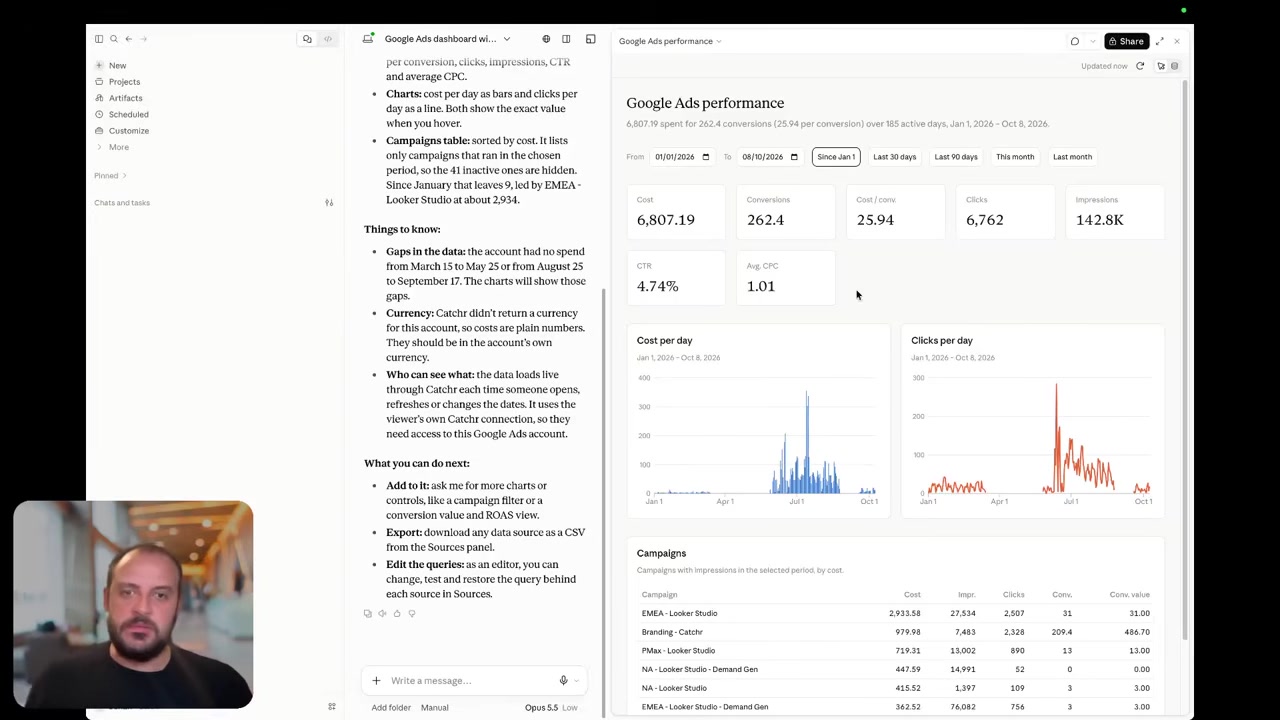
Catchr includes MCP from Starter at $24/month. Use Claude or ChatGPT to explore campaign performance, compare channels and prepare client summaries from your connected marketing data. AI access comes alongside your dashboards and spreadsheets.
Catchr also lets your assistant create and manage reporting export jobs, with storage destinations available on the relevant plan. You can move from a question about campaign performance to a recurring data export in the same conversation.
Supermetrics also connects marketing data to AI assistants. Its additional capability is creating and updating supported ad campaigns. Choose Catchr for analysis and reporting automation; Supermetrics’ campaign actions matter when you want AI to operate the advertising accounts themselves. Its ready-made AI Chats and standalone MCP/API access have separate packaging.
Today, your assistant can analyze marketing data and manage reporting export jobs.
Coming soon
Create and update campaigns through Catchr MCP
Planned for a future release. These actions are not available yet.
Data Studio: familiar reporting, different subscription costs
Catchr

Supermetrics

Catchr connects your marketing accounts to Data Studio from Starter. Build client reports with native charts, date controls, filters, calculated fields and blends. Use reporting templates as a starting point, then adapt the dashboard to each client.
Supermetrics also offers source-specific Data Studio connectors. Catchr covers that core reporting workflow at a lower entry price, with unlimited users and access to your other reporting destinations included.
The same Catchr source connection can serve a client dashboard, a spreadsheet and an AI assistant. Account managers and analysts can work in the tools they prefer under the same Catchr plan.
Find your Catchr Data Studio connectors.
Power BI: your marketing reports, from $24/month
Catchr

Supermetrics

Catchr brings your marketing data into Power BI from $24/month, with unlimited users. Build client dashboards, combine channel performance and work with your data in Power Query and DAX. Power BI is included from Starter alongside Data Studio, spreadsheets and AI assistants.
Select your source, accounts, metrics and dates in Catchr, then load the data into Power BI through a saved Web query. Your team keeps working in the reporting environment it already knows.
Supermetrics also feeds Power BI, with one core destination included in its base plan. Catchr’s advantage is the value of the subscription: Power BI plus your other everyday reporting destinations, with no additional Catchr seat charge as more colleagues join. Explore Catchr for Power BI.
Google Sheets: scheduled reporting included from Starter
Catchr
Supermetrics

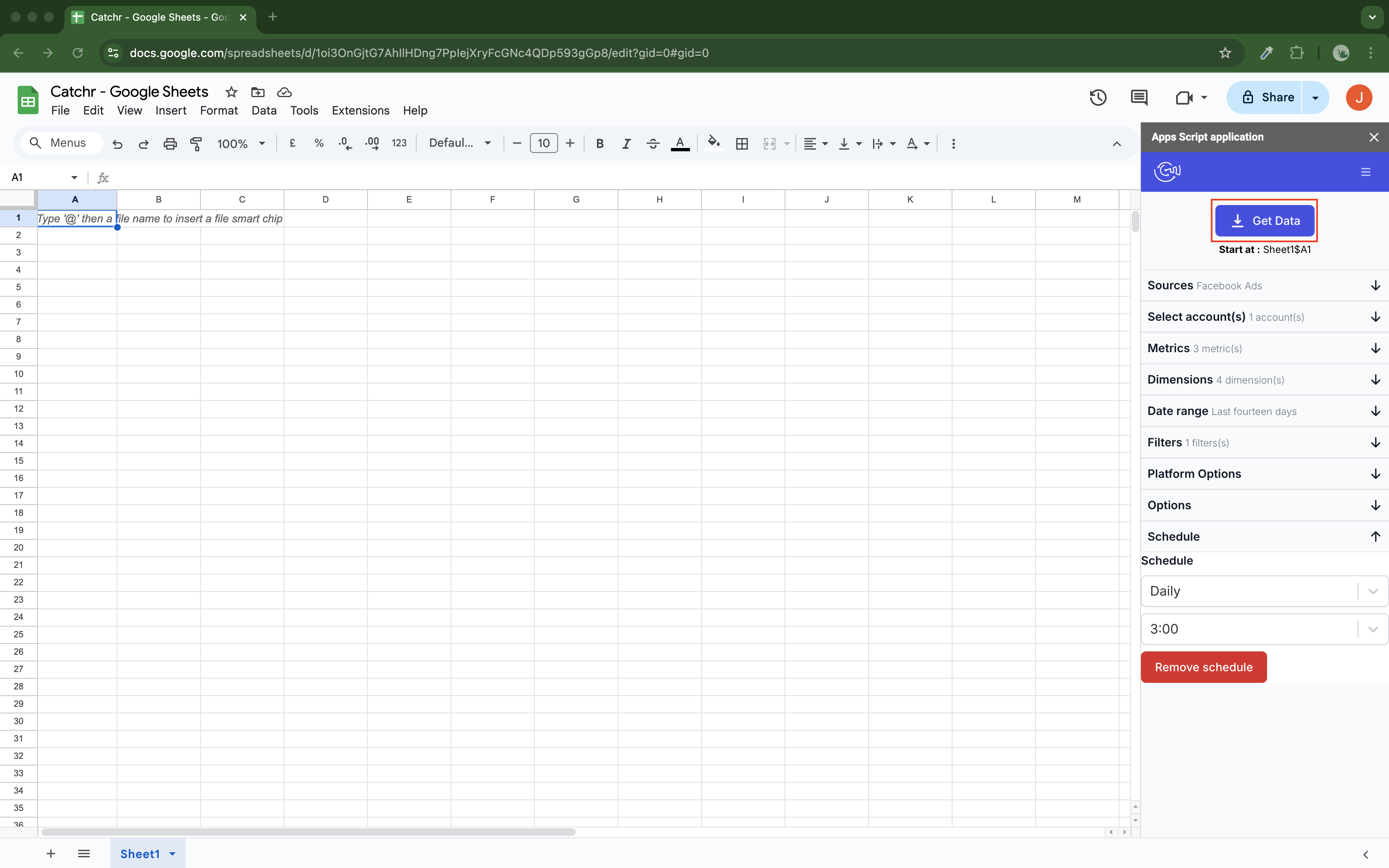
Catchr’s native Google Sheets add-on brings marketing data into the workbooks your team already uses. Select accounts, metrics, dates and a starting cell, then schedule updates hourly, daily, weekly or monthly. Google Sheets is included from Starter.
Choose how each query updates the sheet: replace the existing results, append new rows, or match selected dimensions to update existing rows and add new ones. That gives you options for campaign pacing, historical snapshots and recurring client reports.
Supermetrics also provides a Sheets add-on with saved queries and scheduled refreshes. Catchr combines this everyday reporting capability with unlimited users and the other standard reporting destinations in the same subscription. Your Sheets workflow can sit alongside Data Studio, Power BI, Excel and AI analysis.
Explore Catchr for Google Sheets. · Install the Catchr add-on from Google Workspace Marketplace.
Excel: a native add-in without a separate Catchr plan
Catchr
Supermetrics
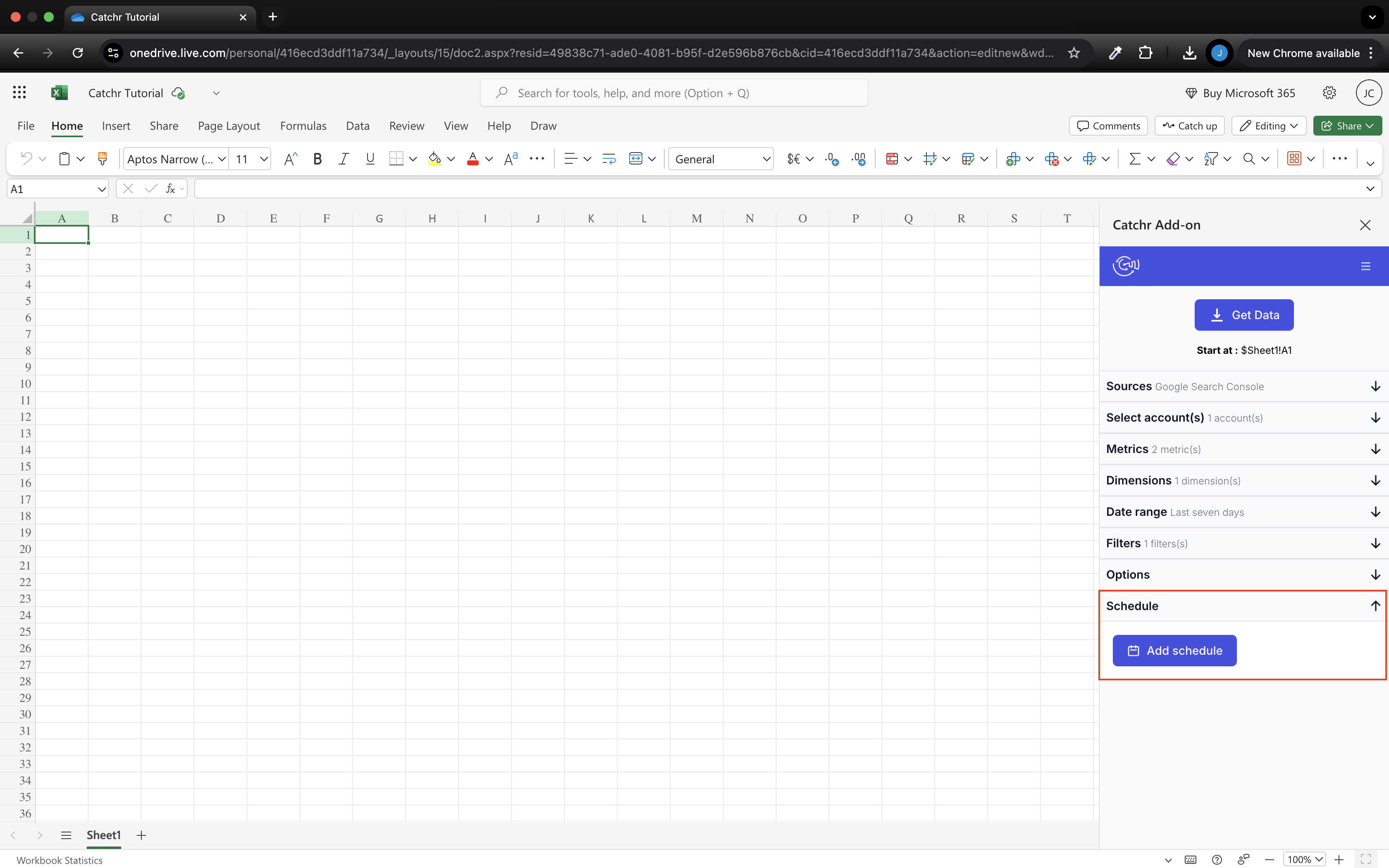
Catchr includes a native Excel add-in from Starter, for web and desktop. Select sources, accounts, fields and dates from the docked pane, then send the results into your workbook. Run queries manually or schedule them hourly, daily, weekly or monthly.
Replace, Append and Combine/update modes let you choose how incoming data updates your reporting tables. Your team can use Excel for its analysis while colleagues work with the same connected sources in other Catchr destinations.
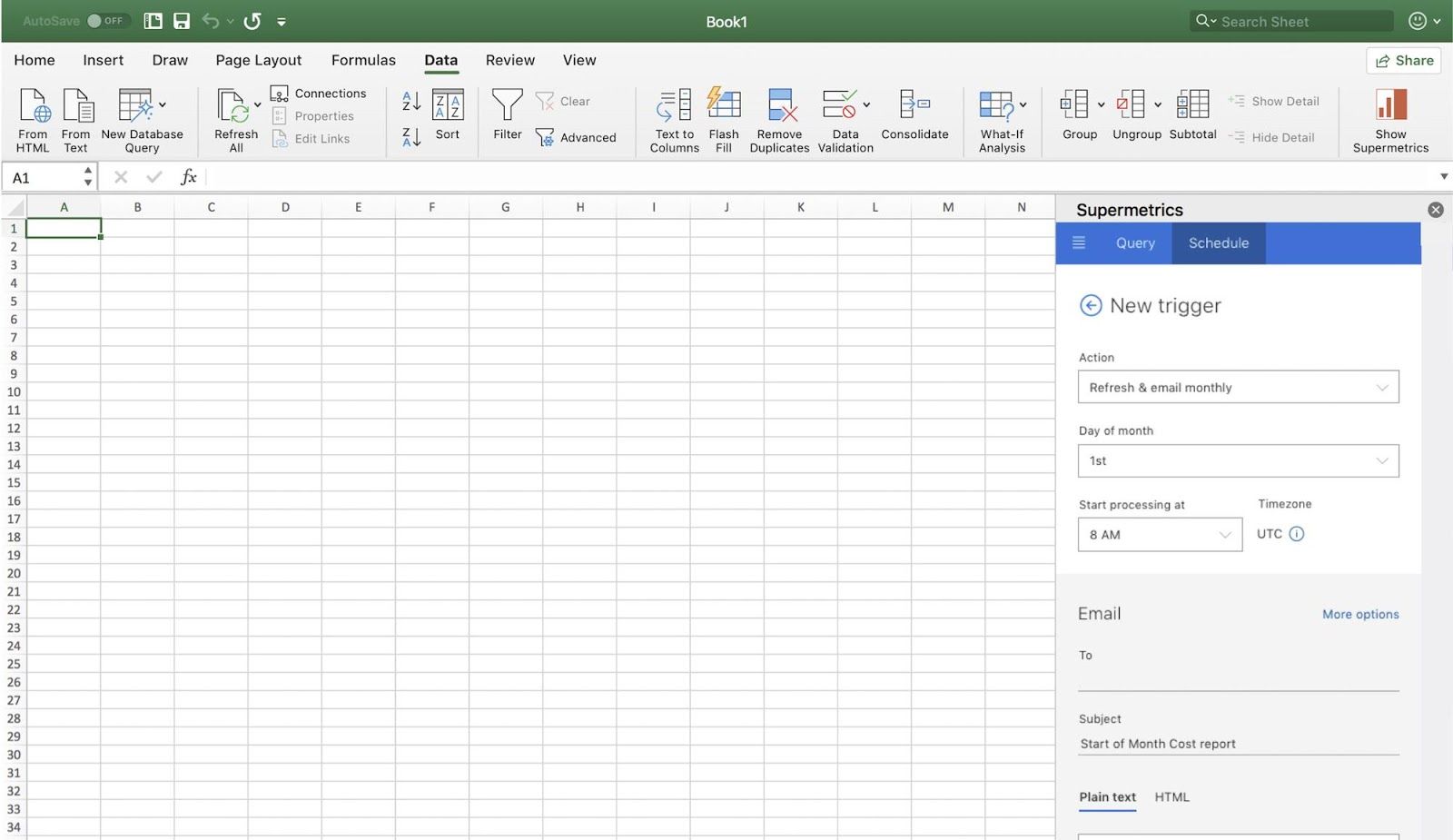
Both Catchr and Supermetrics offer native Office add-ins. Catchr’s advantage is the package: Excel comes with the other everyday reporting destinations and unlimited users, starting at $24/month. Explore Catchr for Excel.
Install Catchr from Microsoft Marketplace.
Compare all six workflows
| Workflow | Supermetrics | Catchr |
|---|---|---|
| MCP & AI | Marketing analysis and supported campaign actions; AI Chats and standalone MCP/API have separate packaging. | MCP analysis and export-job management from Starter. Campaign creation and updates are planned for a future release. |
| Databases & warehouses | Warehouse transfers on Enterprise, priced by the sales team. Managed table groups and schema migration. | BigQuery from Momentum ($79/month). Wider database and storage exports from Scale ($599/month). API access from Growth ($239/month). |
| Data Studio | Source-specific connectors; counts as a core destination in the subscription. | Native connectors from Starter, alongside the other everyday reporting destinations. |
| Power BI | Power BI data delivery; counts as a core destination in the subscription. | Saved Web queries feed Power BI from Starter, with unlimited Catchr users. |
| Google Sheets | Native add-on with saved queries and scheduled refreshes. | Native add-on from Starter with schedules and replace, append or combine/update modes. |
| Excel | Native Office add-in with saved queries and refresh schedules. | Native Office add-in from Starter for web and desktop, with scheduled updates. |
Which one fits your team?
Choose Supermetrics when…
Choose Supermetrics when you need its managed table groups and schema migration, or supported AI campaign actions that are available today. Catchr already covers AI analysis and export automation; campaign creation and updates through MCP are planned for a future release.
Choose Catchr when…
Choose Catchr to connect client accounts, build multi-channel reports, analyze performance with AI and send marketing data to your own warehouse. Everyday reporting destinations and unlimited users are included from $24/month; BigQuery starts on Momentum at $79/month. Your team can expand its analysis without paying for each additional colleague.
How to move from Supermetrics to Catchr
- Inventory Data Studio data sources, spreadsheet queries, Power BI models, API consumers, Studio dashboards, transfers and stored tables.
- Record accounts, fields, filters, formulas, blends, schedules, windows and table keys without copying credentials.
- Rebuild one hard workflow. In Power BI, expect existing source connections to become Web imports; in warehouses, choose partition and backfill behavior explicitly.
- Reconcile a closed period and a conversion-maturity window, including currency, time zone and non-additive metrics.
- Run both schedules in parallel until downstream owners approve several refreshes.
Campaign actions and Studio assets are separate capabilities, not connector settings. Plan replacements for them explicitly.
Test your client stack before committing
Try the workflow your next client report needs.
Connect a real client stack, open your destination and check the numbers before you switch.
No credit card required. Choose a plan after testing your sources and destinations.
Keep comparing by workflow
Find a Data Studio reporting template →
Compare every tool by destination and MCP →
Choose how to visualize marketing data →
Sources and comparison method
Written by Catchr. Product and pricing facts were checked against official public pages on October 16, 2026. Catchr MCP operations were also checked against its currently exposed tool catalogue; access follows workspace permissions and destination plan requirements. Recommendations reflect the workflows described here. We did not run a controlled speed, uptime or support benchmark. Screenshots show public websites, not private customer accounts.
Prices retain their published currency and billing period. A monthly equivalent paid annually is different from a cancel-anytime monthly subscription. Verify the selected configuration before purchase.
- Supermetrics product overview · pricing and allowances.
- Catchr product overview · pricing · destinations · MCP.
- Supermetrics MCP server.
- Manage ad campaigns with AI tools.
- Connect a warehouse destination.
- Warehouse refresh settings.
- Connect to Data Studio.
- Power BI scheduled refresh.
- Sheets advanced settings.
- Excel queries.
- Catchr destination directory.
- Get Started with Database and Data Stream.
- Catchr pricing.
- Data Studio connectors.
- Data Studio script limits.
- Power BI destination.
- Google Sheets destination.
- Get started with Google Sheets.
- Excel destination.
- Catchr MCP.
- MCP usage examples.
- Google Apps Script quotas.


