


Catchr puts marketing data in the tools your team already uses: Data Studio, Power BI, Sheets, Excel and AI assistants from $24/month. Swydo starts at $69/month and brings report building, client delivery and monitoring together. Choose based on where you want the work to happen.
The quick answer
Choose Catchr for flexible reporting and analysis across your existing tools. Its lower entry price includes everyday destinations and unlimited users; BigQuery starts at $79/month. Choose Swydo when branded reports, a client portal and performance monitoring should live in one application.
Swydo vs Catchr at a glance
Catchr connects the client stack to your working tools. Swydo provides the client reporting environment. Both include unlimited users; the main differences are outputs and how account growth affects the bill.
| What matters | Swydo | Catchr |
|---|---|---|
| Monthly starting price | $69/month First 10 connected sources. | $24/month 3 platforms and 10 total accounts. |
| Users and report scope | ✓ Included Unlimited users and native reports. | ✓ Included Build reports in your preferred destination. |
| Everyday destinations | Native dashboards, PDFs and client portals. Sheets and Excel are documented as inputs. | ✓ Included Data Studio, Power BI, native Sheets and Excel add-ons, plus AI assistants. |
| AI workflow | In-product report analysis and authoring. 4,000 AI credits/month. | ✓ Included ◷ Planned Campaign creation and updates are planned. |
| Warehouse exports | Documented outputs focus on finished reports; a managed warehouse destination was not established. | BigQuery from Momentum: $79/month. Wider databases and storage from Scale: $599/month. |
USD monthly billing. Swydo pricing checked October 23, 2026; its localized European calculator uses EUR. Catchr tiers reflect current owner-confirmed packaging.
Pricing: lower connector costs or bundled client reporting?
Catchr costs less in the three examples below, but Swydo includes more of the finished client experience. Budget for the reporting canvas and delivery process you intend to use alongside Catchr.
Swydo pricing: one feature package, more connected sources
| Swydo source band | USD, billed monthly | How it is counted |
|---|---|---|
| First 10 sources | $69/month | One connected account or property is one source. |
| Sources 11–100 | $4.50 per additional source | The rate applies after the first 10 included sources. |
| Sources 101–500 | $3 per additional source | Volume rate for this band. |
| Sources 501+ | $2 per additional source | Volume rate for this band. |
The USD FAQ supplies these monthly rates. The European page displays euro prices and an annual option; do not read an annual monthly equivalent as a monthly subscription. The source fee supports unlimited reports, so making another report from the same connected source does not add a report charge.
Catchr plans
| Catchr plan | USD, billed monthly | Capacity and destination scope |
|---|---|---|
| Starter | $24/month | 3 platforms Data Studio, Power BI, Google Sheets, Excel and MCP. |
| Momentum | $79/month | 5 platforms Adds BigQuery exports. |
| Growth | $239/month | 10 platforms BigQuery plus API access. |
| Scale | $599/month | 25 platforms Wider warehouses, databases and object storage; custom schema mapping. |
Every Catchr plan includes unlimited users and Catchr requests. Source-platform API limits still apply. External BI subscriptions, AI subscriptions and storage usage are separate from the Catchr price.
What changes the total?
| Cost category | Swydo | Catchr |
|---|---|---|
| Additional accounts | Each connected source after the first 10 adds to the bill. A source connected again under another client is counted again. | Capacity is pooled across the plan. Move to the tier that covers your platforms and total accounts. |
| AI usage | 4,000 monthly credits are included. On-demand usage can add cost. | MCP is included from Starter. Your external assistant subscription is separate. |
| Client delivery and storage | Branded reports, portals and monitoring are part of the reporting package. Managed outbound warehouse pricing was not established. | Reporting and sharing happen in your destination. BigQuery begins on Momentum; wider storage begins on Scale. |
Three practical monthly budgets
| Your setup | Catchr | Swydo |
|---|---|---|
| Freelancer 3 platforms / 3 accounts | Starter: $24/month. Build the client dashboard, maintain a pacing sheet and ask your AI assistant about performance. | $69/month. The three connected accounts fit the base package, with native report delivery included. |
| Agency 5 platforms / 25 accounts / 3 people | Momentum: $79/month. 25 accounts fit within the 30-account allowance. All three people are included, as are BigQuery exports. | $136.50/month. $69 + 15 additional sources × $4.50. All three people and unlimited native reports are included. |
| Growing agency 8 platforms / 60 accounts + BigQuery/API | Growth: $239/month. Covers 10 platforms and 100 accounts, BigQuery exports and API access. | $294/month for native reporting. $69 + 50 additional sources × $4.50. This is not a quote for BigQuery/API delivery; those outbound routes were not established in the reviewed documentation. |
Examples assume distinct connected accounts, with no duplicate Swydo client connections. Calculations use the published USD schedule, before tax. Catchr’s advantage grows when the same sources need to serve several destinations.
Data sources: connect the marketing stack your clients use
Advertising, analytics, ecommerce and CRM platforms
Catchr covers paid media, analytics, ecommerce, CRM and social reporting. A typical agency can connect Google Ads, Meta Ads and GA4, then bring store or pipeline data into the same reporting workflow.
Swydo’s directory includes major ad platforms alongside analytics, social and business sources. Its spreadsheet inputs let prepared custom data join a native client report. That is useful for a client’s offline targets or figures from a tool outside the direct integration list.
Browse Catchr connectors or Swydo integrations for your clients’ actual platforms.
Metrics, dimensions and historical data
Both products turn source data into the metrics and breakdowns a marketer needs. Spend, clicks and conversions can be grouped by dimensions such as date or campaign, where the source permits that combination.
Catchr lets you select those fields for the destination. Swydo uses them inside report widgets and custom calculations. Historical access and available breakdowns depend on the source API and account permissions; sharing a platform logo does not establish identical field coverage.
Managing multiple accounts across clients
A platform and a connected account are different units. Five clients using Google Ads means one Catchr platform and five accounts. In Swydo, those five connected accounts are five billable sources.
Catchr Momentum pools 30 accounts across five platforms. Swydo bills source connections and lets you reuse each one across reports. Its billing guide says connecting the same source under another client counts again, which matters for an agency sharing one business account across reporting folders.
Where do you want your team to work?
Catchr keeps dashboards, spreadsheets, AI and storage connected to the same marketing sources. Swydo keeps report building, sharing and monitoring inside its platform. The six workflows below show what that choice changes in practice.
Databases and warehouses: reusable data beyond the client report
Catchr

Catchr export setup is shown. Swydo’s documented report exports are PDF, hosted dashboard and presentation mode; an equivalent warehouse-export interface was not established.
Catchr sends marketing data to BigQuery from Momentum at $79/month. Join campaign spend to sales records and give the team a reusable table for recurring analysis. Growth adds more account capacity and API access.
Scale opens the wider destination set: Snowflake, Redshift, Azure SQL, MySQL, PostgreSQL, S3, Google Cloud Storage and Azure Blob, with custom schema mapping. These wider destinations are not included in Momentum.
Swydo’s export guide describes sharing a finished report. That meets a client-presentation need; it does not establish a scheduled feed into your own warehouse.
Explore Catchr for BigQuery. · Browse database and storage destinations.
MCP and AI: your assistant or Swydo’s report builder?
Catchr
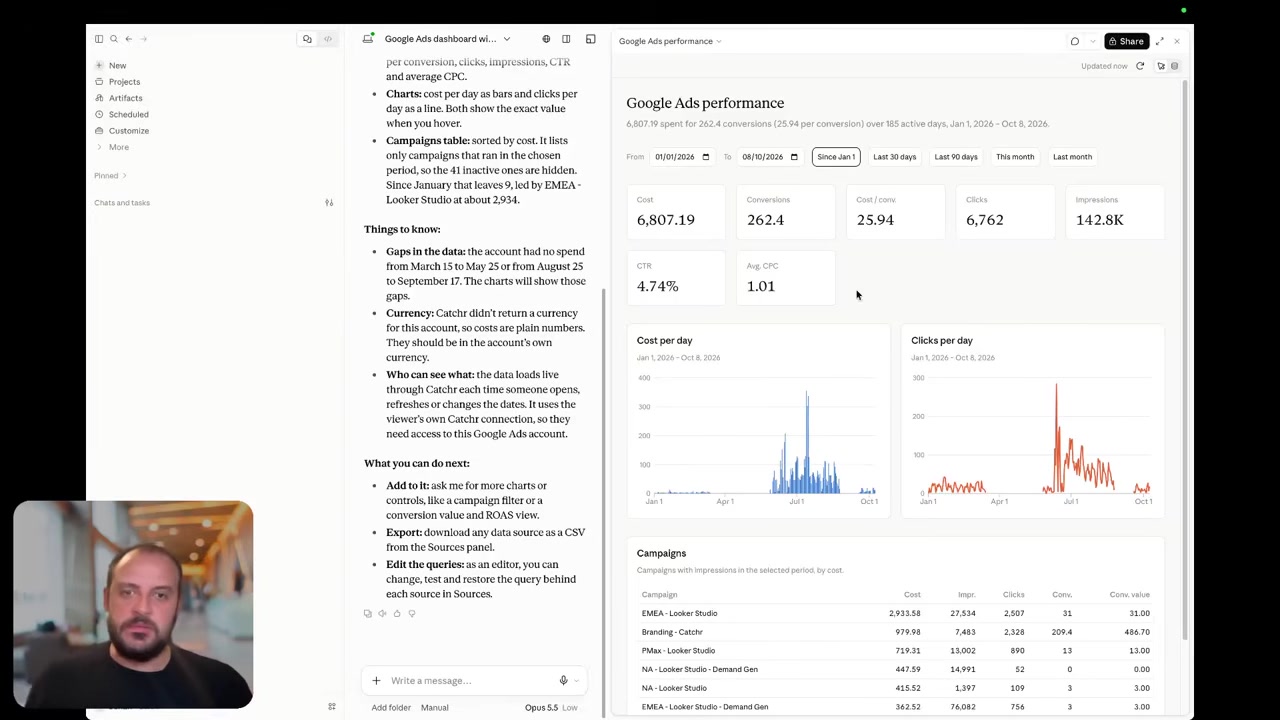
Swydo AI inside the report

Catchr includes MCP from Starter. Use ChatGPT, Claude or Copilot to explore the connected marketing data, compare channels and prepare a client conversation. Your assistant can also manage export jobs, with the destination available on the relevant plan.
Swydo’s AI sits inside its reports. It can analyze results and create or edit supported widgets and sections. That is a strong fit when your next step is to finish the client’s report in Swydo.
The current Swydo AI guide does not establish an external MCP connection. We therefore compare its documented in-product assistant with Catchr’s external-assistant workflow, without treating the documentation gap as proof of absence.
Analysis and export-job management are available today.
Coming soon
Create and update campaigns through Catchr MCP
Planned for a future release. These actions are not available yet.
Data Studio: build in Google’s canvas or stay in Swydo
Catchr

Catchr’s Data Studio connector is shown. Swydo’s documented dashboard is its own reporting product; no equivalent direct connector screenshot was found.
Catchr connects marketing accounts to Data Studio from $24/month. Build charts, date controls, calculated fields and multi-channel dashboards in a tool your team already knows. The same plan includes the other everyday destinations.
Swydo provides its own templates, report editor and client-facing dashboards. It can be the simpler purchase when the agency wants one provider to handle report creation and delivery together.
If clients already receive a Data Studio link, Catchr lets you keep that reporting surface. If they use Swydo portals, moving the data connection alone will not recreate that client experience.
Find Catchr Data Studio connectors.
Power BI: bring marketing into the business reporting model
Catchr

Catchr’s Power BI setup is shown. A direct Swydo-to-Power BI data route was not established in the official sources reviewed.
Catchr includes Power BI from Starter. Save a query for the source, accounts, fields and date range you need, then load it through Power BI’s Web connection. Continue building the model in Power Query and DAX.
This fits an in-house team combining marketing performance with sales or finance, or an agency delivering into a client’s existing Microsoft environment. The report stays with that team’s chosen BI tool.
Swydo’s hosted dashboards offer a different way to share results. They are useful client deliverables, but a shared dashboard link is not the same as rows feeding a Power BI model.
Google Sheets: fill the workbook or read it into a report
Catchr
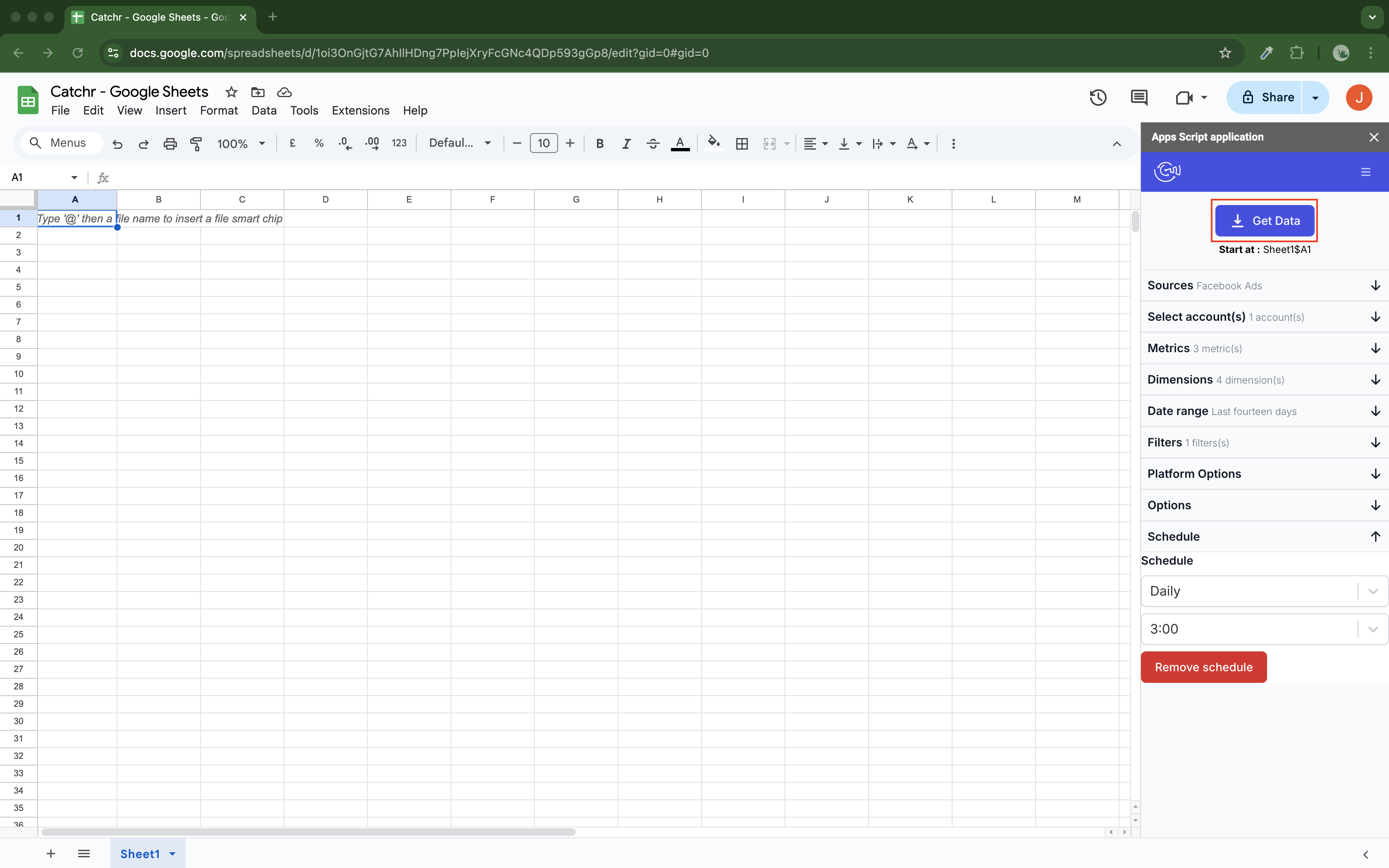
Swydo — spreadsheet input

Catchr’s native add-on writes marketing data into Google Sheets. Select the accounts, fields and destination cell, then refresh hourly, daily, weekly or monthly. Build a pacing sheet that stays current without repeated CSV imports.
Choose replace for a current view, append for additional rows, or combine/update to match selected dimensions and update existing rows. Sheets is included from Starter alongside dashboards and AI.
Swydo’s Sheets integration runs in the other direction: a prepared worksheet supplies data to Swydo widgets. Use it to bring custom figures into a branded report. It is not documented as a marketing-data add-on that fills the worksheet for you.
Explore Catchr for Google Sheets. · Install the Catchr add-on.
Excel: a native Catchr add-in or a Swydo report input
Catchr
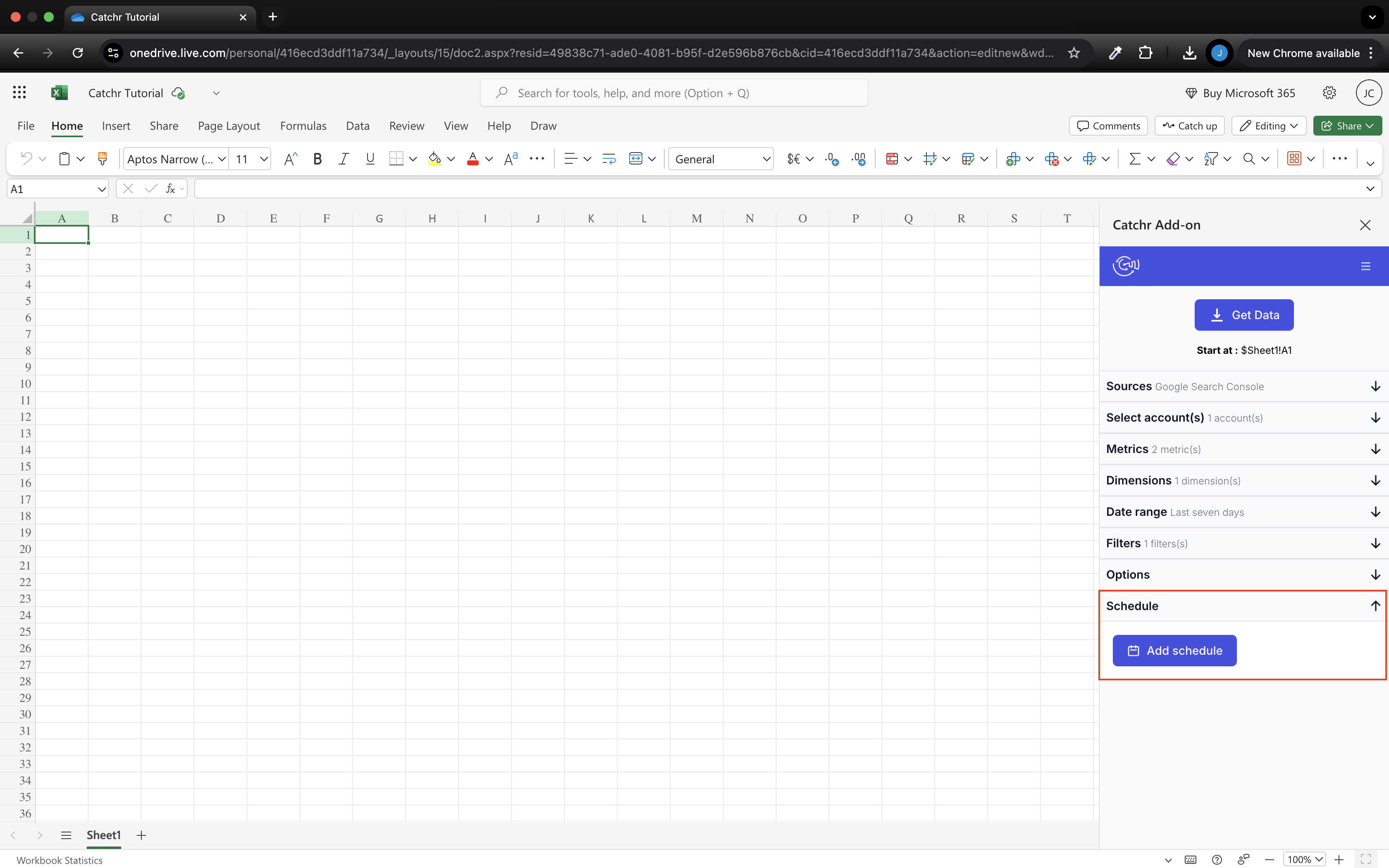
Swydo — workbook input
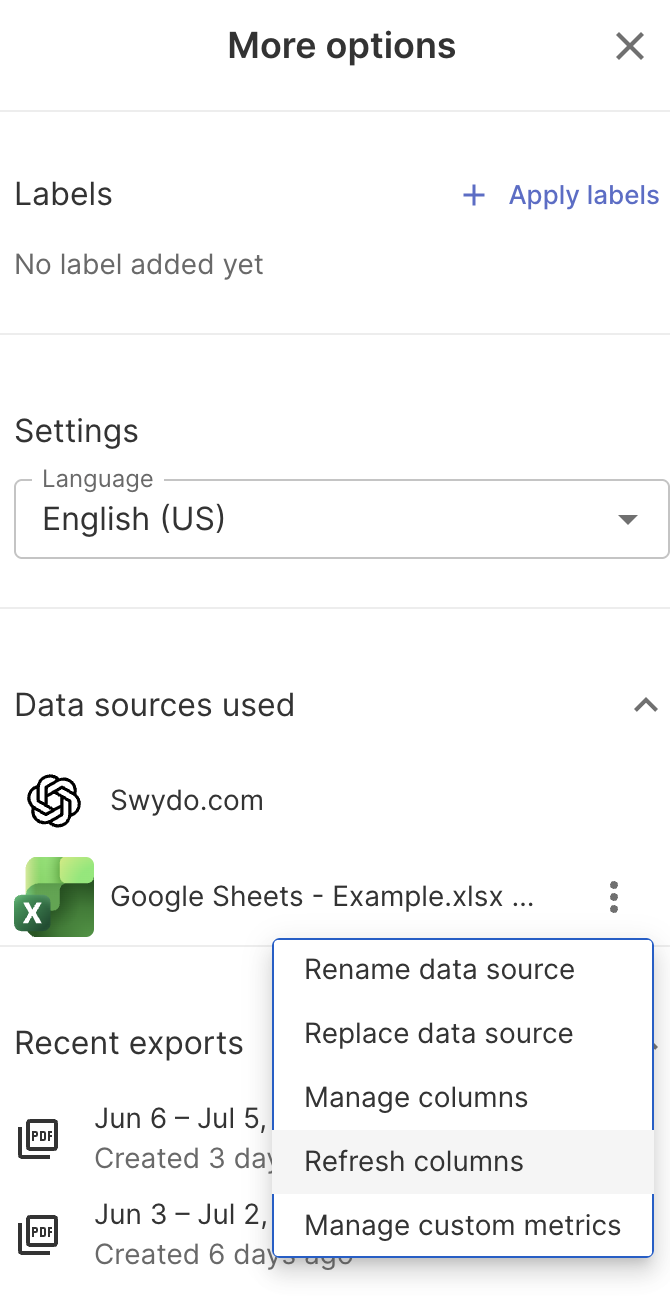
Catchr’s Excel add-in works in web and desktop Excel from Starter. Query the connected marketing accounts inside the workbook, then refresh the data on a schedule. Analysts can keep their existing formulas and reporting tables.
Swydo reads an Excel workbook into its report widgets. Its Excel guide requires a Microsoft Business 365 account and excludes personal accounts. The screenshot shows that inbound workbook source, not an outbound Excel add-in.
The choice follows the deliverable. Choose Catchr when the workbook should receive campaign data. Choose Swydo’s integration when the workbook already contains the numbers and the client should see them in a Swydo report.
Explore Catchr for Excel. · Install the Catchr add-in.
Compare all six workflows
| Workflow | Swydo | Catchr |
|---|---|---|
| MCP & AI | Native report analysis and authoring. External MCP not established in reviewed docs. | MCP analysis and export-job management from Starter. Campaign actions planned. |
| Databases & warehouses | Documented exports are finished reports. | BigQuery from Momentum; API from Growth; wider storage from Scale. |
| Data Studio | Native Swydo dashboards; direct Data Studio route not established. | Direct connectors from Starter. |
| Power BI | Direct outbound route not established. | Saved Web queries from Starter. |
| Google Sheets | Spreadsheet input for report widgets. | Native add-on writes and schedules marketing data. |
| Excel | Business 365 workbook input for reports. | Native add-in for web and desktop. |
Which one fits your team?
Choose Swydo when…
Choose Swydo when your agency wants to build the report, monitor client KPIs, manage branded delivery and offer a client portal in one place. Its unlimited native reports are useful when the same account set serves several report variations. Swydo AI also helps author those reports inside the product.
Choose Catchr when…
Choose Catchr when account managers use Data Studio, analysts prefer Sheets or Excel, and the team wants AI access to the same marketing sources. Power BI is included from Starter; BigQuery begins on Momentum. You get a lower starting price and room to expand the destination mix while keeping the reporting tools you already use.
How to move from Swydo to Catchr
- Choose the new client deliverable. Decide whether each Swydo report becomes a Data Studio dashboard, Power BI report or spreadsheet.
- Connect the client accounts in Catchr. Rebuild the report’s main campaign table and headline metrics in that destination.
- Bring across your reporting logic. Recreate the custom calculations, client targets and channel groupings that explain performance.
- Set up delivery. Replace Swydo portal links, PDF schedules and monitoring alerts in the chosen reporting tools.
- Complete one client reporting cycle. Confirm that the report refreshes and reaches the client before retiring the old delivery.
Swydo report layouts and portal permissions are product assets; they do not transfer with a source connection. Start with one client, then reuse the successful destination template.
Test your client stack before committing
Try the workflow your next client report needs.
Connect a real client stack, open your destination and check the numbers before you switch.
No credit card required. Choose a plan after testing your sources and destinations.
Keep comparing by workflow
Find a Data Studio reporting template →
Compare every tool by destination and MCP →
Plan your client marketing report →
Sources and comparison method
Written by Catchr. Official pricing, product and help pages were checked on October 23, 2026: Swydo pricing, source counting, integrations, report exports, AI, Sheets and Excel.
Catchr’s owner confirmed the current tiers, BigQuery from Momentum, API from Growth, wider storage on Scale, and MCP analysis/export-job management. Campaign creation and updates remain planned. These corrections take precedence over older pricing copy. See Catchr pricing, destinations and MCP.
Images are unmodified official documentation assets or public demos, with source captions and earlier interfaces identified. We did not run a private-account performance benchmark. A workflow not established in public documentation is described as unverified, rather than unavailable.
- Swydo product overview · pricing and allowances.
- Catchr product overview · pricing · destinations · MCP.
- Swydo integrations.
- Google Sheets.
- Microsoft Excel.
- How to export your report.
- How to create a report.
- How to use Swydo AI.
- Swydo pricing.
- FAQ — Billing & Data Sources.
- Catchr destination directory.
- Get Started with Database and Data Stream.
- Catchr pricing.
- Data Studio connectors.
- Data Studio script limits.
- Power BI destination.
- Google Sheets destination.
- Get started with Google Sheets.
- Excel destination.
- Catchr MCP.
- MCP usage examples.
- Google Apps Script quotas.


