


Your client reports may need the same marketing accounts in a dashboard, a spreadsheet and an AI assistant. Catchr brings those everyday destinations together from $24/month. Coupler.io is especially useful when the report also depends on finance, operations or project data that must be combined before it reaches those tools.
The quick answer
Choose Catchr for marketing reporting across several destinations, with unlimited users and more included accounts at entry level. Choose Coupler.io for prepared business datasets, cross-source joins and reusable data flows. Coupler also has a limited free plan, so Catchr is not the cheapest option for a single manual import.
Coupler.io vs Catchr at a glance
| What matters | Coupler.io | Catchr |
|---|---|---|
| Paid starting price | $32/month A limited free plan is also available. | $24/month |
| Accounts and people | Starter: 3 accounts, 1 user. | Unlimited users on every plan. |
| Reporting destinations | Starter: 1 destination application. | Data Studio, Power BI, Sheets, Excel and MCP from Starter. |
| Data preparation | Combine business sources in a prepared flow before delivery. | Connect marketing accounts and work in your chosen reporting tool. |
| Warehouse access | BigQuery and other documented databases count toward destination capacity. | BigQuery from $79/month. |
Pricing: more reporting destinations in Catchr’s starting plan
Catchr and Coupler can both be affordable for a small workflow. The difference appears when one client needs more accounts or a second reporting tool. Compare monthly billing with monthly billing, and include the destination applications your team actually uses.
Coupler.io plans
| Plan | Monthly / annual billing | Included scope |
|---|---|---|
| Free | $0 | 1 account; 1 user; 1 source; 1 destination. Manual refresh. |
| Starter | $32/month $24/month billed annually | 3 accounts; 1 user; 1 destination. Daily refresh; 5,000 rows/run. |
| Active | $132/month $99/month billed annually | 15 accounts; unlimited users; 3 destinations. Daily refresh. |
| Pro | $259/month $199/month billed annually | 50 accounts; unlimited users and destinations. Hourly refresh. |
| Custom / Agency / Enterprise | Quoted | Tailored capacity and services. 15-minute refresh on Custom. |
These are Coupler’s published Business prices. Its Agency solution adds portfolio-sized capacity and client workspaces. Catchr’s prices below are monthly subscriptions; all four include unlimited users and Catchr requests. Source-platform API limits still apply.
Catchr plans
| Catchr plan | Monthly price | Capacity and destination access |
|---|---|---|
| Starter | $24/month | 3 platforms Data Studio, Power BI, Sheets, Excel and MCP. |
| Momentum | $79/month | 5 platforms Adds BigQuery. |
| Growth | $239/month | 10 platforms Adds API access; BigQuery remains included. |
| Scale | $599/month | 25 platforms Wider warehouses, databases and storage; custom schema mapping. |
What costs extra as your team grows?
| Factor | Coupler.io | Catchr |
|---|---|---|
| Another account | Published add-ons: $5.99/account monthly | Use the total account allowance of your plan. |
| Another destination | The limit counts applications, not individual flows. Several Sheets flows remain one destination type. | Everyday reporting destinations are included together. Warehouse access follows the plan. |
| More people or AI | Unlimited users from Active. The MCP guide specifies Professional or higher; current pricing cards call the plan Pro. | Unlimited users and MCP from Starter. No Catchr per-seat or per-request charge. |
Coupler’s limits guide explains the account and application counts. Its MCP page uses an older plan name, so the built-in “AI data analysis” label on a card should not be treated as proof of external MCP entitlement.
Three practical budgets
| Your setup | Coupler.io comparison | Catchr |
|---|---|---|
| Freelancer 3 platforms / 3 accounts | Starter: $32/month, or $24/month annually, for one destination and one user. | Starter: $24/month. |
| Agency 5 platforms / 25 accounts / 3 people | For up to 3 destinations: Active +10 accounts = $191.90/month, or $143.90/month billed annually. Pro may fit better if hourly refresh or client workspaces matter. | Momentum: $79/month. |
| Growth team 8 platforms / 60 accounts + BigQuery/API | Pro +10 accounts = $318.90/month, or $243.90/month billed annually, using the published add-ons. Agency/Custom services are quoted separately. | Growth: $239/month. |
The Coupler totals are arithmetic examples from the published account add-ons, not Agency quotes. The agency example assumes daily refresh and up to three destination types. If your reports need extensive preparation or client-specific workspaces, those capabilities can justify a different choice.
Data sources: connect the client stack you report on
Advertising, analytics, ecommerce and CRM platforms
Both products cover the familiar marketing categories: advertising, web analytics, ecommerce and CRM. Catchr’s focus is making those accounts available across your reporting destinations. A freelancer can connect a three-platform stack once and use it for a client dashboard, spreadsheet analysis and AI questions.
Coupler’s catalog extends further into business operations. Its source inventory includes finance and accounting, project management, surveys and time tracking alongside marketing. That breadth matters when your report needs to connect advertising spend to invoices, project delivery or wider company performance.
Metrics, dimensions and historical data
A connector name tells you the platform is supported; it does not establish identical fields or historical access. A campaign report might need daily spend and conversions, while an ecommerce analysis needs products, orders and refunds. Start with the report you deliver, then select the account, fields and period that support it.
Coupler can combine datasets before delivery. Catchr lets the reporting tool handle the additional model: a Data Studio blend, Power Query transformation, spreadsheet formula or warehouse query. For a straightforward monthly client report, that keeps preparation close to the people using the numbers.
Managing multiple accounts across clients
Count each ad account, analytics property or other connected account across the portfolio. Catchr pools total accounts within the plan’s platform allowance: Momentum covers five platforms and thirty accounts. One client with Google Ads and Meta Ads therefore uses two platforms and two accounts, rather than two subscriptions.
Coupler counts connected accounts across its sources, with account add-ons available. Pro and its Agency offering also emphasize team and client workspaces. This is a meaningful benefit for agencies that organize prepared datasets and their permissions separately for each client.
The six reporting workflows both products can support
Both tools can put marketing data into the environments your team already uses. The practical choice is where you prepare the data and how many destinations you need. The screenshots below show the published product workflows; older interfaces are identified in their captions.
Databases and warehouses: prepared flows or direct marketing exports
Catchr

Coupler.io

Catchr includes BigQuery from Momentum at $79/month. Choose the marketing accounts, fields and export schedule, then combine that data with your own sales and customer tables. Growth adds API access; Scale opens Snowflake, Redshift, Azure SQL, MySQL, PostgreSQL, S3, Google Cloud Storage and Azure Blob Storage.
Coupler documents BigQuery, PostgreSQL, Redshift and Snowflake as destinations. It can send a prepared dataset to several destinations within the plan’s allowance. Its BigQuery flow supports automatic or manual schemas and Replace or Append writes.
Choose Coupler when joins across business sources should happen before the warehouse. Choose Catchr when you want marketing exports feeding the database and models your team already owns. Explore Catchr for BigQuery. · See all Catchr destinations.
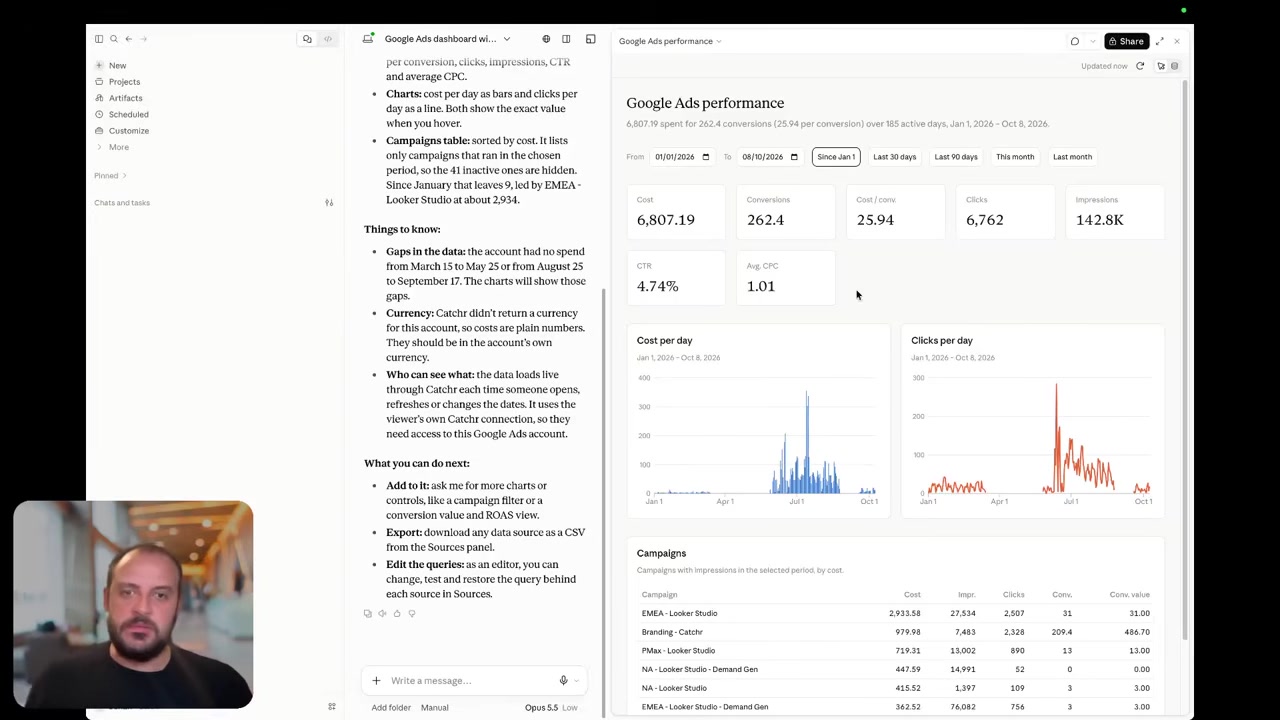
MCP: ask your marketing data and manage reporting exports
Catchr
Coupler.io
Catchr MCP comes with Starter. Ask ChatGPT, Claude or Copilot about campaign performance, investigate a change in cost per lead, or prepare the numbers for a client call. Your assistant can also create and manage reporting export jobs for destinations included in your plan.
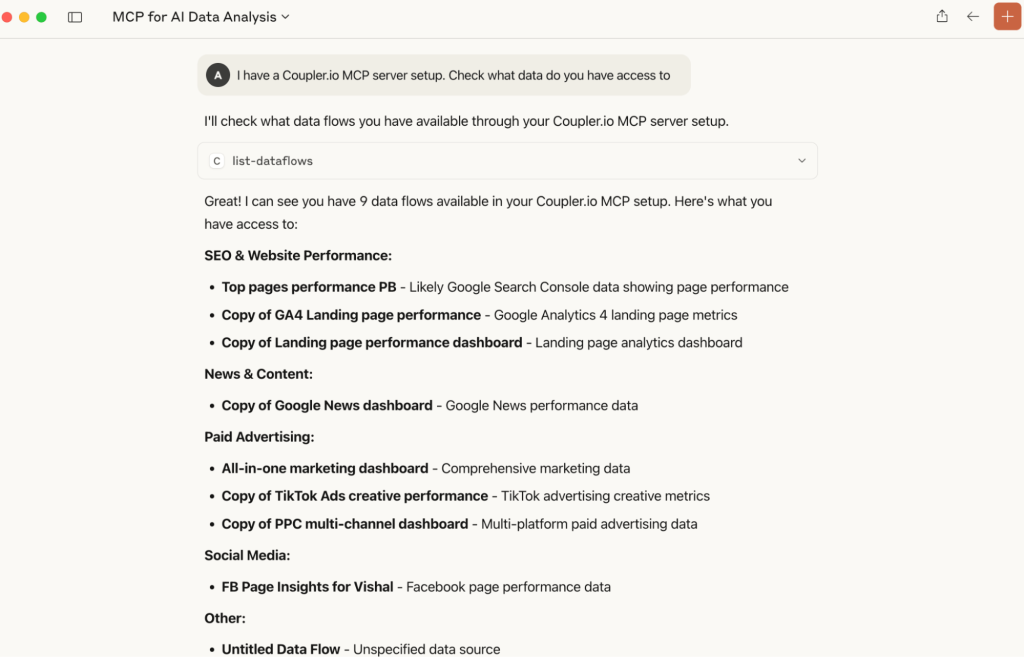
Coupler’s AI documentation describes analysis over prepared datasets, SQL-based transformations and data-flow configuration. An external assistant works with the datasets routed to it; the built-in agent can access the workspace’s datasets. This suits questions that combine marketing with finance or operations.
Both go beyond answering questions: Coupler can configure data flows, while Catchr can manage reporting exports.
Coming soon
Create and update campaigns through Catchr MCP
Planned for a future release. These actions are not available yet.
Data Studio: client dashboards from the same connected accounts
Catchr

Coupler.io

Catchr’s Data Studio connectors are included from $24/month. Select the client accounts and build charts with the report’s date controls, filters and calculated fields. The same Catchr accounts can also serve your spreadsheet and AI work.
Coupler prepares data in a flow before its Data Studio connector supplies the dashboard. Its joins and aggregations are useful when the report needs a combined dataset before you create any charts. Refresh follows the selected flow schedule and plan.
Catchr fits a team that wants to query marketing accounts from its familiar report. Coupler fits a team that wants a reusable prepared dataset behind that report. Explore Catchr for Data Studio.
Power BI: work in the model your analysts already use
Catchr

Coupler.io

Catchr feeds Power BI through a saved Web query from Starter. Select a source, accounts, fields and dates in Catchr, then load the table into Power BI. Your analysts use Power Query, relationships and DAX to build the model around it.
Coupler also provides a Web integration URL. The difference is what arrives: Coupler can combine several sources in its flow first. Its scheduled flow should finish before Power BI refreshes the imported dataset.
For an agency already doing its modeling in Power BI, Catchr offers a smaller paid entry point with other reporting destinations included. For a shared dataset that feeds several tools, Coupler’s preparation layer can save rebuilding that model. Explore Catchr for Power BI.
Google Sheets: scheduled client reporting in your workbook
Catchr
Coupler.io
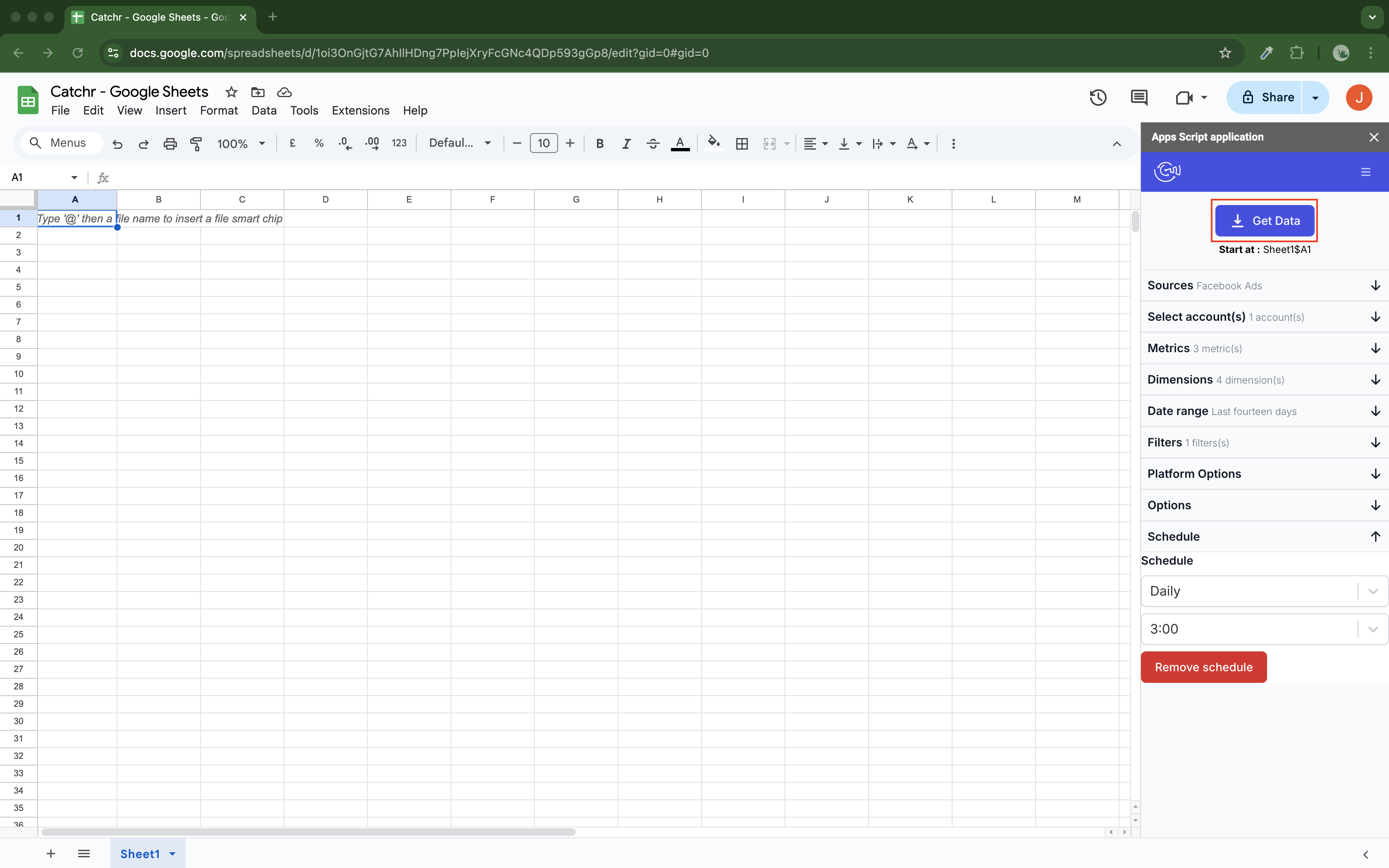
Catchr provides a native Sheets add-on from Starter. Set up the query in your workbook, select the destination cells and schedule hourly, daily, weekly or monthly updates. Replace, Append and Combine/update modes cover recurring reports, growing history and updates to matching rows.
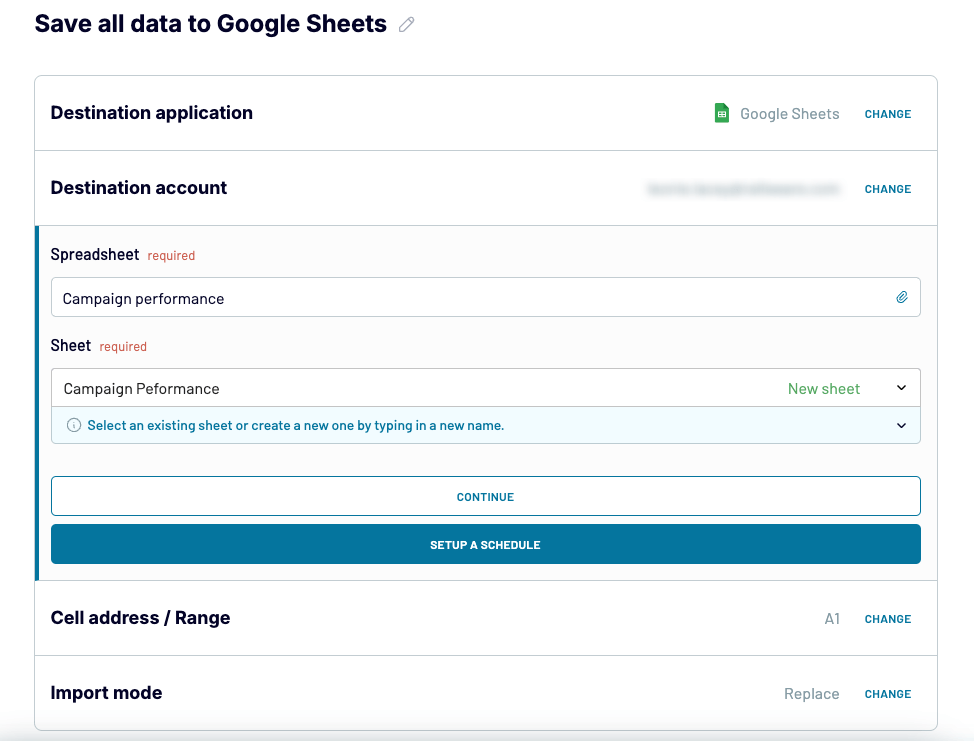
Coupler supports scheduled Sheets exports, range targeting and dynamic sheet names. It can join sources before writing the prepared result, while leaving adjacent formulas outside the written range. Its plan determines refresh frequency.
Catchr is attractive when the sheet is one of several ways your team uses marketing data. Coupler deserves consideration when spreadsheet delivery is part of a broader business-data flow. Explore Catchr for Google Sheets.
Excel: a native add-in or a prepared workbook export
Catchr
Coupler.io
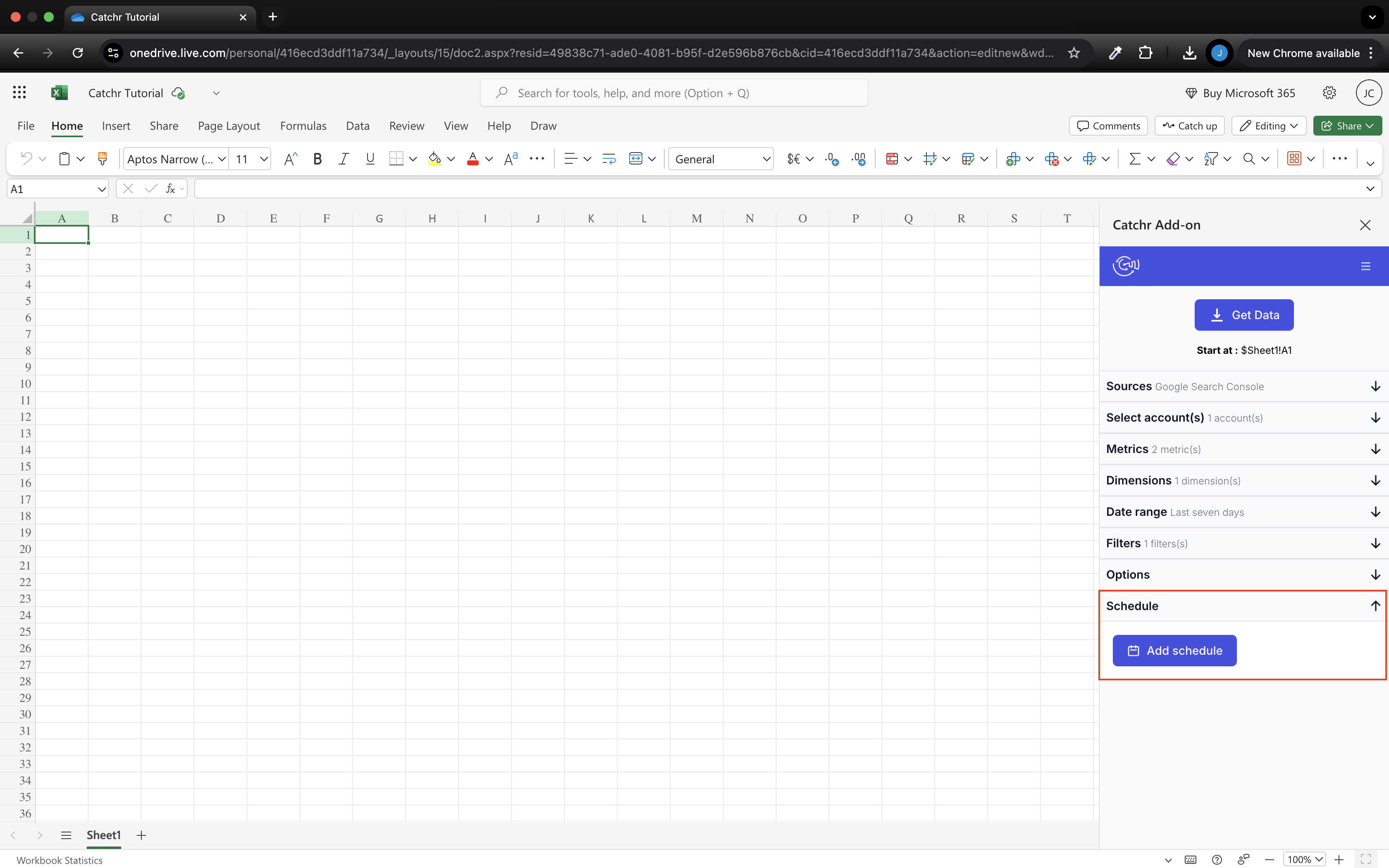
Catchr’s native Excel add-in works in web and desktop Excel. Choose sources, accounts and fields in the side pane, then update the workbook manually or on a schedule. Excel is included alongside Data Studio, Power BI, Sheets and MCP from Starter.
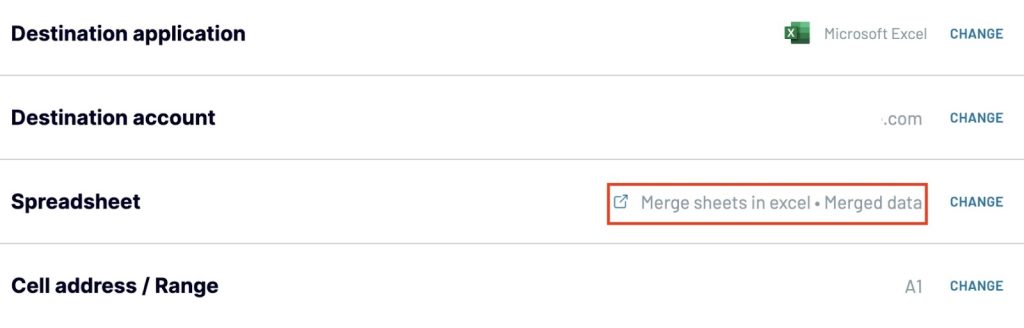
Coupler’s Excel Online destination writes prepared data into a workbook stored in OneDrive or OneDrive for Business. It supports Replace and Append. The online route requires an .xlsx workbook under 25 MB; its wider destination catalog also describes other Excel delivery routes.
Choose Catchr when analysts want to manage marketing queries inside Excel. Choose Coupler when you want a prepared business dataset delivered to the shared file. Explore Catchr for Excel.
Compare all six workflows
| Workflow | Coupler.io | Catchr |
|---|---|---|
| MCP & AI | Prepared datasets, SQL analysis and flow configuration. | Analysis and export-job management from Starter; campaign actions planned. |
| Databases & warehouses | Prepared flows to BigQuery and documented database destinations. | BigQuery from Momentum; wider database and storage exports on Scale. |
| Data Studio | Prepared flow data supplied to the report. | Marketing account queries through native connectors. |
| Power BI | Web URL for prepared flow output. | Saved Web queries; modeling in Power BI. |
| Google Sheets | Prepared data, targeted ranges and scheduled writes. | Native add-on; scheduled replace, append or combine/update. |
| Excel | Prepared workbook delivery, including an online route. | Native add-in for web and desktop, included from Starter. |
Which one fits your team?
Choose Coupler.io when…
Choose Coupler.io when the same report combines campaign costs, invoices, CRM records and operational data. Its prepared datasets can feed several tools, and its AI can help configure those flows. It also makes sense for a single small manual import on Free, or a team that already depends on Coupler joins and formulas.
Choose Catchr when…
Choose Catchr when your team mainly needs marketing accounts available in dashboards, spreadsheets, AI assistants and its own warehouse. Starter gives a freelancer room for ten accounts and several reporting destinations. Momentum fits a five-platform agency with up to thirty accounts, includes BigQuery and lets every colleague participate without a seat charge.
How to move from Coupler.io to Catchr
- Start with one complete client report. Connect its marketing accounts in Catchr and recreate the current date range, metrics and account selection.
- Keep useful preparation logic. Move Coupler joins and formulas into Power Query, your spreadsheet or your warehouse where the report needs them. Retain Coupler flows that still serve finance or operational reporting.
- Reconnect the output. Use the Catchr Data Studio connector, a saved Power BI Web query, or the native spreadsheet add-on. Set the schedule and update mode around the existing report.
- Switch after a successful reporting cycle. Compare the headline spend, leads and revenue for a closed period, then retire the replaced flow once the next scheduled report is ready.
You do not have to move every business process at once. An agency can move its recurring marketing reports first and keep a separate workflow for the company-wide data that still needs Coupler’s preparation tools.
Test your client stack before committing
Try the workflow your next client report needs.
Connect a real client stack, open your destination and check the numbers before you switch.
No credit card required. Choose a plan after testing your sources and destinations.
Keep comparing by workflow
Find a Data Studio reporting template →
Compare every tool by destination and MCP →
Choose how to visualize marketing data →
Sources and comparison method
Verified October 23, 2026 against Coupler’s pricing, plan limits, destinations and AI documentation. Examples use published Business rates and stated billing terms; custom contracts can differ. Product screenshots are unmodified official images, with earlier interfaces labeled.
Catchr plan details use the owner-confirmed October 23 offer: BigQuery from Momentum, API from Growth, wider storage destinations on Scale. MCP analysis and export-job management are available now; campaign creation and updates remain planned. This comparison does not claim identical field coverage or benchmark speed and reliability.
- Coupler.io product overview · pricing and allowances.
- Catchr product overview · pricing · destinations · MCP.
- Coupler.io Destinations.
- BigQuery destination.
- PostgreSQL destination.
- Data Studio connector.
- Power BI destination.
- Google Sheets destination.
- Microsoft Excel integrations.
- Coupler.io MCP.
- Coupler.io features and limits.
- Catchr MCP.
- Catchr pricing.
- Catchr destination directory.
- Get Started with Database and Data Stream.
- Data Studio connectors.
- Data Studio script limits.
- Power BI destination.
- Google Sheets destination.
- Get started with Google Sheets.
- Excel destination.
- MCP usage examples.
- Google Apps Script quotas.


