


Catchr starts at $24/month with three platforms, 10 total accounts and unlimited users. Its bundled capacity can cost less for freelancers reporting across several channels and agencies adding client accounts. Porter starts lower at $15/month for one paid reporting account. Both connect marketing data to dashboards, Sheets and AI analysis; Catchr also includes a native Excel add-in.
The quick answer
Choose Catchr for a multi-client reporting subscription with Excel included, BigQuery from $79/month and a wider choice of database destinations on Scale. Choose Porter when its free reporting option, saved blends, hosted AI reports or campaign automation are central to your work. Both include unlimited users, so seat fees are not the deciding factor.
Porter Metrics vs Catchr at a glance
Count connected accounts before comparing the entry prices. Porter’s one-account plan costs less; Catchr gives a freelancer more capacity for a three-channel client stack.
| What matters | Porter Metrics | Catchr |
|---|---|---|
| Paid monthly starting price | $15/month 1 connected account | $24/month 3 platforms · 10 total accounts |
| People and reporting tools | Unlimited users. | ✓ Included from Starter |
| Three-platform freelancer | $39.99/month 3 accounts on paid Reporting | $24/month 3 accounts fit inside Starter |
| BigQuery and wider exports | BigQuery: custom quote. | BigQuery: Momentum, $79/month. Wider databases and storage: Scale, $599/month. |
| AI analysis and actions | Analysis, saved blends and hosted reports. Campaign actions use separate Automation credits. | ✓ MCP analysis and export-job management ◷ Campaign creation and updates planned |
Monthly USD prices checked October 23, 2026. Porter also offers free reporting with restricted history. Porter pricing.
Pricing: the client portfolio matters more than the entry price
Catchr is the lower-cost paid option for the three-account and 25-account examples below. Porter remains attractive when you only connect one account, and its free option can suit recent-period reporting.
Porter bills each connected source account. Catchr sells a bundle of platforms and total accounts. A five-client agency using Google Ads and Meta Ads has two platforms and ten accounts; the number of dashboards does not change that count.
What costs extra as your team grows?
| What you add | Porter Metrics | Catchr |
|---|---|---|
| People | Unlimited users included. | Unlimited users included. |
| Accounts and platforms | Each connected account increases usage. | Upgrade when platform or total-account capacity is exceeded. |
| AI campaign actions | Automation is a separate credit-based offer. | MCP analysis and export-job management are included. |
| Warehouse and API work | BigQuery needs a custom agreement. | BigQuery from Momentum. |
Three realistic reporting setups
| Your setup | Catchr | Porter Metrics |
|---|---|---|
| Freelancer 3 platforms · 3 accounts | Starter: $24/month. One Google Ads, Meta Ads and GA4 account fits, with seven account slots left across those platforms. | Paid Reporting: $39.99/month. The one-account headline price does not cover this three-account stack. |
| Agency 5 platforms · 25 accounts · 3 people | Momentum: $79/month. All accounts and colleagues fit. Five account slots remain, and BigQuery is included. | Reporting: $125/month. 25 accounts × $5 in the published 21–39 account band. All three people are included; BigQuery is separate. |
| Growth team 8 platforms · 60 accounts · BigQuery/API | Growth: $239/month. Includes the required capacity, BigQuery and API access. | Reporting alone: $240/month. 60 accounts × $4. Obtain a separate BigQuery quote and confirm the required API scope; this is not a complete warehouse/API price. |
Porter reporting and automation offers
| Offer | Published price | Scope |
|---|---|---|
| Free Reporting | $0 | Recent-history reporting. |
| Reporting: 1 account | $15/month or $12.50/month billed annually | Unlimited users and reporting destinations covered by Reporting. |
| Reporting: 13–20 accounts | $100/month | Flat monthly band; higher account counts use volume rates. |
| Automation | Separate credit offer | Free tier lists 100 credits/month. |
| BigQuery / Enterprise | Custom quote | A separately scoped warehouse offer. |
Catchr plans
| Plan | Monthly price | Capacity and destinations |
|---|---|---|
| Starter | $24/month | 3 platforms · 10 total accounts. |
| Momentum | $79/month | 5 platforms · 30 total accounts. |
| Growth | $239/month | 10 platforms · 100 total accounts. |
| Scale | $599/month | 25 platforms · 500 total accounts. |
Every Catchr plan includes unlimited users and Catchr requests. Source platforms still apply their own API limits. BigQuery starts on Momentum; the wider export destinations belong to Scale.
For a growing agency, Catchr makes the next client easy to budget: the Momentum example still has five unused account slots. For a solo marketer with one source account, Porter’s smaller paid starting point may be the better purchase.
Porter’s calculator and monthly bands and its pricing help were checked on October 23, 2026. Annual Porter billing offers two months off. Examples above use monthly billing throughout.
Data sources: can you connect your clients’ marketing stack?
Advertising, analytics, ecommerce and CRM platforms
Both products cover the marketing categories agencies use every week: paid media, social reporting, analytics, ecommerce and CRM. Porter lists platforms such as Google Ads, Meta Ads, GA4, Shopify and HubSpot, alongside email and organic social connectors.
Catchr lets your team connect the client stack and reuse those accounts across reporting tools. A paid-media freelancer can start with three platforms; an agency can move to a larger bundle as ecommerce and sales data become part of the client brief. Browse Catchr connectors and Porter’s directory.
Metrics, dimensions and historical data
A connector name does not guarantee identical fields. Spend and conversions describe performance; campaign, date, device or creative dimensions determine how you can explain it. Available combinations and historical periods depend on the source.
Porter offers saved blends for recurring cross-channel views. Catchr lets you select the fields for each report, spreadsheet or export. For a client review, build the view around the decision: campaign pacing, acquisition efficiency or revenue contribution. Neither catalog count proves complete field parity.
Porter’s free history window matters if you compare last month with the previous quarter. Paid reporting removes that free-plan window, while source API retention still governs what can be retrieved.
Managing multiple accounts across clients
A Google Ads platform connection and a Google Ads client account are different units. Five clients with one account each use one platform and five accounts in Catchr. Porter also counts individual connected accounts, rather than treating a manager login as one billable client account.
Catchr pools account capacity across the subscription. Your agency can distribute Momentum’s 30 accounts across its five platforms. Porter’s account model can suit a small portfolio spread across many source types because it does not impose the same platform bundle.
Choose the tools your team works in
Both products connect marketing accounts to dashboards, spreadsheets and AI assistants. The main differences are Excel, warehouse scope and how far the AI workflow goes beyond analysis.
Catchr keeps Data Studio, Power BI, Sheets, Excel and MCP together from Starter. Porter combines reporting with an optional automation product for teams that also want an AI assistant to carry out marketing tasks.
Databases and warehouses: BigQuery from $79/month
Catchr

Catchr includes BigQuery from Momentum at $79/month. Select marketing accounts and fields, then schedule exports into your own project. Growth adds API access and room for 100 accounts.
Scale extends the destination choice to Snowflake, Redshift, Azure SQL, MySQL, PostgreSQL, Amazon S3, Google Cloud Storage and Azure Blob, with custom schema mapping. That is useful when your company already has a database standard outside Google’s stack.
Porter documents a BigQuery export builder with fields, filters, write modes and schedules. Its dedicated pricing help treats BigQuery as an Enterprise/custom offer. We show the Catchr setup here; no comparable Porter warehouse screenshot was verified for this article.
A database that Porter can read through MCP is a source, which does not establish an export to that database. Choose the product around where your team needs the data to land. Explore Catchr for BigQuery or browse its other destinations.
MCP: analysis in both, campaign automation in Porter
Catchr
Porter Metrics

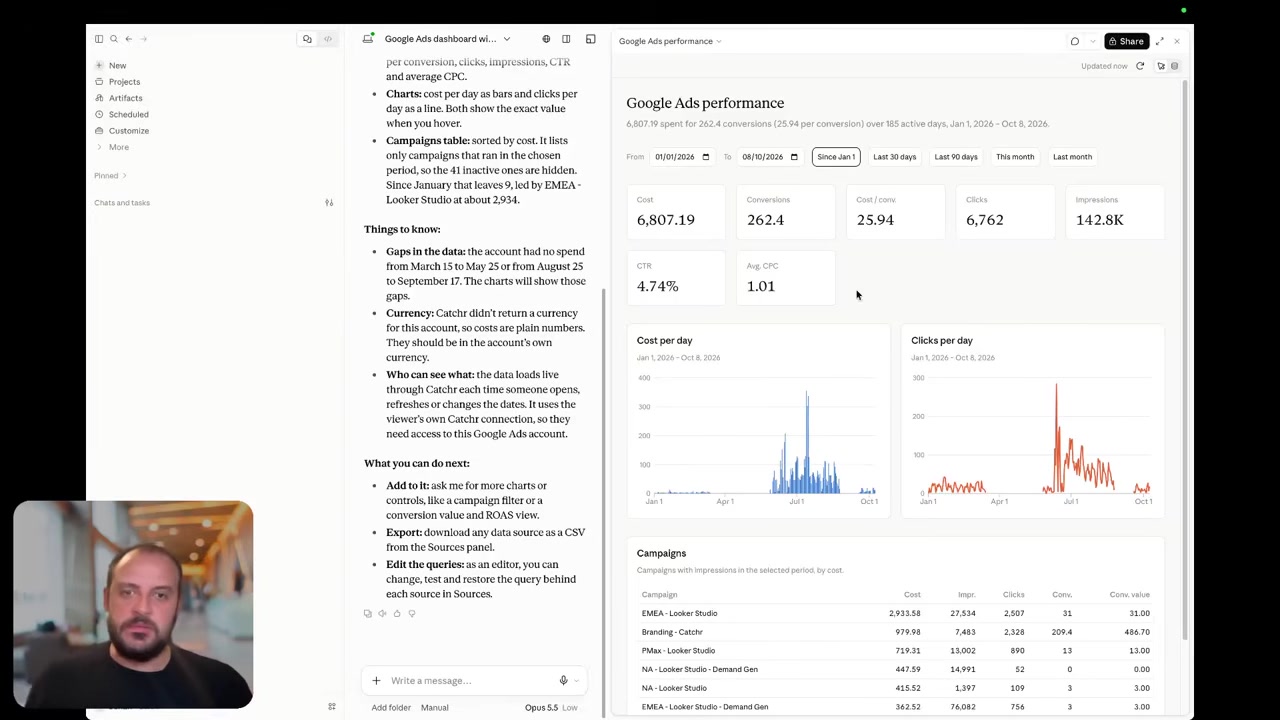
Catchr MCP lets ChatGPT, Claude and Copilot work with your connected marketing data from Starter. Ask which campaigns changed, compare periods or prepare the numbers for a client call. It also manages export jobs, so an assistant can help set up recurring delivery and inspect runs.
Porter adds saved cross-source blends, hosted report creation and sharing, and scheduled exports to Sheets or BigQuery. Its separate Automation offer supplies campaign and other marketing actions using credits. Those capabilities make it a credible choice for an agency that wants to move from a performance question to an approved action in the source platform.
Today, its writes concern reporting and export jobs. Select Catchr for analysis and data delivery; select Porter’s action offer when campaign execution is a requirement.
Coming soon
Create and update campaigns through Catchr MCP
Planned for a future release. These actions are not available yet.
Data Studio: reusable client dashboards in both
Catchr

Porter Metrics

Catchr includes native Data Studio connectors from Starter. Connect the accounts, choose fields and build the dashboard using the charts, filters and date controls your clients already know. Templates provide a starting point for recurring reports.
Porter is also a strong Data Studio option, with a template gallery and a documented workflow for adapting copied reports to each client. Its direct connectors and BigQuery route serve different needs: a quick source report or a warehouse feeding more complex analysis.
For an agency with several small clients, the subscription calculation can matter more than the dashboard editor: the charts still live in Google’s reporting tool. Catchr’s $79 Momentum bundle covers the 25-account example while leaving the same accounts available to spreadsheets and AI. Explore Catchr for Data Studio.
Power BI: a clear Catchr route from Starter
Catchr

Catchr brings marketing data into Power BI through saved Web queries. Choose the source, accounts, metrics and dates in Catchr, then load the result into Power BI. Your team can prepare the data with Power Query and build measures in DAX.
Power BI is included in Starter, together with the other everyday reporting destinations. An analyst working in Microsoft’s stack can use the same Catchr source connections as a colleague preparing a Google dashboard.
Porter names Power BI as a supported destination, including for teams combining marketing and business data. The reviewed public guide does not detail its current connection and Service-refresh setup, so we do not claim an identical native connector. No matching Porter Power BI interface was verified. See the Catchr Power BI workflow.
Google Sheets: automate the recurring reporting workbook
Catchr
Porter Metrics
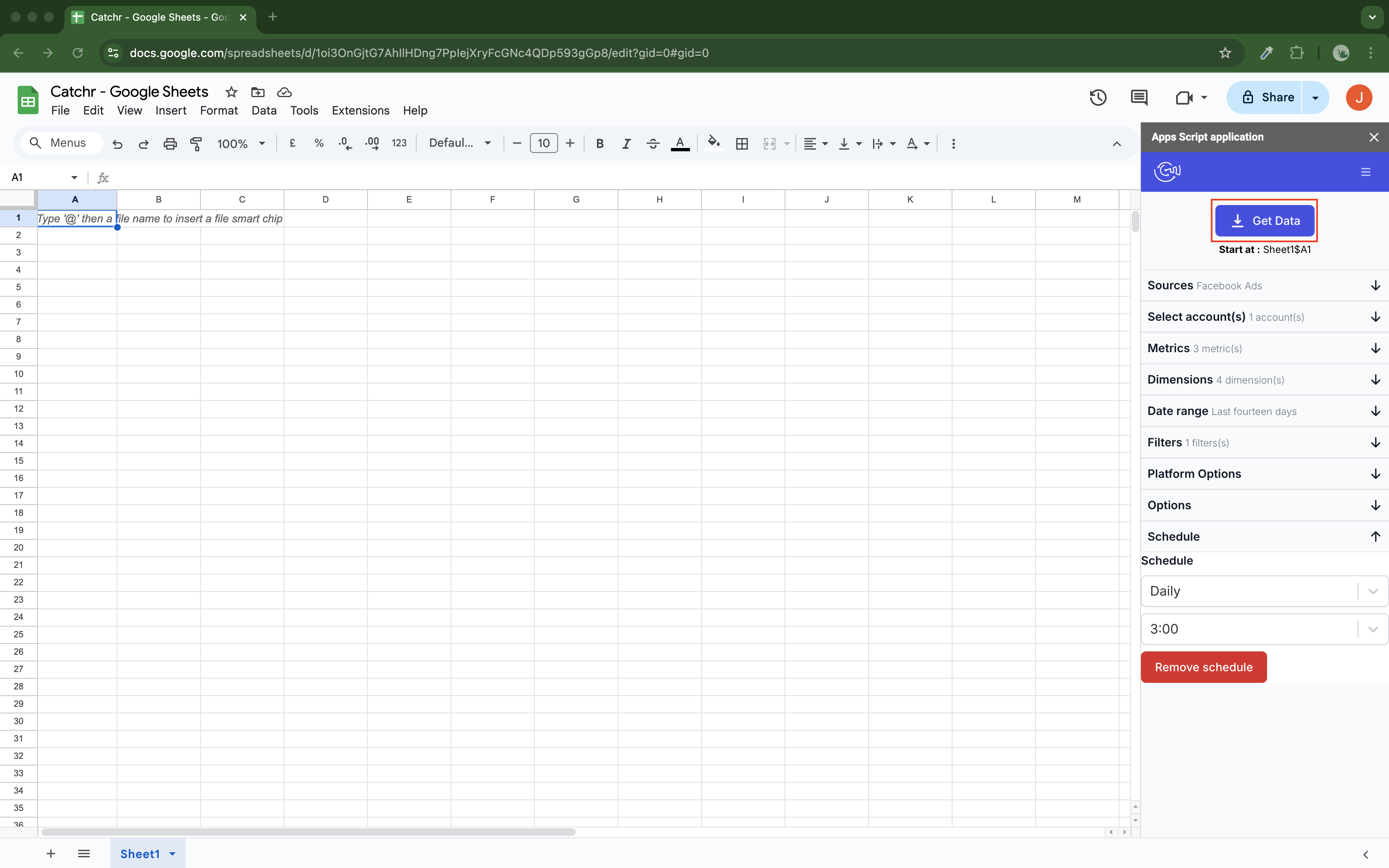
Catchr’s native Sheets add-on is included from $24/month. Choose accounts, fields, dates and a starting cell; schedule hourly, daily, weekly or monthly updates. Replace, append and combine/update modes support different workbook layouts.
Use replacement for a current-period pacing table. Append rows to accumulate snapshots, or combine/update by chosen dimensions when existing records and new rows need to live together. The raw data can feed your own formulas, targets and notes.
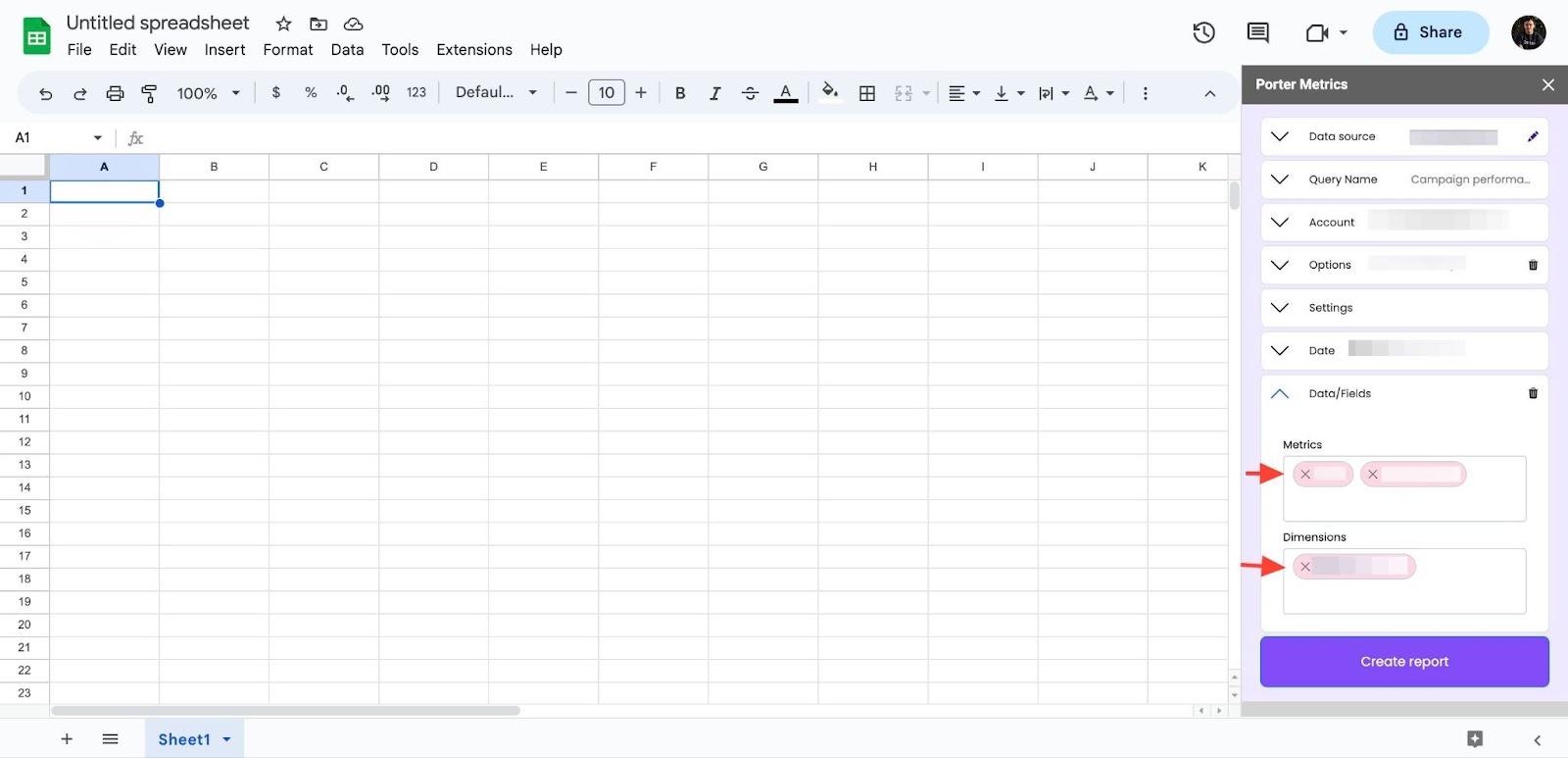
Porter also provides a Sheets add-on and scheduled exports. Its published 2023 guide shows replacement and append options; the screenshot above is explicitly an earlier interface. Its current MCP can also schedule saved blends into Sheets. Both products cover recurring spreadsheet reporting, so compare account costs and how you prefer to build the query. Explore Catchr for Google Sheets.
Excel: a native add-in included with Catchr
Catchr
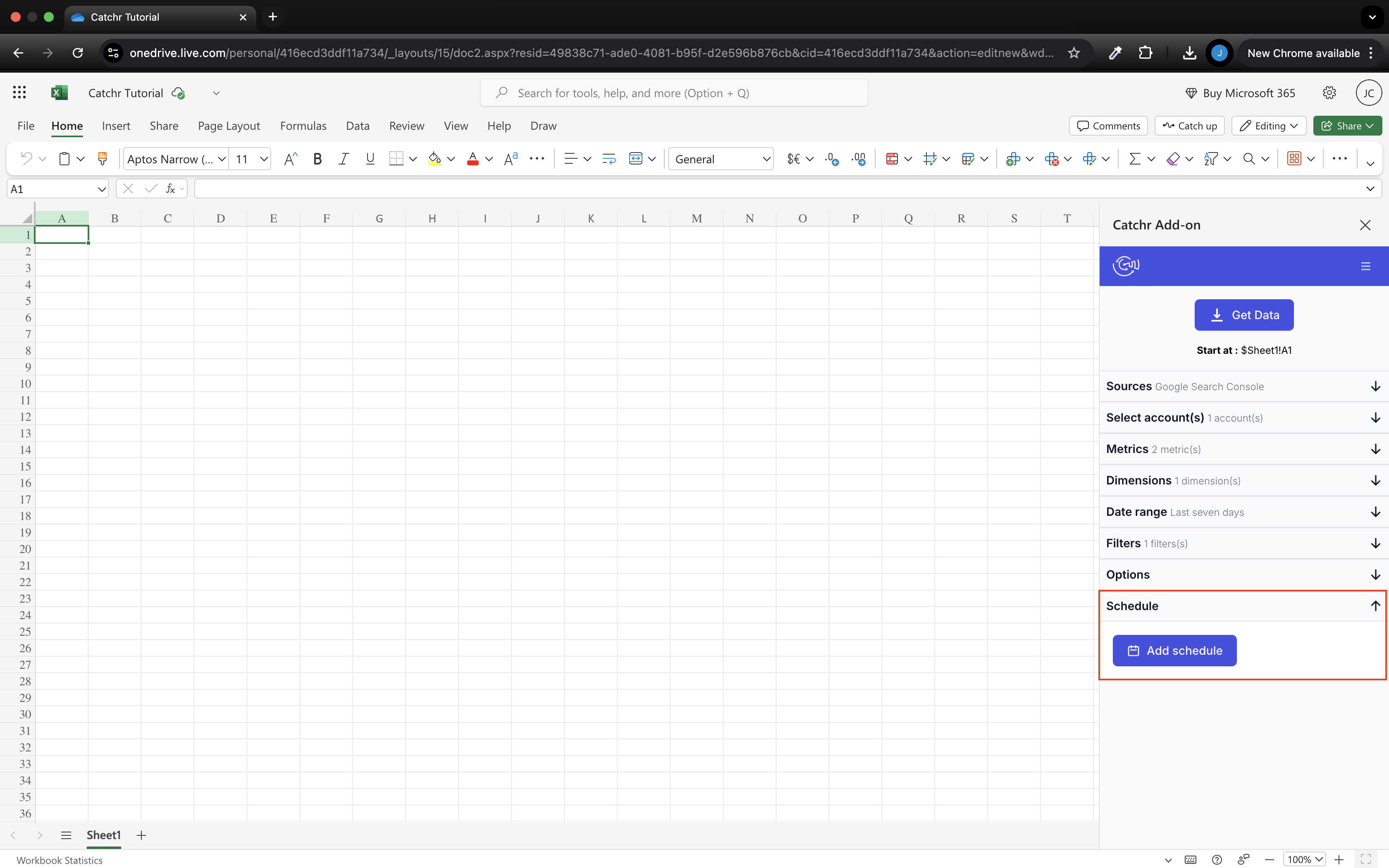
Catchr offers a native Excel add-in for web and desktop from Starter. Work in the side pane to select a source, account, fields and date range, then send the results into your workbook. Scheduled queries keep recurring reporting tables current.
This suits an agency that prepares budgets, performance summaries or client analysis in Excel. There is no separate Catchr spreadsheet plan, and colleagues can still use Data Studio or AI with the same connected accounts.
The Porter destination guides reviewed name Data Studio, Sheets, BigQuery, AI and Power BI, but do not establish a native Excel add-in. We therefore show only Catchr’s verified Excel interface. A file or warehouse handoff may serve a different need, but should not be presented as the same in-workbook experience. Explore Catchr for Excel.
Compare all six workflows
| Workflow | Porter Metrics | Catchr |
|---|---|---|
| MCP & AI | Analysis, blends and hosted reports. | Analysis and export-job management from Starter. |
| Databases & warehouses | BigQuery on a custom agreement. | BigQuery from Momentum. |
| Data Studio | Direct connectors and reusable templates. | Native connectors from Starter. |
| Power BI | Named destination; connection details not established here. | Saved Web queries from Starter. |
| Google Sheets | Add-on, scheduled delivery and MCP blends. | Native add-on with schedules and update modes. |
| Excel | Native add-in not verified in reviewed documentation. | Native web/desktop add-in from Starter. |
Which one fits your team?
Choose Porter Metrics when…
Choose Porter for one paid reporting account, recent-period free reporting, or a small number of accounts spread across many platforms. Its template workflow and saved blends can also suit a reporting team that already works comfortably in Porter.
Choose its Automation offer when you need campaign actions today. Hosted AI reports and action credits are meaningful capabilities, rather than reasons to compare only the lowest reporting price.
Choose Catchr when…
Choose Catchr when several clients share a manageable set of platforms and you want predictable bundled capacity. Starter covers the three-channel freelancer; Momentum covers five platforms and 25 accounts with room to grow.
It is also the clearer fit for a native Excel workflow, publicly priced BigQuery access, or direct exports to the wider databases and storage services included on Scale. Your team can keep dashboards, spreadsheets and AI under one reporting subscription.
How to move from Porter Metrics to Catchr
- Start with one recurring client report. Connect its source accounts in Catchr and keep the existing dashboard as the reference for dates, currency and conversion definitions.
- Move the destination you actually use. Copy the Data Studio report and replace its data sources, or rebuild the saved Sheets query in the Catchr add-on. Excel users can connect directly through Catchr’s Office add-in.
- Recreate shared blends where they belong. Use report blends, spreadsheet formulas or your warehouse for the cross-channel calculations the team needs. Porter-hosted reports need their own reporting replacement.
- Set the recurring delivery. Add your spreadsheet schedule or BigQuery export and compare one completed reporting period before changing the client-facing link.
- Keep campaign automation separate. Catchr’s current MCP covers analysis and export management; existing Porter campaign actions need a continuing execution tool.
Test your client stack before committing
Try the workflow your next client report needs.
Connect a real client stack, open your destination and check the numbers before you switch.
No credit card required. Choose a plan after testing your sources and destinations.
Keep comparing by workflow
Find a Data Studio reporting template →
Compare every tool by destination and MCP →
Connect marketing data to ChatGPT →
Sources and comparison method
Checked October 23, 2026 against Porter pricing, its pricing help, destination guide and MCP reference. Product screenshots link to their official sources; earlier interfaces are labeled. This is a public-documentation comparison, not a paid-account benchmark.
Catchr’s team confirmed the current plan capacities, unlimited users and requests, BigQuery on Momentum, API on Growth, wider exports on Scale, native spreadsheet add-ins and MCP export-job management. Campaign actions are planned; the public Catchr pricing page is being updated. Porter’s dedicated pricing help governs the BigQuery comparison where broader marketing copy is ambiguous.
- Porter Metrics product overview · pricing and allowances.
- Catchr product overview · pricing · destinations · MCP.
- Porter Metrics MCP Server.
- Porter MCP connector.
- Choosing a Porter destination.
- Porter refresh schedules.
- Porter BigQuery connectors.
- Send data to BigQuery.
- BigQuery versus direct Looker.
- Copy a Looker template.
- Porter pricing.
- Catchr destination directory.
- Get Started with Database and Data Stream.
- Catchr pricing.
- Data Studio connectors.
- Data Studio script limits.
- Power BI destination.
- Google Sheets destination.
- Get started with Google Sheets.
- Excel destination.
- Catchr MCP.
- MCP usage examples.
- Google Apps Script quotas.


