


Catchr starts at $24/month with three platforms, 10 accounts and unlimited users. Adzviser starts at $59.99 on monthly billing, with two platforms and unlimited accounts on each. Both connect marketing data to dashboards, spreadsheets and AI; the deciding differences are your account volume, Excel automation and warehouse destinations.
The quick answer
Choose Catchr for a lower entry price, scheduled Excel reporting and marketing data delivered to a broader range of databases. Choose Adzviser when you manage many accounts across a small platform mix or want its entry-level BigQuery and Amazon S3 exports. Both offer AI analysis; Catchr also supports export-job management through MCP.
Adzviser vs Catchr at a glance
Catchr gives a freelancer more platform capacity for a lower monthly starting price. Adzviser becomes attractive when account volume grows faster than the number of platforms you use.
| What matters for your team | Adzviser | Catchr |
|---|---|---|
| Starting price | $59.99/month on monthly billing. $48.99/month billed yearly. | ✓ Lower monthly entry price $24/month on monthly billing. |
| Entry capacity | 2 sources monthly, or 3 yearly. Unlimited accounts per purchased source. | ✓ Included 3 platforms 10 total accounts Unlimited users. |
| Reporting destinations | Data Studio, Power BI, Sheets, Excel and AI included. | Data Studio, Power BI, Sheets, Excel and ChatGPT, Claude and Copilot access included from Starter. |
| Excel refresh | − Manual refresh only Native add-in; automatic scheduling is explicitly unavailable. | ✓ Scheduled reporting Native web and desktop add-in with recurring updates. |
| Warehouse exports | BigQuery and Amazon S3 included; monthly exported-row capacity applies. | BigQuery from Momentum, $79/month. Wider database and storage destinations on Scale, $599/month. |
| MCP actions | Read-only marketing analysis. | Analysis and export-job management today. ◷ Planned Campaign creation and updates in a future release. |
Prices checked October 23, 2026. Annual Adzviser source counts already include its extra source versus monthly billing. See Adzviser pricing.
Pricing: lower entry cost or unlimited accounts per source?
Catchr is less expensive to start when you need three marketing platforms. Its $24 monthly Starter plan can cover Google Ads, Meta Ads and GA4 together, with capacity for 10 accounts across those platforms.
Adzviser charges for selected source types and includes unlimited accounts within them. Its billing term changes both the price and source allowance. The annual Starter offer has three sources in total; the “extra source” message compares it with the two-source monthly plan.
Adzviser plans
| Plan | Published USD price | Selected sources and warehouse capacity |
|---|---|---|
| Starter | $59.99/month monthly $48.99/month billed yearly | 2 sources monthly / 3 yearly. Unlimited accounts per selected source. 6 million monthly active rows for warehouse exports. |
| Growth | $164.99/month monthly $148.99/month billed yearly | 6 sources monthly / 7 yearly. Unlimited accounts per selected source. 8.5 million warehouse rows per month. |
| Enterprise | Custom quote | Custom source selection, warehouse capacity and support. |
Catchr plans
| Plan | USD, billed monthly | Included capacity and destinations |
|---|---|---|
| Starter | $24/month | 3 platforms 10 total accounts Data Studio, Power BI, Sheets, Excel and MCP. |
| Momentum | $79/month | 5 platforms 30 total accounts BigQuery exports included. |
| Growth | $239/month | 10 platforms 100 total accounts BigQuery plus API access. |
| Scale | $599/month | 25 platforms 500 total accounts Wider warehouses, databases and storage; custom schema mapping. |
Every Catchr plan includes unlimited users and Catchr requests. Source-platform API limits still apply. Your BI, Microsoft, Google, AI and cloud-storage subscriptions are separate.
What changes the total?
| What grows | Adzviser | Catchr |
|---|---|---|
| Client accounts | Unlimited accounts within the selected source types. | A larger plan or added capacity when total accounts exceed the allowance. |
| Team access | Viewer and Editor invitations are supported. The account panel shows a member limit; its numeric allowance is not published in the reviewed guide. | Unlimited users, including account managers and analysts. No Catchr seat fee. |
| Exports and refreshes | BigQuery and S3 share a monthly row allowance. Re-exporting rows counts again. | Destination access follows the plan. Catchr requests are unlimited; provider limits remain applicable. |
| External tools | AI, Microsoft and cloud services can have their own charges. | The same external services remain separate from Catchr. |
Three reporting setups, priced by what they need
| Your setup | Catchr fit | Adzviser fit |
|---|---|---|
| Freelancer: 3 platforms, 3 accounts | Starter: $24/month. All three platforms fit, with seven account slots left. Use dashboards, spreadsheets and AI in the same subscription. | Starter yearly: $48.99/month for three sources, paid annually. Monthly Starter covers two sources. Monthly Growth covers the three-source requirement at $164.99/month. |
| Agency: 5 platforms, 25 accounts, 3 people | Momentum: $79/month. Five platforms and 30 total accounts cover the portfolio. All three colleagues are included, with BigQuery available too. | Growth: $164.99/month monthly, or $148.99/month billed yearly. The source and account requirements fit. Team-member allowance needs confirmation because the public guide refers to an account-level limit. |
| Growth team: 8 platforms, 60 accounts, BigQuery and API | Growth: $239/month. Ten platforms and 100 accounts leave room to expand. BigQuery and API access support shared reporting and custom workflows. | Custom configuration required. Eight source types exceed standard Growth, including its seven-source annual allowance. Obtain a quote covering sources, export rows and the required API use. |
These examples compare the published capacity needed for each setup. An agency with hundreds of accounts across only two or three source types may find Adzviser’s unlimited-account model compelling. Catchr’s advantage is strongest when its account allowances already cover the portfolio and the team needs several reporting tools.
Adzviser pricing · Adzviser team access · Catchr pricing. Checked October 23, 2026.
Data sources: can you connect your clients’ marketing stack?
Both products connect the familiar platforms behind agency reporting. The practical difference is how your selected sources and client accounts fit the subscription.
Advertising, analytics, ecommerce and CRM platforms
Catchr covers paid media, analytics, ecommerce, CRM and social reporting. Google Ads, Meta Ads, GA4, Shopify and HubSpot are examples of the different types of data a team can bring together across its client stack.
Adzviser also covers those categories and publishes source-specific metrics and breakdowns. Its AI positioning does not make it an AI-only connector: the same subscription serves spreadsheets and reporting destinations. Browse Catchr sources or Adzviser’s source guides.
Metrics, dimensions and historical data
A useful report combines a measure, such as spend or purchases, with a breakdown, such as campaign or date. Both tools let you choose reporting fields; a shared platform logo does not establish identical field coverage.
Use the source’s available dimensions to match the question. A daily campaign pacing table is different from a product-level ecommerce report. Historical depth and compatible field combinations depend on the underlying platform, the selected endpoint and account permissions.
Managing multiple accounts across clients
Catchr counts accounts across the plan: five Google Ads accounts use one platform and five account slots. That makes a 25-account agency a straightforward Momentum fit, regardless of how those accounts are distributed across its five selected platforms.
Adzviser allows unlimited accounts for each purchased source type. Its workspace guide organizes one account per source in each workspace, so a second account on the same platform belongs in another workspace. This can suit agencies that organize reporting around individual clients. The account allowance and the workspace structure describe different things.
Both cover everyday reporting; automation sets them apart
You can use either product for dashboards, Sheets and AI analysis. Catchr’s clearer advantages are recurring Excel updates, MCP export operations and its wider range of direct database destinations. Adzviser includes BigQuery and S3 earlier in its pricing, which can matter for a focused warehouse setup.
Databases and warehouses: direct destinations and row allowances
Catchr

Adzviser

Catchr sends marketing data to BigQuery from Momentum at $79/month. Growth adds API access and more account capacity. Scale opens Snowflake, Redshift, Azure SQL, MySQL, PostgreSQL, S3, Google Cloud Storage and Azure Blob, with custom schema mapping.
Adzviser documents direct BigQuery and S3 pipelines. You can schedule exports and backfill history. S3 files can then feed another warehouse, but that downstream route is different from a direct Adzviser connection to Snowflake or Redshift.
For Adzviser, export volume matters alongside source count. BigQuery and S3 share the monthly active-row allowance, and running the same rows again counts again. A daily rolling export can therefore use more capacity than the number of unique records stored.
Choose Catchr Scale when the final destination is an existing database your team already operates. Adzviser deserves a place on the shortlist when BigQuery or S3 is sufficient and you value unlimited source accounts.
Explore Catchr for BigQuery. · See all Catchr destinations.
MCP: analysis with both, export-job management with Catchr
Catchr
Adzviser

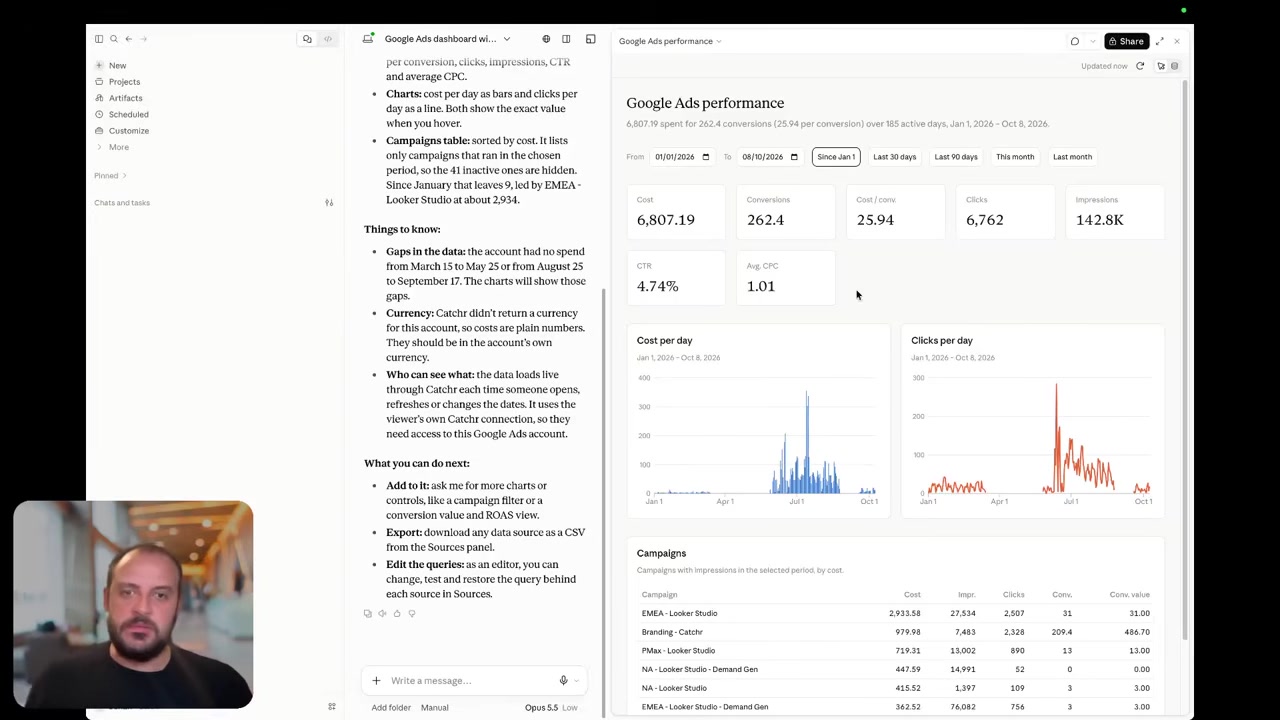
Catchr includes MCP from Starter. Ask Claude, ChatGPT or Copilot to investigate campaign performance using connected marketing data. The same subscription also serves the reports and spreadsheets used by colleagues.
Adzviser offers a strong range of AI integrations, including Claude, ChatGPT and other MCP clients. Its documented workflow discovers workspaces and fields, retrieves reporting data and helps the assistant explain results. Its reporting tools are read-only.
Catchr adds export-job management: an assistant can help create and update recurring reporting exports, with the destination available on the relevant plan. This is useful when a performance question leads to a repeatable BigQuery report instead of a one-off answer.
Today’s tools support analysis and export operations. Adzviser also explicitly excludes campaign edits from its reporting tools.
Coming soon
Create and update campaigns through Catchr MCP
Planned for a future release. These actions are not available yet.
Data Studio: keep your dashboard and compare the source mix
Catchr

Adzviser

Catchr connects marketing data to Data Studio from Starter. Build client dashboards with charts, date controls, calculated fields and blends, or begin with a reporting template.
Adzviser also supplies community connectors. It intentionally relies on Google’s free connectors for Google Ads, GA4 and Search Console, rather than duplicating those services. Its paid connections serve platforms such as Meta Ads, Shopify and LinkedIn Ads.
That distinction can change the subscription you need. A dashboard combining Google’s native connections with one paid social connector may need fewer Adzviser source types than a workbook that pulls all the same platforms through Adzviser. Count sources for the complete workflow, including AI and spreadsheets.
Explore Catchr for Data Studio.
Power BI: saved queries for the model you already use
Catchr

Adzviser

Catchr brings marketing data into Power BI through a saved Web query. Choose the source, accounts, metrics and dates, then load the result into your Power BI model. Power BI is included from the $24 Starter plan.
Adzviser offers a Desktop connector and a separate saved Query URL route for scheduled refresh in Power BI Service. Its official guide says the Query URL feature requires activation on the account. Once configured, Power BI manages the refresh schedule.
Both approaches leave your team in charge of the finished report: relationships, transformations, measures and presentation remain in Power BI. For an agency with established DAX measures and dashboards, Catchr offers an accessible connection layer alongside its spreadsheet and AI destinations.
Google Sheets: scheduled reporting with either connector
Catchr
Adzviser

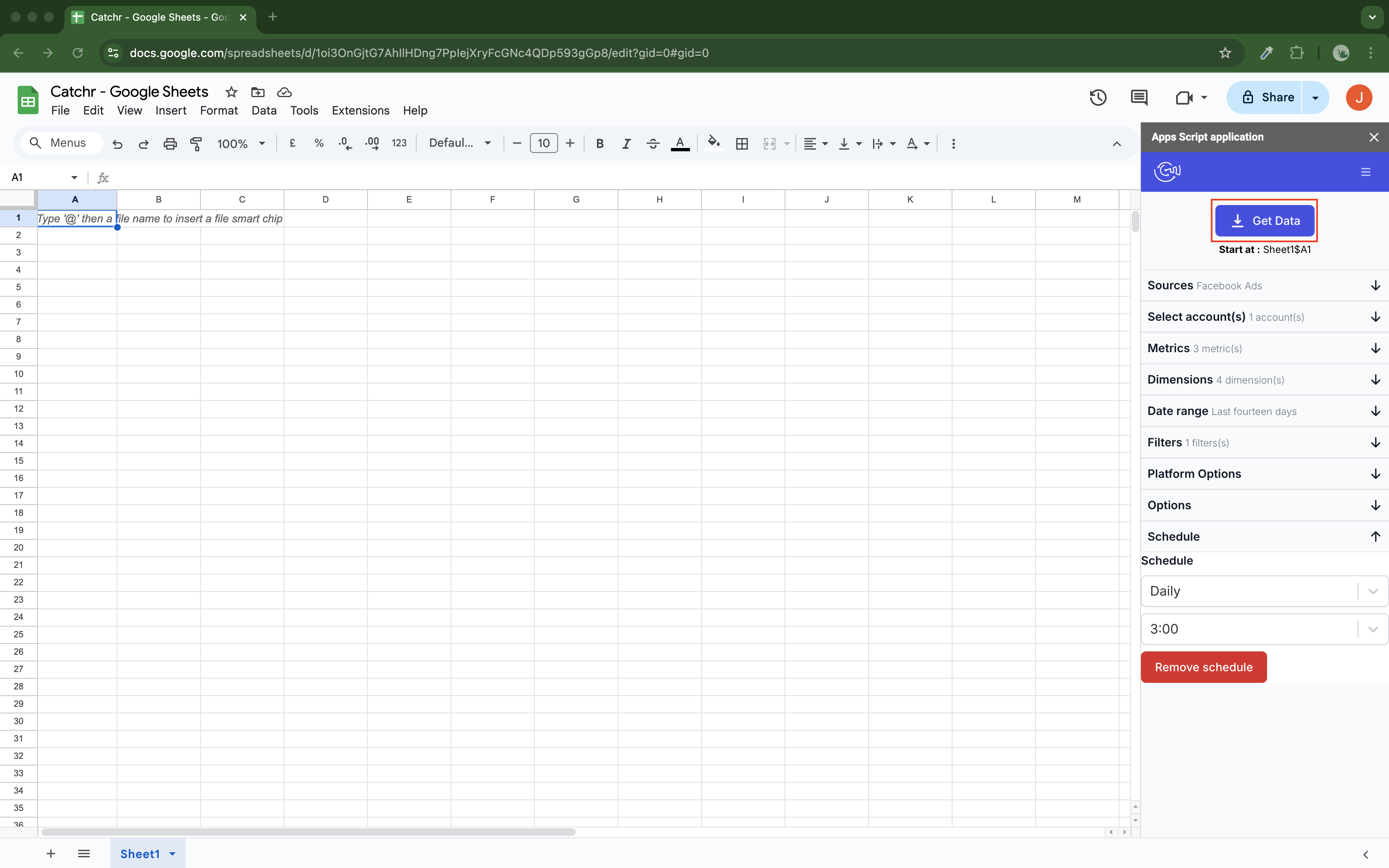
Catchr’s native Sheets add-on supports hourly, daily, weekly and monthly updates. Select your accounts and fields, choose a starting cell, and decide how new data updates the reporting table.
Replace refreshes the result, Append adds rows, and Combine/update matches selected dimensions to update existing rows and add new ones. This is useful for keeping a pacing workbook current while preserving its formulas and targets.
Adzviser also supports saved queries and scheduled refreshes. Its query definitions are stored in an adzviserQuery sheet, and its current guide describes a Schedule tab for recurring triggers. The schedule belongs to the Google account that creates it.
For either product, the workbook can remain the place where your team adds forecasts and commentary. Catchr combines that workflow with unlimited users and the other everyday reporting destinations from Starter.
Explore Catchr for Google Sheets.
Excel: Catchr adds automatic refresh to the native add-in
Catchr
Adzviser

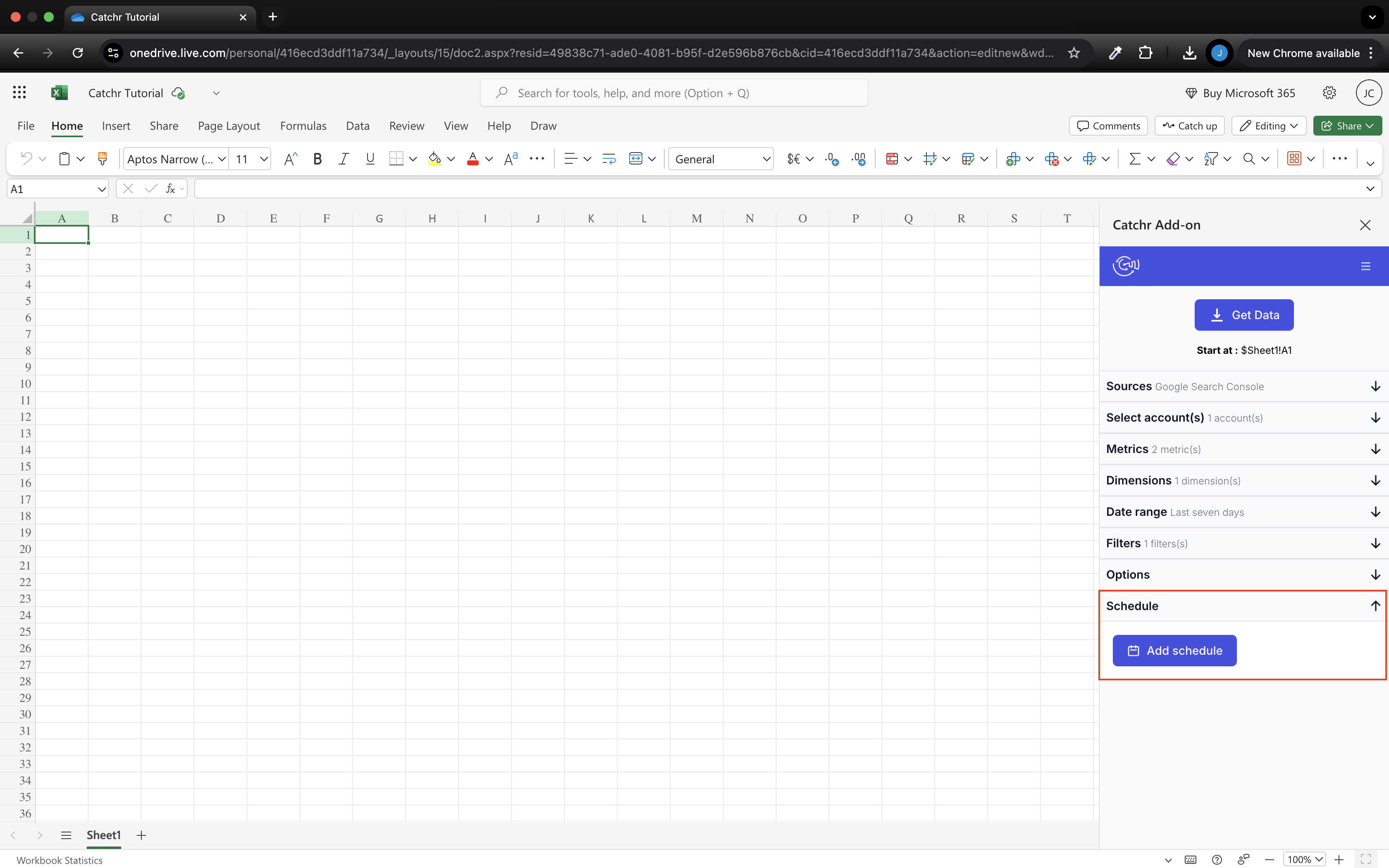
Catchr includes a native Excel add-in for web and desktop from Starter. Choose the source, accounts, fields and date range from the task pane, then load the data into the workbook your team already uses.
Schedule updates hourly, daily, weekly or monthly, with replace, append and combine/update modes. An account manager can open the recurring review workbook without first rebuilding the marketing-data extracts.
Adzviser also has a native Excel add-in and saved queries. Its documentation explicitly says automatic scheduled refresh is unavailable; users rerun queries manually. That is a concrete difference for teams whose monthly reporting depends on current Excel tables.
Adzviser can fit occasional, analyst-led exploration. Catchr is the stronger fit when the workbook is part of a recurring reporting routine and automatic updates are a requirement.
Compare all six workflows
| Workflow | Adzviser | Catchr |
|---|---|---|
| MCP & AI | Read-only analysis across supported AI clients. | Analysis and export-job management; campaign actions planned. |
| Databases & warehouses | Direct BigQuery and S3; exported-row allowances. | BigQuery from Momentum; broader databases and storage on Scale. |
| Data Studio | Community connectors plus Google’s free native connectors. | Source connectors included from Starter. |
| Power BI | Desktop connector or activated saved Query URL. | Saved Web queries from Starter. |
| Google Sheets | Native add-on, saved queries and schedules. | Native add-on, schedules and three row-update modes. |
| Excel | Native add-in; manual refresh. | Native web/desktop add-in with scheduled updates. |
Which one fits your team?
Choose Adzviser when…
Choose Adzviser when many client accounts share a small group of source types, or when you want BigQuery and S3 included in the entry subscription. Its range of AI clients is another reason to consider it. Manual Excel refresh can be sufficient for a team that runs occasional analysis rather than scheduled workbook reporting.
Choose Catchr when…
Choose Catchr when its account allowances cover your portfolio and you want dashboards, spreadsheets and AI in one subscription from $24/month. Scheduled Excel refresh, unlimited users and MCP export-job management help the same connected sources serve account managers and analysts. BigQuery starts at $79/month, with broader direct database destinations on Scale.
How to move from Adzviser to Catchr
- List the Adzviser workspaces and accounts used by each client report, workbook and export.
- Connect those source accounts in Catchr and rebuild the queries in the destinations your team uses.
- For Data Studio, keep suitable Google-native connections and replace the paid connections you are moving.
- For Excel, move recurring manual queries to Catchr schedules. Keep formulas and presentation in your workbook.
- For warehouse exports, choose the existing destination and recreate the refresh schedule and historical window.
- Compare one completed reporting period, then switch the recurring delivery after the report owner approves the result.
Existing Adzviser saved queries do not automatically become Catchr queries. Your dashboard and spreadsheet remain useful assets; the data connections need to be rebuilt.
Test your client stack before committing
Try the workflow your next client report needs.
Connect a real client stack, open your destination and check the numbers before you switch.
No credit card required. Choose a plan after testing your sources and destinations.
Keep comparing by workflow
Find a Data Studio reporting template →
Compare every tool by destination and MCP →
Connect marketing data to ChatGPT →
Sources and comparison method
Written by Catchr. Official product and pricing pages were reviewed on October 23, 2026. Prices retain their billing terms. Adzviser’s published pricing-page configuration distinguishes monthly and annual source counts; the annual bonus is included in the displayed total. Catchr’s team confirmed BigQuery from Momentum, current MCP export-job management and planned campaign actions; these owner confirmations supersede older public pricing details.
Images are unmodified screenshots from official guides, with original annotations retained. Some show an earlier interface. We did not conduct a controlled speed, support or uptime benchmark.
Adzviser pricing · Team access · Workspaces · Warehouse row usage · BigQuery · Amazon S3 · MCP analysis · Data Studio · Power BI refresh · Sheets refresh · Excel capabilities · Catchr pricing · Catchr destinations · Catchr MCP.
- Adzviser product overview · pricing and allowances.
- Catchr product overview · pricing · destinations · MCP.
- Adzviser pricing.
- Analyze data with Adzviser in Claude.
- Power BI scheduled refresh.
- Adzviser saved Sheets queries.
- Adzviser Excel add-in.
- Adzviser usage metrics and MAR.
- Catchr destination directory.
- Get Started with Database and Data Stream.
- Catchr pricing.
- Data Studio connectors.
- Data Studio script limits.
- Power BI destination.
- Google Sheets destination.
- Get started with Google Sheets.
- Excel destination.
- Catchr MCP.
- MCP usage examples.
- Google Apps Script quotas.


