

Managing Facebook Ads without a proper reporting dashboard is like flying blind. You have the data: spend, ROAS, CTR, frequency. But it is scattered across Ads Manager, spreadsheets, and email threads. A Data Studio template (formerly known as Looker Studio) solves this by consolidating everything into a single live, shareable dashboard that updates automatically.
The problem? Finding the right template takes time. There are hundreds out there, across a dozen different tools, with wildly different quality levels, connector requirements, and pricing models.
This guide cuts through the noise. We reviewed the best Facebook Ads Data Studio templates available in 2026, from quick one-pagers to full agency-grade dashboards, and compared them side by side so you can pick the right one for your use case.
Quick note on naming
- Google renamed Looker Studio back to Data Studio in April 2026. The product is the same: same URL, same features, same free tier. In this article we use 'Data Studio (ex-Looker Studio)' for clarity, since most search results still reference the old name.
What Makes a Great Facebook Ads Data Studio Template?
Before diving into the list, here is what separates a genuinely useful template from a pretty dashboard that does not hold up in practice:
- Automatic data refresh: no manual CSV exports or copy-pasting. The best templates connect directly to your Facebook Ads account via a native connector.
- The right metrics: spend, impressions, reach, CPM, CPC, CTR, ROAS, purchases, CPA, and frequency at a minimum. Campaign and ad set-level breakdowns are a significant bonus for day-to-day optimization.
- Filters and date controls: the ability to filter by campaign, ad set, platform (Facebook vs. Instagram), date range, and objective.
- Client-ready design: if you are an agency, the template needs to look polished enough to share directly with clients without extra design work.
- Ease of setup: copy, connect your data source, done. Anything requiring custom scripting or API keys is a red flag for most users.
The Best Facebook Ads Data Studio Templates
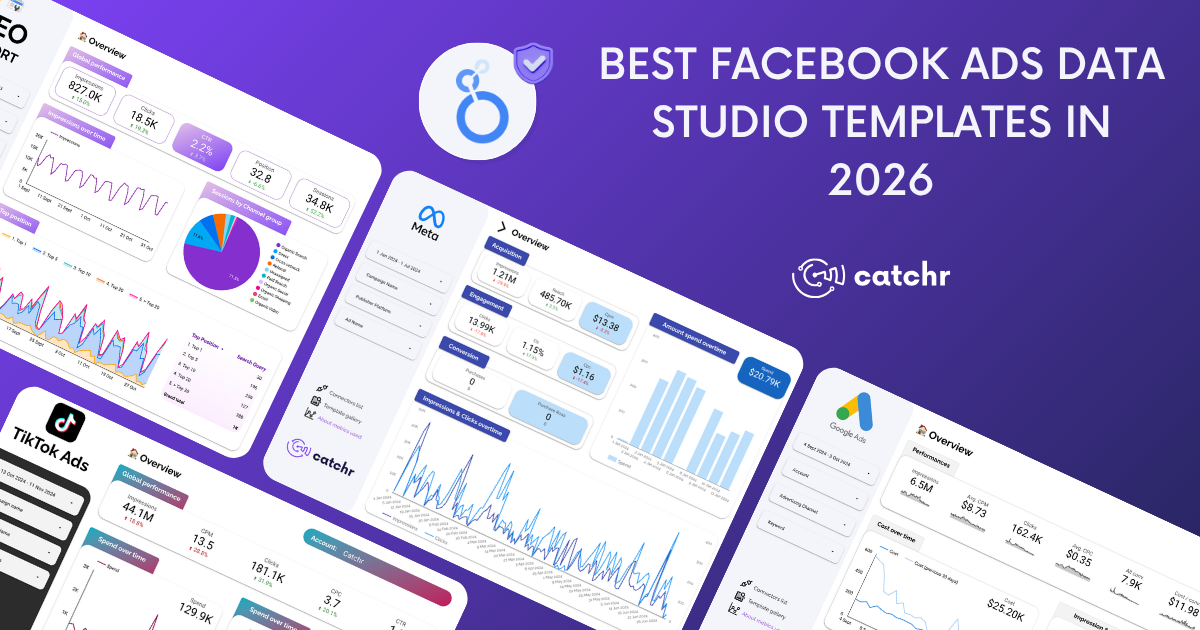
Below is a curated list of the best Facebook Ads templates available for Data Studio in 2026, starting with Catchr's own templates, built by an official Google Data Studio Partner, followed by the best options from other tools on the market.
1. Ads Performance Overview
A cross-platform overview report that centralizes Facebook Ads, Google Ads, and Microsoft Ads performance in a single dashboard. Data blends are pre-configured, so there is no manual setup to connect your accounts, and the report is live. Each platform gets its own metrics columns alongside a unified cross-platform view, making it easy to compare budget allocation and ROAS across channels at a glance.

- Metrics: Spend, Impressions, CPM, Clicks, CPC, CTR, ROAS, Purchases, CPA shown per platform and in aggregate
- Breakdowns: By platform (Facebook, Google, Microsoft), by campaign, by date period
- Pages: Overview, platform comparison, campaign breakdown, date trends
- Filters: Date range, platform selector, campaign name
- Ideal for: Agencies and media buyers running paid campaigns across multiple platforms who want one unified weekly report
Get the All-in One Ads template for Data Studio.
2. Meta Ads Campaign Objective Template
A multi-page report that splits Meta Ads performance by campaign objective, giving each objective its own dedicated dashboard page. An awareness campaign is measured on reach, frequency, and CPM. A sales campaign is measured on ROAS, purchases, and CPA. A lead campaign on CPL and lead volume. Each page shows only the metrics that are meaningful for that objective, so you can evaluate performance without mixing incomparable goals.

- Metrics: 39 metrics in total across objectives: reach, frequency, CPM (Awareness); clicks, CPC, CTR, landing page views (Traffic); video views at 25/50/75/100% (Engagement); leads, CPL (Leads); app installs, CPInstall (App Promotion); purchases, ROAS, CPA, omni purchases (Sales)
- Breakdowns: By campaign, ad set, and ad within each objective; by placement (Facebook Feed, Instagram Stories, Reels, etc.); by account for multi-account setups
- Pages: Overview, Awareness, Traffic, Engagement, Leads, App Promotion, Sales — one dedicated page per objective
- Filters: Date range, campaign name, ad set name, ad name, placement
- Ideal for: Advertisers running multiple campaign objectives simultaneously who need clean, objective-specific reporting without building separate dashboards for each goal
Get the Facebook Ads (Meta Ads) Objective template for Data Studio.
3. Meta Ads Template
A four-page report covering the full Meta Ads account from top-level KPIs to audience segmentation and campaign-level performance. The left-side filter panel applies across all pages simultaneously, date range, campaign, platform, and ad name, so switching context is instant. The Funnel page maps the full conversion path from impression to purchase, useful for identifying where drop-offs occur across the account.

- Metrics: Spend, Impressions, Reach, CPM, Clicks, CPC, CTR, ROAS, Purchases, Purchases Value, Add to Cart, Add to Wishlist
- Breakdowns: By campaign, by platform (Facebook vs. Instagram), by audience demographics (age, gender, country), by campaign objective, and status
- Pages: Overview (top-level KPIs and trends), Audience (demographics breakdown), Campaign (per-campaign performance table), Funnel (impression to purchase path)
- Filters: Date range, campaign name, platform selector, ad name applied across all pages simultaneously
- Ideal for: Marketing teams and agencies that want a complete Meta Ads report with audience insights, ready to share with clients without modifications
Get the Facebook Ads (Meta Ads) template for Data Studio.
4. Facebook and Instagram Ads Report Template
A multi-page report covering Meta Ads in a single dashboard. The report includes audience breakdowns by age, gender, country, and device, as well as a placement-level view showing performance across Facebook Feed, Instagram Stories, Reels, and Messenger.
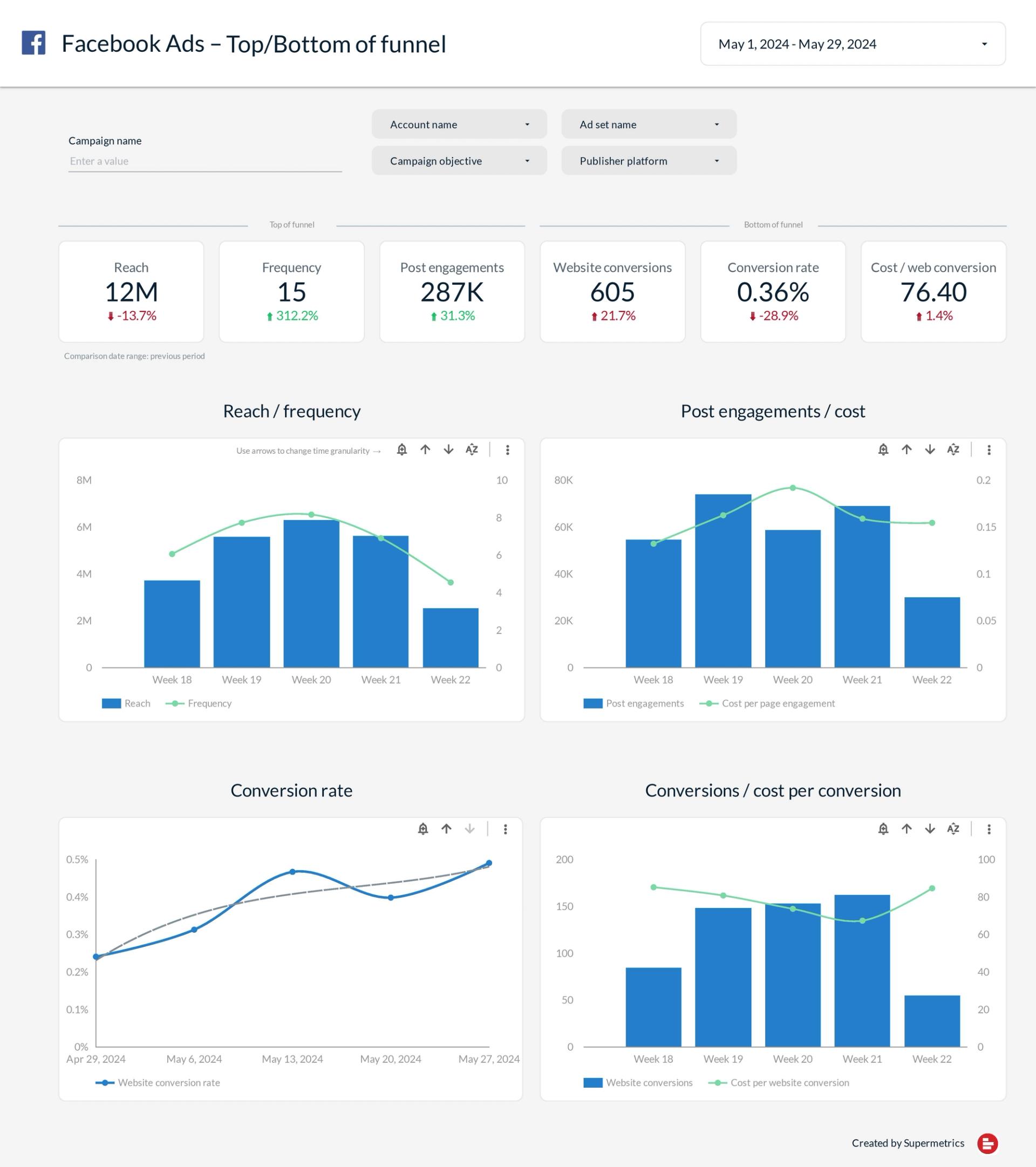
- Metrics: Spend, impressions, reach, frequency, clicks, CTR, CPC, CPM, ROAS, purchases, leads, video views, post engagement
- Breakdowns: By platform (Facebook, Instagram, WhatsApp, Messenger), by campaign, by ad set, by audience (age, gender, country, device), by placement
- Ideal for: Agencies and advertisers running campaigns across the full Meta family who need all four platforms in one report, or teams already using Supermetrics for other channels
5. Facebook Ads Overview Dashboard Template
A clean one-page overview report structured around three core sections: Cost & Visibility (spend, CPM, impressions), Acquisition (clicks, CTR, CPC), and Conversion (conversions, cost per conversion). A campaign performance table appears below, showing spend, impressions, CPM, CTR, and CPC per campaign, color-coded for quick performance reading. A trend chart on the right tracks spend and clicks over time.
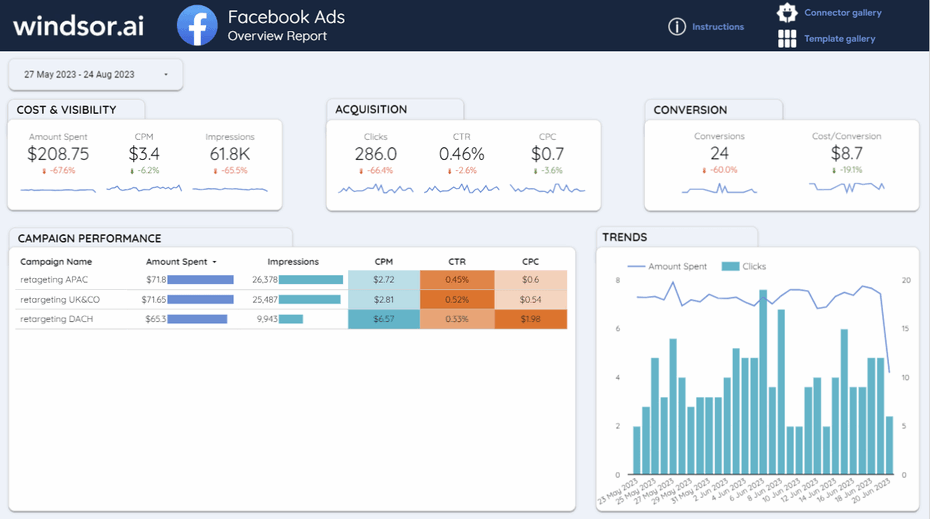
- Metrics: Amount Spent, CPM, Impressions, Clicks, CTR, CPC, Conversions, Cost per Conversion, grouped by funnel stage (visibility, acquisition, conversion)
- Breakdowns: By campaign (spend, impressions, CPM, CTR, CPC in a color-coded table); trend view by date (spend and clicks over time)
- Ideal for: Advertisers who want a fast, single-page summary of their Facebook Ads account structured by funnel stage, without needing multi-page breakdowns
6. Facebook Ads Data Studio Report Template
A multi-page report with a strong focus on visual design quality. The template covers ad performance, platform breakdown across Meta Ads, and campaign-level analysis across dedicated pages. Calculated fields for efficiency ratios (ROAS, CPA, CPM) are pre-built and ready to use. The template is available as a one-time purchase (199 EUR), with unlimited copies included.
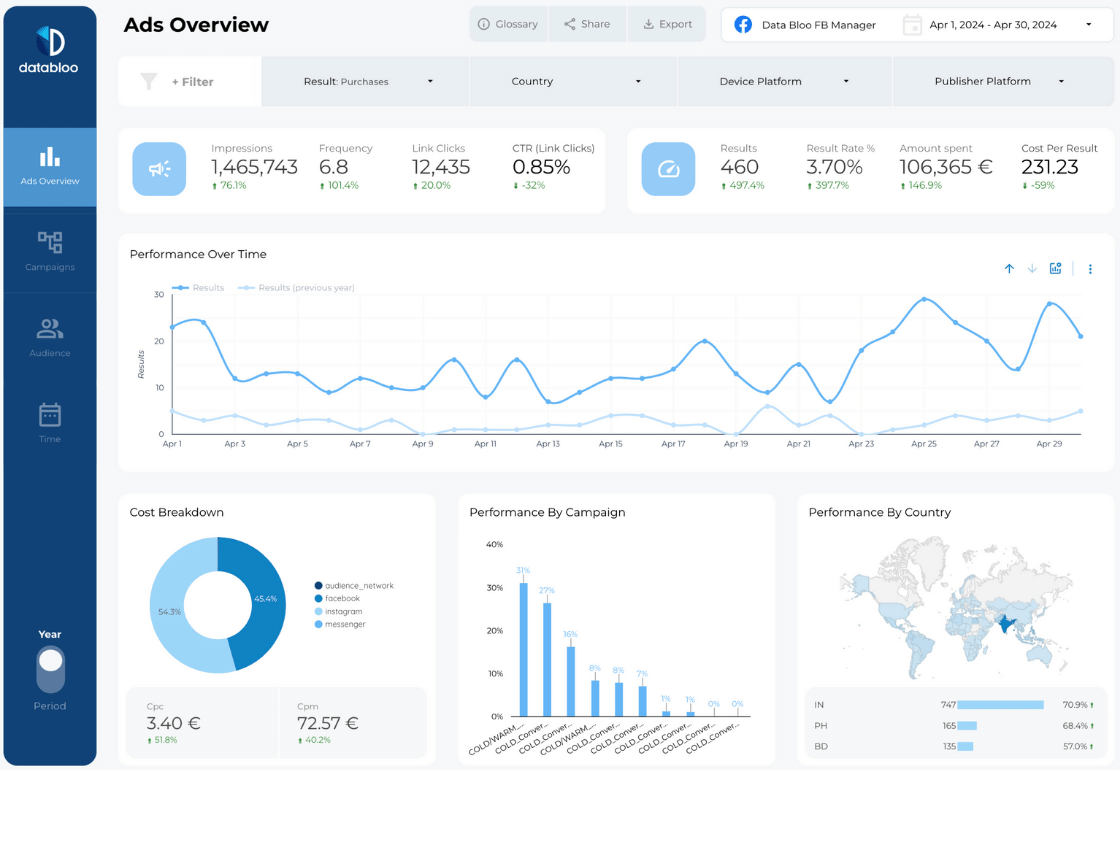
- Metrics: Spend, impressions, reach, clicks, CTR, CPC, CPM, ROAS, purchases, conversions, with pre-built calculated efficiency fields
- Breakdowns: By platform (Facebook, Instagram, Messenger), by campaign, by ad set, by audience demographics, by time period (daily, weekly, monthly)
- Ideal for: Agencies that send polished, branded client reports and are willing to pay a one-time fee for premium design quality and unlimited copies
7. Meta Ads Looker Studio Report Template
A PPC-focused report built around ROAS tracking and campaign efficiency. The template is structured to provide a clear view of budget allocation and return on ad spend across campaigns and ad sets, with built-in period-over-period comparisons so you can track performance trends without manual calculations. The template is free to copy and available through Porter Metrics, with a 14-day free trial on the connector.
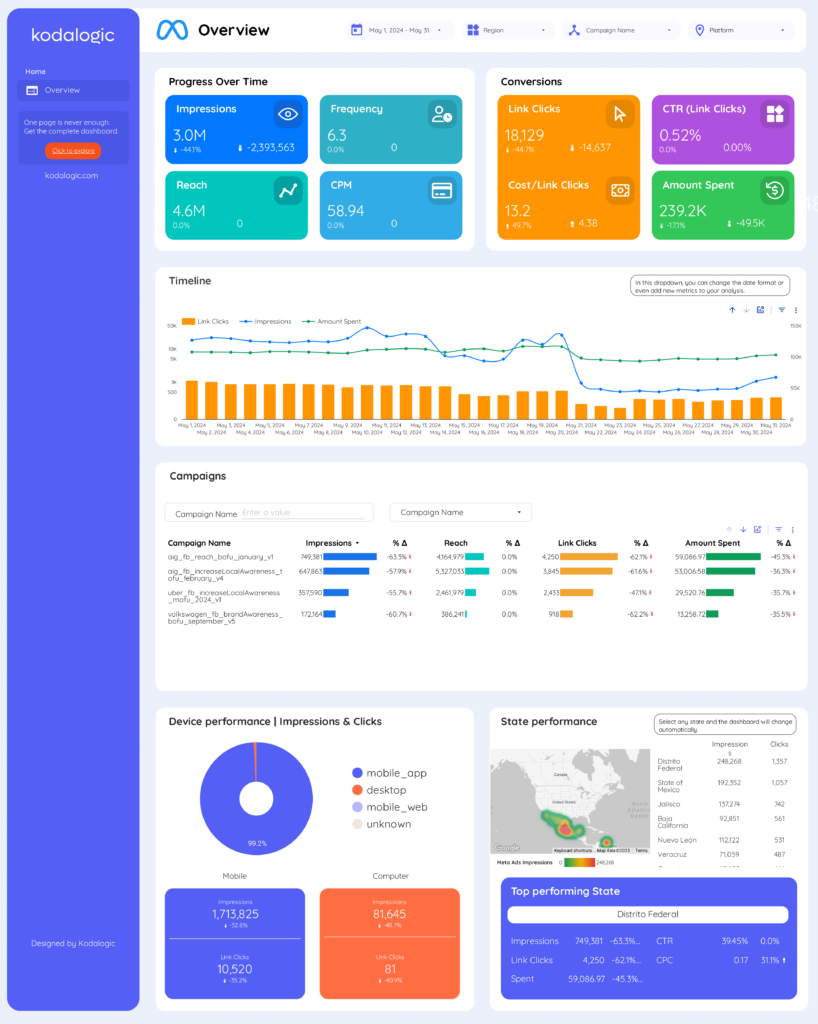
- Metrics: Spend, impressions, reach, clicks, CTR, CPC, CPM, ROAS, purchases, CPA, frequency with period-over-period comparison
- Breakdowns: By campaign, by ad set, by platform (Facebook vs. Instagram), by objective; budget pacing view included
- Ideal for: Performance marketers and PPC specialists who prioritize ROAS optimization and want period-over-period comparisons built into the template
8. Facebook Ads Overall Performance Template
A straightforward multi-page report covering Facebook Ads overall performance. The template includes all essential KPIs across a clean layout designed to be set up and shared in minutes. White-label customization (logo, colors, sender name) and automated report scheduling are built in, making it practical for smaller agencies handling client reporting at scale. The template is available through Two Minute Reports.
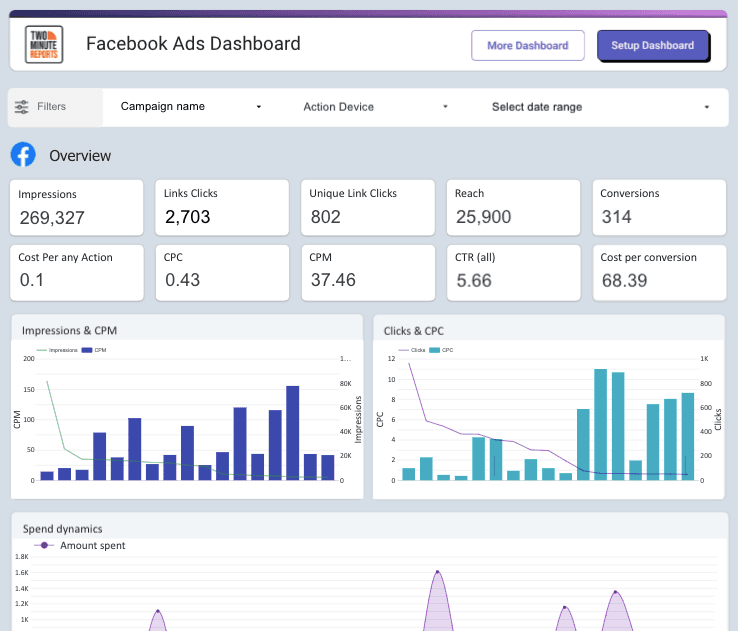
- Metrics: Spend, impressions, reach, clicks, CTR, CPC, CPM, ROAS, purchases, CPA — core KPIs without objective-specific custom fields
- Breakdowns: By campaign, by ad set, by date; demographic breakdowns on additional pages
- Ideal for: Freelancers and small agencies who need a quick, white-labeled client report with automated scheduling and no complex metric setup
How to Choose the Right Template for Your Use Case
Here is a simple decision framework:
- You manage a few accounts as a freelance media buyer: start with the Catchr Meta Ads Template. It covers all the essential metrics, includes audience and campaign breakdowns, and takes five minutes to set up.
- You run paid campaigns across Facebook, Google, and Microsoft: the Catchr Ads Performance Overview is built for exactly this. Pre-configured blends, one unified report across all three platforms.
- You run multiple campaign objectives simultaneously: the Catchr Campaign Objective template gives each objective its own dedicated page with the right KPIs. No other template on this list does this out of the box.
- You need to justify Facebook spend within a broader media mix: the Windsor.ai attribution dashboard is the most relevant option for cross-channel measurement, and it offers a 30-day trial to test it.
- You prioritize polished client-facing design: the DataBloo template produces the most visually refined output on this list. The 199 EUR one-time fee includes unlimited copies.
How to Set Up a Catchr Facebook Ads Template in Data Studio
Getting from zero to a live dashboard takes under 5 minutes:
- Pick a template from the Catchr template library and click 'Get this template'.
- Create a Catchr account and start your 14-day free trial. No credit card required.
- Connect your Facebook Ads account via the Catchr connector: authenticate with Facebook and select your ad account.
- Copy the template in Data Studio: click 'Make a copy', then swap the data source to your newly created Catchr source.
- Your dashboard is live and will refresh automatically going forward.
Questions About Facebook Ads Data Studio Templates
Is Looker Studio the same as Data Studio?
Yes. Google renamed Data Studio to Looker Studio in October 2022, then renamed it back to Data Studio in April 2026. The product, features, and free tier are unchanged. You will still see 'Looker Studio' used in older articles and templates, including some on this page.
Are these templates really free?
The templates themselves are free to copy and use. To connect your own Facebook Ads data, you need a paid connector. Catchr, Supermetrics, and Porter Metrics offer a 14-day free trial; Windsor.ai offers a 30-day free trial. DataBloo charges 199 EUR for the template itself, in addition to the connector.
Can I use these templates with multiple ad accounts?
Yes. Catchr's connector supports multi-account setups. You can create a single data source that pulls from multiple Facebook Ads accounts and use it across client reports.
Do these templates work with Instagram Ads too?
Yes. Facebook Ads and Instagram Ads are managed through the same Meta Ads Manager, and Catchr's connector pulls data for both. The Meta Ads Template and the Campaign Objective template both include platform-level breakdowns to compare Facebook and Instagram performance side by side.
Can I customize these templates?
Fully. Once you make a copy in Data Studio, you own it. You can add metrics, change colors, rearrange pages, add your client's logo, or connect additional data sources such as Google Analytics or Google Ads.
Bottom Line
The best Facebook Ads Data Studio template is the one that matches how you actually report: the metrics you track, the level of detail your clients expect, and the platforms you manage.
For most media buyers and agencies, Catchr's three templates cover the full range: the Meta Ads Template for straightforward campaign reporting, the Campaign Objective template for multi-objective accounts, and the Ads Performance Overview for multi-platform setups. All three are free to copy and connect in under five minutes.
If you need full Meta family coverage, including WhatsApp and Messenger, the Supermetrics template goes deepest on that front. If attribution across your entire media mix is the priority, the Windsor.ai dashboard is the most focused option. And if premium design for client presentations matters, the DataBloo template is worth the one-time investment.
Browse all Catchr Facebook Ads templates for Data Studio: catchr.io/templates


.png)