

MCP stands for Model Context Protocol. It is an open standard that gives AI applications a consistent way to connect to external data and tools.
Instead of relying only on what a model already knows—or building a different integration for every assistant—an MCP-compatible application can discover approved capabilities, request the information it needs, and use the result in its answer.
For a marketer, that can mean asking an AI assistant why CPA increased and letting it retrieve the relevant campaign data, rather than exporting files from five platforms before the analysis can begin.
The useful way to think about MCP is not “a bigger brain for AI.” It is a controlled service desk: the assistant can see which services are available, make a specific request, and receive a structured response. The connection still needs authentication, permissions, and a trusted data source.
What does MCP stand for?
MCP stands for Model Context Protocol:
- Model refers to the AI model or application using the information.
- Context is the external information or capability the application needs to complete a task.
- Protocol is the shared set of rules used by the application and the connected system to communicate.
The official MCP documentation describes it as a standard for connecting AI applications to external systems such as data sources, tools, and workflows. Anthropic introduced MCP as an open-source project in November 2024, with the aim of replacing fragmented, one-off AI integrations with a common protocol.
How does MCP work?
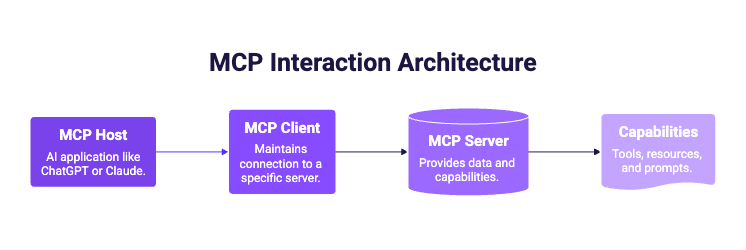
A typical MCP interaction involves three participants:
One host can connect to several MCP servers. The host creates a separate client connection for each server, while every server defines the capabilities it makes available. The MCP architecture documentation calls those capabilities tools, resources, and prompts:
- Tools perform a defined operation, such as querying campaign metrics.
- Resources provide context, such as a record, file, or API response.
- Prompts provide reusable instructions or interaction templates.
Most marketers do not need to manage these components. What matters is the sequence behind the answer.
A marketing example, step by step
Suppose you ask:
Compare Meta Ads and Google Ads for Client A over the last 30 days versus the previous 30 days. Show the three largest changes in spend, conversions, and CPA.
Here is what happens:
- The assistant interprets the request. It identifies the client, sources, date ranges, comparison, and metrics.
- The MCP client checks the available capabilities. It finds the relevant tool offered by the connected MCP server.
- The server handles the data request. It applies the authorized accounts, fields, and source queries.
- The server returns structured data. The assistant receives the requested figures—not a pre-written conclusion.
- The assistant explains the result. You can then ask a follow-up question without starting the data collection again.
That last distinction matters. MCP provides a route to context; it does not guarantee that every interpretation made by an AI model is correct. Important decisions still deserve a look at the supporting numbers.
.png)
What is an MCP server?
An MCP server is a program that exposes a defined set of data or actions to compatible AI applications. It tells the application what is available, accepts valid requests, and returns the result in the protocol's expected format.
The word “server” can sound more complicated than it is. An MCP server may run locally on the same computer as the AI application or remotely as an online service. For business tools, a remote MCP server is often more practical because the provider can manage availability, authentication, and updates centrally.
An MCP server does not automatically open an entire system to an AI assistant. What the assistant can access depends on:
- the capabilities exposed by the server;
- the identity used to connect;
- the accounts and permissions granted to that identity;
- the controls enforced by the host application and the service provider.
In other words, connecting a server should be treated like connecting any other business application: use a trusted provider and review the requested access.
MCP vs API: what is the difference?
MCP does not replace APIs. In many cases, an MCP server uses existing APIs behind the scenes.
For example, advertising platforms already provide APIs. Catchr connects to those source APIs, normalizes the marketing data, and exposes useful capabilities to AI assistants through MCP. The API remains the route to the source; MCP becomes the common interface used by the assistant.
.png)
Why MCP matters for marketing teams
Marketing work has a context problem. The question usually starts in one place, while the evidence sits across ad platforms, analytics properties, CRM records, ecommerce stores, and client accounts.
MCP can shorten the distance between the question and that evidence.
Start with the question, not the export
Without a connected data layer, asking an AI assistant about live performance often means collecting CSV files first. With an appropriate MCP connection, the assistant can request current data as part of the conversation.
Keep follow-up questions in the same workflow
A static export answers the question you anticipated. A connected conversation lets you move from “What changed?” to “Which campaigns caused it?” and then to “How should I explain this to the client?” while retaining the relevant context.
Reuse one governed connection
The same approved data connection can support different questions and workflows. Teams do not need to build a new point-to-point integration every time the analysis changes.
Make AI useful beyond generic advice
An unconnected assistant can explain how CPA works. A connected assistant can help investigate why your CPA changed, for a named account and period, using the data you authorized.
Where MCP helps—and where it does not
MCP is especially useful when the work is exploratory and the next question depends on the previous answer:
- preparing a performance brief before a client meeting;
- comparing channels or client accounts;
- investigating a sudden change in spend, conversions, ROAS, or CPA;
- finding the campaigns behind an account-level movement;
- turning an analysis into a structured client recap;
- asking for the evidence behind a summary.
It is not automatically the best interface for every reporting task. A dashboard remains useful for monitored KPIs, a scheduled export remains useful for a recurring delivery, and a warehouse remains useful as a controlled data layer. MCP complements those systems by making selected data easier to use in an AI-led workflow.
It also cannot fix unclear data or an underspecified question. “How are my campaigns doing?” leaves the assistant to guess the account, period, comparison, and definition of success. A useful request names those choices.
Is MCP secure?
MCP is a communication standard, not a blanket security guarantee. A safe implementation still depends on the host, the server, its authentication method, the permissions granted, and how each provider handles data.
Before connecting any MCP server:
- Verify the provider. Do not connect an unknown server simply because its description sounds useful.
- Review the requested permissions. Grant only the data and actions needed for the workflow.
- Separate read and write access. A tool that can retrieve a report carries a different risk from one that can change a campaign.
- Keep humans in high-impact decisions. Check the source numbers before changing budgets or sending client conclusions.
- Review the AI provider's data policy. MCP defines the connection; it does not decide whether a host stores prompts or uses submitted data under its product terms.
This is also why “MCP gives AI access to everything” is the wrong mental model. A well-designed connection should expose a deliberate set of capabilities to an authenticated user.
How Catchr MCP connects AI to marketing data
Catchr MCP is a remote MCP server built for marketing work. Catchr connects to data from more than 100 advertising, analytics, CRM, ecommerce, email, SEO, and social platforms, then makes approved marketing-data capabilities available to ChatGPT and Claude.
Catchr handles the layer marketers should not have to rebuild for every question:
- connecting and maintaining source integrations;
- selecting the correct client accounts;
- mapping source-specific fields;
- applying the requested dates and breakdowns;
- returning structured data to the assistant.
The result is a practical separation of roles:
- ChatGPT or Claude handles the conversation and explanation.
- Catchr MCP handles access to the right marketing data.
- Your connected platforms remain the source of the performance metrics.
How to get started with Catchr MCP
- Connect your marketing platforms in Catchr. Authorize the sources and choose the accounts your team needs.
- Add Catchr to your AI assistant. Install Catchr from the ChatGPT app directory or add the Catchr to Claude.
- Authenticate and review access. Sign in to Catchr and confirm the connection.
- Ask a bounded question. Include the account, period, comparison, metrics, and preferred output.
Try this structure:
Using Catchr, prepare a client-ready performance brief for [client]. Compare [date range] with [comparison period] across [sources]. Start with the five most important changes, show the metrics behind each one, and finish with three questions we should discuss in the meeting.
See the Catchr MCP setup options and prompt examples, or browse the supported marketing integrations.
.png)