


Claude becomes a useful AI marketing assistant when it can work with the campaign data behind your question—not only generic marketing knowledge.
Catchr MCP connects Claude to the marketing sources and client accounts you authorize, so you can compare periods, investigate performance changes, and prepare client-ready answers without collecting another set of exports first.
Catchr is available directly in Claude's Connectors Directory. Open the listing, click Connect or Install, authenticate your Catchr account, and enable the connector in your conversation. There is no server URL or custom connector configuration to copy.
This guide shows what an AI assistant can do with connected marketing data, how to set it up on each Claude plan, and which prompts produce evidence you can actually use. For the product overview and supported workflows, see Catchr MCP for Claude.
What can an AI marketing assistant help you do?
An AI marketing assistant is most useful for investigative work: the next question depends on what the data reveals. With the right sources and accounts connected, Claude can help you move from a performance change to the campaigns behind it, then turn the evidence into a useful explanation.
The assistant should not invent missing metrics, hide an ambiguous scope, or present a recommendation as an observed fact. A strong workflow asks Claude to show the source, account, dates, and figures behind each important conclusion.
Why Claude needs connected marketing data
Claude can explain marketing concepts without a connector. It cannot know what happened in your accounts unless you provide the relevant evidence or give it access to an authorized data connection.
Catchr provides the connection layer. Claude handles the conversation and explanation. The connected marketing platforms remain the source of the performance data.
What you need before connecting Catchr to Claude
Prepare these three things:
- A Catchr account with at least one marketing source connected.
- Access to the source and client accounts you want Claude to query.
- A Claude account with access to the Connectors Directory.
Claude makes web connectors available to all users across Claude, Cowork, Claude Desktop, and Claude Mobile. On Team and Enterprise plans, an Owner or Primary Owner must enable Catchr for the organization before members can connect it. Each member then authenticates their own Catchr access. Check Claude's current connector documentation before publishing or troubleshooting availability.
You do not need to build an MCP server or configure a custom connector. Claude handles discovery and installation from the directory; Catchr handles access to the marketing sources and accounts you authorize.
Choose the setup that matches your Claude workspace
If Catchr already appears in your connector list, open it and click Connect to authenticate. You do not need to create another connector.
Connect Catchr from Claude's Connectors Directory
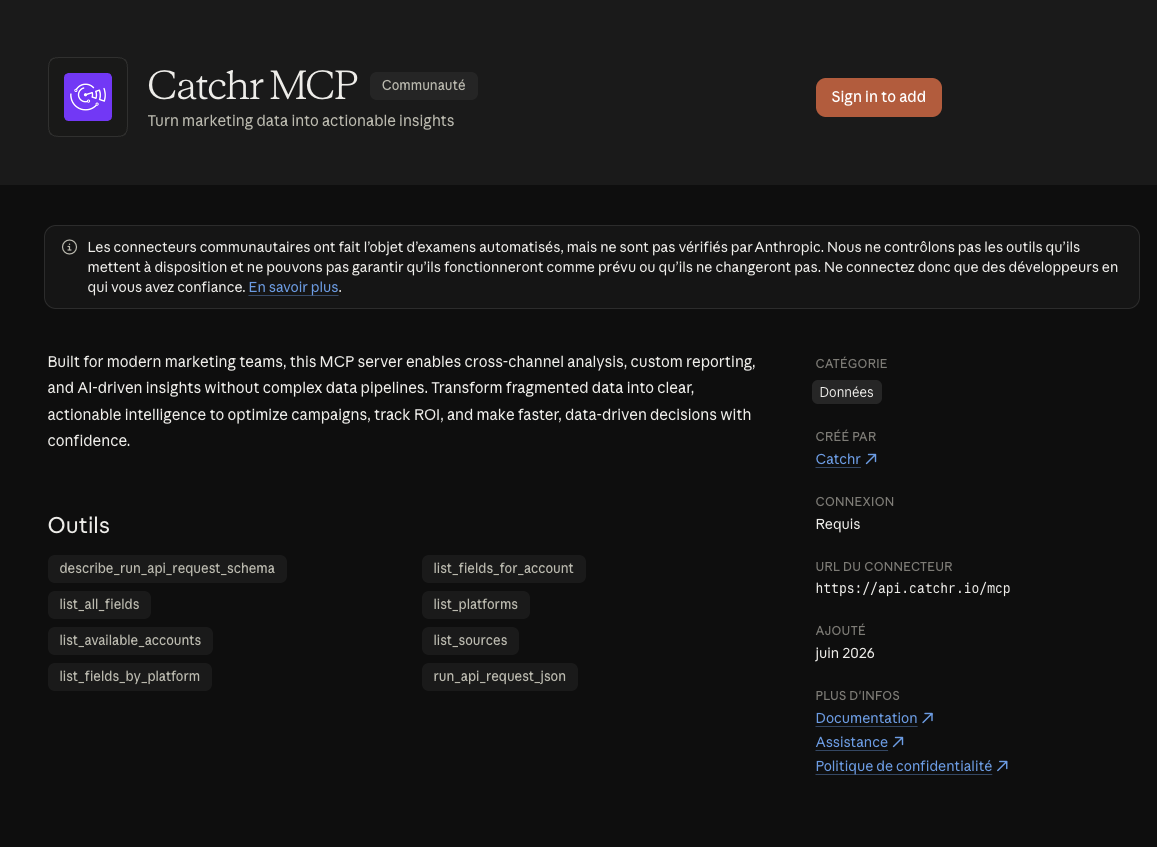
Use this flow for an individual Claude account.
1. Open the Catchr connector listing
Open Catchr MCP in Claude's Connectors Directory.
You can also browse from Claude:
- Open Customize → Connectors.
- Click the + button next to Connectors.
- Find Catchr in the directory.
2. Connect Catchr
Review the connector's description and capabilities, then click Connect or Install. Claude starts the Catchr authentication flow directly from the directory listing.
3. Authenticate your Catchr account
Sign in to Catchr, review the requested access, and authorize the connection. Claude inherits the permissions of the Catchr account you authenticate; installing the connector does not automatically grant access to every source or client account.
4. Confirm the connector and permissions
Return to Customize → Connectors and confirm that Catchr shows as connected. Review the tools and permission mode available for the connector.
Keeping tool permissions on Needs approval lets you review a request before Claude runs it. Only approve a tool when its requested operation matches the analysis you want to perform.
Already using the old custom connector? Connect and test the directory version first. Once Catchr works in a conversation, disconnect the duplicate custom entry so Claude only shows the native directory connector.
Enable Catchr for a Team or Enterprise workspace
Team and Enterprise setup happens in two stages.
Stage 1: an organization owner adds Catchr
An Owner or Primary Owner should:
- Open Organization settings → Connectors.
- Click Browse connectors at the bottom of the page.
- Select Catchr from the directory.
- Click Add to your team.
Stage 2: each member connects their Catchr account
Once Catchr is available in the organization, each member should:
- Open Customize → Connectors.
- Find Catchr in the connector list.
- Click Connect.
- Sign in to Catchr and authorize access.
This individual authentication matters: Claude uses the Catchr access available to the member who connected, rather than giving every workspace member the same source access by default.
Enable Catchr in a Claude conversation
Installing and authenticating Catchr makes it available in Claude, but the connector may still need to be enabled for the conversation you are using.
In a new Claude conversation:
- Click the + button beside the message box.
- Open Connectors.
- Enable Catchr for that conversation.
- Ask Claude to use Catchr in your request.
If Claude answers from general knowledge without requesting Catchr data, first confirm that the connector is enabled. Then make the source, account, dates, metrics, and expected output explicit in the prompt.
Run your first marketing analysis in Claude
A vague question forces Claude to guess what you mean. A useful MCP request names the scope of the analysis.
Include these five elements:
Start with this prompt:
Using Catchr, analyze [source and account] for [date range] versus [comparison period]. Compare [metrics] by [breakdown]. Show the figures behind the five largest changes, flag any missing data, and finish with three questions to investigate next.
Prompt for an agency client review
Using Catchr, prepare a client-ready performance brief for [client]. Compare the last 30 days with the previous 30 days across the connected Google Ads and Meta Ads accounts. Show spend, conversions, and CPA by channel, identify the campaigns behind the three largest changes, and separate observed facts from recommendations.
Prompt for a Google Ads investigation
Using Catchr, compare Google Ads campaign performance for [account] over the last 14 days versus the previous 14 days. Rank campaigns by their contribution to the change in total CPA. Include spend, conversions, CPA, and the absolute change for each campaign. Do not recommend budget changes when the supporting metric is unavailable.
Prompt for a recurring report
Using Catchr, create a monthly recap for [account] from the connected GA4 data. Summarize the most important changes in sessions, conversions, and conversion rate by channel. Show the evidence in a compact table, then list five questions for the next client call.
For more source-specific ideas, browse the marketing platforms supported by Catchr.
Troubleshoot a Claude MCP connection
Give your AI marketing assistant the context behind the question
An AI assistant is only as useful as the context it can access and the question it receives. Once Catchr MCP is connected and enabled, Claude can request the marketing data needed for a bounded analysis. You can start with the client, account, period, and decision you need to prepare instead of assembling another set of CSV files first.
Connect your marketing sources in Catchr, explore Catchr MCP for Claude, or learn how MCP works for marketing teams.


.png)