
Automation in Power BI can feel confusing at first. Between refresh options, datasets, gateways, and schedules, it’s not always clear what is truly automated and what still depends on manual work.
In reality, automation is about removing human dependency from the reporting loop so dashboards stay up to date, reliable, and easy to share. This article explains the core pillars of Power BI automation and how marketing teams can set it up in a practical, scalable way.
The three pillars of Power BI automation
Successful automation in Power BI relies on three complementary pillars. If one of them is missing, dashboards may refresh, but they won’t truly be automated.

Data source automation
The first pillar is how data reaches Power BI. If data relies on manual exports, email attachments, or file replacements, automation is fragile by definition. True automation starts when data collection is reliable and repeatable, either through structured file processes or automated connections.
Data source automation is about getting the data automatically.
Dataset and refresh automation
The second pillar is the dataset itself. In Power BI, the dataset is the engine behind reports and dashboards. Automation requires:
- a stable dataset structure
- a refreshable connection
- a scheduled refresh in Power BI Service
Dataset and refresh automation are about updating dashboards automatically.
Access and sharing automation
Automation is not only about data freshness. It’s also about making sure stakeholders always see the latest numbers without manual sharing. When reports are published in Power BI Service and shared through workspaces or apps, dashboards update automatically for everyone.
Setting up automation for marketing dashboards
Once the principles are clear, automation becomes easier to reason about. The goal is not complexity, but stability.
The automation workflow: datasets, refresh, and gateways
In practice, an automated Power BI workflow looks like this:
- Data is collected from a stable source
- Power BI builds and maintains a dataset
- Power BI Service refreshes the dataset on schedule
- Reports and dashboards update automatically
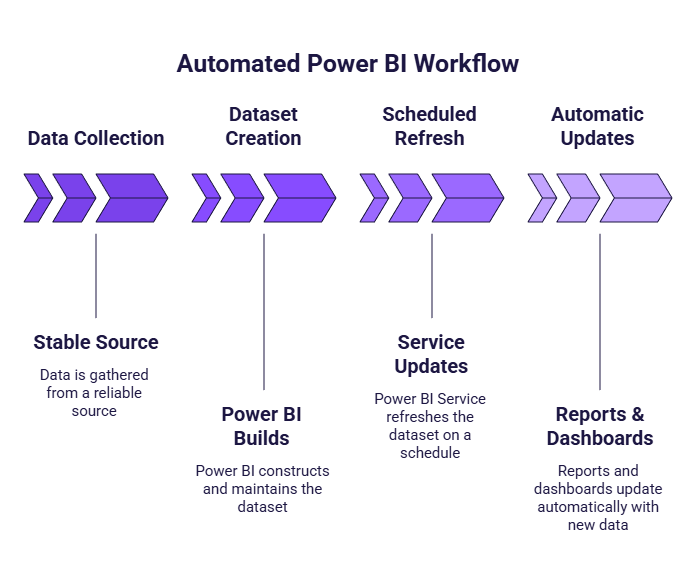
To set this up correctly, it helps to understand what each building block does.
- Refresh pulls new data from your connected sources into the dataset, keeping dashboards current, but it won’t fix broken paths, missing files, or an unstable pipeline.
- The dataset is the core layer behind your reports: it stores the data model and KPI logic and feeds all related reports and dashboards, which is why using one dataset as a “source of truth” helps avoid conflicting numbers across teams.
- Gateways are only needed when Power BI Service cannot reach the data directly, typically because the data lives on a local computer or private network; if your data is cloud-based or comes from an online connector, you usually won’t need one.
Recommended automation setups by team size
Automation evolves with team maturity.
For solo marketers or early-stage teams, manual or folder-based imports combined with occasional refresh in Power BI Service are often sufficient. This keeps things simple while reducing repetitive work.
Small to mid-size marketing teams typically rely on scheduled refresh in Power BI Service and shared datasets. At this stage, automation becomes essential to keep reporting consistent across stakeholders.
Scaling teams with daily reporting needs usually move toward fully automated data collection. Manual exports become a bottleneck, and dashboards must update reliably without human intervention.
Where connectors fit in the Power BI stack
Connectors sit between marketing platforms and Power BI. Their role is to automate data collection, standardize data structure, and make datasets reusable across reports.

Instead of exporting files repeatedly, marketing platforms are connected once, and the same connection can feed multiple datasets and reports, even beyond Power BI. Tools like Catchr act as this automation layer, delivering clean, ready-to-use marketing data into Power BI while keeping Power BI focused on reporting and analysis.
Common automation pitfalls to avoid
Several mistakes prevent marketing dashboards from being truly automated.
A common misconception is thinking that a dashboard is automated just because it refreshes. If data still depends on manual exports or file updates, automation is incomplete.
Another frequent issue is duplicating datasets for the same KPIs, leading to inconsistent numbers across reports. Automation works best with a clear “source of truth”.
Finally, refresh failures often come from unstable data sources, expired credentials, or poorly maintained gateways. Most automation issues are upstream, not in Power BI visuals.
Conclusion
Automating Power BI marketing dashboards is about building a reliable system, not adding complexity. By focusing on stable data sources, well-managed datasets, and scheduled refresh in Power BI Service, marketing teams can move away from manual reporting and toward dashboards that update themselves. The best automation setup is the one that works consistently, requires minimal maintenance, and lets teams focus on insights instead of data handling.