In Power BI, refresh is the mechanism that brings new data into your reports and turns static dashboards into reliable decision-making tools.
For marketers, understanding how refresh works is essential to avoid manual updates, broken dashboards, or outdated KPIs. In this article, we’ll explain how data refresh works in Power BI Desktop and Power BI Service, how scheduling works, and how to think about automation in a marketing context.
Refreshing data in Power BI Desktop
Power BI Desktop is where reports are built and edited. When you refresh data in Desktop, Power BI pulls the latest data from the connected sources into your local PBIX file.
This refresh is manual and happens only when you click the refresh button. It uses the same file paths, credentials, and connection logic defined in the report. You can also choose to refresh only the data or update the schema by clicking the arrow next to the Refresh icon.
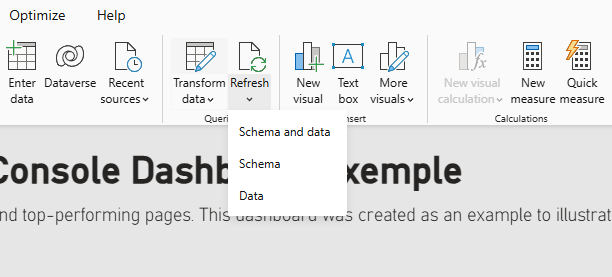
Marketers typically refresh data in Power BI Desktop when:
- Testing a new data connection
- Updating visuals or KPIs
- Working with local files or folders
- Iterating on a report before publishing
Refreshing data in Power BI Service
Power BI Service is where reports live once they are published and shared. Refreshing data in the Service works differently from Desktop.
In Power BI Service, refresh happens in the cloud. Power BI connects to the data sources using stored credentials and updates the dataset without needing your computer.
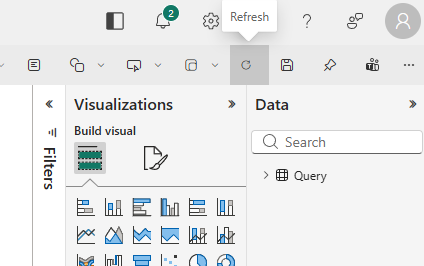
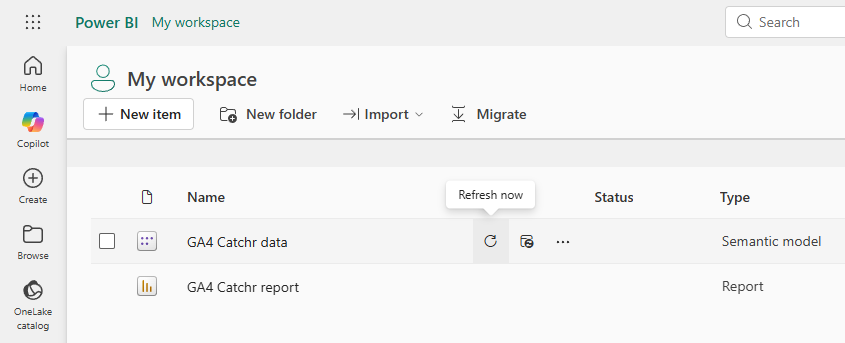
You can refresh the semantic model (data source) directly in the workspace or from any report that uses it.
Refresh from a report
Refresh from the workspace
Scheduled refresh basics in Power BI Service
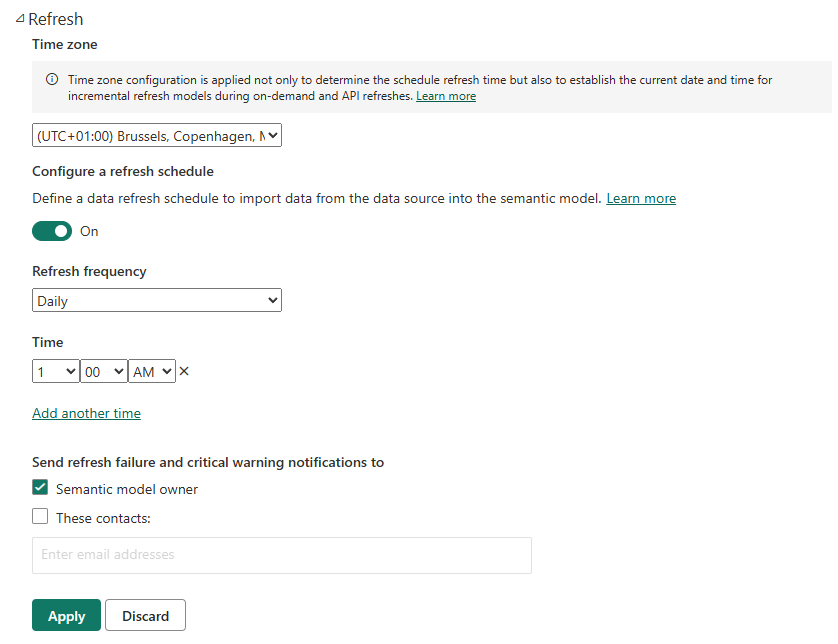
Scheduled refresh allows Power BI Service to update data automatically at defined intervals. To set up a scheduled refresh:
- Go to Power BI Service.
- Open the Workspace where your data source is published.
- Hover over the semantic model (dataset) you want to refresh, then select Scheduled refresh.
- Scroll to the Refresh section.
- Configure the schedule options you want (frequency and time), then Apply your changes.

With scheduled refresh, you can:
- Choose how often data is refreshed
- Define specific times during the day
- Keep dashboards up to date without manual intervention
Choosing the right refresh strategy in Power BI
Automation in Power BI is not all-or-nothing. Most marketing teams move through different levels of refresh maturity over time.
How to automate Power BI dashboards (principles, not tools)
Automation in Power BI is not about clicking a single button. It’s about combining three elements:
- A reliable data source
- A refreshable connection
- A scheduled refresh strategy
Common refresh issues and how to fix them
Refresh issues are common, especially when moving from Desktop to Service.
Typical problems include:
- Refresh works in Desktop but not in Service
- Credentials expired or need to be re-entered
- Files or folders were moved
- Unsupported sources for scheduled refresh
- Privacy level conflicts
In most cases, the issue can be resolved by checking Data source settings, credentials, or the dataset refresh history in Power BI Service.
FAQ: Power BI refresh and automation
How do I update a Power BI dashboard with new data?
By refreshing the dataset in Power BI Desktop or Power BI Service, depending on where the report is hosted.
Why is my Power BI dashboard not refreshing?
Common reasons include broken paths, expired credentials, unsupported sources, or privacy settings issues.
How often should marketing dashboards be refreshed?
It depends on the use case. Daily refresh is common for performance dashboards, while weekly refresh may be enough for strategic reporting.
Can Power BI refresh dashboards automatically?
Yes, using scheduled refresh in Power BI Service with supported data sources.
Do I need Power BI Pro to schedule refresh?
Yes, scheduled refresh in Power BI Service requires a paid license such as Power BI Pro.
Conclusion
Refresh is what turns Power BI dashboards into reliable reporting tools. Understanding the difference between Desktop and Service refresh, choosing the right strategy, and setting up automation progressively allows marketing teams to move away from manual updates and focus on analysis. A clear refresh strategy is the foundation of trustworthy, scalable marketing dashboards in Power BI.