As you start working with real data in Power BI, it’s normal to encounter situations where a report no longer refreshes correctly. Files are moved, folders are reorganized, passwords change, or access permissions are updated.
The good news is that these issues are common and usually easy to fix. Power BI provides dedicated tools to update data sources and credentials without rebuilding your report or losing your work.
This article explains how to change a data source, fix broken paths, and manage credentials in a simple, marketer-friendly way.
Why data sources sometimes break in Power BI
Data source issues usually happen because something changed outside Power BI. The report itself is rarely the problem. Common reasons include:
- Files or folders were moved, renamed, or transferred to another computer or shared drive.
- Credentials expired or changed, for example after a password update or a new user taking over the report.
- Permissions or privacy settings prevent Power BI from accessing or combining data sources the same way as before.
Understanding these causes helps you troubleshoot calmly and avoid unnecessary rework.
How to change a data source in Power BI Desktop
When a data source changes, you don’t need to rebuild your report. Power BI allows you to update paths and connections directly.
To do this, open your report in Power BI Desktop and:
- Go to File
- Then, Options and settings
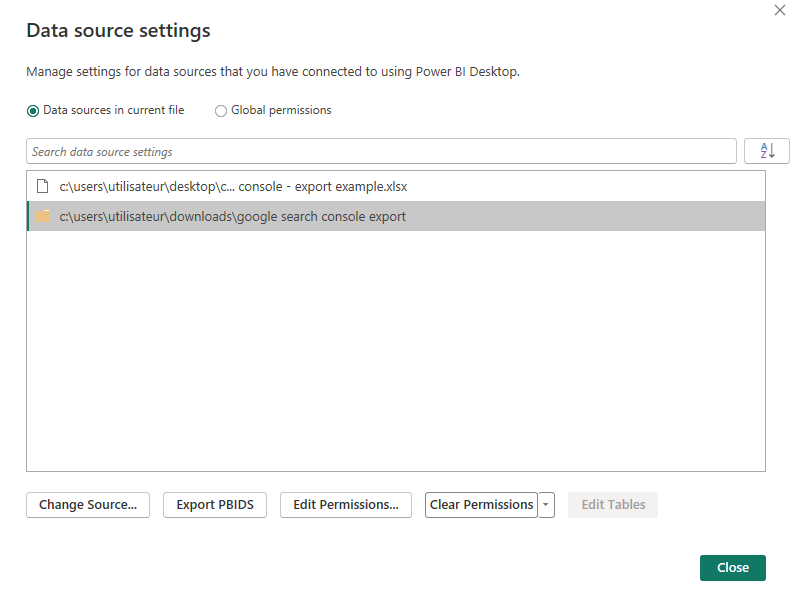
- Finally, Data source settings. From there, you can see all sources used in the report.
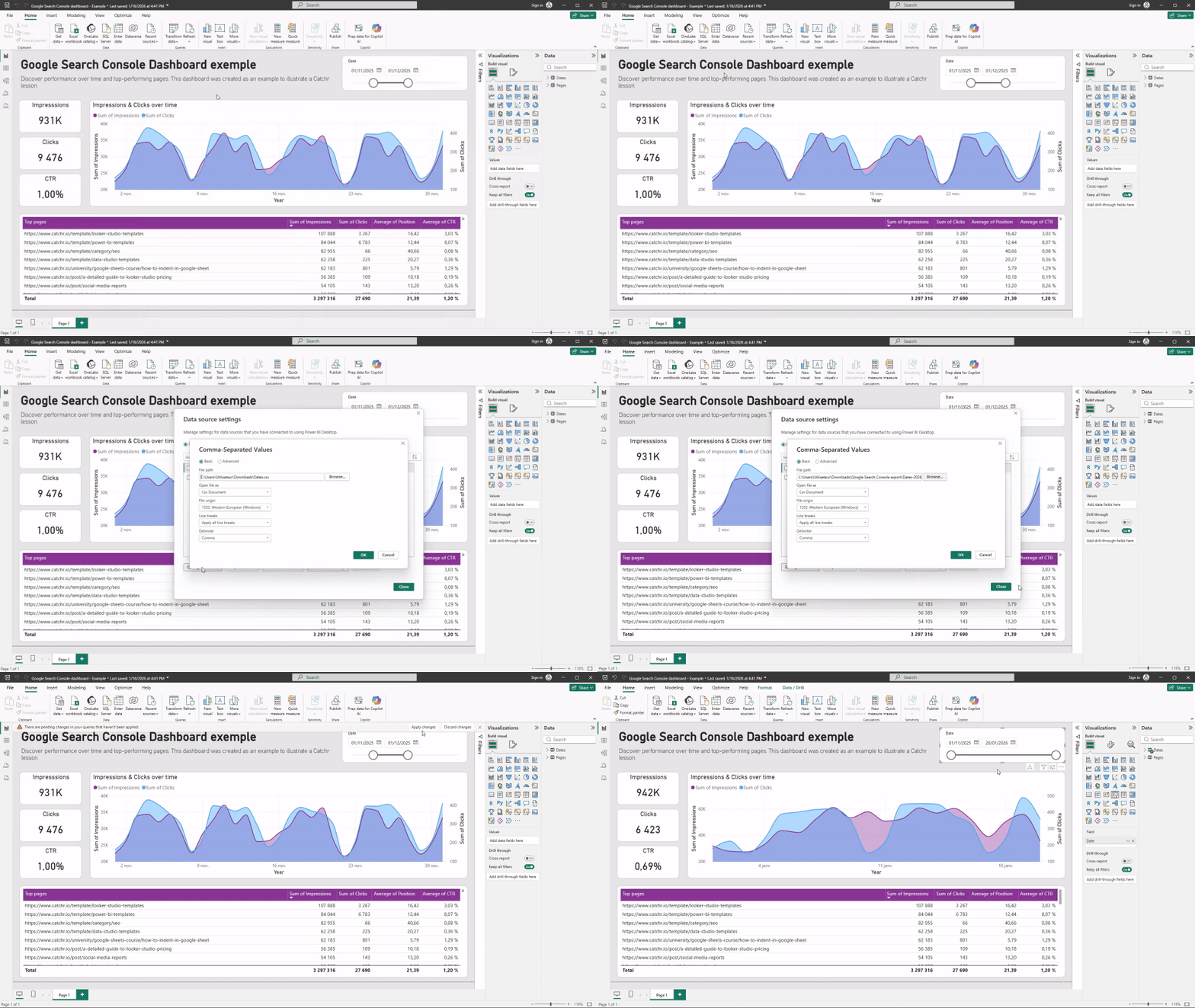
You can select a source and change its path, for example to point to a new file or folder location. Once updated, Power BI applies the change across the report, keeping visuals and KPIs intact.
This is especially useful after moving files, switching computers, or migrating data to a shared drive.
Fixing broken paths after moving files or folders
If Power BI can’t find a file or folder, it will usually display an error during refresh. This does not mean the report is broken.
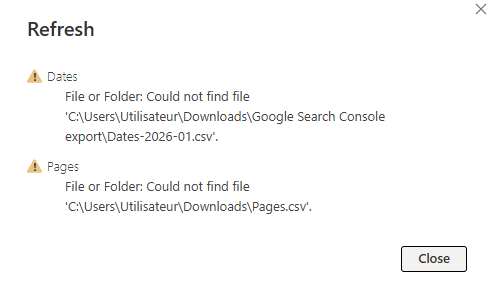
Power BI is simply looking for the data at the old location. By updating the path in Data source settings, you can tell Power BI where the data now lives. Once the correct location is set, the report refreshes normally.
Managing credentials in Power BI
Power BI stores credentials for each data source so it can refresh data automatically. When access details change, Power BI may ask you to sign in again.
What credentials Power BI uses
For each source, Power BI stores:
- The account used to access the data
- The authentication method
- Permissions associated with that account
Updating or resetting credentials
If Power BI prompts you to sign in, or if a refresh fails due to access issues, you can update credentials:
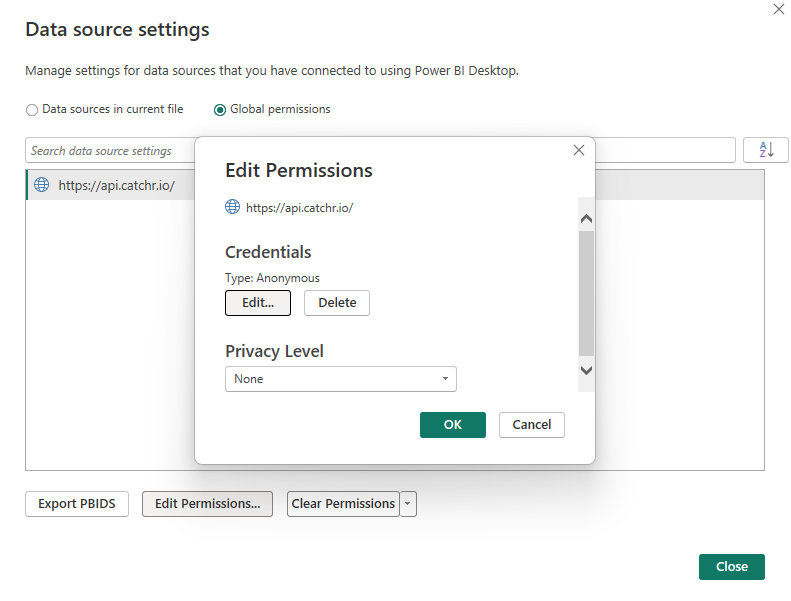
- Go to File tab in Power BI
- From Data source settings
- Select the source, choose Edit permissions > Edit (beside Credential section)
- Sign in again with the correct account.
This process is safe and does not affect your report structure or visuals.
Understanding privacy levels at a high level
Privacy levels in Power BI define how data from different sources can be combined. While the concept can sound technical, marketers usually only encounter it when mixing files, folders, or online data.
In most cases, Power BI’s default settings work fine. If prompted, choose consistent privacy levels for sources that are meant to be combined. This ensures Power BI can refresh data without conflicts.
There’s no need to overthink this early on. Privacy settings can be adjusted later if needed.
Common mistakes to avoid
Some issues happen because of simple but avoidable mistakes. Rebuilding a report instead of fixing the data source is one of the most common. Others include editing queries without understanding the impact, mixing personal and shared credentials, or ignoring refresh warnings.
In most cases, the solution is already available in Data source settings.
Conclusion
Data source and credential issues are a normal part of working with Power BI. Files move, access changes, and permissions evolve over time. Knowing where to update paths and credentials allows you to fix problems quickly and confidently, without starting from scratch. Once you understand these basics, Power BI becomes much more resilient and easier to maintain in real marketing workflows.