Home > Data Studio templates > Klaviyo Responsive template

Klaviyo Responsive Data Studio dashboard template

Free responsive Looker Studio template to track Klaviyo email campaigns with clear performance insights.

14 days free-trial
No credit-card required
Access all features
No items found.

Klaviyo Email Campaign Performance Dashboard

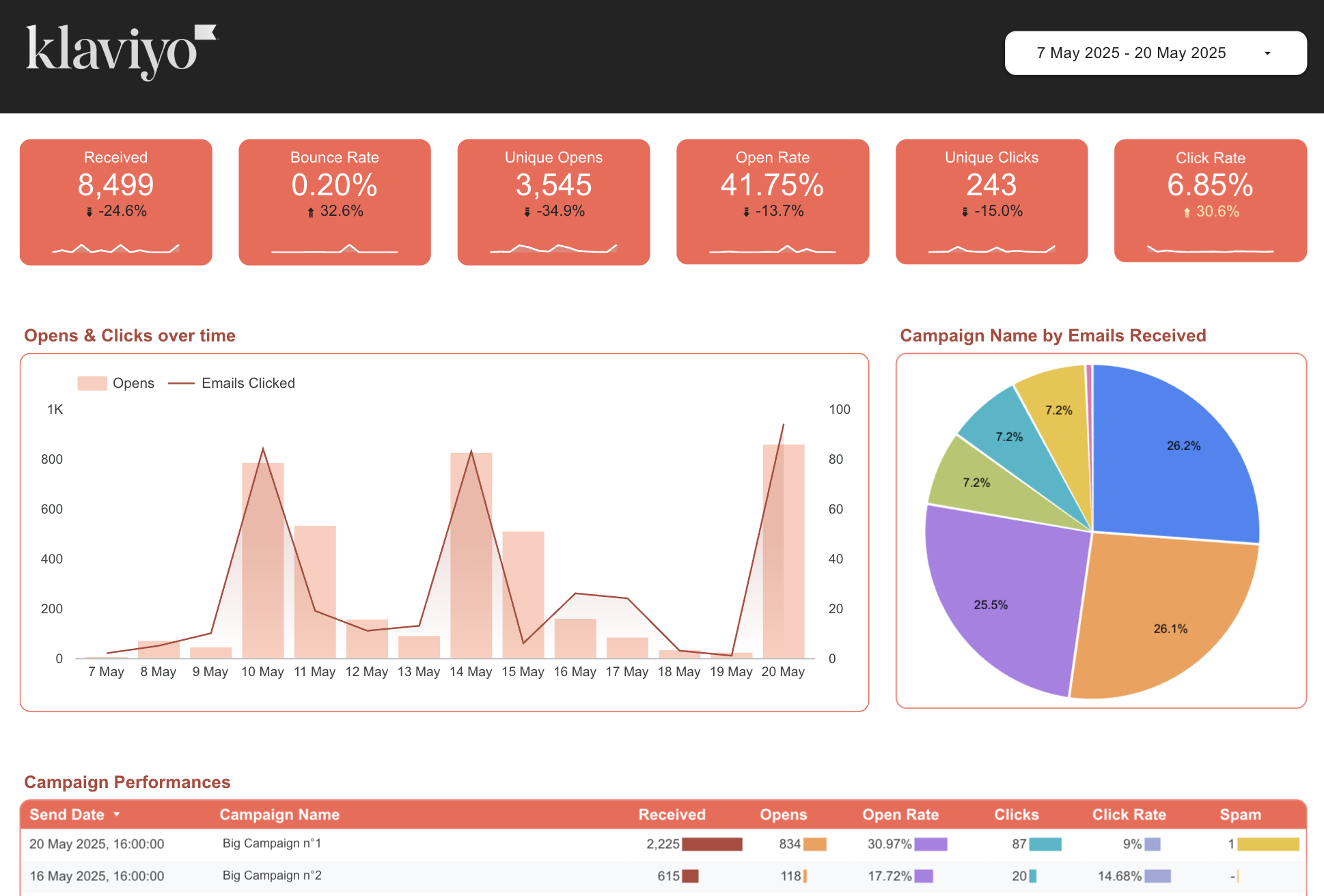
This Klaviyo responsive Looker Studio template helps freelancers, agencies, and marketing teams review email campaign performance without rebuilding the same report for every client or send.

Use it to monitor email volume, opens, unique opens, clicks, unique clicks, spam marks, bounce rate, open rate, and click rate over time. The report is structured around practical campaign analysis, with dimensions for date, campaign name, and campaign send date.

  • Compare engagement by campaign to identify which emails attract opens and clicks.
  • Track open rate, click rate, and bounce rate trends across recent sends.
  • Review unique engagement metrics to separate total activity from individual recipient behavior.
  • Prepare recurring Klaviyo performance updates in a responsive Looker Studio dashboard.

The template is useful for campaign reporting, client updates, ecommerce email reviews, and ongoing optimization work where teams need a clear view of what happened after each Klaviyo send.

Metrics used

Metrics

  • Emails received
  • Emails opened
  • Emails opened unique
  • Emails clicked
  • Emails clicked unique
  • Email mark as spam

Calculated fields: bounce rate, open rate, click rate

Dimensions used

  • Date
  • Campaign Name
  • Campaign Send Date

Questions you can answer with this template

What can I track with this Klaviyo Looker Studio template?

You can track emails received, emails opened, unique opens, emails clicked, unique clicks, spam marks, bounce rate, open rate, and click rate, with reporting views organized by date, campaign name, and campaign send date.

What can I track with this Klaviyo Looker Studio template?

It is built for freelancers, agencies, and marketing practitioners who need a reusable Looker Studio report for Klaviyo campaign performance, client reporting, and ongoing email marketing analysis.

How does this template help with campaign analysis?

The dashboard brings together campaign-level engagement metrics so you can compare sends, spot changes in open and click behavior, and review performance trends over time without manually rebuilding charts.

Can I use this dashboard for client reporting?

Yes. Agencies and consultants can use it to present Klaviyo email results in a consistent format, covering volume, engagement, click activity, spam marks, and calculated performance rates.

Which Klaviyo dimensions are used in the report?

The template uses date, campaign name, and campaign send date, making it suitable for time-based analysis, campaign comparisons, and recurring email performance reviews.

Get Klaviyo Responsive into Data studio in 3 steps.

Get the template

Click "Get this template" button at the top of this page. Now, time to set it up on Data Studio!

Connect your data

Connect your data thanks to the Catchr connector used in this template.

Open your report

Enjoy this template with your data, automatically refresh, so always up-to-date.

Use this Data Studio template

Copy the free Data (Looker) Studio template, connect your account , and get a clear view of the insight you need.

Looking for other Data Studio Dashboard ?

We provide ready to work Data Studio dashboard for all your marketing needs.

Data Studio Looker Studio templates FAQ

Analyze your Klaviyo Responsive performance in Data Studio with a ready-to-use dashboard template. Track key metrics, dimensions, and build clearer reports faster with Catchr.

What is this Klaviyo Responsive Data Studio template used for ?

This template helps you visualize your Klaviyo Responsive data in Data Studio. You can use it to monitor performance, follow key metrics, and create clearer marketing reports without starting from scratch.

Do I need technical skills to use this template ?

No. The template is designed to be simple to use. You only need to connect your Klaviyo Responsive account through Catchr, then open the report in Data Studio.

Can I customize this Klaviyo Responsive dashboard template ?

Yes. Once you copy the template, you can edit charts, metrics, filters, colors, and layout to match your reporting needs.

Is this Data Studio template free ?

Yes, the template is free to use. You can copy it and connect your own data. The connector may require a Catchr subscription after the free trial.

How often is the data updated ?

Your data can be refreshed automatically through Catchr, so your Data Studio report stays up to date without manual exports.

Can I use this template for client reporting ?

Yes. You can copy the template, connect a client’s Klaviyo Responsive account, customize the report, and share it directly from Data Studio.

Who is this template made for ?

This template is useful for marketers, agencies, freelancers, and teams that need a faster way to report on Klaviyo Responsive performance.

Still have a question ? 

Our teams is always here to responds to any question you could have about our data connector.
