As you start building more reports in Power BI, questions naturally arise around files, reuse, and organization. What exactly is a PBIX file? How is it different from a template? What happens when you publish a report? And how should marketing teams organize their Power BI projects over time?
Understanding these basics early helps you avoid confusion, duplicated work, and messy reporting setups. In this article, we’ll explain the main Power BI file types and share simple best practices to organize marketing reporting projects efficiently.
Power BI file types available
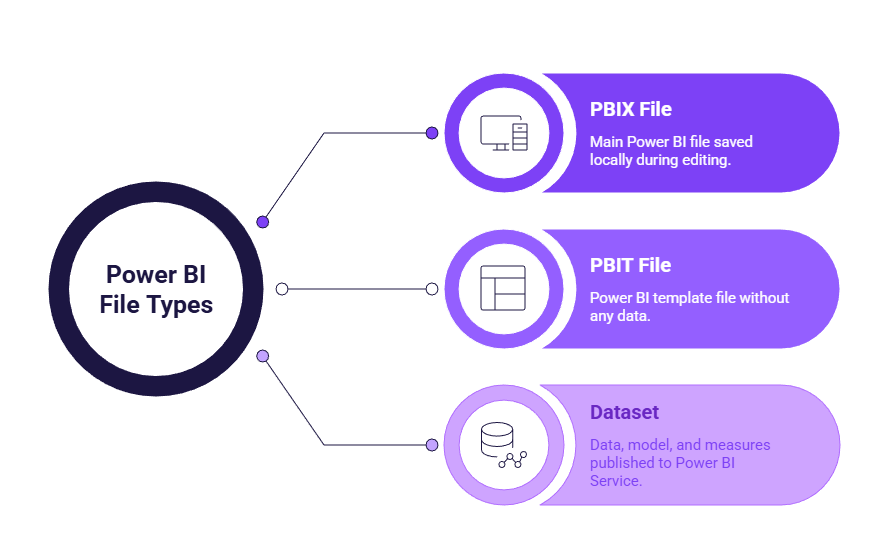
Power BI relies on a few key file types and objects. Each one plays a specific role in how reports are built, shared, and reused.
What is a PBIX file in Power BI?
A PBIX file is the main Power BI file you work with in Power BI Desktop. This is the file you save locally while building or editing a report.
A PBIX file contains:
- Data connections
- The data model and relationships
- Measures and calculations
- Report pages, visuals, and layout
What is a PBIT template in Power BI?
A PBIT file is a Power BI template. It looks similar to a PBIX file but does not include any data.
Templates keep:
- The report structure
- Visuals and layout
- Measures and calculations
- Data source definitions (without the data itself)
They are especially useful for marketing teams that need to reuse the same dashboard structure across multiple accounts, countries, or platforms. For example, a Meta Ads performance dashboard or a ecommerce reporting template can be reused without starting from scratch each time.
What is a dataset in Power BI?
A dataset is created when a PBIX file is published to Power BI Service. It contains the data, the data model, and all measures defined in the report.
From a marketing perspective, the dataset acts as the engine behind your dashboards. One dataset can power multiple reports, ensuring that KPIs and definitions remain consistent across teams or regions.
How these elements work together
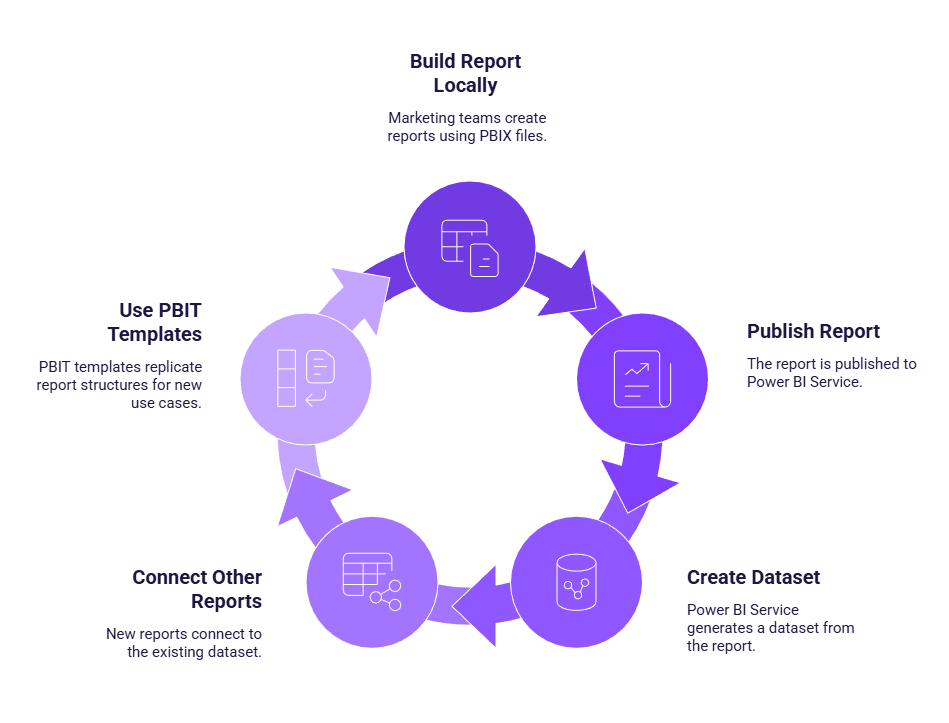
In practice, marketing teams usually follow a simple flow. A PBIX file is used locally to build and update a report. When the report is published, Power BI Service creates a dataset from it. Other reports can then connect to that dataset, and PBIT templates can be used to replicate the same structure for new use cases.
Organizing Power BI projects for marketing teams
Beyond file types, good organization habits are essential to keep reporting manageable as the number of dashboards grows.
Naming conventions for Power BI files
Clear naming conventions make reports easier to find and understand. A good practice is to include the marketing channel or use case first, followed by the scope or purpose.
Examples:
SEO_GSC_Performance.pbixPaidAds_Global_Dashboard.pbixCRM_Leads_Template.pbit
Folder structure for marketing reporting
A simple folder structure helps separate working files from reusable assets. Many marketing teams use a structure similar to this:
- PowerBI
- Templates
- Production
- Archive
- Exports
Templates are stored separately, production files are actively maintained, archives keep old versions, and raw exports are isolated from reporting files.
Versioning and collaboration tips
To avoid confusion, it’s best to assign a clear owner to each report. Before making major changes, duplicate the PBIX file instead of editing the production version directly. Avoid vague file names like “final_v3_last.pbix” and keep changes documented lightly when working as a team.
These simple habits prevent accidental overwrites and broken dashboards.
Common mistakes
A common mistake is creating a new PBIX file for every reporting period instead of reusing the same report. Others duplicate reports endlessly instead of using templates, or mix raw data exports with reporting files.
Another frequent issue is editing production files directly without backups, which can lead to lost work. Most of these problems come from unclear file organization rather than Power BI itself.
Key takeaways
Understanding Power BI file types and organizing your projects properly helps keep marketing reporting clear, reusable, and easy to maintain. By knowing when to use PBIX files, templates, and datasets, and by applying simple naming and folder rules, you reduce duplication, avoid mistakes, and make dashboards easier to scale as reporting needs grow.