Permissions are what keep marketing reporting consistent as more people start using (and building) dashboards. Without a clear setup, teams end up with duplicate “versions of truth”, accidental edits, and confusion about who can see what.
Power BI roles and permissions
Power BI subscription is required to manage sharing, access, and workspace roles in Power BI Services.
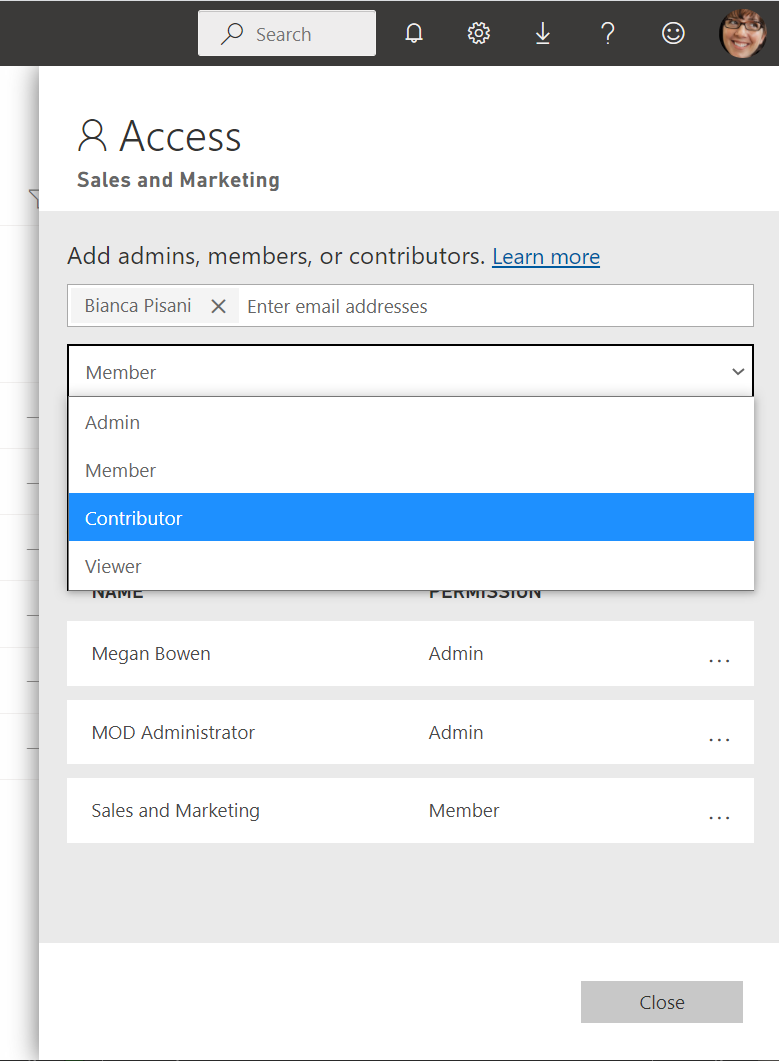
Workspace roles
Workspace roles determine who can view content, who can edit reports, and who can manage the workspace itself. In most organizations you will see roles like:
- Admin: full workspace owner access—manages roles and settings, publishes/manages the app, and can create, edit, or delete anything.
- Member: power collaborator—can create, edit, delete, and publish content, but has limited control over roles/settings compared to an admin.
- Contributor: report builder—can create, edit, and publish content, but can’t manage workspace access, settings, or the app.
- Viewer: consumer—can view and interact with reports, but can’t edit or publish.
From a marketing perspective, roles are less about hierarchy and more about protecting definitions. Most teammates should be able to explore dashboards. Only a small group should be able to publish changes.
A simple “viewer vs contributor” model that works
Viewers should be able to filter, export what they are allowed to export, and share insights. They should not be able to change measures, publish updates, or overwrite reports.
Contributors are responsible for keeping reporting stable. That includes KPI logic, filter rules (for example excluding test campaigns), page consistency, and basic QA after refresh.
External access
If you work with agencies, treat workspace access like a governance decision. Give the minimum access needed, keep a clear owner on your side, and avoid letting external collaborators change core datasets unless you have strong review processes.
Dataset access: semantic model governance
Report permissions vs dataset permissions
A report can be shared, but the dataset behind it is where KPI definitions usually live. Dataset permissions control whether someone can build new reports on top of it, and in some cases whether they can see underlying data.
“Build” access (the permission that changes everything)
Build permission allows someone to create new reports using the dataset. This is powerful for scaling reporting, but it can also create metric drift if people recreate measures inconsistently.
Row-level security (RLS) as a governance tool (optional)
If different teams should see different subsets of data (for example by region, brand, or client), RLS is one of the standard approaches. It requires careful planning and testing, but it can prevent “wrong audience, wrong numbers” situations.
Best permission setup for marketing teams and agencies
Recommended baseline (in-house marketing team)
- One trusted workspace for production dashboards.
- A small contributor group that can edit and publish.
- Everyone else as viewers.
This setup keeps dashboards stable while still letting the business self-serve insights.
Recommended baseline (marketing team + agency)
A clean pattern is to separate collaboration from production:
- A production workspace, owned by your team, with tight edit rights.
- A collaboration or staging workspace where the agency can build and iterate.
- A clear handoff process for promoting changes into production.
Keep governance lightweight but explicit
You do not need heavy process to get most of the benefit. You do need clarity on:
- Who owns KPI definitions
- Who approves changes to the dataset
- Where “draft” work lives versus “trusted” reporting
- How stakeholders should request changes
Conclusion
Good governance makes marketing dashboards easier to trust and easier to scale. Keep most users in a viewer role, protect the dataset as your definition layer, and give agencies a safe collaboration space that does not put production reporting at risk.