




Google Display & Video 360 to Google Sheets

Catchr is a powerful data analytics tool that allows users to easily connect various data sources to their Google Sheets. With Catchr, users can easily import data from different sources and manipulate it to create valuable insights and reports.

14 days free-trial
No credit-card required
Access all features
Trusted and loved by more than 2,000 companies
Ikom
TigrzParis
Mo&Jo
Get all your metrics and dimensions from Google Display & Video 360

Save hours and export all your Google Display & Video 360 to Google Sheets

Get all your marketing data in your Sheets in one clicks with Catchr.

470 metrics

Impressions, conversions, CPA, CTR, and many more.

287 dimensions

Account, Campaigns, AdGroup, and many more.

Filter on anything

You can filter by date or anything else.

Custom fields

Build custom fields directly from Google Sheets.

Import all your data from Google Display & Video 360 to Google Sheets

Connect you Google Display & Video 360 KPI to Google Sheets in seconds.

With our integration to Google Sheets, you can connect any sources you want and get the data directly in your spreadsheet.

Easy data import

Catchr makes it easy to import data from various sources into Google Sheets.

Time-saving

Catchr saves time by automating the data import process and eliminating the need for manual data entry.

Data manipulation

Users can easily manipulate and transform data within Google Sheets to create valuable insights and reports

No-code

Our entire platform is a no code platform. You do not need any line of code to get your data. 

Collaborate, from anywhere.

Create a single source of truth for your data in your online spreadsheet, with easy sharing and real-time editing. To keep the analysis moving, use all the power of Google Sheets.

Use Catchr as your data connector

Show, all your data.

Catchr is cleverly linked to Google Sheets, saving you time. Marketing data can be easily analyzed in Sheets, and Sheets charts can be embedded in any Google Tools like Google Form or Google Slide.

How to connect Google Display & Video 360 to Google Sheets

2
Connect a Google Display & Video 360 source.
You will need to use our one-clik auth to connect your Google Display & Video 360 source.
3
Build your request
Once you have added your source, you could extract all the metrics and dimensions you need for Google Display & Video 360.
4
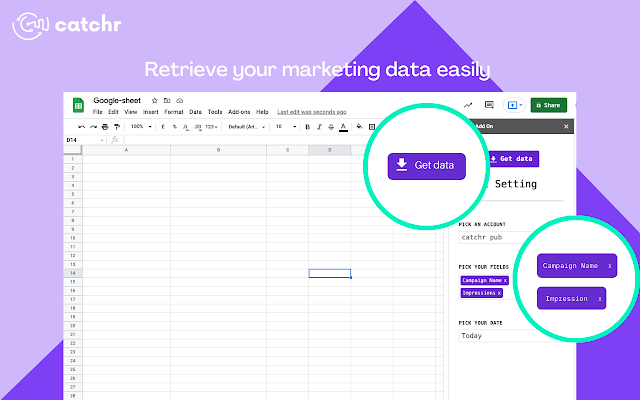
Click on "Get Data"
Use the "Get Data" builtin functionality in our Google Sheets Add-on to get all your Google Display & Video 360 data.
No items found.

Unlock the full potential of your Google Display & Video 360 data

Build custom reports

Build business apps and automations to accelerate workflows. Catchr allows you to create custom applications on top of Sheets without writing code. All the functions from Google Sheets can also be used.

Work with live data

Data is always pulled in real-time from your sources. We do not store your data in any data center. As a result, you always have the most up-to-date information about your campaigns / customers / etc.

Seamlessly connect to data

Pull in and analyze data from other tools you use, such as Google Display & Video 360. You can pull all your data without any limit abour GB or row - all without writing a single line of code.

We work with customers across all industries.

Agency
Client typology
Marketing
Sector
“The solution is a real game changer, providing optimal time savings for our data reporting. The major strength of the solution is their highly responsive and professional support.”
Agency
Client topology
Marketing
Sector
“The major advantage for us has been that right from the start, Catchr has prioritized its support. This sets them apart significantly from other solutions I've tried.”
6x
increase impressions
280%
increase in organic traffic
“Velocity is crucial in marketing. The more campaigns we can put together, the more pages we can create, the bigger we feel, and the more touch points we have”
our ıntegratıons

Need other data source

We provides more than 20 connectors for all the platform you need. Do not hesitate if something is not present.

Shopify

The best and easiest way to start selling products online ! Create your website without writing code and choose your theme between more than 100+ free templates.

See more

Branch

Easily sync Branch’s mobile attribution data with your dashboards, databases, or spreadsheets using Catchr’s dedicated connector.

See more

CallRail

Enhance call tracking with Catchr's CallRail integration, enabling seamless monitoring and analysis for improved insights.

See more

Amazon Seller

Simplify Amazon Seller management with Catchr's integration, streamlining inventory, orders, and fulfillment.

See more

Google Trends

Connect your Google Trends data to track keyword popularity, analyze search trends, and integrate real-time insights into your dashboards and databases.

See more

Klaviyo

Grow your e-commerce with Klaviyo, the best e-commerce marketing automation platform.

See more
TURN DATA INTO GROWTH

Bring your Marketing data together, where it really matters

With Catchr, pull data from all your platforms, export it to dashboards, spreadsheets or databases, and track the metrics that drive your business.
Start moving your data
14 days free-trial - No credit card required 🎉